
Unlock Professional Credibility: Your Guide to Crafting the Perfect Work Email ID
Establish a strong professional presence with a well-chosen email address, leveraging modern solutions for branding, security, and productivity.
Key Insights for Your Professional Email Identity
- Custom Domain is Paramount: The most professional email addresses use your own domain (e.g.,
yourname@yourcompany.com), significantly boosting credibility and brand recognition compared to generic email addresses. - Leading Providers Offer Comprehensive Suites: Google Workspace (Gmail) and Microsoft 365 (Outlook) are top-tier choices, providing not just email but also integrated productivity tools, robust security, and seamless collaboration features.
- Security and Privacy are Non-Negotiable: Prioritize providers that offer advanced encryption, two-factor authentication, and strong privacy policies, especially when handling sensitive work-related communications.
In today's professional landscape, your email address is often the first point of contact and a direct reflection of your credibility. Crafting a work email ID that is both functional and professional is essential for building trust and enhancing your brand. This comprehensive guide outlines the best options available in 2025, detailing how to choose and set up an email address that aligns with your specific work needs, whether you're a freelancer, a small business, or part of a larger enterprise.
Defining Professionalism: Why Your Work Email Matters
A professional email ID goes beyond just communication; it's a fundamental aspect of your business identity. Using a custom domain email like yourname@yourcompany.com instantly conveys professionalism and legitimacy, making clients and partners nine times more likely to trust and engage with your business. In contrast, generic email addresses (e.g., yourname@gmail.com or yourname@outlook.com) can undermine your credibility, suggesting a less established presence.
Beyond branding, a professional email solution offers enhanced security features, greater storage capacity, and seamless integration with vital productivity tools, all of which are crucial for efficient and secure operations.
Primary Approaches to Creating a Professional Work Email
When it comes to setting up a professional email ID for work, you generally have two main avenues:
1. Leveraging Free Email Providers (with Strategic Professionalism)
For individuals, freelancers, or startups with budget constraints, free email services can be a starting point. While they typically don't offer custom domains, thoughtful username selection can still convey a degree of professionalism.
Gmail (Google Accounts)
Gmail remains a dominant force due to its widespread recognition, user-friendly interface, and extensive feature set. A personal Gmail account can be made to sound professional by choosing a clean, name-based username (e.g., firstname.lastname@gmail.com). It offers 15 GB of free storage shared across Google services (Gmail, Drive, Photos) and includes intelligent features like smart replies and strong spam filtering.
Outlook.com (Microsoft Accounts)
Similar to Gmail, Outlook.com provides free email accounts with 15 GB of storage and a robust interface. It's particularly advantageous if you are already deeply integrated into the Microsoft ecosystem, offering strong synchronization with Microsoft Office applications. Like Gmail, a professional username is key to making a free Outlook.com account suitable for work.
While convenient, these free options are generally less secure and lack the branding benefits of a custom domain, making them less ideal for established or growing businesses.
2. Establishing a Custom Domain Email with Business Email Hosting
This is the gold standard for professional work email. It requires owning a domain name (e.g., yourcompany.com) and subscribing to a business email hosting service. This approach provides unparalleled branding, security, and scalability.
The Foundation: Your Custom Domain
Before setting up a custom domain email, you'll need to register a domain name. This can be done through domain registrars like GoDaddy, Google Domains, or Namecheap. Your domain name should ideally reflect your business name or personal brand.
Leading Business Email Providers for Custom Domains
The market for business email hosting is robust, with several providers offering comprehensive suites of features. Here are the top contenders:
- Google Workspace (formerly G Suite): Utilizes the familiar Gmail interface with your custom domain (e.g.,
you@yourbusiness.com). It offers a complete productivity suite including Google Drive, Docs, Sheets, Calendar, Meet, and Chat. Known for its strong AI-powered security (reducing spam, phishing, and malware) and collaborative capabilities, Google Workspace is highly recommended for businesses of all sizes due to its ease of use and extensive integrations. - Microsoft 365: Provides enterprise-grade email through Outlook, deeply integrated with Microsoft 365 applications like Word, Excel, PowerPoint, and Teams. It's a premier choice for businesses already invested in the Microsoft ecosystem, offering advanced security features, robust protection, and seamless synchronization across devices. Microsoft 365 requires a domain name for setup and provides significant mailbox storage (e.g., 50 GB per user).
- Zoho Mail: Stands out for its strong emphasis on privacy, security, and an ad-free experience. Zoho Mail supports custom domain names and offers guaranteed uptime. It's part of the broader Zoho suite, integrating well with other Zoho applications for tasks, notes, and calendar management. Zoho Mail also offers a free tier for small businesses, making it a cost-effective option while maintaining a professional image.
- Proton Mail: Ideal for businesses and individuals prioritizing encryption and privacy. Proton Mail offers end-to-end encryption, ensuring that only the sender and recipient can read messages. It's open-source, ad-free, and part of the Proton ecosystem (including a VPN and calendar). While it has a smaller attachment size limit compared to some competitors, its security focus is unparalleled.
- Titan Email: Specifically designed for businesses, Titan offers features tailored for professional communication, such as email templates, follow-up reminders, and read receipts. It's known for its user-friendly interface and is trusted by over 100,000 businesses, making it suitable for solopreneurs, freelancers, and small businesses.
- Hosting Providers (e.g., Bluehost, Hostinger, GoDaddy): Many web hosting companies and domain registrars offer professional email hosting as part of their packages or as standalone services. These are convenient if you're already hosting your website with them. They often include features like mobile access, email backup, and essential security protocols (DKIM, DMARC, SPF).
Comparing Leading Business Email Providers
To help you choose the best fit for your work needs, here's a comparative overview of the top business email providers:
| Provider | Best For | Key Features & Benefits | Considerations |
|---|---|---|---|
| Google Workspace | Collaboration, ease of use, all business sizes | Gmail interface, full productivity suite (Docs, Drive, Meet, Calendar), AI-powered security, excellent search, mobile apps. | Subscription cost per user. |
| Microsoft 365 | Microsoft ecosystem users, enterprises, robust security | Outlook email, deep integration with Office apps (Word, Excel, Teams), advanced security & compliance, strong synchronization. | Requires a domain, subscription cost per user. |
| Zoho Mail | Privacy-focused, cost-conscious, small businesses | Ad-free, strong encryption, privacy emphasis, integrates with Zoho suite, free tier available for custom domains. | Interface may take getting used to for some. |
| Proton Mail | Highest security & privacy requirements | End-to-end encryption, zero-access encryption, open-source, ad-free, part of Proton ecosystem (VPN, Calendar). | Smaller attachment size limit, limited cloud storage. |
| Titan Email | Solopreneurs, freelancers, small businesses | Business-specific features (templates, read receipts, follow-up reminders), user-friendly, focus on customer relationships. | May not offer the same breadth of integrated apps as Google/Microsoft. |
Understanding Key Features & Considerations for Your Work Email
Choosing the right email provider for work involves evaluating several critical factors:
The radar chart above visually compares various professional email providers across key performance indicators. It highlights how each service balances aspects like professional branding, security, integration capabilities, and cost-effectiveness. For instance, Google Workspace and Microsoft 365 generally score high on integration and branding, while Proton Mail excels in security and privacy. This visual representation helps in quickly grasping the strengths and weaknesses of different options based on your specific priorities.
A. Custom Domain Requirement
For true professionalism, a custom domain (e.g., yourname@yourcompany.com) is indispensable. Most leading providers require you to own a domain name before you can set up branded email addresses.
B. Security and Privacy
Especially for work, robust security is paramount. Look for providers offering:
- Encryption: End-to-end encryption ensures only the sender and recipient can read messages.
- Two-Factor Authentication (2FA): Adds an extra layer of security to prevent unauthorized access.
- Spam and Malware Protection: Advanced filters to keep your inbox clean and secure.
- Compliance: Adherence to data protection regulations like GDPR.
Providers like Proton Mail and Zoho Mail are particularly strong in this area, while Google Workspace and Microsoft 365 also offer enterprise-grade security features.
C. Integration with Productivity Tools
The best email solutions integrate seamlessly with other business applications like calendars, document editors, video conferencing, and cloud storage. Google Workspace (with Docs, Drive, Meet) and Microsoft 365 (with Office apps, Teams, OneDrive) are prime examples, offering comprehensive ecosystems that streamline workflow.
D. Storage Capacity
Consider how much storage you'll need for emails and attachments. While free accounts offer limited storage (e.g., 15 GB), paid plans often provide significantly more (e.g., 30 GB, 50 GB, or even unlimited storage per user).
E. Reliability and Uptime
Choose a provider with a proven track record of high uptime to ensure your communication remains uninterrupted. Leading services boast 99.9% uptime guarantees.
F. Scalability
As your business grows, your email needs may expand. Select a service that can easily accommodate additional users and features without complex migrations.
G. Customer Support
Reliable customer support is crucial for troubleshooting and assistance, especially during initial setup or in case of issues.
H. Cost
Evaluate pricing models. While free options exist, paid plans (typically starting from ~$5-$10 per user/month) offer a much richer set of features, security, and professional branding. Some providers like Zoho Mail offer competitive free tiers for custom domains for a limited number of users.
The Setup Process for a Custom Domain Email
Setting up a professional email ID with a custom domain typically involves a few straightforward steps:
This mindmap illustrates the typical flow for setting up a custom domain email. It begins with selecting your preferred email provider, then moves to securing a domain name. The crucial step of configuring DNS records ensures proper email delivery and security. Finally, you create user accounts and customize settings to optimize your professional email experience. This structured approach helps ensure a smooth setup process.
1. Register Your Domain Name:
If you don't already have one, purchase a domain name (e.g., yourcompany.com) from a reputable registrar. This will be the backbone of your professional email address.
2. Choose and Sign Up for an Email Hosting Service:
Select a provider (e.g., Google Workspace, Microsoft 365, Zoho Mail) and sign up for a business plan that fits your needs.
3. Verify Your Domain Ownership:
Your chosen email provider will guide you through verifying that you own the domain. This typically involves adding a specific DNS record (like a TXT record) to your domain's DNS settings.
4. Configure DNS Records (MX, SPF, DKIM, DMARC):
This is a critical step for email deliverability and security. You'll update your domain's DNS records (specifically MX records to direct email traffic to your provider, and SPF, DKIM, and DMARC records to prevent spoofing and enhance trustworthiness). Your email provider will supply the exact records you need to add.
5. Create User Accounts:
Within your email provider's admin panel, create individual email accounts for yourself and any team members (e.g., john.doe@yourcompany.com, info@yourcompany.com, support@yourcompany.com).
6. Configure Email Clients and Settings:
Set up your new professional email on your preferred email client (Outlook, Gmail app, Apple Mail) and configure important settings like email signatures, out-of-office replies, and two-factor authentication.
Visualizing Professional Email Use
Here's a visual representation of a professional email interface, demonstrating key elements like clear sender information and organized inboxes.
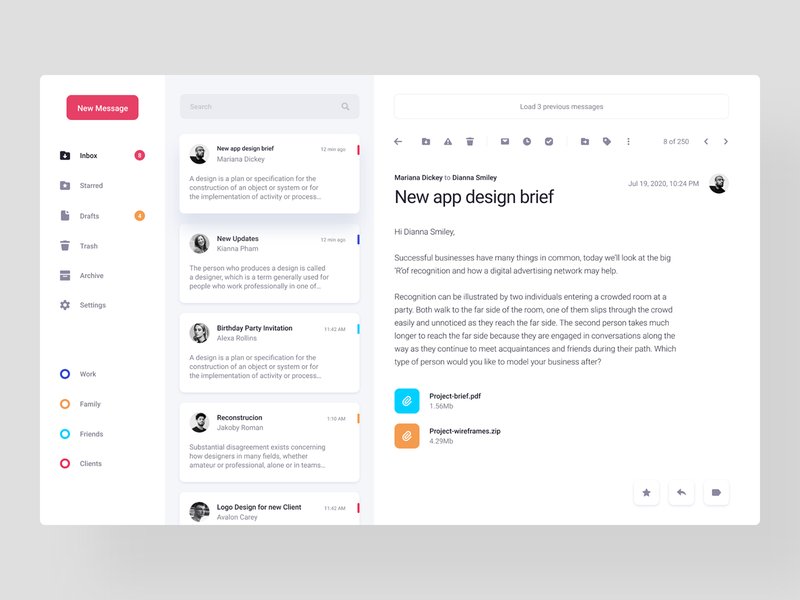
An example of a clean and organized email application interface, emphasizing professional communication.
Beyond the technical setup, remember to maintain professionalism in your email communication:
- Concise and Clear Subject Lines: Make your subject lines informative and to the point.
- Professional Salutations and Closings: Always use appropriate greetings and sign-offs.
- Well-Structured Content: Keep your emails clear, concise, and easy to read.
- Consistent Email Signature: Include your name, title, company, website, and contact information.
Diving Deeper: Best Business Email Providers for 2025
Choosing the right email provider for your business is a critical decision that impacts communication, security, and productivity. The video below offers a detailed review of some of the best business email providers available in 2025, providing insights into their features, benefits, and target audiences. This can help you make an informed decision based on expert analysis.
This video provides a detailed review of the top business email providers in 2025, covering their features and ideal use cases to help you select the best option for your professional needs.
The video above provides a comprehensive breakdown of the top business email providers, including discussions on Google Workspace, Microsoft 365, Zoho Mail, and Proton Mail. It delves into aspects such as pricing, security, integration capabilities, and overall user experience. Understanding these nuances from an expert perspective can significantly aid in selecting a provider that not only meets your current needs but also supports your future growth and operational demands.
Frequently Asked Questions
What is the most professional email address format?
firstname.lastname@yourcompany.com or a variation like firstname@yourcompany.com, using your own custom domain. This immediately conveys legitimacy and brand identity.Can I get a free business email with a custom domain?
What are the benefits of a paid business email over a free one?
How long does it take to set up a professional email ID?
What is a custom domain and why do I need one for work email?
Conclusion
Creating a professional email ID for work is a foundational step in establishing your professional presence and credibility. While free options like Gmail or Outlook.com can suffice for very basic needs when carefully branded, the unparalleled advantages of a custom domain email cannot be overstated. Leading providers such as Google Workspace, Microsoft 365, Zoho Mail, Proton Mail, and Titan Email offer robust, secure, and integrated solutions that empower seamless communication and collaboration. By prioritizing a custom domain, advanced security, and integration with productivity tools, you can select an email solution that not only meets your immediate needs but also scales with your professional growth, ensuring a strong and trustworthy digital identity in 2025 and beyond.
Recommended Further Exploration
- How to migrate emails from a personal to a business account?
- What are the advanced email security features essential for small businesses?
- How to integrate business email with CRM and marketing automation tools?
- What are the best practices for professional email etiquette and management?