
Crafting a Competitive Project Management Software: Essential Features for 2025
Navigating the Landscape of Modern Project Management Tools and Building a Powerful Solution
Developing a project management software that stands out in today's competitive market requires a deep understanding of current industry leaders and the features that drive user adoption and success. As Ithy, an AI assistant designed to aggregate insights and present them clearly, I've compiled a comprehensive guide to help you build a robust and compelling platform for 2025 and beyond.
Key Highlights for Your Project Management Software
- Comprehensive Core Functionality: Your software must excel in task management, project planning, collaboration, and resource allocation. These are the foundational pillars for any successful project management tool.
- Advanced Features for Efficiency: Incorporate capabilities like AI-powered automation, robust reporting, time tracking, and budget management to provide a holistic solution that addresses complex project needs.
- User-Centric Design and Customization: An intuitive interface, customizable workflows, and integration capabilities are crucial for catering to diverse team sizes and industries, from startups to large enterprises.
The Evolving Landscape of Project Management Software
The project management software market is dynamic, with continuous advancements driven by the need for greater efficiency, collaboration, and intelligent automation. Today's leading tools like Wrike, monday.com, Asana, and ClickUp are not just task trackers; they are comprehensive ecosystems designed to support the entire project lifecycle from inception to completion. They empower teams to stay organized, meet deadlines, and adapt to changing demands with agility.
Understanding the Core Value Proposition
At its heart, project management software aims to bring structure to complexity. It provides a centralized space for planning, executing, and monitoring projects. For your software to be competitive, it must effectively address common pain points such as unclear priorities, overwhelming workloads, communication breakdowns, and budget overruns.
Essential Features for a Competitive Edge
To compete with established players, your project management software needs a robust set of features. These can be broadly categorized into core functionalities, advanced capabilities, and additional considerations that enhance user experience and versatility.
Core Functionalities: The Foundation
These are the non-negotiable features that every effective project management tool must possess. They form the backbone of project organization and execution.
Project Planning and Scheduling
This is where projects are mapped out. Your software should allow users to define project phases, tasks, and milestones with ease. Features like setting start and end dates, linking task dependencies, and allocating resources are critical for creating a clear roadmap. Gantt charts are particularly valuable here, offering a visual representation of project timelines and dependencies.
A typical Gantt chart illustrating project timelines and task dependencies.
Task Management
Effective task management is crucial for daily operations. Your software should enable users to create, assign, prioritize, and track individual tasks. This includes setting due dates, adding descriptions, attaching files, and breaking down larger tasks into sub-tasks. Kanban boards, list views, and calendar views offer flexible ways for teams to visualize and manage their workload.
Collaboration and Communication
Seamless team interaction is vital, especially for remote or distributed teams. Include features such as in-app messaging, discussion boards, real-time commenting on tasks, and file sharing with version control. The ability to tag team members and receive notifications for updates ensures everyone stays on the same page.
Resource Management
This feature helps project managers understand who is working on what, when, and for how long. It's about optimizing the deployment of people and resources to expedite projects. Features like workload planners and utilization rate tracking are essential for preventing team burnout and ensuring balanced distribution of tasks.
Advanced Capabilities: Driving Efficiency and Insight
To truly stand out, your software needs to go beyond the basics, offering sophisticated tools that enhance productivity and provide actionable insights.
Time Tracking
The ability to log time spent on tasks, both billable and non-billable, is invaluable. This allows for accurate invoicing, performance analysis, and better estimation for future projects. Integration with billing and invoicing systems is a significant plus.
Budget Management and Cost Tracking
Automating the tracking of actual costs against planned budgets is critical for financial health. Your software should allow for expense recording, budget overruns alerts, and potentially even integrate with accounting software to streamline financial processes.
Reporting and Analytics
Comprehensive reporting provides a clear picture of project progress, team performance, and potential bottlenecks. Features like customizable dashboards, real-time progress tracking, and performance analytics (e.g., burndown charts, velocity charts) are key for data-driven decision-making and stakeholder communication. Consider offering pre-built templates for various report types.
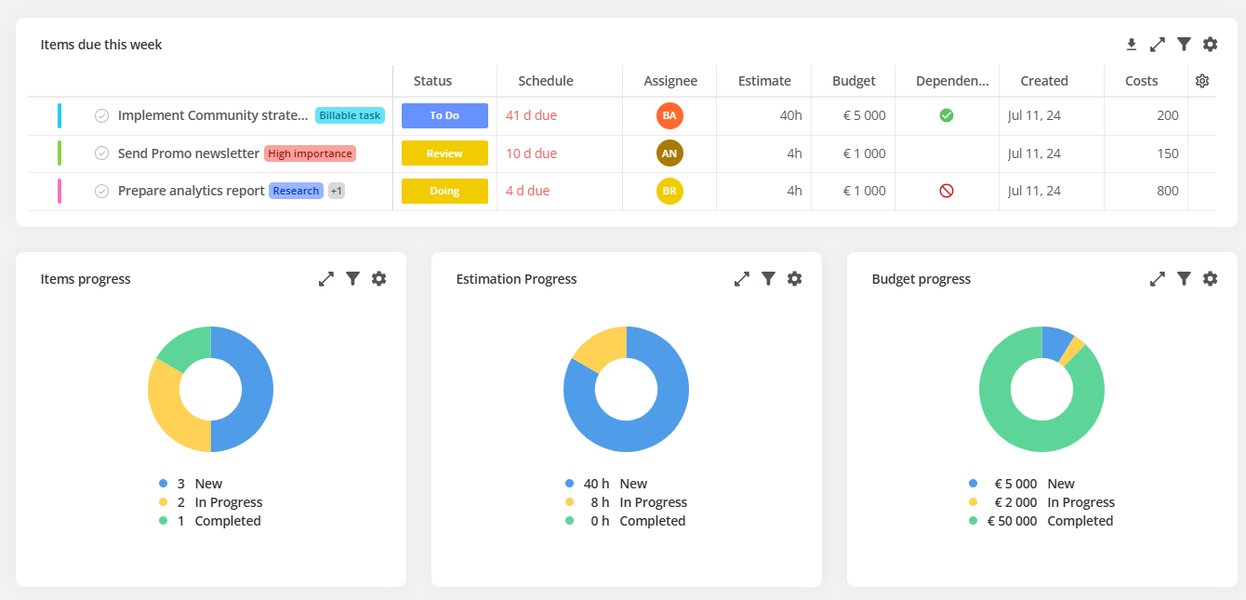
An example of a project management dashboard for tracking key metrics.
Workflow Automation
Automating repetitive tasks significantly boosts efficiency. This can include automated notifications, task assignments based on triggers, and integration with other business tools like email and calendars. AI-powered automation, such as smart task assignment or content summarization, is becoming increasingly prevalent.
Customization and Flexibility
Teams across different industries and sizes have unique workflows. Your software should offer extensive customization options, including custom fields, adaptable views (Kanban, list, Gantt), and the ability to create bespoke workflows and templates. This flexibility caters to a broader user base, from agile development teams to marketing agencies or construction firms.
Additional Considerations: Enhancing the User Experience
Beyond the core and advanced features, certain elements can significantly improve the overall user experience and your software's appeal.
Integrations
The ability to seamlessly integrate with other widely used business tools (e.g., communication platforms like Slack, file storage like Dropbox, CRM systems, email clients) is a massive time-saver and enhances the overall workflow.
Scalability and Performance
Your software should be able to scale from small teams and simple projects to large enterprises with complex portfolio management needs without compromising performance. This includes robust backend infrastructure and responsive user interfaces.
Security and Permissions
For businesses, especially larger ones, data security and granular permission controls are paramount. Ensure secure data handling, user roles, and access restrictions.
User-Friendliness and Onboarding
An intuitive and easy-to-learn interface is crucial. Provide clear video tutorials, comprehensive help documentation, and responsive customer support to ensure a smooth onboarding process and continued user satisfaction.
Feature Comparison Radar Chart
To illustrate how different project management software might stack up based on feature strengths, consider the following radar chart. This chart is based on an opinionated analysis of common strengths observed in leading project management tools. It visually represents how your software could aim to perform across key feature categories to be truly competitive.
This radar chart illustrates the importance of excelling across various dimensions. Your competitive software (green) should aim to surpass the average market competitor (red) in most, if not all, key feature areas, particularly in comprehensive planning, collaboration, reporting, and customization.
A Project Management Software Feature Checklist
Below is a detailed checklist of features to consider when developing your project management software, categorized for clarity and ease of reference. This table integrates insights from various top-tier tools and general best practices.
| Feature Category | Specific Feature | Description & Importance |
|---|---|---|
| Project Planning & Setup | Project Creation & Overview | Ability to easily initiate new projects, define goals, and get a high-level overview of all active projects. |
| Gantt Charts | Visual timeline for tasks, dependencies, and milestones, crucial for complex project scheduling. | |
| Project Templates | Pre-built templates for common project types to save time and ensure consistency. | |
| Milestone Tracking | Define and track key project milestones to mark progress and significant achievements. | |
| Task Management | Task Creation & Assignment | Simple creation of tasks, assigning ownership, and setting due dates. |
| Multiple Task Views (Kanban, List, Calendar) | Flexibility for users to visualize tasks in ways that suit their workflow. | |
| Subtasks & Checklists | Break down complex tasks into manageable sub-components and smaller action items. | |
| Task Prioritization | Tools to rank tasks by urgency and importance to guide team focus. | |
| Collaboration & Communication | In-app Messaging & Comments | Centralized communication on tasks and projects to reduce email clutter. |
| File Sharing & Version Control | Securely share documents and ensure everyone works on the latest file version. | |
| Discussion Boards/Forums | Dedicated spaces for broader project discussions and knowledge sharing. | |
| Notifications & Alerts | Real-time updates on task changes, mentions, and important deadlines. | |
| Resource & Workload Management | Resource Allocation | Assign resources (people, equipment) to tasks and projects efficiently. |
| Workload Viewers | Visual dashboards to see team members' current workloads and identify overloads or under-utilization. | |
| Capacity Planning | Tools to forecast resource availability and plan future projects based on team capacity. | |
| Time & Budget Management | Time Tracking | Ability to log hours spent on tasks for accurate billing and performance analysis. |
| Expense Tracking | Monitor project-related expenses and compare against the allocated budget. | |
| Invoicing Integration | Connect with accounting or invoicing software for streamlined financial operations. | |
| Reporting & Analytics | Customizable Dashboards | Personalized views of key performance indicators (KPIs) and project metrics. |
| Progress Tracking & Visualizations | Real-time updates on project status, progress charts (e.g., burndown, velocity). | |
| Performance Reports | Detailed reports on team productivity, project profitability, and bottlenecks. | |
| Automation & Customization | Workflow Automation Rules | Automate repetitive tasks (e.g., status changes, notifications) based on predefined triggers. |
| Custom Fields | Add unique data fields to tasks and projects to tailor the software to specific needs. | |
| Customizable Workflows | Design project workflows that align with the organization's unique processes. | |
| Integrations & Ecosystem | Third-party Integrations | Connect seamlessly with popular tools like Slack, Google Drive, Outlook, CRM, etc. |
| API Access | Allow developers to build custom integrations and extend functionality. | |
| Mobile App Support | Native mobile applications for iOS and Android for on-the-go project management. | |
| Security & Administration | User Roles & Permissions | Granular control over who can view, edit, or manage specific tasks and projects. |
| Data Security & Compliance | Robust security measures and compliance with relevant data protection regulations. | |
| Audit Trails | Record of all actions and changes within the system for accountability and troubleshooting. | |
| User Experience & Support | Intuitive User Interface (UI) | Clean, easy-to-navigate design that minimizes the learning curve. |
| Customer Support & Knowledge Base | Responsive support channels (chat, email, phone) and extensive self-help resources. |
Choosing the Right Features: A Strategic Approach
While a comprehensive feature set is important, it's equally crucial to align your software's capabilities with your target audience's specific needs. For instance, a tool for creative freelancers might prioritize flexible task tracking and file management, whereas a solution for large enterprises would focus on security, scalability, and deep integrations with ERP/BI tools.
Consider Your Target Market
Before implementing every possible feature, identify who your primary users will be:
- Small Businesses/Startups: Often prefer straightforward, easy-to-use interfaces with essential task management and collaboration. Free tiers or low-cost plans are highly attractive.
- Mid-sized Businesses: Look for better integrations, scalable reporting, and features that support fast-growing teams, possibly with industry-specific needs.
- Large Enterprises: Demand robust security, advanced administrative controls, deep integrations with existing systems, and highly customizable workflows for complex operations (e.g., IT, HR, engineering).
Focus on Problem-Solving, Not Just Features
The most successful project management software solves real problems for its users. Rather than simply listing features, articulate how each feature directly addresses a pain point. For example, workflow automation isn't just a "bell and whistle"; it directly prevents stress and burnout by streamlining tasks and ensuring clear expectations.
Here's a relevant video that delves into various project management tools and their features, which can provide further insights into the competitive landscape:
A comparative review of various project management tools, highlighting their features and use cases.
This video provides an excellent overview of how different project management tools stack up against each other, offering a practical perspective on what users value in a competitive solution. Understanding these comparisons can help refine your feature development priorities.
Frequently Asked Questions (FAQ)
What is the most important feature for project management software?
How important is AI in project management software?
Should I offer a free version of my project management software?
What is a project management checklist?
Conclusion
To create a truly competitive project management software in 2025, you must develop a solution that combines essential core functionalities with advanced features, all wrapped in a user-friendly and highly customizable interface. Prioritize seamless collaboration, intelligent automation, comprehensive reporting, and robust integration capabilities. By focusing on solving real-world problems for your target audience and continuously innovating, your software can carve out a significant niche in the bustling project management market.
Recommended Further Queries
- How to implement agile methodologies in project management software?
- The role of user experience in project management software adoption.
- Future trends in AI-powered project management tools.
- Strategies for marketing new project management software to small businesses.
References
Last updated May 21, 2025