
Unlocking Log Mysteries: Your Python-Powered Root Cause Investigator
Introducing RootCauser.py: A smart utility to dissect log files, pinpoint failures, and accelerate troubleshooting by comparing successful and failed run logs.
Highlights: Key Insights into Log Discrepancy Analysis
- Automated Comparison: RootCauser.py systematically compares a reference (successful) log file against a target (failed) log file to identify critical differences.
- Intelligent Normalization: The utility employs sophisticated variable masking (timestamps, IDs, paths, etc.) to ensure that only truly significant deviations are highlighted, filtering out operational noise.
- Focused Root Cause Identification: By isolating errors and warnings unique to the failed log, and commands missing from it, the script provides a prioritized list of potential root causes, accelerating debugging efforts.
The Challenge of Log Analysis in Troubleshooting
When software systems misbehave, log files are often the first place engineers look for clues. However, sifting through potentially megabytes or gigabytes of log data can be a daunting and time-consuming task. Comparing a log from a failed operation against one from a successful operation is a common diagnostic technique, but manual comparison is error-prone and inefficient, especially when logs contain dynamic data like timestamps, session IDs, or temporary file paths.
Effective root cause analysis (RCA) requires not just finding errors, but understanding the context: What changed? What was expected versus what actually happened? This is where automated log comparison and analysis tools become invaluable.
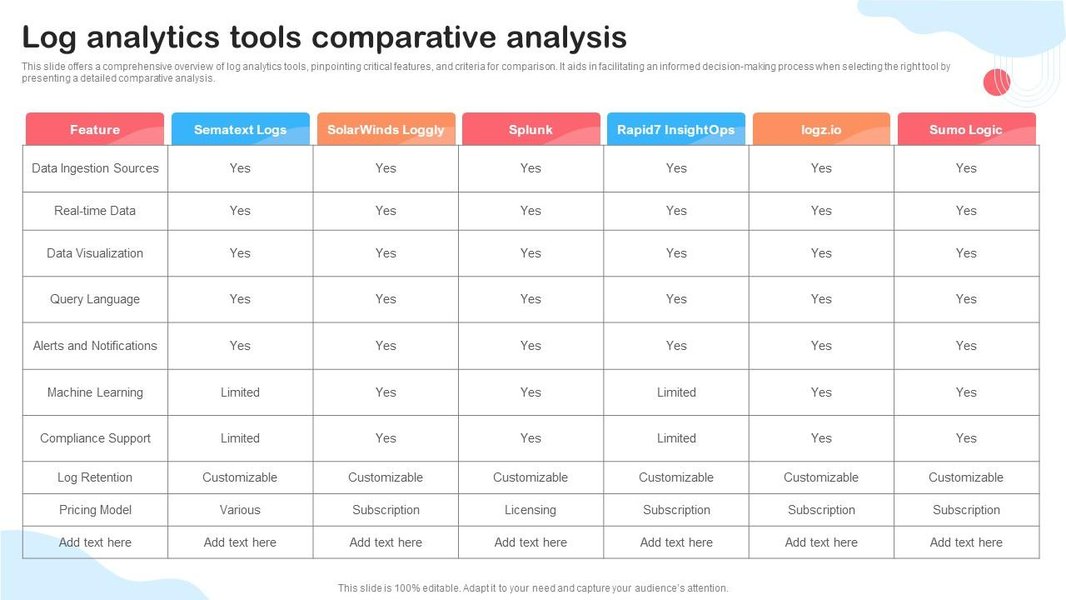
Visual representation of comparative analysis in log analytics.
Introducing RootCauser.py: Your Automated Log Detective
RootCauser.py is a Python utility designed to streamline the process of comparing two log files—one from a successful execution (log_pass.txt) and one from a failed execution (log_fail.txt). Its primary goal is to help identify potential root causes for the failure by highlighting significant discrepancies.
Core Functionalities
- Argument Parsing: Accepts paths to the reference and target log files via command-line arguments.
- Log Ingestion: Reads and processes both log files.
- Statistical Summary: Counts total lines, original errors/warnings, and unique errors/warnings after normalization.
- Variable Masking: Normalizes log lines by replacing dynamic data (timestamps, IDs, numbers, paths, etc.) with a generic placeholder (e.g.,
<VAR>). This allows for meaningful comparison of log message structures. - Differential Analysis:
- Identifies "special errors": errors present in the failed log but not in the reference log (after masking).
- Identifies "special warnings": warnings present in the failed log but not in the reference log (after masking).
- Identifies "special flow commands": key operational messages present in the reference log but missing from the failed log (after masking).
- Root Cause Suggestion: Provides a sorted list of potential root causes, primarily based on the special errors and warnings found in the failed log, often prioritized by frequency.
- Dual Output: Presents the analysis results in a human-readable table format on the console and also generates a structured XML file for further processing or archiving.
Conceptual Workflow of RootCauser.py
The utility follows a logical sequence of steps to analyze the log files. This process is designed to filter out noise and focus on the critical differences that might point to the root cause of a failure. The mindmap below illustrates this workflow:
This structured approach ensures that the analysis is systematic and focuses on relevant discrepancies, aiding significantly in the diagnostic process.
Diving Deeper: Key Components and Python Logic
The RootCauser.py script is built using standard Python libraries, emphasizing clarity and extensibility. Below is the complete script, followed by explanations of its key sections.
import argparse
import re
import xml.etree.ElementTree as ET
from collections import Counter
import sys # For sys.exit

# --- Configuration Constants ---
# More specific patterns should come before general ones
VARIABLE_MASK_PATTERNS = [
    re.compile(r'\b\d{4}-\d{2}-\d{2} \d{2}:\d{2}:\d{2}(?:,\d{3})?\b'),  # Timestamps 'YYYY-MM-DD HH:MM:SS,ms' or 'YYYY-MM-DD HH:MM:SS'
    re.compile(r'\b\d{2}:\d{2}:\d{2}\b'),                             # Time 'HH:MM:SS'
    re.compile(r'\b(?:[0-9a-fA-F]{8}-){3}[0-9a-fA-F]{12}\b', re.I),    # UUIDs
    re.compile(r'\b[0-9a-fA-F]{20,}\b', re.I),                        # Long Hex IDs (e.g., git hashes, other transaction IDs)
    re.compile(r'\b0x[0-9a-fA-F]+\b', re.I),                          # Hexadecimal numbers (e.g., memory addresses)
    re.compile(r'\b(?:[0-9]{1,3}\.){3}[0-9]{1,3}\b'),                  # IP Addresses v4
    re.compile(r'(?:/[^/\s]+)+/?'),                                   # Unix-like paths
    re.compile(r'(?:[a-zA-Z]:)?(?:\(?:[^\/:*?"<>|\r\n\s]+))+'),     # Windows-like paths (simplified)
    re.compile(r'session[_.-]?id=[0-9a-zA-Z-]+', re.I),               # Session IDs
    re.compile(r'request[_.-]?id=[0-9a-zA-Z-]+', re.I),               # Request IDs
    re.compile(r'user[_.-]?id=[0-9a-zA-Z\d]+', re.I),                 # User IDs
    re.compile(r'\b\d+(?:\.\d+)?(?:[eE][+-]?\d+)?\b'),                # Integers, floats, scientific notation (must be after IPs, timestamps)
    re.compile(r'\"[^\"]*\"'),                                        # Content within double quotes
    re.compile(r'\'[^\']*\''),                                        # Content within single quotes
]
MASK_REPLACEMENT = '<VAR>'

ERROR_PATTERNS = [re.compile(p, re.I) for p in [r'ERROR', r'FATAL', r'CRITICAL', r'Traceback \(most recent call last\):']]
WARNING_PATTERNS = [re.compile(p, re.I) for p in [r'WARN', r'WARNING']]
FLOW_PATTERNS = [re.compile(p, re.I) for p in [r'flow', r'command', r'action', r'step', r'sequence', r'process.*start', r'process.*end', r'invoking', r'completed']]

OUTPUT_XML_FILE = "root_cause_analysis_report.xml"

# --- Core Functions ---

def parse_arguments():
    """Parses command-line arguments."""
    parser = argparse.ArgumentParser(description="Compares two log files to help identify root causes of failures.")
    parser.add_argument('-reference_file', required=True, help="Path to the reference (successful) log file.")
    parser.add_argument('-target_file', required=True, help="Path to the target (failed) log file.")
    return parser.parse_args()

def read_log_file(file_path):
    """Reads log file lines. Exits if file not found."""
    try:
        with open(file_path, 'r', encoding='utf-8', errors='ignore') as f:
            return [line.strip() for line in f.readlines()]
    except FileNotFoundError:
        print(f"Error: File not found at '{file_path}'. Please check the path.")
        sys.exit(1)
    except Exception as e:
        print(f"Error reading file '{file_path}': {e}")
        sys.exit(1)

def mask_line(line, patterns, replacement):
    """Masks variable parts of a single log line."""
    masked_line = line
    for pattern in patterns:
        masked_line = pattern.sub(replacement, masked_line)
    return masked_line.strip()

def extract_typed_entries(lines, type_patterns):
    """Extracts lines that match any of the given type patterns."""
    extracted = []
    for line in lines:
        if any(pattern.search(line) for pattern in type_patterns):
            extracted.append(line)
    return extracted

def analyze_log_file_data(lines, error_patterns, warning_patterns, flow_patterns, mask_patterns, mask_replacement):
    """Analyzes a list of log lines to extract and normalize data."""
    raw_errors = extract_typed_entries(lines, error_patterns)
    raw_warnings = extract_typed_entries(lines, warning_patterns)
    raw_flows = extract_typed_entries(lines, flow_patterns)

    masked_errors_list = [mask_line(e, mask_patterns, mask_replacement) for e in raw_errors]
    masked_warnings_list = [mask_line(w, mask_patterns, mask_replacement) for w in raw_warnings]
    masked_flows_list = [mask_line(f, mask_patterns, mask_replacement) for f in raw_flows]

    return {
        'total_lines': len(lines),
        'raw_errors': raw_errors,
        'raw_warnings': raw_warnings,
        'raw_flows': raw_flows,
        'masked_errors_counts': Counter(masked_errors_list),
        'masked_warnings_counts': Counter(masked_warnings_list),
        'masked_flows_counts': Counter(masked_flows_list),
        'unique_masked_errors': set(masked_errors_list),
        'unique_masked_warnings': set(masked_warnings_list),
        'unique_masked_flows': set(masked_flows_list),
    }

def generate_xml_report(stats, special_items, root_causes_console_format, output_file):
    """Generates an XML report from the analysis results."""
    root_xml = ET.Element("LogAnalysisReport")

    # Statistics from target file
    ET.SubElement(root_xml, "lines_count").text = str(stats['lines_count_target'])
    ET.SubElement(root_xml, "original_errors_count").text = str(stats['original_errors_count_target'])
    ET.SubElement(root_xml, "after_mask_variables_and_drop_duplicate_errors_count").text = str(stats['masked_errors_count_target'])
    ET.SubElement(root_xml, "original_warnings_count").text = str(stats['original_warnings_count_target'])
    ET.SubElement(root_xml, "after_mask_variables_and_drop_duplicate_warnings_count").text = str(stats['masked_warnings_count_target'])

    # Special Errors
    special_errors_xml = ET.SubElement(root_xml, "the_special_errors_in_fail_log")
    if special_items['special_errors_fail']:
        for err in sorted(list(special_items['special_errors_fail'])): # Sort for consistent output
            ET.SubElement(special_errors_xml, "Error").text = err
    else:
        special_errors_xml.text = "None"

    # Special Warnings
    special_warnings_xml = ET.SubElement(root_xml, "the_special_warnings_in_fail_log")
    if special_items['special_warnings_fail']:
        for warn in sorted(list(special_items['special_warnings_fail'])):
            ET.SubElement(special_warnings_xml, "Warning").text = warn
    else:
        special_warnings_xml.text = "None"

    # Special Flow Commands in Pass Log (Missing in Fail Log)
    special_flows_xml = ET.SubElement(root_xml, "the_special_flow_command_in_pass_log")
    if special_items['special_flows_pass_missing_in_fail']:
        for flow in sorted(list(special_items['special_flows_pass_missing_in_fail'])):
            ET.SubElement(special_flows_xml, "Command").text = flow
    else:
        special_flows_xml.text = "None"

    # Root Cause Sorting
    root_causes_xml_parent = ET.SubElement(root_xml, "the_root_cause_sorting")
    if root_causes_console_format:
        for idx, cause_line in enumerate(root_causes_console_format):
            # cause_line is "   1. root cause1: Description..."
            # Extract the description part "root cause1: Description..."
            try:
                description = cause_line.split(":", 1)[1].strip()
                cause_elem = ET.SubElement(root_causes_xml_parent, "Cause", id=str(idx + 1))
                cause_elem.text = description
            except IndexError: # Should not happen if format is correct
                 ET.SubElement(root_causes_xml_parent, "Cause", id=str(idx + 1)).text = cause_line.strip()
    else:
        root_causes_xml_parent.text = "None identified"

    tree = ET.ElementTree(root_xml)
    try:
        ET.indent(tree, space="  ") # Pretty print for Python 3.9+
    except AttributeError:
        pass # ET.indent not available in older Python, output will be unformatted

    tree.write(output_file, encoding='utf-8', xml_declaration=True)
    print(f"\nXML report generated: {output_file}")

# --- Main Execution ---
def main():
    args = parse_arguments()

    print(f"Analyzing reference log: {args.reference_file}")
    ref_lines = read_log_file(args.reference_file)
    ref_data = analyze_log_file_data(ref_lines, ERROR_PATTERNS, WARNING_PATTERNS, FLOW_PATTERNS, VARIABLE_MASK_PATTERNS, MASK_REPLACEMENT)

    print(f"Analyzing target log: {args.target_file}")
    target_lines = read_log_file(args.target_file)
    target_data = analyze_log_file_data(target_lines, ERROR_PATTERNS, WARNING_PATTERNS, FLOW_PATTERNS, VARIABLE_MASK_PATTERNS, MASK_REPLACEMENT)

    # --- Calculate statistics for console output (as per user request) ---
    lines_count_target = target_data['total_lines']
    original_errors_count_target = len(target_data['raw_errors'])
    masked_errors_count_target = len(target_data['unique_masked_errors'])
    original_warnings_count_target = len(target_data['raw_warnings'])
    masked_warnings_count_target = len(target_data['unique_masked_warnings'])

    # --- Identify special items ---
    special_errors_fail = list(target_data['unique_masked_errors'] - ref_data['unique_masked_errors'])
    special_warnings_fail = list(target_data['unique_masked_warnings'] - ref_data['unique_masked_warnings'])
    # Flow commands in pass log that are NOT in fail log
    special_flows_pass_missing_in_fail = list(ref_data['unique_masked_flows'] - target_data['unique_masked_flows'])

    # --- Determine and sort root causes (based on special errors/warnings in fail log) ---
    potential_root_causes = []
    for err_msg in special_errors_fail:
        count = target_data['masked_errors_counts'].get(err_msg, 0)
        potential_root_causes.append({'type': 'Error', 'message': err_msg, 'count': count})

    for warn_msg in special_warnings_fail:
        count = target_data['masked_warnings_counts'].get(warn_msg, 0)
        potential_root_causes.append({'type': 'Warning', 'message': warn_msg, 'count': count})

    # Sort by count (descending), then by type (Error before Warning), then by message for stable sort
    potential_root_causes.sort(key=lambda x: (-x['count'], x['type'] == 'Warning', x['message']))

    root_causes_console_format = []
    if potential_root_causes:
        for i, cause_info in enumerate(potential_root_causes[:10], 1): # Display top 10 potential causes
            root_causes_console_format.append(f"   {i}. root cause{i}: {cause_info['type']}: {cause_info['message']} (Count: {cause_info['count']})")

    # --- Prepare console output ---
    console_output = []
    console_output.append(f"lines_count: {lines_count_target}")
    console_output.append(f"original errors count: {original_errors_count_target}")
    console_output.append(f"after mask variables and drop duplicate errors count: {masked_errors_count_target}")
    console_output.append(f"original warnings count: {original_warnings_count_target}")
    console_output.append(f"after mask variables and drop duplicate warnings count: {masked_warnings_count_target}")

    console_output.append(f"the special errors in fail log: {', '.join(sorted(special_errors_fail)) if special_errors_fail else 'None'}")
    console_output.append(f"the special warnings in fail log: {', '.join(sorted(special_warnings_fail)) if special_warnings_fail else 'None'}")
    console_output.append(f"the special flow command in pass log (missing in fail log): {', '.join(sorted(special_flows_pass_missing_in_fail)) if special_flows_pass_missing_in_fail else 'None'}")

    console_output.append("the root cause sorting:")
    if root_causes_console_format:
        console_output.extend(root_causes_console_format)
    else:
        console_output.append("   No distinct root causes identified based on special errors/warnings.")

    # --- Print to console ---
    print("\n--- Log Analysis Report ---")
    for line in console_output:
        print(line)

    # --- Generate XML output ---
    stats_for_xml = {
        'lines_count_target': lines_count_target,
        'original_errors_count_target': original_errors_count_target,
        'masked_errors_count_target': masked_errors_count_target,
        'original_warnings_count_target': original_warnings_count_target,
        'masked_warnings_count_target': masked_warnings_count_target,
    }
    special_items_for_xml = {
        'special_errors_fail': special_errors_fail,
        'special_warnings_fail': special_warnings_fail,
        'special_flows_pass_missing_in_fail': special_flows_pass_missing_in_fail,
    }
    generate_xml_report(stats_for_xml, special_items_for_xml, root_causes_console_format, OUTPUT_XML_FILE)

if __name__ == '__main__':
    main()
Key Logic Explained
- Configuration Constants: At the top,
VARIABLE_MASK_PATTERNSdefines a list of regular expressions used to identify and mask dynamic parts of log lines.ERROR_PATTERNS,WARNING_PATTERNS, andFLOW_PATTERNSdefine keywords to categorize log entries. mask_line(): Iterates throughVARIABLE_MASK_PATTERNSto replace matched segments withMASK_REPLACEMENT(<VAR>). The order of patterns inVARIABLE_MASK_PATTERNScan be important (more specific patterns should typically come before more general ones).analyze_log_file_data(): This function processes a list of log lines. It first extracts raw errors, warnings, and flow commands. Then, it masks these entries and uses Python'scollections.Counterto count frequencies of masked entries andsetfor unique entries.main():- Parses arguments using
argparse. - Calls
analyze_log_file_data()for both reference and target logs. - Calculates the required statistics for the target log (total lines, original/masked error/warning counts).
- Determines "special" items by finding the set difference between masked entries in the target and reference logs. For example,
special_errors_fail = target_data['unique_masked_errors'] - ref_data['unique_masked_errors']. - Identifies potential root causes by taking special errors and warnings from the failed log, then sorting them by their frequency in the failed log (most frequent first).
- Formats and prints the console output.
- Calls
generate_xml_report()to create the XML file.
- Parses arguments using
generate_xml_report(): Constructs an XML tree usingxml.etree.ElementTreethat mirrors the structure of the console output, then writes it to a file.
Effectiveness of Log Analysis Stages
The effectiveness of different stages in log analysis can vary based on the complexity and variability of the log data. The radar chart below provides an opinionated visualization of how each stage might perform across different types of logs when using a tool like RootCauser.py. The stages are rated on a scale of 1 (less effective/more challenging) to 5 (highly effective/straightforward).
This chart illustrates that while tools can significantly aid analysis, the quality and structure of logs play a crucial role. More complex and less structured logs inherently make tasks like masking and flow identification more challenging, potentially impacting the relevance of suggested root causes.
Data Masking Strategy
A critical aspect of RootCauser.py is its ability to mask variable data. This allows the comparison to focus on the semantic content of log messages rather than transient values. The table below summarizes common categories of data that are masked and the purpose of doing so.
| Category Masked | Example Regex Pattern (Simplified Concept) | Purpose in Log Comparison |
|---|---|---|
| Timestamps | \d{4}-\d{2}-\d{2} \d{2}:\d{2}:\d{2} |
Normalize time-sensitive entries to compare event sequences regardless of exact timing. |
| UUIDs / Unique IDs | [0-9a-fA-F]{8}-([0-9a-fA-F]{4}-){3}[0-9a-fA-F]{12} |
Generalize instance-specific identifiers (sessions, transactions) to find common error patterns. |
| Numeric Values | \b\d+\b |
Abstract specific counts, metrics, or other numbers that vary per run but don't change the log message's core meaning. |
| IP Addresses | (\d{1,3}\.){3}\d{1,3} |
Anonymize or generalize network identifiers, useful if IPs change but the logged event is the same. |
| File Paths / URLs | /[^\s]* or \[^\s]* |
Generalize resource locations, especially for temporary or dynamically generated paths. |
| Quoted Strings | \"[^\"]*\" |
Abstract dynamic string content like user inputs or specific data payloads, focusing on the surrounding log message structure. |
| Hexadecimal IDs | 0x[0-9a-fA-F]+ |
Mask memory addresses or other system-generated hex values. |
The effectiveness of masking depends heavily on the comprehensiveness and order of the regular expressions defined in VARIABLE_MASK_PATTERNS. Users may need to customize these patterns based on their specific log formats.
Usage and Output
Running the Script
To use RootCauser.py, save the code above into a file named RootCauser.py. Then, run it from your terminal using Python 3:
python RootCauser.py -reference_file path/to/log_pass.txt -target_file path/to/log_fail.txtReplace path/to/log_pass.txt with the actual path to your successful log file and path/to/log_fail.txt with the path to your failed log file.
Example Console Output
The script will print an analysis report to the console, similar to this format:
--- Log Analysis Report ---
lines_count: 150
original errors count: 12
after mask variables and drop duplicate errors count: 3
original warnings count: 8
after mask variables and drop duplicate warnings count: 2
the special errors in fail log: ERROR: Connection to <VAR> timed out, ERROR: Null pointer exception at <VAR>
the special warnings in fail log: WARNING: Configuration <VAR> not found, using default
the special flow command in pass log (missing in fail log): INFO: Step <VAR> completed successfully
the root cause sorting:
   1. root cause1: Error: ERROR: Connection to <VAR> timed out (Count: 5)
   2. root cause2: Error: ERROR: Null pointer exception at <VAR> (Count: 3)
   3. root cause3: Warning: WARNING: Configuration <VAR> not found, using default (Count: 2)
This output provides a quick overview of key statistics and highlights the most probable areas to investigate.
XML Output Structure
In addition to the console output, an XML file named root_cause_analysis_report.xml (by default) will be generated in the same directory. This file contains the same information in a structured format, suitable for programmatic access or archival.
Example XML structure:
<?xml version='1.0' encoding='utf-8'?>
<LogAnalysisReport>
<lines_count>150</lines_count>
<original_errors_count>12</original_errors_count>
<after_mask_variables_and_drop_duplicate_errors_count>3</after_mask_variables_and_drop_duplicate_errors_count>
<original_warnings_count>8</original_warnings_count>
<after_mask_variables_and_drop_duplicate_warnings_count>2</after_mask_variables_and_drop_duplicate_warnings_count>
<the_special_errors_in_fail_log>
<Error>ERROR: Connection to <VAR> timed out</Error>
<Error>ERROR: Null pointer exception at <VAR></Error>
</the_special_errors_in_fail_log>
<the_special_warnings_in_fail_log>
<Warning>WARNING: Configuration <VAR> not found, using default</Warning>
</the_special_warnings_in_fail_log>
<the_special_flow_command_in_pass_log>
<Command>INFO: Step <VAR> completed successfully</Command>
</the_special_flow_command_in_pass_log>
<the_root_cause_sorting>
<Cause id="1">root cause1: Error: ERROR: Connection to <VAR> timed out (Count: 5)</Cause>
<Cause id="2">root cause2: Error: ERROR: Null pointer exception at <VAR> (Count: 3)</Cause>
<Cause id="3">root cause3: Warning: WARNING: Configuration <VAR> not found, using default (Count: 2)</Cause>
</the_root_cause_sorting>
</LogAnalysisReport>
Visualizing Log Analysis with Python
Understanding log data often involves parsing and extracting meaningful information. Python is a powerful tool for such tasks. The following video provides an introduction to log file analysis using Python, covering concepts that are foundational to how RootCauser.py operates, such as reading files and searching for patterns.
A tutorial on basic Python log parsing techniques, relevant to the core operations of RootCauser.py.
While RootCauser.py provides a specific solution for comparative analysis, the techniques shown in general log parsing tutorials can help in customizing or extending its capabilities, especially in defining more sophisticated patterns for error, warning, or flow command identification.
Frequently Asked Questions (FAQ)
How do I customize the patterns for errors, warnings, or flow commands?
You can customize these patterns by modifying the global lists at the beginning of the RootCauser.py script:
ERROR_PATTERNS: Add or change regular expressions for identifying error messages.WARNING_PATTERNS: Add or change regular expressions for identifying warning messages.FLOW_PATTERNS: Add or change regular expressions for identifying significant operational/flow messages.
ERROR_PATTERNS = [re.compile(p, re.I) for p in [r'ERROR', r'FATAL', r'CRITICAL', r'Traceback...', r'EXCEPTION_OCCURRED']].
How can I improve the accuracy of variable masking?
The accuracy of variable masking depends on the regular expressions in the VARIABLE_MASK_PATTERNS list. To improve accuracy:
- Add More Specific Patterns: If your logs have specific formats for IDs, timestamps, or other variables not covered, add new regex patterns to capture them.
- Order Matters: Place more specific patterns before more general ones in the list. For example, a pattern for a full timestamp (
YYYY-MM-DD HH:MM:SS) should come before a general number pattern (\b\d+\b) to prevent parts of the timestamp from being masked as simple numbers. - Test Thoroughly: After modifying patterns, test with various log samples to ensure they work as expected without over-masking or under-masking.
What if my log files are very large?
The current version of RootCauser.py reads the entire content of both log files into memory (readlines()). For very large files (e.g., gigabytes), this could lead to high memory consumption and performance issues. Potential optimizations for very large files (not implemented in the current script) could include:
- Line-by-Line Processing: Read and process files line by line instead of loading everything into memory. This would require changes in how unique entries are stored and compared, possibly using temporary files or databases for intermediate results if memory is severely constrained.
- Sampling: If appropriate for your use case, analyze only a subset of the logs (e.g., the last N lines, or lines around a specific timeframe if timestamps are available and not fully masked initially).
- Specialized Log Analysis Tools: For enterprise-scale log analysis, consider dedicated log management systems (e.g., ELK Stack, Splunk) that are designed for handling massive volumes of log data efficiently.
The script reports 'File not found'. What should I do?
If you see a "File not found" error, please check the following:
- Correct Path: Ensure that the paths provided for
-reference_fileand-target_fileare accurate. Double-check for typos. - Absolute vs. Relative Paths: If you're using relative paths, make sure you are running the script from the correct directory relative to where the log files are located. Using absolute paths can often prevent such issues.
- File Existence: Verify that the log files actually exist at the specified locations.
- Permissions: Ensure that the user running the script has read permissions for the log files.
What does "special flow command in pass log (missing in fail log)" signify?
This section lists (normalized) log messages identified as "flow commands" that were present in the successful (pass) log but were NOT found in the failed log. These can be important indicators of what went wrong. For example:
- A missing "Process X completed successfully" message might indicate that Process X never finished or even started in the failed run.
- A missing "User authentication successful" command could point to an authentication failure early in the process.
Recommended Further Exploration
- How can machine learning techniques be integrated into Python-based log analysis for more advanced anomaly detection?
- What are advanced techniques and libraries for optimizing Python scripts that process very large log files efficiently?
- What are some best practices for crafting robust and efficient regular expression patterns tailored for diverse log formats?
- How could a utility like RootCauser.py be integrated into a CI/CD pipeline to automatically analyze logs from failed tests or deployments?
References
Last updated May 9, 2025