
Building Your Intelligent Automation Platform: A Guide to Python Frameworks and Architectures
Leveraging Python, AI agents, and the right tech stack for multi-agent prompting, API integration, and user-created workflows.
Highlights: Key Insights for Your Project
- Framework Choice is Crucial: While Flask offers simplicity and flexibility, FastAPI excels in performance and async operations vital for API integrations and agent orchestration. Django provides a comprehensive, 'batteries-included' approach that can accelerate development for complex features. Dash and Streamlit are best suited for specific UI tasks (dashboards, prototypes) rather than the core application backend.
- Architecture Matters for AI Agents: A modular design with clear separation of concerns (e.g., backend API, frontend UI, workflow engine) significantly aids AI coding agents like Windsurf. Well-documented, API-first approaches are highly recommended.
- User Workflow Builders Require Effort: Building a visual, user-friendly workflow editor like n8n.com or make.com typically requires a dedicated frontend component (often using JavaScript libraries) alongside a robust backend engine to manage workflow definitions and execution logic.
Understanding Your Project Requirements
Core Features
Your goal is to build a sophisticated web platform featuring:
- Multi-Agent Prompting: Orchestrating multiple AI agents to collaborate on tasks.
- Proprietary Data Integration: Securely connecting to user data via APIs like Gmail, Google Drive, Google Sheets, Google Calendar, and Twitter/X.
- User-Created Agentic Workflows: Enabling users to design, build, and manage their own automated workflows involving AI agents and API integrations, similar to platforms like n8n.com or make.com.
Technology Preferences & Constraints
- Primary Language: Python (preferred over Next.js/JavaScript).
- Development Assistance: Use of AI coding agents (Windsurf, VS Code) necessitates a technologically simple and manageable stack.
- Hosting: Deployment on Render.com.
The challenge lies in selecting a Python tech stack that balances functionality, performance, ease of development (especially for AI agents), and compatibility with your hosting environment, while supporting the complexity of agentic workflows and diverse API integrations.
Choosing the Right Python Framework: A Deep Dive
Selecting the right Python web framework is foundational. Let's analyze the candidates you mentioned (Dash, FastAPI, Flask, Streamlit) and include Django, a strong contender often considered for complex applications.
Dash: The Data Visualization Specialist
Dash is specifically designed for building analytical web applications and interactive dashboards. While excellent for visualizing data (e.g., agent outputs or data from Google Sheets), its primary focus isn't on building comprehensive backends with complex workflow logic or extensive API management. Using Dash for the core application framework would be limiting for features beyond data presentation. Its role is likely best confined to frontend visualization components.
Streamlit: The Rapid Prototyping Tool
Similar to Dash, Streamlit excels at quickly turning Python scripts into interactive web apps, particularly for data science and machine learning demos. It's fantastic for prototyping or building simple internal tools and dashboards. However, it lacks the robust backend capabilities, multi-user support, and customization needed for a full-scale platform managing complex, persistent user workflows and numerous API integrations. Like Dash, its role is likely limited to specific UI parts or internal tools.
Flask: The Flexible Microframework
Flask is a lightweight and highly flexible microframework. Its simplicity and minimal boilerplate make it easy to learn and potentially easy for AI agents to work with. You have complete control over components and extensions. However, this flexibility means features like database integration (ORM), complex authentication, and asynchronous operations often require adding external libraries and more configuration. While capable, building a sophisticated platform like yours on Flask might involve significant custom development, potentially increasing complexity as the project scales.
FastAPI: The Modern API Powerhouse
FastAPI is a modern, high-performance framework built for creating APIs. Its key strengths include native asynchronous support (crucial for handling many concurrent API calls and agent interactions efficiently), automatic data validation using Python type hints, and interactive API documentation (Swagger UI/OpenAPI), which greatly benefits both human developers and AI agents. It's an excellent choice for the backend API layer, managing agent orchestration, workflow execution logic, and external API integrations. However, it's primarily backend-focused, requiring a separate frontend solution for the user interface, including the workflow editor.
Django: The Full-Stack Contender
Django is a mature, "batteries-included" full-stack framework. It provides many built-in features needed for complex web applications, such as an ORM, authentication system, admin interface, and templating engine. This can significantly accelerate development by reducing the need for external libraries for common tasks. Using Django Rest Framework (DRF) provides a powerful toolkit for building APIs. While potentially having a steeper initial learning curve than Flask or FastAPI for simple tasks, its structured approach and comprehensive features can simplify the overall development of a large application, offering a solid foundation that AI agents can leverage within its conventions.
Framework Comparison Radar Chart
This radar chart provides a visual comparison of the discussed Python frameworks based on factors relevant to your project. Scores are relative estimates (1=Low, 5=High) reflecting general suitability:
Framework Comparison Table
Here's a table summarizing the key characteristics relevant to your project:
| Feature / Framework | Dash | FastAPI | Flask | Streamlit | Django (+DRF) |
|---|---|---|---|---|---|
| Primary Use | Python dashboards/UI | Async backend APIs | Lightweight backend/web | Interactive data apps | Full-stack web apps/APIs |
| Async Support | Limited | Excellent (Native) | Limited (via extensions) | Limited | Good (ASGI support) |
| UI Flexibility | Moderate (Dash components) | None (Backend only) | Basic (Templating/Extensions) | Limited (Built-in components) | Good (Templating/Can integrate JS frameworks) |
| Agent Orchestration / Workflow | Not Native | Excellent (via background tasks, async) | Possible (requires extensions) | Not Native | Good (via Celery, background tasks) |
| API Integrations | Possible (less ideal) | Excellent | Good | Possible (less ideal) | Excellent (esp. with DRF) |
| Ease for AI Agents | Moderate | High (Typed, Docs) | High (Simple, Minimal) | High (Simple scripts) | High (Structured, Conventions) |
| Scalability | Moderate | High | Moderate | Low | High |
| Suitability for Your Core Project | Frontend/Viz Layer Only | Excellent (Backend Core) | Good (Flexible Backend) | Frontend/Prototype Layer Only | Excellent (Full-Stack/Backend Core) |
Architecting Your Multi-Agent Workflow Platform
Building a platform with multi-agent prompting and user-creatable workflows requires careful architectural planning.
Key Architectural Components
Regardless of the specific framework, your application will likely need these core components. This mindmap illustrates a typical structure:
This structure separates concerns, making the application easier to develop, test, and maintain, especially when collaborating with AI coding agents.
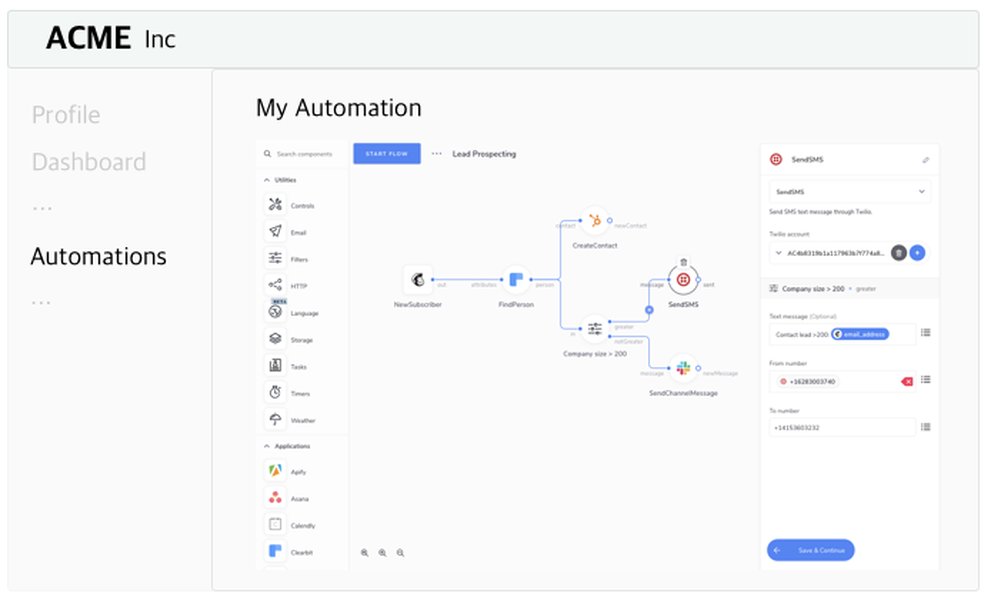
Example of a visual workflow automation interface similar to n8n.com or Make.com.
Integrating External APIs Securely
Connecting to services like Gmail, Google Drive, and Twitter requires robust and secure API integration:
- Authentication: Use OAuth 2.0 for user authorization. Store credentials securely (e.g., encrypted in the database or using a dedicated secrets manager).
- Libraries: Leverage official Python client libraries provided by Google (
google-api-python-client) and Twitter/X to simplify interactions. - Modularity: Create separate modules or services within your backend for each external API integration. This isolates dependencies and makes updates easier.
- Error Handling: Implement comprehensive error handling for API calls, including rate limits, network issues, and authentication failures.
- Rate Limiting: Be mindful of API rate limits imposed by external services. Implement strategies like exponential backoff for retries.
Building the User Workflow Editor
Creating an intuitive interface for users to build workflows is challenging. While Python frameworks handle the backend logic (saving definitions, executing steps), the visual drag-and-drop editor typically requires frontend technologies:
- Frontend Libraries: JavaScript libraries like React Flow, Blockly, or similar are often used to create node-based visual editors.
- Backend Integration: The frontend editor communicates with the backend API to load, save, and potentially validate workflow structures.
- Python-based Alternatives (Limited): While possible to build simpler UIs using Dash or Streamlit components, achieving the sophistication of n8n/Make editors usually necessitates dedicated frontend development.
Best Practices for Building with AI Coding Agents
To maximize the effectiveness of AI coding agents like Windsurf and VS Code assistants, adopt these practices:
- Modular Design: Break the application into small, well-defined modules or microservices with clear responsibilities. This makes it easier for AI to understand and modify specific parts.
- Clear Documentation: Maintain concise, up-to-date documentation (docstrings, READMEs, API specs like OpenAPI). This provides context for the AI.
- Standardized Code Style: Adhere strictly to a code style guide (e.g., PEP 8 for Python). Consistency makes the codebase more predictable for AI.
- Automated Testing: Implement comprehensive unit and integration tests. AI agents can use these tests to verify generated code and prevent regressions.
- Version Control (Git): Use Git with a clear branching strategy. This allows tracking AI-generated changes and easy rollbacks.
- API-First Approach: Define clear API contracts between components early on. This helps both human and AI developers understand interactions.
- Specific Instructions: Provide clear, specific prompts to AI agents, including context about the relevant modules, desired functionality, and constraints.
A well-structured, documented, and tested codebase is significantly easier for AI agents to navigate and contribute to effectively.
Three Potential Solution Architectures for Render.com
Considering your requirements, Python preference, use of AI agents, and Render.com hosting, here are three viable architectural solutions:
Solution 1: FastAPI Backend + Modern Frontend (React/Vue)
Rationale & Components
- Backend: FastAPI handles API requests, agent orchestration (leveraging async), workflow execution logic, and external API interactions.
- Frontend: A separate JavaScript framework (React, Vue.js) builds the interactive UI, including the complex workflow editor (using libraries like React Flow).
- Workflow Engine: A custom engine built within FastAPI or integration with a library/background task queue (Celery/RQ) for execution.
- Database: PostgreSQL or MySQL managed via an ORM like SQLAlchemy or Tortoise ORM.
- Deployment: Deploy FastAPI backend and React/Vue frontend as separate services on Render.com.
Suitability for AI Agents
High. The clear separation between backend and frontend, FastAPI's typed nature, and automatic API docs make it easier for AI agents to work on specific API endpoints, database models, or backend logic without needing context for the entire system. AI tools can also assist with frontend component generation if needed.
Solution 2: Django Full-Stack with DRF
Rationale & Components
- Framework: Django manages the entire application structure, including URL routing, authentication, database models (ORM), and potentially serving frontend templates (Jinja2).
- API Layer: Django Rest Framework (DRF) builds the API endpoints for frontend interaction and agent communication.
- Workflow Engine: Develop a custom Django app for workflow logic and execution, potentially using Celery for background tasks.
- Frontend: Use Django's templating system for a server-rendered frontend or integrate a JavaScript framework if a richer client-side experience (especially for the workflow editor) is required.
- Database: Django's built-in ORM integrates seamlessly with PostgreSQL, MySQL, etc.
- Deployment: Deploy as a single monolithic service or multiple services on Render.com.
Suitability for AI Agents
High. Django's strong conventions and "batteries-included" nature provide a clear structure. AI agents can leverage the ORM, built-in features, and DRF patterns to generate models, views, serializers, and API endpoints efficiently, potentially requiring less boilerplate generation compared to microframeworks for common web tasks.
Solution 3: Flask Backend + Server-Side Rendering/Simpler Frontend
Rationale & Components
- Backend: Flask handles API endpoints, basic workflow logic, and external API connections using extensions as needed (e.g., Flask-SQLAlchemy for database, Flask-Login for auth).
- Frontend: Use Flask's Jinja2 templating for server-side rendering, potentially augmented with a library like HTMX for more dynamic interactions without heavy JavaScript. The workflow editor might be simpler or rely more on server logic.
- Workflow Engine: Custom implementation within Flask, possibly using Celery/RQ for async tasks if Flask's native async support isn't sufficient.
- Database: Integrate with SQLAlchemy or other ORMs via Flask extensions.
- Deployment: Deploy as a single service on Render.com.
Suitability for AI Agents
Good. Flask's simplicity and minimal structure are easy for AI agents to grasp for generating basic routes and functions. However, as complexity grows, managing the application structure and ensuring consistency across features added via extensions might require more careful guidance for the AI compared to the more opinionated structure of Django or the explicit contracts of FastAPI.
Recommendation: For a project of this complexity involving multi-agent workflows and a sophisticated UI, **Solution 1 (FastAPI + Modern Frontend)** or **Solution 2 (Django + DRF)** generally offer better scalability, structure, and feature sets compared to Flask, while still being manageable for AI agents due to their respective strengths (performance/async/typing for FastAPI, structure/conventions/built-ins for Django).
Relevant Video Insights
Understanding the nuances between major Python web frameworks can help solidify your decision. This video offers a technical comparison of Django, Flask, and FastAPI, discussing their strengths and weaknesses in various scenarios, which is highly relevant to your framework selection process.
The video delves into aspects like performance, feature sets, asynchronous capabilities, and typical use cases, providing valuable context for choosing the best fit for your multi-agent platform.
Frequently Asked Questions (FAQ)
Which framework is best if I prioritize performance for API calls?
FastAPI is generally considered the best choice for raw API performance due to its modern architecture based on Starlette and Pydantic, and its native support for asynchronous operations (async/await). This makes it highly efficient for I/O-bound tasks like handling numerous external API calls simultaneously.
How complex is building the user workflow editor?
Building a sophisticated, visual drag-and-drop workflow editor like those found on n8n.com or make.com is a significant undertaking. It typically requires substantial frontend development effort, often using JavaScript libraries specifically designed for creating node-based interfaces (e.g., React Flow, Drawflow, Blockly). While the backend (Python) manages storing and executing the workflow logic, creating the intuitive visual builder itself is primarily a frontend challenge.
Can AI coding agents handle the entire development?
While AI coding agents like Windsurf and VS Code copilots can significantly accelerate development by generating boilerplate code, writing functions, suggesting implementations, and assisting with debugging, they typically cannot handle the entire end-to-end development of a complex application autonomously. Human oversight, architectural decisions, integration testing, handling complex logic nuances, and ensuring security best practices remain crucial. AI agents are powerful assistants, but not yet replacements for experienced developers, especially for architecting and refining sophisticated systems.
How should I manage API keys and user credentials securely?
Never store sensitive credentials like API keys or user OAuth tokens directly in your codebase or version control. Use secure methods such as environment variables (managed securely by your hosting provider like Render.com), a dedicated secrets management service (e.g., HashiCorp Vault, AWS Secrets Manager, Google Secret Manager), or store encrypted values in your database, ensuring robust encryption and access control practices are followed.
Recommended Next Steps & Further Reading
- How can I build a visual workflow editor using React Flow and connect it to a FastAPI backend?
- What are the best practices for securely storing and managing OAuth tokens for multiple users in a Python web application?
- Explore different patterns for implementing multi-agent orchestration and communication in Python.
- Learn about the differences between Celery and RQ for handling background tasks required by workflow execution engines.
References
 cdn.openai.com
Last updated May 4, 2025