
Creating Python Code to Print "Hello"
A Comprehensive Guide to Writing and Executing Your First Python Program
Key Takeaways
- Understanding the
print()Function: Learn how Python's built-inprint()function works to display messages. - Setting Up Your Python Environment: Steps to install Python and choose an appropriate IDE or text editor.
- Executing Python Scripts: Methods to run Python code and view output in the console.
Introduction to Python Programming
Python is a versatile and beginner-friendly programming language widely used for various applications, including web development, data analysis, artificial intelligence, and more. One of the first and simplest programs you can write in Python is the "Hello World" program, which serves as an introduction to the language's syntax and basic functionalities.
What is the print() Function?
The print() function in Python is a built-in function that outputs data to the console. It's commonly used to display messages, variables, and other information during the execution of a program. Using the print() function is an essential step in debugging and providing user feedback.
Writing Your First Python Program
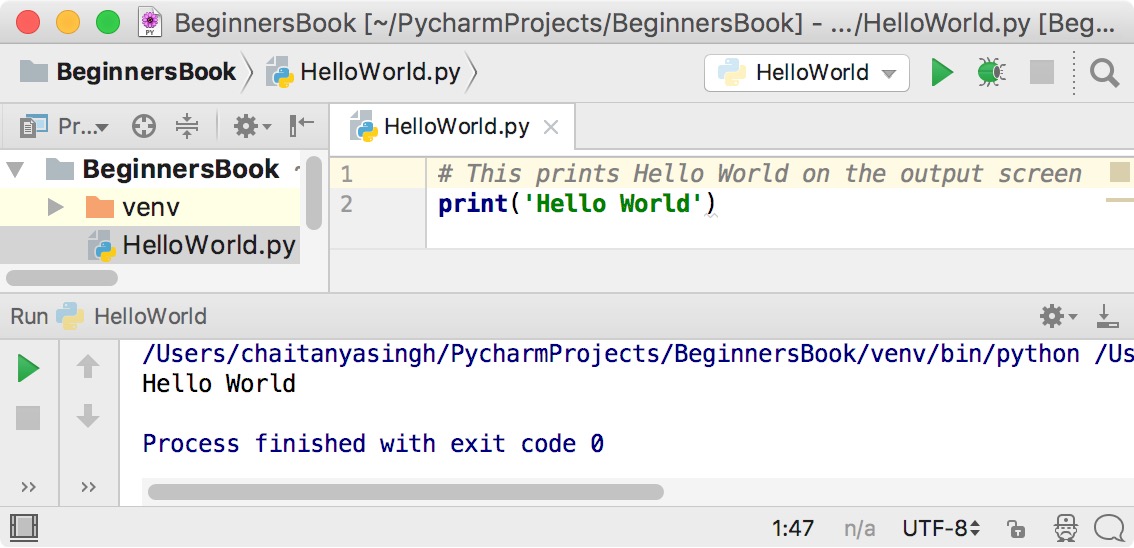
Creating a Python program to print "Hello" is straightforward. Here's the basic code:
print("Hello")When you run this code, it will display:
HelloSetting Up Your Python Environment
Before writing and executing Python code, you need to ensure that Python is installed on your system and choose an appropriate Integrated Development Environment (IDE) or text editor.
Installing Python
To install Python:
- Visit the official Python website: python.org/downloads.
- Download the latest stable release compatible with your operating system (Windows, macOS, Linux).
- Run the installer and follow the on-screen instructions. It's recommended to check the option to add Python to your system's PATH during installation.
Choosing an IDE or Text Editor
An IDE or text editor is essential for writing and managing your Python code. Popular choices include:
-
Visual Studio Code (VS Code): A free and highly customizable editor with a wide range of extensions.
-
PyCharm: A powerful IDE specifically designed for Python development with extensive features.
-
Sublime Text: A lightweight and fast text editor with syntax highlighting and other useful features.
-
IDLE: Python's default IDE, suitable for beginners.
Saving and Running Your Python Script
After writing your Python code, follow these steps to save and execute it:
Saving the File
- Open your chosen text editor or IDE.
- Type the Python code:
- Save the file with a
.pyextension, such ashello.py.
print("Hello")Executing the Program
- Open your terminal or command prompt.
- Navigate to the directory where the
hello.pyfile is saved using thecdcommand. - Run the program by typing:
- Press Enter, and you should see the output:
python hello.pyor, depending on your Python installation:
python3 hello.pyHelloEnhancing the Hello Program
To make the "Hello" program more interactive, you can prompt the user to enter their name and greet them accordingly.
Interactive Greeting Program
name = input("Enter your name: ")
print(f"Hello, {name}!")
Explanation:
input()function prompts the user to enter their name and stores it in the variablename.- The
print()function utilizes an f-string to insert the user's input into the greeting message.
Sample Execution:
Enter your name: Alice
Hello, Alice!
Understanding Python's print() Function
The print() function is fundamental in Python programming, used primarily for outputting information to the console. Understanding its versatility and usage forms the basis for effective Python scripting.
Basic Usage
The most basic use of print() is to display a simple string:
print("Hello")Output:
HelloPrinting Multiple Items
You can print multiple items by separating them with commas:
print("Hello", "World")Output:
Hello WorldFormatted Strings (f-strings)
Introduced in Python 3.6, f-strings allow embedding expressions inside string literals, using curly braces:
name = "Alice"
print(f"Hello, {name}!")
Output:
Hello, Alice!Troubleshooting Common Issues
While writing and executing Python code, beginners often encounter specific issues. Understanding these can help in debugging effectively.
Syntax Errors
Syntax errors occur when the code does not follow Python's syntax rules. For example, omitting the closing quotation mark:
print("Hello)Error Message: SyntaxError: EOL while scanning string literal
Solution: Ensure all strings are properly closed with matching quotation marks.
Indentation Errors
Python relies on indentation to define code blocks. Incorrect indentation can lead to errors:
def greet():
print("Hello")
Error Message: IndentationError: expected an indented block
Solution: Indent the code block inside the function:
def greet():
    print("Hello")
Name Errors
Name errors occur when trying to use variables that haven't been defined:
print(message)Error Message: NameError: name 'message' is not defined
Solution: Define the variable before using it:
message = "Hello"
print(message)
Advanced Print Features
Beyond basic usage, the print() function offers several parameters to control output formatting.
End Parameter
The end parameter specifies what to print at the end of the output. By default, it is a newline character (\n):
print("Hello", end=" ")
print("World")
Output:
Hello WorldSeparator Parameter
The sep parameter defines the separator between multiple items:
print("Hello", "World", sep="-")Output:
Hello-WorldPrinting to a File
You can direct the output to a file instead of the console using the file parameter:
with open("output.txt", "w") as file:
    print("Hello", file=file)
This will write "Hello" to the file output.txt.
Best Practices for Writing Python Code
Writing clean and efficient Python code enhances readability and maintainability. Consider the following best practices when writing your "Hello" program and beyond.
Use Meaningful Variable Names
Choose variable names that clearly describe their purpose:
name = input("Enter your name: ")
print(f"Hello, {name}!")
Keep It Simple
Aim for simplicity in your code. Avoid unnecessary complexity, especially in beginner programs:
print("Hello, World!")Comment Your Code
Include comments to explain the purpose of the code, especially for more complex scripts:
# Prompt the user for their name
name = input("Enter your name: ")
# Greet the user
print(f"Hello, {name}!")
Conclusion
Creating a Python program to print "Hello" is a fundamental step in learning programming with Python. By understanding the print() function, setting up your development environment, and following best practices, you can create and execute basic Python scripts with ease. As you progress, these foundational skills will enable you to tackle more complex programming challenges and develop robust applications.
References
Last updated January 23, 2025