

Essential Insights for Your UDP Listener
- Foundation with Python's Socket Module: All Python UDP listeners leverage the built-in
socketmodule, utilizingsocket.AF_INETfor IPv4 andsocket.SOCK_DGRAMto specify UDP. - Binding and Listening: A critical step involves binding the created socket to a specific IP address and port using
sock.bind((IP_ADDRESS, PORT)), allowing the listener to actively wait for incoming datagrams. - Continuous Data Reception: The core functionality resides in a continuous loop that employs
sock.recvfrom(BUFFER_SIZE)to capture incoming data packets and the sender's address, facilitating real-time network monitoring.
Developing a User Datagram Protocol (UDP) listener in Python is a fundamental skill for network programming, enabling applications to receive data from other networked devices. UDP, a connectionless protocol, is often preferred for its speed and efficiency in scenarios where occasional data loss is acceptable, such as streaming media, online gaming, or sensor data collection. This guide will provide a comprehensive understanding and practical Python code to implement a robust UDP listener.
Understanding UDP Fundamentals
Before diving into the code, it's essential to grasp the core concepts of UDP. Unlike TCP (Transmission Control Protocol), UDP does not establish a persistent connection between the sender and receiver. This characteristic makes it lightweight and faster but means it doesn't guarantee delivery, order, or prevent duplicate packets. Therefore, applications using UDP must handle these aspects at a higher level if reliability is required.
Key Components of UDP Communication
At the heart of any UDP communication are several crucial elements:
IP Address and Port:
The IP address identifies the machine on the network, while the port number specifies the particular application or service running on that machine. For a UDP listener, you bind to a specific IP and port to listen for incoming packets. Common IP addresses include "127.0.0.1" (localhost for internal communication) or "0.0.0.0" (to listen on all available network interfaces).
Sockets:
Sockets are the endpoints of communication. In Python, the socket module provides the necessary tools to create and manage network sockets. For UDP, you'll create a datagram socket (SOCK_DGRAM).
Binding:
Binding is the process of associating a socket with a specific local IP address and port. This tells the operating system that your application is ready to receive data on that particular network endpoint.
Receiving Data:
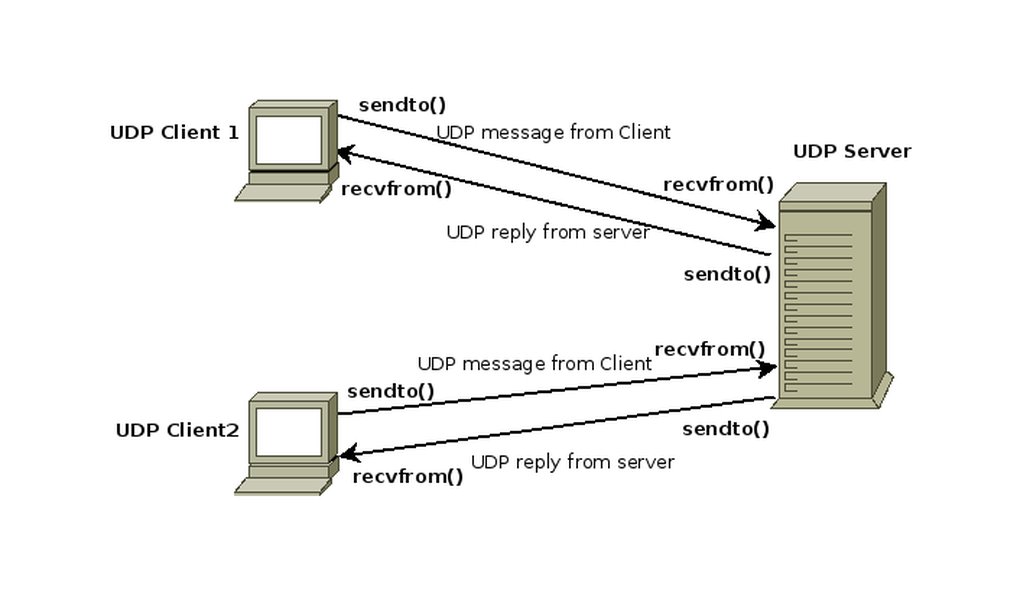
Once bound, the listener continuously waits for incoming data. When a UDP packet arrives, the recvfrom() method captures the data and the address of the sender.
Implementing a Simple Python UDP Listener
The following Python code provides a straightforward and ready-to-run UDP listener. It demonstrates the fundamental steps involved in setting up, binding, and continuously receiving data from a UDP socket.
import socket

# Define the IP address and port to listen on
# Use "0.0.0.0" to listen on all available interfaces, or "127.0.0.1" for localhost only.
LISTEN_IP = "0.0.0.0"
LISTEN_PORT = 12345    # Choose an available port number
BUFFER_SIZE = 1024     # Maximum size of the received datagram in bytes

# 1. Create a UDP socket
# socket.AF_INET specifies the address family for IPv4.
# socket.SOCK_DGRAM specifies that it's a UDP socket (datagram).
sock = socket.socket(socket.AF_INET, socket.SOCK_DGRAM)

# 2. Bind the socket to the specified IP address and port
try:
    sock.bind((LISTEN_IP, LISTEN_PORT))
    print(f"UDP listener started on {LISTEN_IP}:{LISTEN_PORT}")
except socket.error as e:
    print(f"Error binding socket: {e}. Port might be in use or address invalid.")
    exit()

# 3. Enter a loop to continuously receive incoming datagrams
try:
    while True:
        # Receive data and the sender's address
        # recvfrom() returns a tuple: (data, address)
        data, address = sock.recvfrom(BUFFER_SIZE)

        # Decode the received data from bytes to a UTF-8 string
        # 'errors='replace'' handles cases where data might not be perfectly UTF-8 compliant.
        message = data.decode('utf-8', errors='replace')

        print(f"Received {len(data)} bytes from {address[0]}:{address[1]}: {message!r}")

        # Optional: Send a response back to the client
        # response_message = "Message received by server."
        # sock.sendto(response_message.encode('utf-8'), address)
        # print(f"Echoed back to {address[0]}:{address[1]}")

except KeyboardInterrupt:
    print("\nUDP listener is shutting down.")
except Exception as e:
    print(f"An unexpected error occurred: {e}")
finally:
    # 4. Close the socket when the listener stops
    sock.close()
    print("Socket closed.")
Importing the Socket Module:
The line import socket brings in the necessary functionality for network operations.
Configuration:
LISTEN_IP and LISTEN_PORT define the network interface and port on which the listener will operate. BUFFER_SIZE specifies the maximum amount of data the listener can receive in a single packet. For listening on all interfaces, "0.0.0.0" is typically used, while "127.0.0.1" restricts listening to the local machine only.
Socket Creation:
sock = socket.socket(socket.AF_INET, socket.SOCK_DGRAM) creates the UDP socket. AF_INET indicates IPv4, and SOCK_DGRAM specifies UDP.
Binding the Socket:
sock.bind((LISTEN_IP, LISTEN_PORT)) ties the socket to the chosen IP address and port. This step is crucial for the operating system to direct incoming UDP packets on that specific port to your application.
Listening Loop:
The while True: loop ensures the listener runs continuously. Inside the loop, data, address = sock.recvfrom(BUFFER_SIZE) waits for and receives an incoming UDP packet. The data is received as bytes, and address is a tuple containing the sender's IP and port.
Data Decoding and Output:
The received data is decoded into a human-readable string using data.decode('utf-8', errors='replace'). The errors='replace' argument helps prevent decoding errors for malformed or non-UTF-8 data by replacing problematic characters. The message and sender's address are then printed to the console.
Optional Echo Back:
The commented-out lines demonstrate how you could send a response back to the client using sock.sendto(response_message.encode('utf-8'), address). This turns the listener into a simple echo server.
Graceful Shutdown:
The try...except KeyboardInterrupt...finally block ensures that the listener can be stopped gracefully (e.g., by pressing Ctrl+C), and the socket is properly closed with sock.close() to release system resources.
Testing Your UDP Listener
To test your UDP listener, you'll need a way to send UDP packets to it. Here are a couple of common methods:
Using netcat (nc):
netcat is a versatile networking utility available on most Linux and macOS systems. To send a simple message, open a terminal and type:
echo "Hello from Netcat" | nc -u 127.0.0.1 12345Replace 127.0.0.1 with the IP address your listener is bound to (if different from localhost) and 12345 with your chosen port.
Using another Python script (UDP Client):
You can also create a separate Python script to act as a UDP client:
import socket

UDP_IP = "127.0.0.1"  # Or the IP your listener is on
UDP_PORT = 12345
MESSAGE = "Greetings from Python client!"

sock = socket.socket(socket.AF_INET, socket.SOCK_DGRAM)
sock.sendto(MESSAGE.encode('utf-8'), (UDP_IP, UDP_PORT))
print(f"Sent message: {MESSAGE}")
sock.close()
Run your UDP listener script first, then execute one of the client examples. You should see the listener print the received message.
UDP Listener Capabilities and Considerations
A basic UDP listener forms the foundation for more complex network applications. However, understanding its limitations and potential enhancements is key.
Scalability and Concurrency
The provided example is synchronous, meaning it processes one packet at a time. For high-traffic applications, you might consider:
- Threading: Spawning a new thread for each incoming message (though this can lead to overhead if not managed carefully).
- Asyncio: Python's
asynciolibrary provides an event-driven approach for handling many network connections concurrently without using multiple threads. - Message Queues: Decoupling the reception of messages from their processing by putting them into a queue for worker processes.
Error Handling and Data Validation
While the example includes basic error handling for socket binding and decoding, real-world applications require more robust validation. This could include checking message integrity, source authentication, and handling malformed packets to prevent application crashes or security vulnerabilities.
Network Interface Selection
Using "0.0.0.0" is convenient for listening on all interfaces, but for specific network configurations or security reasons, you might want to bind to a particular network interface's IP address. This can be critical in multi-homed systems (systems with multiple network cards).
This video provides a valuable visual walkthrough and practical demonstration of setting up both UDP clients and servers in Python. It reinforces the concepts discussed here, making the abstract ideas of sockets, binding, and sending/receiving data more concrete through a step-by-step implementation. Understanding both sides of the communication — how to listen and how to send — is crucial for building complete network applications.
Comparison with TCP Listeners
It's beneficial to understand how UDP listeners differ from their TCP counterparts, as this informs when to choose one protocol over the other.
| Feature | UDP Listener | TCP Listener |
|---|---|---|
| Connection State | Connectionless (no setup/teardown) | Connection-oriented (handshake required) |
| Reliability | Unreliable (no guarantees for delivery, order, duplicates) | Reliable (guaranteed delivery, ordered, flow control) |
| Speed | Faster (less overhead) | Slower (more overhead due to reliability mechanisms) |
| Header Size | 8 bytes | 20-60 bytes |
| Use Cases | Streaming, gaming, DNS, VoIP, sensor data | Web browsing (HTTP), email (SMTP), file transfer (FTP) |
| Congestion Control | None | Built-in |
This table highlights the fundamental distinctions between UDP and TCP listeners, guiding the choice of protocol based on application requirements.
Mindmap of UDP Listener Components
This mindmap visually organizes the various components and concepts involved in building and understanding a Python UDP listener.
Advanced Considerations for Production Environments
While the provided code is excellent for learning and simple tasks, deploying a UDP listener in a production environment often requires more sophisticated design patterns and robust error handling.
Resource Management:
In high-throughput scenarios, managing network buffers, CPU usage, and memory becomes critical. Efficient loop structures and data processing can prevent bottlenecks.
Security Considerations:
UDP is stateless, making it inherently less secure than TCP for many applications. Implementing security measures like data encryption (e.g., using DTLS if possible), source validation, and robust access controls is crucial when sensitive data is involved.
Logging and Monitoring:
Integrating a logging framework is essential for tracking listener activity, identifying issues, and debugging. Monitoring tools can provide insights into network traffic, packet loss, and overall performance.
Dynamic Port Allocation:
While often using fixed ports, some applications might require dynamic port allocation for clients or temporary services. This adds complexity but offers flexibility.
Platform Compatibility:
Ensure your code works across different operating systems if your application needs to be deployed in diverse environments. Python's socket module generally provides good cross-platform compatibility.
Frequently Asked Questions (FAQ)
What is the main difference between UDP and TCP?
Why would I choose UDP over TCP for an application?
What does "binding to 0.0.0.0" mean for a UDP listener?
How can I make a UDP listener more robust in production?
What is the buffer size in sock.recvfrom(BUFFER_SIZE)?
recvfrom() method will attempt to read from an incoming UDP packet. If an incoming packet is larger than the buffer size, the excess data will be truncated or discarded, depending on the system's behavior. Choosing an appropriate buffer size is important to avoid data loss and manage memory efficiently.Conclusion
Building a simple UDP listener in Python is a straightforward process using the built-in socket module. This fundamental understanding opens the door to developing a wide array of network-centric applications, from simple data collection to complex real-time communication systems. By grasping the core concepts of UDP, socket operations, and thoughtful error handling, you can effectively leverage this lightweight protocol for efficient data exchange.
Recommended Further Exploration
- How to implement a UDP client in Python?
- Understanding TCP vs UDP sockets in Python for network programming
- Exploring Python asyncio for concurrent network programming
- What are the best practices for Python socket error handling and logging?