
Unlock a World of Movies & TV: Top qBittorrent Search Plugins for 2025 Revealed!
Streamline your media hunt with these powerful, community-driven tools directly within qBittorrent.
Key Insights for 2025
- Python is Essential: Ensure Python 3 (preferably a recent version like 3.12+) is installed, as qBittorrent's search functionality and plugins depend on it.
- Community-Driven Power: The most effective search plugins are typically unofficial and maintained by the community, found in various GitHub repositories.
- Plugin Specialization: Some plugins excel at movies (e.g., YTS), others at TV shows (e.g., EZTV), while many offer broad coverage (e.g., 1337x, TorrentGalaxy).
Introduction: Enhancing qBittorrent with Search Plugins
qBittorrent, a popular open-source BitTorrent client, features a powerful built-in search engine that can be significantly extended with search plugins. These plugins are small Python scripts that allow you to search for torrents across numerous websites directly from the qBittorrent interface. This centralized approach saves you the hassle of visiting multiple, often ad-laden, torrent sites manually, providing a more streamlined and potentially safer experience for finding movies and TV shows.
As of 2025, a vibrant ecosystem of community-developed plugins continues to thrive, offering access to vast libraries of media content. Understanding which plugins are most reliable and effective is key to optimizing your search.
Top Recommended qBittorrent Search Plugins for Movies & TV Shows in 2025
Based on community consensus, update frequency, and effectiveness in delivering quality movie and TV show torrents, the following plugins are highly recommended for 2025:
Specialized and High-Performance Plugins
YTS (YTS.mx)
YTS remains a top choice specifically for movies. It's renowned for providing high-quality movie torrents (often 720p or 1080p) with remarkably optimized file sizes. This makes it ideal for users conscious of bandwidth or storage space. The YTS plugin typically delivers verified torrents, minimizing the risk of fake files, and is praised for its speed and accuracy, especially for recent releases and classics.
EZTV
When it comes to TV shows, EZTV is a highly specialized and reliable plugin. It offers an extensive selection of popular series, covering both ongoing shows with timely episode updates and vast archives of completed series. Users appreciate its stability and the quality of TV content it helps locate directly within qBittorrent.
Versatile All-Rounder Plugins
1337x
A versatile and widely respected plugin, 1337x excels in indexing both movies and TV shows. It boasts a broad database and frequent updates, making it a reliable workhorse for general media searches. It supports various categories, including high-definition content, and integrates smoothly into qBittorrent, often providing comprehensive results.
TorrentGalaxy
TorrentGalaxy has grown in popularity for its comprehensive selection of movies and TV shows. It's praised for a clean search experience within qBittorrent and for providing verified torrents from reliable sources. In 2025, it's considered a top unofficial plugin, particularly strong for high-quality content like 4K movies and complete TV seasons.
LimeTorrents
LimeTorrents offers a user-friendly interface and is effective for finding a broad range of movies and TV shows. It's known for its consistent delivery of functional links and a good catalog of mainstream content, focusing on quality over sheer quantity, which helps in avoiding irrelevant results.
RARBG
Although the original RARBG site shut down, plugins referencing RARBG (often pointing to archives or mirrors) are still mentioned for their focus on high-quality, verified torrents of movies and TV shows. If you find a functional RARBG plugin from a trusted source, it can be valuable for users prioritizing reliability and verification.
Setting Up qBittorrent for Search Plugins
To leverage these powerful search tools, you need to configure qBittorrent correctly:
1. Install Python
qBittorrent's search engine and its plugins are written in Python. Therefore, Python 3 must be installed on your system. It's recommended to use the latest stable version of Python (e.g., Python 3.12 or newer as of early 2025) for best compatibility and performance. You can download Python from its official website.
2. Enable the Search Tab
If the "Search" tab isn't visible in your qBittorrent interface:
- Go to the View menu in qBittorrent.
- Select Search Engine to enable it. The "Search" tab should now appear.
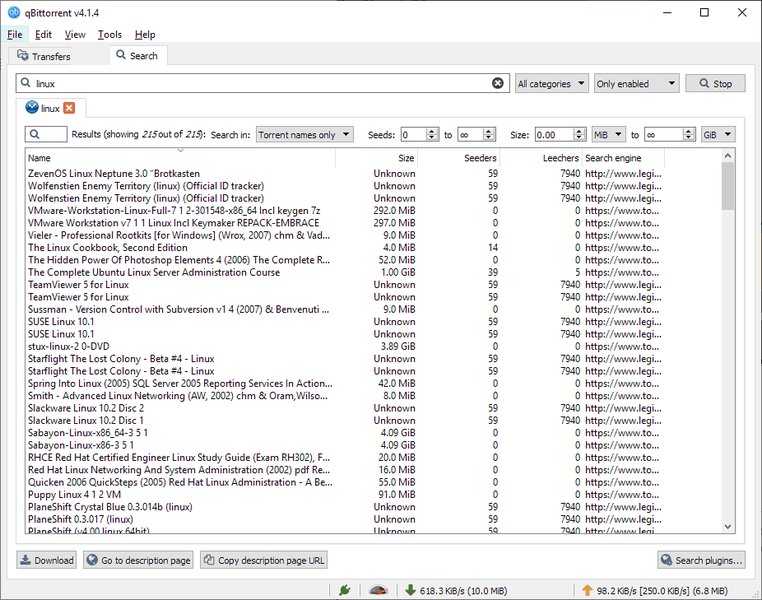
The qBittorrent interface with the Search tab enabled.
3. Installing Search Plugins
Once the Search tab is active, you can install plugins:
- Navigate to the "Search" tab.
- In the bottom-right corner, click the "Search plugins..." button.
- A new window will appear. Click the "Install a new one" button.
- You can install plugins in two ways:
- Via Web Link: Paste the direct URL to the plugin's
.pyfile (often a "raw" link from GitHub). - Via Local File: Download the plugin's
.pyfile from a trusted source and use the "Local file" option to browse and select it.
- Via Web Link: Paste the direct URL to the plugin's

The dialog for installing a new search plugin in qBittorrent using a web link.
After installation, ensure the desired plugins are enabled (checked) in the "Search plugins" window to be included in your searches.
Where to Find Search Plugins: Repositories
Since many of the best plugins are unofficial, knowing where to find them is crucial. Community-maintained GitHub repositories are the primary sources:
- Official qBittorrent Search Plugins Wiki: While qBittorrent itself doesn't bundle many plugins, its GitHub wiki lists several official and unofficial plugins. This is a good starting point: Unofficial search plugins - qBittorrent GitHub Wiki.
- LightDestory's qBittorrent-Search-Plugins: An actively maintained and popular collection of various unofficial search engine plugins: LightDestory/qBittorrent-Search-Plugins.
- BurningMop's qBittorrent-Search-Plugins: Another comprehensive collection that includes many movie and TV-oriented plugins: BurningMop/qBittorrent-Search-Plugins.
Always download plugins from reputable sources to minimize security risks.
Comparative Overview of Top Plugins
To help you choose the best plugins for your needs, the following table summarizes the key characteristics of the top recommendations for 2025:
| Plugin | Primary Focus | Key Strengths | Notes for 2025 |
|---|---|---|---|
| YTS | Movies | High-quality, small file sizes, verified torrents | Excellent for movie collectors, especially recent releases. |
| EZTV | TV Shows | Wide selection, timely episode updates, good archive | Go-to plugin for TV series enthusiasts. |
| 1337x | Movies & TV Shows | Large database, frequent updates, reliable | Strong all-rounder, good for diverse content. |
| TorrentGalaxy | Movies & TV Shows | Verified torrents, 4K content, growing popularity | Good for high-quality media and comprehensive searches. |
| LimeTorrents | Movies & TV Shows | User-friendly, good for mainstream content, verified links | Consistent and reliable for popular media. |
| RARBG (via plugins) | Movies & TV Shows | Historically known for high-quality, verified torrents | Plugins may point to archives/mirrors; prioritize source trust. |
Visualizing Plugin Strengths: A Comparative Analysis
The effectiveness of a search plugin can vary across different aspects. The radar chart below offers a visual comparison of some leading plugins based on factors like movie/TV show variety, content quality, update frequency, ease of use, and file size optimization. These are subjective assessments based on general community feedback and plugin characteristics.
This chart helps illustrate how different plugins might cater to specific preferences. For instance, YTS scores high on movie variety and file size optimization, while EZTV excels in TV show availability.
Understanding the qBittorrent Search Plugin Ecosystem
The qBittorrent search plugin system involves several interconnected components. The mindmap below provides a simplified overview of this ecosystem, from the core application to the individual plugins and their sources.
(e.g., YTS)"] id3.2.2["TV Show-Specific
(e.g., EZTV)"] id3.2.3["General Purpose
(e.g., 1337x, TorrentGalaxy)"] id3.3["Sources"] id3.3.1["Official qBittorrent
Repositories/Wikis"] id3.3.2["Unofficial Community Repositories
(GitHub)"] id3.3.2.1["LightDestory Collection"] id3.3.2.2["BurningMop Collection"] id3.4["Installation Methods"] id3.4.1["Via Web Link (URL)"] id3.4.2["Via Local File (.py)"] id4["Key Considerations for Users"] id4.1["Plugin Maintenance & Updates"] id4.2["Compatibility (qBittorrent & Python versions)"] id4.3["User Discretion & Legality"] id4.4["Security (Source Vetting)"]
This mindmap illustrates how Python acts as the backbone for plugins, which are sourced from various repositories and categorized by their specialty, all integrating into qBittorrent's search tab.
Visual Guide: Installing and Using qBittorrent Search Plugins
For a visual walkthrough of how to enable the search feature and install plugins in qBittorrent, the following video provides a helpful tutorial. It covers the fundamental steps that are broadly applicable to most plugin installations.
A tutorial on how to install and use qBittorrent search plugins.
This video demonstrates enabling the search tab, finding plugin sources (often GitHub), and adding them to qBittorrent, which are crucial steps for accessing the wealth of movies and TV shows available through these extensions.
Key Considerations and Best Practices
When using qBittorrent search plugins, keep the following in mind:
Plugin Stability and Updates
Unofficial plugins are maintained by the community. Their functionality can sometimes be affected by updates to qBittorrent or changes on the websites they scrape. It's good practice to:
- Periodically check the GitHub repositories for updated versions of your plugins.
- Be aware that newer qBittorrent versions (e.g., v5.0 and above) might occasionally break older plugins. Look for plugins specifically tested or updated for your qBittorrent version.
Security and Legal Aspects
- Source Trust: Only download plugins from reputable GitHub repositories or trusted community sources. Since plugins are Python scripts, a malicious script could theoretically pose a risk. Reviewing the script is an advanced step, but sticking to well-known collections mitigates risk.
- Use at Your Own Risk: Unofficial plugins come without guarantees.
- Legal Compliance: Downloading and sharing copyrighted material without authorization is illegal in many countries. Ensure you understand and comply with the copyright laws in your jurisdiction. Using a VPN is often recommended for privacy when using torrent clients, but it does not legalize downloading copyrighted content.
Frequently Asked Questions (FAQ)
Why do I need Python for qBittorrent search plugins? ▼
qBittorrent's search engine and all its search plugins are written in the Python programming language. Therefore, Python 3 needs to be installed on your computer for the search functionality to work at all. qBittorrent uses the Python interpreter to execute these plugin scripts, which then fetch search results from various torrent indexing sites.
Are unofficial qBittorrent search plugins safe to use? ▼
Generally, plugins from well-known and reputable community repositories (like those mentioned in this guide) are considered safe. However, since they are community-developed, there's always a small inherent risk if you download from unverified sources. It's wise to stick to popular, actively maintained plugins. Advanced users can inspect the Python (.py) code of a plugin before installing it. Always exercise caution and use plugins at your own risk.
How often should I update my search plugins? ▼
There's no fixed schedule, but it's a good idea to check for updates periodically, perhaps every few months, or if you notice a plugin has stopped working correctly. Torrent sites sometimes change their structure, which can break plugins. Plugin developers then update the scripts to restore functionality. Checking the GitHub repositories for newer versions is the best approach.
What if a plugin stops working? ▼
If a plugin stops working, the first step is to check its source (usually a GitHub page) for an updated version or any reported issues. It might be temporarily broken due to changes on the target website or an incompatibility with a new qBittorrent version. You can try uninstalling and reinstalling the latest version of the plugin. If it remains broken, you may need to find an alternative plugin or wait for a fix from the developer.
Can I use multiple search plugins at once? ▼
Yes, absolutely! qBittorrent allows you to have multiple search plugins installed and enabled simultaneously. When you perform a search, qBittorrent will query all enabled plugins. This can be very effective for finding a wider range of results, as different plugins search different sites. You can then sort and filter the aggregated results within the qBittorrent search tab.
Recommended Further Exploration
- How can I optimize my qBittorrent settings for faster download speeds in 2025?
- What are the implications of different Python versions on qBittorrent plugin compatibility?
- Explore alternative tools like Jackett for managing torrent searches with qBittorrent.
- Delve deeper into the legal and ethical considerations of using torrent technology and search plugins.
References
Last updated May 13, 2025