
Comprehensive Guide to Developing a Quiz Builder Web Application
Empowering Interactive Learning and Engagement through Customizable Quizzes
Key Takeaways
- Diverse Question Formats: Support for multiple-choice, true/false, and open-ended questions enhances versatility.
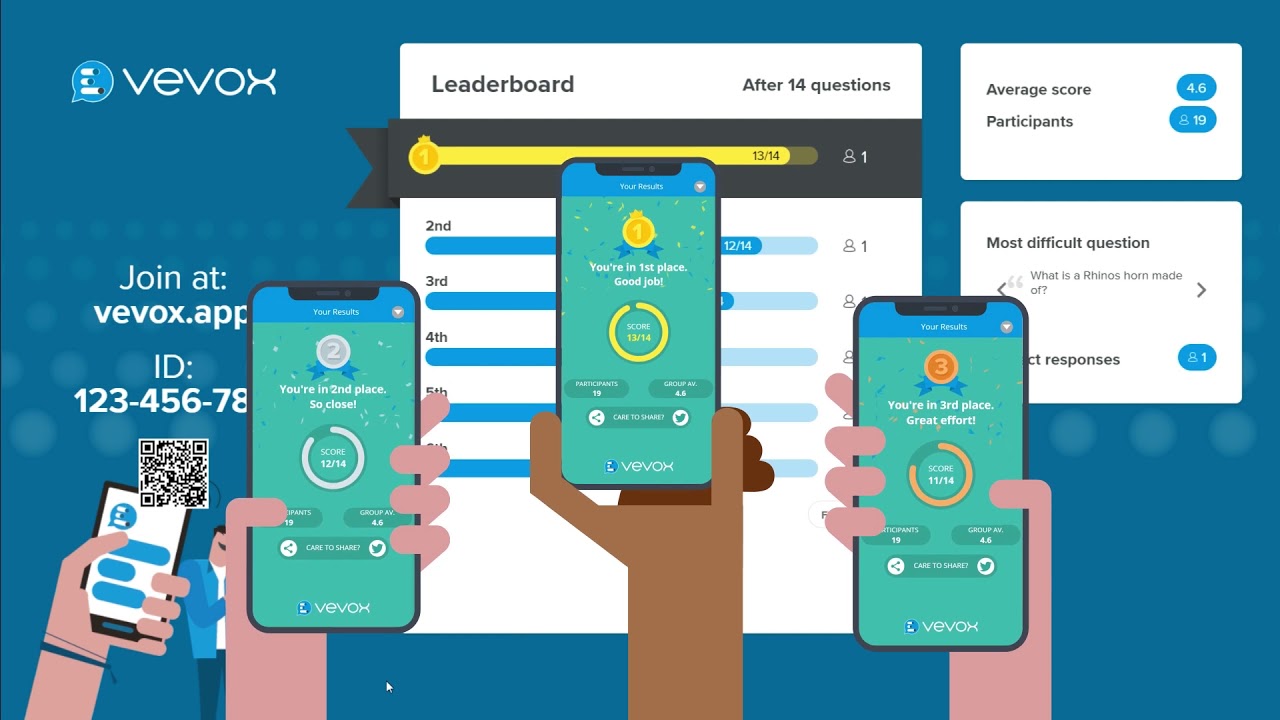
- Real-Time Engagement: Features like live participation and leaderboards foster competitive and interactive experiences.
- Advanced Management: Randomization, score tracking, and comprehensive reporting streamline quiz administration and analysis.
Introduction
A Quiz Builder is an innovative web application that enables users to create, customize, and share interactive quizzes tailored for education, training, or entertainment purposes. This tool is instrumental in fostering engagement, assessing knowledge, and providing an entertaining platform for users to test their skills and learn new information dynamically.
Core Features of a Quiz Builder
Diverse Question Types and Customization
A robust Quiz Builder supports various question formats to cater to different assessment needs:
Multiple-Choice Questions
Allows the creation of questions with several answer options, where users select the correct one. This format is ideal for testing factual knowledge and comprehension.
True/False Questions
Simple statements where users determine the veracity, suitable for quick assessments and reinforcing key concepts.
Open-Ended Questions
Encourages detailed responses, enabling deeper evaluation of user understanding and critical thinking abilities.
Customization Options
Users can personalize quizzes by adding multimedia elements such as images, videos, and audio clips. Additionally, customizable templates and themes allow for a tailored aesthetic that aligns with specific branding or educational purposes.
Advanced Quiz Management
Question Randomization
Randomizing the order of questions ensures each quiz attempt is unique, minimizing predictability and enhancing replayability.
Score Tracking
The system monitors and records user scores in real-time, providing immediate feedback and enabling users to track their progress over time.
Comprehensive Reporting
Generates detailed reports that analyze individual and collective performance, identify knowledge gaps, and offer insights for further improvement.
User Performance Analytics
Provides in-depth analytics on user interactions, question difficulty levels, and overall quiz effectiveness, aiding in data-driven decision-making for educators and trainers.
Real-Time Participation and Engagement
Live Quiz Functionality
Supports real-time participation, allowing multiple users to engage in the quiz simultaneously, enhancing the interactive experience.
Competitive Environment
Incorporates features like leaderboards and instant scoring updates to foster a competitive spirit, encouraging users to perform better and stay engaged.
Simultaneous User Engagement
Ensures that all participants can interact with the quiz concurrently, maintaining a cohesive and unified experience.
User Experience and Interface
Intuitive Design
The user interface is designed to be user-friendly and intuitive, allowing users with minimal technical expertise to navigate the quiz creation process effortlessly.
Responsive Design
Ensures that the platform is accessible and functional across various devices, including desktops, tablets, and smartphones, providing a seamless experience for all users.
Interactive Elements
Features like drag-and-drop question placement, real-time previews, and immediate feedback mechanisms enhance user satisfaction and engagement.
Technical Implementation
Frontend Development
The frontend of a Quiz Builder is typically developed using modern JavaScript frameworks such as React.js or Vue.js. These frameworks facilitate the creation of dynamic and responsive user interfaces, allowing for real-time interactions and immediate feedback. Key frontend technologies include:
- HTML for structuring content.
- CSS for styling and layout designs.
- JavaScript for adding interactivity and dynamic features.
Backend Development
The backend handles server-side logic, data management, and user authentication. Common technologies include:
- Node.js with Express.js for handling server requests and managing APIs.
- Django for building robust and scalable server-side applications.
- WebSockets for enabling real-time communication between the server and clients.
Database Management
Efficient data storage and retrieval are crucial for managing quizzes, user information, and performance metrics. Popular databases include:
- MongoDB for flexible, scalable NoSQL data storage.
- PostgreSQL for reliable and structured relational data management.
Security and Data Protection
Ensuring the security of user data and the integrity of quizzes is paramount. Implementations often involve:
- OAuth for secure user authentication and authorization.
- Data encryption to protect sensitive information.
- Regular security audits to identify and mitigate vulnerabilities.
Deployment and Scalability
To ensure reliability and handle increasing user loads, deploying the application on scalable cloud platforms is essential. Common deployment services include:
-
Google Cloud Run for scalable containerized applications.
-
AWS for a wide range of cloud services and infrastructure.
-
Azure for integrated cloud solutions and enterprise-level scalability.
Integration Capabilities
Learning Management System (LMS) Integration
Integrating with LMS platforms allows educators to seamlessly incorporate quizzes into their existing curricula, synchronizing data and enhancing the learning experience.
Social Media Sharing
Enables users to share quizzes on various social media platforms, increasing reach and engagement through easy distribution.
API Connections
Providing APIs allows for extended functionality and integration with other tools and services, facilitating a more interconnected and versatile application ecosystem.
Advanced Features for Enhanced Functionality
Randomization of Questions
Randomizing both the order of questions and answer options ensures each participant has a unique quiz experience, reducing the chances of answer sharing and enhancing the challenge.
Live Leaderboards
Displaying real-time leaderboards adds a competitive edge, motivating participants to perform better and fostering a sense of community and achievement.
Instant Feedback Mechanisms
Providing immediate feedback on answers helps users understand their mistakes and learn in real-time, increasing the educational value of the quizzes.
Multimedia Integration
Incorporating images, videos, and audio into questions enriches the quiz content, catering to different learning styles and making the quizzes more engaging and informative.
User Roles and Permissions
Administrator
Administrators have full control over the platform, including user management, quiz moderation, and system settings. They ensure the smooth operation and integrity of the quiz builder.
Quiz Creators
Users who design and create quizzes, customizing questions and settings to suit their specific needs. They have access to advanced tools for quiz creation and management.
Participants
Individuals who take part in quizzes. They interact with the quiz content, receive feedback, and can view their performance metrics.
Best Practices for Developing a Quiz Builder
User-Centric Design
Focus on creating an intuitive and accessible user interface that caters to both technical and non-technical users, ensuring a seamless experience for all.
Scalability and Performance
Design the architecture to handle varying loads and ensure quick response times, maintaining performance as the number of users grows.
Security Measures
Implement robust security protocols to protect user data and prevent unauthorized access, maintaining trust and compliance with data protection regulations.
Continuous Feedback and Improvement
Regularly gather user feedback to identify areas for improvement and update the platform accordingly, ensuring it remains relevant and effective.
Comprehensive Testing
Conduct thorough testing of all features, including unit tests, integration tests, and user acceptance tests, to ensure reliability and a bug-free experience.
Implementation Technologies
Frontend Technologies
Utilizing frameworks like React.js or Vue.js enables the creation of dynamic and responsive user interfaces. HTML, CSS, and JavaScript form the foundation for structuring, styling, and adding interactivity to the application.
Backend Technologies
Node.js with Express.js or Django are popular choices for building scalable and efficient server-side applications. These technologies handle data processing, user authentication, and API management.
Database Solutions
MongoDB offers a flexible NoSQL database solution, while PostgreSQL provides a reliable relational database system. Both are excellent choices depending on the specific data management needs.
Real-Time Features
WebSockets facilitate real-time communication between the server and clients, enabling live quiz participation and instant score updates.
Example Use Cases
Educational Institutions
Teachers can create quizzes to assess student understanding, provide immediate feedback, and identify areas needing further instruction. Real-time quizzes can be used during live classes to enhance engagement.
Corporate Training
Businesses can utilize the Quiz Builder to train employees, measure knowledge retention, and ensure that training programs are effective. Detailed reports help in tracking progress and identifying training needs.
Entertainment and Social Engagement
Casual users can create fun quizzes for social media, fostering community interaction and engagement. Competitive quizzes with leaderboards add a gamified element, making them more appealing.
Comprehensive HTML Table of Features
| Feature | Description | Benefits |
|---|---|---|
| Multiple-Choice Questions | Questions with several answer options for selection. | Enhances versatility and accommodates various testing needs. |
| True/False Questions | Simple statements requiring a true or false response. | Facilitates quick assessments and reinforces key concepts. |
| Open-Ended Questions | Questions that require detailed, written responses. | Encourages critical thinking and in-depth evaluation. |
| Question Randomization | Randomizes the order of questions and answer options. | Prevents predictability and enhances replayability. |
| Real-Time Participation | Enables multiple users to take quizzes simultaneously. | Fosters engagement and competitive spirit among participants. |
| Score Tracking | Monitors and records user scores in real-time. | Provides immediate feedback and tracks user progress. |
| Comprehensive Reporting | Generates detailed reports on performance and analytics. | Offers insights for improving content and assessing effectiveness. |
| Multimedia Integration | Allows inclusion of images, videos, and audio in quizzes. | Enhances engagement and caters to different learning styles. |
| Responsive Design | Ensures accessibility across various devices. | Provides a seamless user experience on desktops, tablets, and smartphones. |
| Leaderboards | Displays real-time rankings of participants. | Encourages competition and motivates users to improve. |
Conclusion
The development of a Quiz Builder web application presents a multifaceted opportunity to enhance interactive learning, training, and entertainment. By integrating diverse question formats, real-time participation features, and comprehensive management tools, such a platform serves a wide array of user needs, from educators and corporate trainers to casual quiz enthusiasts. Leveraging modern web technologies ensures that the application is both robust and scalable, capable of providing a seamless user experience across multiple devices. As digital engagement continues to evolve, the Quiz Builder stands out as a valuable tool for fostering knowledge, competition, and enjoyment in various contexts.
References
Last updated February 15, 2025