
Unlock Future Power: Predicting Your Rankine-Hirn Cycle Output Minute-by-Minute
Harness historical data and time series techniques to forecast the next 7 days of energy generation.
Predicting the power output of a thermodynamic cycle like the Rankine-Hirn cycle is crucial for energy management, grid stability, and operational planning. This simulation uses historical performance data, patterns linked to time, and the system's recent output (lagged values) to create a minute-by-minute forecast for the upcoming week (10,080 minutes). While the term "Rankine-Hirn" might refer to a specific modification or Organic Rankine Cycle (ORC), the forecasting principles using time series analysis remain applicable.
Highlights
- Iterative Forecasting: Learn how to predict future outputs minute-by-minute, where each prediction informs the next, crucial for using lagged values accurately.
- Feature Engineering Power: Discover how transforming time into cyclical features (like hour sine/cosine) and using past outputs (lags) significantly boosts prediction accuracy.
- Model Selection Matters: Understand different modeling approaches (like Random Forest, Prophet, SARIMA) and how they handle time series data with specific features.
The Forecasting Workflow: From History to Future
Building a reliable power generation forecast involves several key steps. We start with historical data and progressively refine it to train a model capable of predicting future output.
1. Data Acquisition and Preparation
Gathering the Foundation
The cornerstone of any accurate forecast is high-quality historical data. You need minute-by-minute records of the power generated by your specific Rankine-Hirn installation. This data should ideally span a significant period (months or years) to capture various operational conditions and seasonal patterns.
- Ensure timestamps are consistent and at a one-minute frequency.
- Clean the data: Address missing values (e.g., using interpolation or forward-fill) and handle outliers or anomalies caused by maintenance or outages.
- Structure the data: Typically, a table with a timestamp column and a power output column (e.g., in kW or MW) is required.
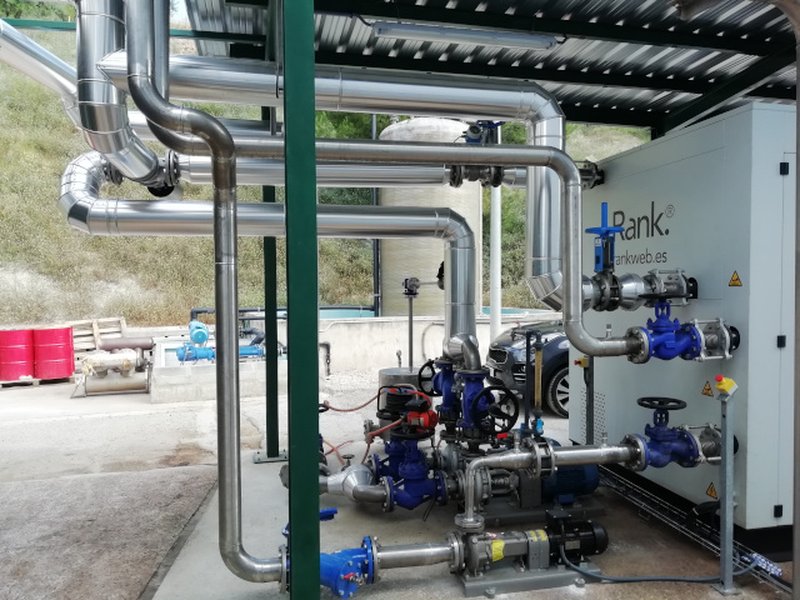
An Organic Rankine Cycle (ORC) installation, a potential type of Rankine-Hirn system, undergoing service.
2. Feature Engineering: Extracting Predictive Signals
Raw power data alone isn't enough. We enhance it by creating features that help the model understand underlying patterns:
Time-Based Features
Power generation often follows predictable cycles related to time:
- Hour of the day: Captures diurnal patterns (e.g., related to ambient temperature changes or energy demand).
- Day of the week: Captures weekly patterns (e.g., different industrial loads on weekdays vs. weekends).
- Minute of the hour, Day of the year, etc.: Can capture finer-grained or longer-term seasonalities.
Representing these cyclically (using sine and cosine transformations) helps models understand that hour 23 is close to hour 0, for example.
# Example: Cyclic features for minute of the day
df['minute_of_day'] = df.index.hour * 60 + df.index.minute
df['minute_of_day_sin'] = np.sin(2 * np.pi * df['minute_of_day'] / (24*60))
df['minute_of_day_cos'] = np.cos(2 * np.pi * df['minute_of_day'] / (24*60))
Lagged Values (Autoregressive Features)
The power generated now is often strongly correlated with the power generated recently. Lagged features capture this short-term persistence:
- Lag 1: Power output from the previous minute.
- Lag 60: Power output from one hour ago.
- Lag 1440: Power output from one day ago.
The choice of which lags to include depends on the system's dynamics and requires experimentation.
# Example: Creating lagged features
for lag in range(1, 61): # Lags from 1 minute to 60 minutes
    df[f'power_lag_{lag}'] = df['power'].shift(lag)

# Drop rows with NaNs created by shifting
df.dropna(inplace=True)
Feature Summary Table
This table summarizes the types of features used in this forecasting approach:
| Feature Type | Examples | Purpose | Implementation Notes |
|---|---|---|---|
| Time-Based (Raw) | Hour, Day of Week, Minute | Capture basic time patterns. | Directly extracted from timestamp. |
| Time-Based (Cyclic) | Sine/Cosine of Hour, Day | Help model understand cyclical nature (e.g., time of day, day of week). | Use np.sin() and np.cos() transformations. |
| Lagged Values | Power(t-1), Power(t-60) | Incorporate recent history (autoregression). Models short-term persistence. | Use pandas .shift() method. Requires careful handling during forecasting. |
3. Model Selection: Choosing the Right Tool
Several models can tackle time series forecasting. The best choice depends on data characteristics and the specific requirements:
- Statistical Models (ARIMA/SARIMA(X)): Classical methods good at capturing linear patterns, seasonality, and autocorrelation. SARIMAX can include external regressors (like our time features). Can be complex to tune (
p,d,qorders). - Prophet: Developed by Facebook, excels at handling multiple seasonalities (daily, weekly, yearly), holidays, and trend changes. Robust to missing data. Can include regressors, but handling future lagged values requires careful implementation (often predicting step-by-step or using approximations).
- Machine Learning Regressors (Random Forest, Gradient Boosting, LSTMs): Frame the problem as supervised learning (predict next minute's power based on features). Can capture complex non-linear patterns. Models like Random Forest are robust and relatively easy to implement. Essential for accurate iterative forecasting with lagged features. LSTMs (a type of neural network) are powerful for complex sequences but require more data and tuning.
For this simulation, we will focus on a Random Forest Regressor because it handles non-linearities well and fits naturally into the required iterative forecasting framework for incorporating predicted lagged values.
Comparing Forecasting Approaches
Different models have strengths and weaknesses for this type of minute-by-minute forecasting task. This radar chart provides a qualitative comparison based on common criteria relevant to our simulation goals. Scores are indicative (1=Low, 5=High).
Visualizing the Forecasting Process
This mindmap outlines the complete workflow, from initial data collection to the final forecast output.
Understanding the Rankine Cycle
The standard Rankine cycle is a fundamental thermodynamic process used in many power plants, particularly those using steam turbines. It involves heating a working fluid (like water) to create vapor, expanding the vapor through a turbine to generate work (electricity), condensing the vapor back to liquid, and pumping the liquid back to the heat source.

Fundamental components of a steam power plant operating on the Rankine cycle.
The "Rankine-Hirn" cycle, as mentioned in the query, might refer to enhancements like superheating the vapor before it enters the turbine or using reheat stages (heating the steam again after partial expansion) to improve thermal efficiency. These modifications aim to extract more energy from the heat source. Alternatively, it could refer to an Organic Rankine Cycle (ORC), which uses an organic fluid instead of water, often suitable for lower-temperature heat sources like geothermal energy or waste heat recovery.
This video discusses methods for increasing the efficiency of the basic Rankine cycle, such as superheating and reheating, which might be relevant to understanding a "Rankine-Hirn" cycle's operation and potential output patterns.
Python Code for Simulation (Jupyter Notebook)
Below is the Python code structured for a Jupyter Notebook environment. It demonstrates the process using synthetic data and the RandomForestRegressor model with iterative forecasting.
Step 1: Setup and Imports
import pandas as pd
import numpy as np
import matplotlib.pyplot as plt
from sklearn.ensemble import RandomForestRegressor
from sklearn.model_selection import train_test_split
from sklearn.metrics import mean_squared_error
from datetime import timedelta
import time

# Display settings for plots
plt.style.use('seaborn-v0_8-whitegrid')
Step 2: Load/Generate Historical Data
Important: Replace this synthetic data generation with loading your actual historical minute-by-minute power generation data.
# --- Generate Synthetic Historical Data (Replace with your actual data loading) ---
print("Generating synthetic historical data...")
np.random.seed(42)
# Use a shorter period for faster example execution, expand for real use
hist_periods = 24 * 60 * 60 # 60 days of minute-level data
end_hist_date = pd.to_datetime('2025-05-03 00:00:00') # Up to today
start_hist_date = end_hist_date - timedelta(minutes=hist_periods)
hist_index = pd.date_range(start=start_hist_date, end=end_hist_date, freq='T', name='timestamp')

# Simulate power: Base + Daily cycle + Weekly cycle + Noise + Trend
base_power = 500
daily_cycle = 150 * np.sin(2 * np.pi * hist_index.hour / 24)
weekly_cycle = 50 * np.sin(2 * np.pi * hist_index.dayofweek / 7)
noise = np.random.normal(0, 25, len(hist_index))
trend = np.linspace(0, 50, len(hist_index)) # Gradual upward trend
power = base_power + daily_cycle + weekly_cycle + trend + noise
power[power < 50] = 50 # Ensure non-negative power with a floor

df_hist = pd.DataFrame({'power': power}, index=hist_index)
print(f"Generated {len(df_hist)} minutes of synthetic data.")
print(df_hist.head())
# --- End Synthetic Data Generation ---

# --- Data Loading Placeholder (Uncomment and adapt for your CSV) ---
# # print("Loading data from CSV...")
# # df_hist = pd.read_csv('your_rankine_power_data.csv', parse_dates=['timestamp_column'])
# # df_hist.set_index('timestamp_column', inplace=True)
# # df_hist = df_hist.rename(columns={'power_column': 'power'})
# # df_hist = df_hist.asfreq('T') # Ensure minute frequency
# # print("Data loaded.")
# # Handle missing values if any (e.g., interpolation)
# # df_hist['power'].interpolate(method='time', inplace=True)
# # df_hist.dropna(inplace=True) # Drop any remaining NaNs
# --- End Placeholder ---
Step 3: Feature Engineering
def create_features(df):
    """Creates time-based and lagged features for the power data."""
    df_feat = df.copy()

    # Time-based features
    df_feat['hour'] = df_feat.index.hour
    df_feat['day_of_week'] = df_feat.index.dayofweek
    df_feat['minute_of_day'] = df_feat.index.hour * 60 + df_feat.index.minute

    # Cyclic time features
    df_feat['hour_sin'] = np.sin(2 * np.pi * df_feat['hour'] / 24)
    df_feat['hour_cos'] = np.cos(2 * np.pi * df_feat['hour'] / 24)
    df_feat['day_of_week_sin'] = np.sin(2 * np.pi * df_feat['day_of_week'] / 7)
    df_feat['day_of_week_cos'] = np.cos(2 * np.pi * df_feat['day_of_week'] / 7)
    df_feat['minute_of_day_sin'] = np.sin(2 * np.pi * df_feat['minute_of_day'] / (24*60))
    df_feat['minute_of_day_cos'] = np.cos(2 * np.pi * df_feat['minute_of_day'] / (24*60))

    # Lagged features (e.g., past 1, 5, 15, 30, 60 minutes)
    lags_to_create = [1, 5, 15, 30, 60, 1440] # Example lags
    for lag in lags_to_create:
        df_feat[f'power_lag_{lag}'] = df_feat['power'].shift(lag)

    return df_feat

print("Creating features...")
df_featured = create_features(df_hist)
df_featured.dropna(inplace=True) # Drop rows with NaNs from lagging
print("Features created.")
print(df_featured.head())
Step 4: Model Training
# Define features (X) and target (y)
FEATURES = [col for col in df_featured.columns if col != 'power']
TARGET = 'power'

X = df_featured[FEATURES]
y = df_featured[TARGET]

# Split data (optional, but good practice - train on older data, test on recent)
# Using last day for testing here
X_train, X_test = X[:-1440], X[-1440:]
y_train, y_test = y[:-1440], y[-1440:]

print(f"Training data shape: {X_train.shape}")
print(f"Testing data shape: {X_test.shape}")

# Initialize and train the Random Forest model
# Use fewer estimators and limited depth for faster example execution
# Increase n_estimators (e.g., 100-200) and max_depth for better accuracy
model = RandomForestRegressor(n_estimators=50, # Reduced for speed
                              max_depth=15,    # Reduced for speed
                              random_state=42,
                              n_jobs=-1,       # Use all available CPU cores
                              max_features=0.7) # Use 70% of features per tree

print("Training the model (this may take a few minutes)...")
start_train_time = time.time()
model.fit(X_train, y_train)
end_train_time = time.time()
print(f"Model training completed in {end_train_time - start_train_time:.2f} seconds.")

# Evaluate on test set
print("Evaluating on test set...")
y_pred_test = model.predict(X_test)
rmse_test = np.sqrt(mean_squared_error(y_test, y_pred_test))
print(f"Test Set RMSE: {rmse_test:.3f} kW")

# Plot test set results
plt.figure(figsize=(15, 6))
plt.plot(y_test.index, y_test, label='Actual Power', alpha=0.8)
plt.plot(y_test.index, y_pred_test, label='Predicted Power (Test)', linestyle='--', alpha=0.8)
plt.title('Model Performance on Test Set (Last Day of Historical Data)')
plt.xlabel('Timestamp')
plt.ylabel('Power (kW)')
plt.legend()
plt.show()
Step 5: Iterative Forecasting for Next 7 Days
This is the core of the simulation. We predict one minute at a time, using the prediction to help create features for the next minute's prediction.
# --- Iterative Forecasting ---
print("Starting 7-day iterative forecast...")
forecast_horizon_minutes = 7 * 24 * 60 # 10080 minutes

# Get the last known data point from historical data to start the forecast
last_timestamp = df_featured.index[-1]
last_data_point = df_featured.iloc[-1]

# Prepare a structure to hold the forecast
future_index = pd.date_range(start=last_timestamp + timedelta(minutes=1),
                             periods=forecast_horizon_minutes,
                             freq='T')
forecast_df = pd.DataFrame(index=future_index)
forecast_df['predicted_power'] = np.nan

# Store recent history needed for lags (start with actual historical values)
# We need enough history to calculate the longest lag (e.g., 1440 minutes)
max_lag = max([int(f.split('_')[-1]) for f in FEATURES if 'lag' in f])
recent_history = df_featured['power'].iloc[-max_lag:].tolist()

start_forecast_time = time.time()

# Iterative loop
for i in range(forecast_horizon_minutes):
    current_timestamp = future_index[i]

    # Create features for this future timestamp
    features_for_pred = {}
    features_for_pred['hour'] = current_timestamp.hour
    features_for_pred['day_of_week'] = current_timestamp.dayofweek
    features_for_pred['minute_of_day'] = current_timestamp.hour * 60 + current_timestamp.minute

    features_for_pred['hour_sin'] = np.sin(2 * np.pi * features_for_pred['hour'] / 24)
    features_for_pred['hour_cos'] = np.cos(2 * np.pi * features_for_pred['hour'] / 24)
    features_for_pred['day_of_week_sin'] = np.sin(2 * np.pi * features_for_pred['day_of_week'] / 7)
    features_for_pred['day_of_week_cos'] = np.cos(2 * np.pi * features_for_pred['day_of_week'] / 7)
    features_for_pred['minute_of_day_sin'] = np.sin(2 * np.pi * features_for_pred['minute_of_day'] / (24*60))
    features_for_pred['minute_of_day_cos'] = np.cos(2 * np.pi * features_for_pred['minute_of_day'] / (24*60))

    # Create lagged features using the 'recent_history' list
    for lag in [int(f.split('_')[-1]) for f in FEATURES if 'lag' in f]:
        if lag <= len(recent_history):
            features_for_pred[f'power_lag_{lag}'] = recent_history[-lag]
        else:
            # Handle cases where lag goes beyond available history (e.g., at the very start)
            # Use a simple fallback like the mean of recent history or last known value
            features_for_pred[f'power_lag_{lag}'] = np.mean(recent_history) if recent_history else 0

    # Convert features to DataFrame format expected by the model
    # Ensure columns are in the same order as training data
    features_df = pd.DataFrame([features_for_pred], index=[current_timestamp])[FEATURES]

    # Predict power for the current minute
    predicted_value = model.predict(features_df)[0]

    # Store the prediction
    forecast_df.loc[current_timestamp, 'predicted_power'] = predicted_value

    # Update recent history: append the new prediction and remove the oldest value
    recent_history.append(predicted_value)
    recent_history.pop(0)

    # Optional: Print progress
    if (i + 1) % 1440 == 0: # Print every day
         print(f"Forecasted {i+1}/{forecast_horizon_minutes} minutes...")

end_forecast_time = time.time()
print(f"Iterative forecast completed in {end_forecast_time - start_forecast_time:.2f} seconds.")
print(forecast_df.head())
print(forecast_df.tail())
Step 6: Visualize and Save Forecast
# Plot the forecast
plt.figure(figsize=(15, 7))
# Plot some recent historical data for context
plt.plot(df_featured.index[-1440*3:], df_featured['power'][-1440*3:], label='Historical Power (Last 3 Days)', alpha=0.7)
plt.plot(forecast_df.index, forecast_df['predicted_power'], label='Predicted Power (Next 7 Days)', color='red', linestyle='-')
plt.title('Rankine-Hirn Cycle Power Generation Forecast')
plt.xlabel('Timestamp')
plt.ylabel('Power (kW)')
plt.legend()
plt.grid(True)
plt.show()

# Save the forecast to CSV
# forecast_filename = 'rankine_hirn_7day_forecast.csv'
# forecast_df.to_csv(forecast_filename)
# print(f"Forecast saved to {forecast_filename}")
Frequently Asked Questions (FAQ)
What is the Rankine-Hirn cycle?
The standard Rankine cycle is a common thermodynamic cycle for power generation, especially using steam. The term "Rankine-Hirn" isn't universally standard but likely refers to a modified Rankine cycle incorporating efficiency improvements like superheating steam before expansion in the turbine or reheating steam between turbine stages. It might also refer specifically to Organic Rankine Cycles (ORC) which use organic fluids instead of water, often suitable for lower temperature heat sources like geothermal or industrial waste heat.
Why use lagged values as features?
Lagged values (past power outputs) are crucial because physical systems like power generation units often exhibit inertia or persistence. The power output at a given minute is typically strongly correlated with the output in the preceding minutes or hours. Including these lagged values as features allows the model to learn this autoregressive behavior, significantly improving short-term forecast accuracy.
Why is iterative forecasting necessary?
When forecasting multiple steps into the future (here, 10,080 minutes), we need lagged features for future time steps. However, the actual power output for those future minutes isn't known yet. Iterative forecasting solves this: we predict minute 1, use that predicted value as the 'actual' value to calculate the lag feature(s) needed for predicting minute 2, predict minute 2, use that prediction for minute 3's lags, and so on. This recursive process simulates how the system evolves based on its predicted behavior.
Can other data improve the forecast?
Absolutely. While this simulation uses only historical power, time features, and lags, incorporating other relevant data as exogenous variables can significantly improve accuracy. Examples include:
- Weather Data: Ambient temperature, humidity, solar irradiance (if relevant to heat source or cooling) can affect cycle efficiency.
- Operational Parameters: Turbine inlet temperature/pressure, condenser pressure, fuel flow rate (if applicable), working fluid flow rate.
- Maintenance Schedules: Planned outages or deratings.
- Electricity Market Data: Prices or grid demand signals might influence dispatch decisions.
Adding these requires corresponding future forecasts for these external variables as well, which adds complexity.
How accurate is this simulation?
The accuracy depends heavily on several factors:
- Quality and Quantity of Historical Data: Longer, cleaner, and more representative data leads to better models.
- Model Choice and Tuning: The chosen model (Random Forest here) and its hyperparameters (like `n_estimators`, `max_depth`) need tuning for optimal performance on your specific data.
- Feature Engineering: Selecting the right time features and, crucially, the right lag lengths is vital.
- System Stability: The forecast assumes future operational patterns resemble the past. Unexpected events (equipment failure, sudden changes in operation) will cause deviations.
- Forecast Horizon: Accuracy generally decreases as the forecast horizon increases (predicting 7 days ahead is harder than predicting 1 hour ahead).
The provided RMSE on the test set gives an indication of short-term accuracy, but performance over the full 7 days might differ. Regular retraining and monitoring are essential.
Recommended Further Exploration
- How can I add weather data (like temperature) to improve my power generation forecast in Python?
- What are the pros and cons of using LSTM neural networks versus Random Forest for minute-level energy forecasting?
- What are the primary engineering techniques used to optimize the thermal efficiency of Rankine cycle power plants?
- How can machine learning be used for real-time anomaly detection in power plant sensor data to predict failures?
References
Last updated May 3, 2025