
Unlock the Power of Dynamic Web Interfaces: Your Guide to React JS Basics
Dive into the fundamental concepts of React, the JavaScript library transforming front-end development.
React JS, often simply called React, is a declarative, efficient, and flexible JavaScript library developed and maintained by Meta (formerly Facebook) for building user interfaces (UIs). It excels at creating interactive UIs for single-page applications (SPAs) where data changes frequently without requiring a full page refresh. This guide will walk you through the essential concepts you need to understand to start building with React.
Key Takeaways for Getting Started
- Component-Based Architecture: React applications are built using reusable, self-contained pieces of code called components, making development modular and maintainable.
- Declarative UI with JSX: React uses JSX, a syntax extension that allows you to write HTML-like structures within your JavaScript code, simplifying UI creation.
- State and Props for Data Flow: Understanding how components manage their internal data (state) and receive data from parents (props) is crucial for building dynamic applications.
Understanding the Core Pillars of React
React's popularity stems from its unique approach to building UIs. Let's break down the fundamental concepts that form its foundation.
Components: The Building Blocks
Think of components as custom, reusable HTML elements. They encapsulate markup, logic, and sometimes styling, allowing you to build complex UIs by composing smaller, independent pieces. Components receive data via props and manage their own internal data using state.
Types of Components
- Functional Components: These are simple JavaScript functions that accept props as an argument and return JSX to describe the UI. With the introduction of Hooks, functional components can now manage state and lifecycle features, making them the preferred way to write components in modern React.
- Class Components: These are ES6 classes that extend
React.Component. They use lifecycle methods (likecomponentDidMount) and manage state usingthis.stateandthis.setState(). While still supported, they are less common in new projects compared to functional components with Hooks.
// Example of a Functional Component
import React from 'react';

function Welcome(props) {
  // This component takes 'name' as a prop
  return <h1>Hello, {props.name}!</h1>;
}

// You can use this component like: <Welcome name="Developer" />
export default Welcome;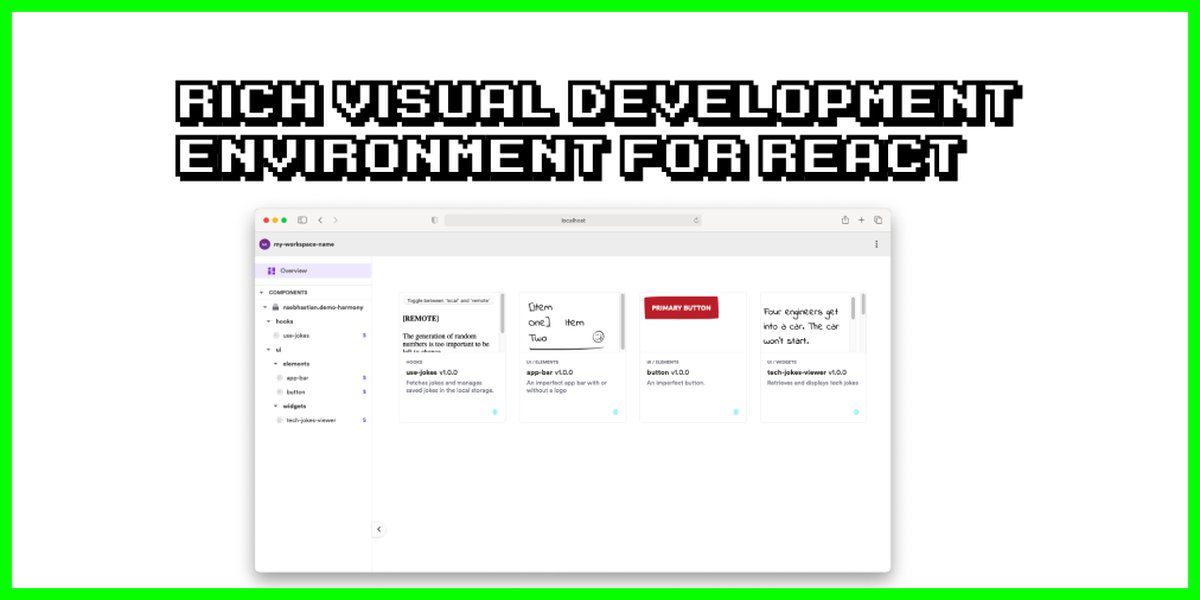
Visualizing React's component structure in a development workspace.
JSX: Writing Markup in JavaScript
JSX (JavaScript XML) is a syntax extension that allows you to write HTML-like code directly within your JavaScript files. It's not actual HTML but gets transpiled (converted) into regular JavaScript function calls (React.createElement()) by tools like Babel. While optional, JSX makes React code more readable and intuitive, especially for describing UI structure.
// JSX example
const name = "React Learner";
const element = <h1>Hello, {name}</h1>; // Embed JavaScript expressions using {}

// Without JSX, the above would be:
// const element = React.createElement('h1', null, 'Hello, ', name);
Key things to remember about JSX:
- You can embed any valid JavaScript expression inside curly braces
{}. - JSX tags must be closed, either with a closing tag (
<div></div>) or self-closing (<img />). - Components must return a single root element. If you need multiple elements, wrap them in a fragment (
<React.Fragment>...</React.Fragment>or the shorthand<>...</>). - HTML attributes like
classbecomeclassNamein JSX, andforbecomeshtmlFor.

Example of React code demonstrating JSX syntax.
Props: Passing Data Down
Props (short for properties) are how components receive data from their parent components. They are passed down like arguments to a function or attributes to an HTML tag. Props are read-only within the receiving component, enforcing a one-way data flow that makes applications easier to understand and debug.
// Parent Component
import React from 'react';
import UserProfile from './UserProfile'; // Assume UserProfile is another component

function App() {
  return (
    <div>
      <UserProfile name="Alice" age={30} />
      <UserProfile name="Bob" age={25} />
    </div>
  );
}

// Child Component (UserProfile.js)
function UserProfile(props) {
  // Accessing props passed from App
  return (
    <div>
      <p>Name: {props.name}</p>
      <p>Age: {props.age}</p>
    </div>
  );
}
State: Managing Component Data
State represents data that is managed *within* a component and can change over time, typically due to user interactions or network responses. When a component's state changes, React automatically re-renders the component and its children to reflect the updated UI. State is local or encapsulated to the component where it's defined.
Using the `useState` Hook
In functional components, the `useState` Hook is the primary way to add state.
import React, { useState } from 'react';

function Counter() {
  // Declare a state variable 'count' initialized to 0
  // 'setCount' is the function to update 'count'
  const [count, setCount] = useState(0);

  return (
    <div>
      <p>You clicked {count} times</p>
      {/* Update state when the button is clicked */}
      <button onClick={() => setCount(count + 1)}>
        Click me
      </button>
    </div>
  );
}

export default Counter;
Hooks: Supercharging Functional Components
Hooks were introduced in React 16.8. They are functions that let you "hook into" React state and lifecycle features from function components. They allow you to use state and other React features without writing a class.
- `useState`: Manages state within a functional component (as shown above).
- `useEffect`: Lets you perform side effects in functional components. Side effects include data fetching, subscriptions, or manually changing the DOM. It runs after every render by default, but you can control when it runs.
- Other hooks like `useContext`, `useReducer`, `useCallback`, `useMemo` provide more advanced capabilities.
Bringing UIs to Life: Rendering and Interaction
Conditional Rendering
Often, you need to show or hide parts of the UI based on certain conditions (e.g., showing a login button or a user profile). React allows you to use standard JavaScript logic like `if` statements, ternary operators (`condition ? exprIfTrue : exprIfFalse`), or logical `&&` operators directly within your JSX.
function Greeting({ isLoggedIn }) {
  if (isLoggedIn) {
    return <h1>Welcome back!</h1>;
  }
  return <h1>Please sign up.</h1>;
}

// Using ternary operator
function LoginStatus({ isLoggedIn }) {
    return (
        <div>
            {isLoggedIn ? <p>Logged In</p> : <p>Logged Out</p>}
        </div>
    );
}
Rendering Lists
You can render dynamic lists of elements by using JavaScript's array `map()` method. It's crucial to provide a unique `key` prop to each list item. Keys help React identify which items have changed, are added, or are removed, which optimizes updates and prevents potential issues with component state.
function TodoList({ tasks }) {
  const listItems = tasks.map((task, index) =>
    // Use a stable ID if available, otherwise index (less ideal)
    <li key={task.id || index}>
      {task.text}
    </li>
  );

  return <ul>{listItems}</ul>;
}

// Example usage:
// const myTasks = [{ id: 1, text: 'Learn React' }, { id: 2, text: 'Build an app' }];
// <TodoList tasks={myTasks} />
Handling Events
React can handle user interactions like clicks, form submissions, or keyboard inputs using event handlers. React events are named using camelCase (e.g., `onClick`, `onChange`) and you pass a function as the event handler, rather than a string.
function AlertButton() {
  function handleClick() {
    alert('You clicked me!');
  }

  return (
    <button onClick={handleClick}>
      Click Me
    </button>
  );
}
React uses a synthetic event system, which wraps the browser's native event system to ensure consistency across different browsers.
The Virtual DOM
One of React's key performance optimizations is the Virtual DOM. Instead of directly manipulating the browser's DOM (which can be slow), React maintains an in-memory representation of the UI (the Virtual DOM). When a component's state changes, React creates a new Virtual DOM tree, compares it ("diffing") with the previous one, and calculates the most efficient way to update the actual browser DOM. This minimizes direct DOM manipulation, leading to faster updates and a smoother user experience.
Visualizing React Concepts
Relative Importance of Core Concepts for Beginners
The following radar chart provides a subjective view on the relative importance and initial learning focus for key React concepts when starting out. Higher scores indicate concepts that are more fundamental or frequently encountered early on.
This chart highlights that understanding Components, State, Props, JSX, and basic Hooks like `useState` are generally considered the most critical first steps. While the Virtual DOM is a key concept for *why* React is efficient, understanding its deep mechanics isn't usually required for initial development.
React Basics Mindmap
This mindmap provides a visual overview of how the fundamental concepts of React JS relate to each other, centered around the idea of building User Interfaces.
The mindmap illustrates how concepts like Components, JSX, State, and Props are central, supporting UI rendering techniques and optimized by the Virtual DOM. Getting started involves setting up the development environment.
Setting Up Your First React Project
Getting started with React is straightforward thanks to modern tooling.
Prerequisites
- Node.js and npm (or yarn): React development relies on Node.js as a runtime and npm (Node Package Manager) or yarn for managing project dependencies. Download and install Node.js from nodejs.org (npm is included).
Using Create React App (CRA) or Vite
The simplest way to bootstrap a new React application is by using a tool like Create React App or Vite. These tools set up a development server, build pipeline, and project structure with sensible defaults.
Create React App (Classic choice)
# Open your terminal and run:
npx create-react-app my-react-app
cd my-react-app
npm start
Vite (Faster alternative)
# Open your terminal and run:
npm create vite@latest my-react-app -- --template react
cd my-react-app
npm install
npm run dev
Both commands create a new directory (`my-react-app`) with a basic React project. `npm start` (for CRA) or `npm run dev` (for Vite) will launch a development server, and you can view your new app in the browser.
Typical Project Structure
Inside your project folder, you'll typically find:
- `node_modules/`: Contains all project dependencies.
- `public/`: Contains static assets like `index.html` (the main HTML page), images, etc.
- `src/`: This is where most of your React code lives.
- `index.js` (or `main.jsx` in Vite): The entry point of your application. It renders the root component (usually `App`) into the DOM.
- `App.js` (or `App.jsx`): The main application component where you typically start building your UI.
- Other component files, CSS files, etc.
- `package.json`: Lists project dependencies and scripts.

A developer's workspace showing a typical React project file structure.
Key React Concepts Summarized
Here's a table summarizing the core concepts we've discussed:
| Concept | Description | Purpose |
|---|---|---|
| Component | Reusable, independent piece of UI (function or class). | Build modular and maintainable user interfaces. |
| JSX | Syntax extension for writing HTML-like markup in JavaScript. | Describe UI structure declaratively and readably. |
| Props | Read-only data passed from parent to child components. | Configure and customize child components. |
| State | Data managed internally by a component that can change over time. | Enable dynamic behavior and interactivity. Changes trigger re-renders. |
| Hooks | Functions (like `useState`, `useEffect`) that add state and lifecycle features to functional components. | Allow functional components to manage state and side effects without classes. |
| Virtual DOM | In-memory representation of the UI, used for performance optimization. | Minimize direct DOM manipulation for faster UI updates. |
| Conditional Rendering | Using JavaScript logic to show/hide UI elements based on conditions. | Create dynamic UIs that adapt to application state. |
| Lists & Keys | Rendering arrays of data as UI elements, requiring unique `key` props. | Display dynamic collections of data efficiently. |
| Event Handling | Responding to user interactions (clicks, input changes, etc.). | Make applications interactive. |
Learn More with a Video Tutorial
Visual learning can be very effective. This video provides a comprehensive beginner's tutorial on React JS, covering many of the concepts discussed here and showing practical examples.
React Tutorial for Beginners - A helpful video resource to solidify your understanding.
Frequently Asked Questions (FAQ)
What exactly is JSX?
JSX stands for JavaScript XML. It's a syntax extension recommended for use with React to describe what the UI should look like. It allows you to write HTML-like tags directly in your JavaScript code. While it looks like HTML, it gets converted into regular JavaScript function calls (`React.createElement`) before being executed. It makes component code more readable and easier to visualize.
What's the main difference between State and Props?
Props (properties) are used to pass data *down* from a parent component to a child component. They are read-only within the child component. State, on the other hand, is data managed *internally* within a component. State can change over time (usually due to user interaction), and when it changes, the component re-renders. Think of props as function arguments and state as variables declared inside the function body.
Why are Hooks used in React?
Hooks (like `useState`, `useEffect`, `useContext`) were introduced to allow developers to use state, lifecycle methods, and other React features in *functional* components. Before Hooks, these features were only available in class components. Hooks make it possible to write entire applications using only functional components, which are often considered simpler and easier to reason about than class components. They promote code reuse and composition of stateful logic.
Do I need to learn class components?
For new projects, functional components with Hooks are the recommended approach and cover almost all use cases. However, you might encounter class components in older codebases or legacy tutorials. While it's beneficial to have a basic understanding of class components (especially lifecycle methods like `componentDidMount` and `componentDidUpdate`) if you need to maintain older code, focusing primarily on functional components and Hooks is sufficient for starting with modern React development.
Recommended Next Steps
- How does React handle state management in large applications?
- Explain the React component lifecycle methods and the useEffect hook.
- What is React Router and how is it used for navigation?
- Compare React with other frontend frameworks like Angular and Vue.
References
Last updated May 5, 2025