
Troubleshooting Editing Prefilled Data in React-Mentions
Addressing Common Issues with Pre-populated Mention Inputs
Key Highlights
- Controlled Component Requirement: The
react-mentionsMentionsInputmust be used as a controlled component, meaning its value should be managed by the parent component's state and updated via theonChangehandler. - Data Structure for Prefilling: Prefilled data needs to be in a specific format that
react-mentionsunderstands, typically involving a string with embedded mention markup (e.g.,@{display_name}__id__). The library uses this markup to identify and render mentions correctly. - Handling Edits within Mentions: Editing within the curly braces of a mention (e.g.,
@{names}) can cause issues. The library may treat the entire mention as a single entity. Custom logic or workarounds might be needed to allow granular editing within mentions.
The react-mentions library is a popular choice for implementing mention functionalities in React applications, similar to those found on social media platforms like Facebook or Twitter. However, users often encounter challenges when attempting to edit prefilled data within the MentionsInput component. This comprehensive guide aims to diagnose and provide solutions for these issues, drawing upon common experiences and reported problems within the community.
Understanding React-Mentions as a Controlled Component
A fundamental aspect of working with react-mentions, particularly the MentionsInput component, is recognizing its nature as a controlled component. In React, controlled components are form elements whose values are controlled by the state of a parent component. This means that the input's value is driven by state, and any changes to the input update that state via an onChange handler.
When prefilling data into a MentionsInput, you must ensure that the initial value is set in the parent component's state. The MentionsInput component should then receive this state variable as its value prop. Furthermore, the onChange prop must be implemented to update the state whenever the input's content changes. Failure to follow this pattern can lead to issues where the input appears uneditable or resets unexpectedly.
import { MentionsInput, Mention } from 'react-mentions';
import React, { Component } from 'react';

class MyMentionEditor extends Component {
  constructor(props) {
    super(props);
    this.state = {
      editorValue: 'This is some prefilled text with a mention: @{John Doe}__user-123__',
      users: [
        { id: 'user-123', display: 'John Doe' },
        { id: 'user-456', display: 'Jane Smith' },
      ],
    };
  }

  handleEditorChange = (event, newValue, newPlainTextValue, mentions) => {
    this.setState({
      editorValue: newValue,
    });
  };

  render() {
    return (
      <MentionsInput
        value={this.state.editorValue}
        onChange={this.handleEditorChange}
        placeholder="Mention people using '@'"
      >
        <Mention
          trigger="@"
          data={this.state.users}
          appendSpaceOnAdd
        />
      </MentionsInput>
    );
  }
}
In the example above, editorValue in the component's state holds the content of the mention input. The MentionsInput is bound to this state via the value prop, and the handleEditorChange function updates the state on every change, ensuring the component remains controlled.
The Importance of Correct Data Structure for Prefilling
react-mentions uses a specific markup format to represent mentions within the input value. This format typically involves the mention's display value and its unique ID enclosed in curly braces, followed by double underscores and the ID (e.g., @{display_name}__id__). When prefilling data, it is crucial that your initial string value adheres to this format for any existing mentions you want the library to recognize and render correctly.
If the prefilled data does not match the expected markup, react-mentions may not be able to parse the mentions, leading to them appearing as plain text rather than highlighted, interactive mention elements. This can significantly impact the editing experience, as the user might not be able to interact with the prefilled mentions as intended.
Consider the following table illustrating the expected data structure:
| Type of Content | Example String Value | Notes |
|---|---|---|
| Plain Text | This is a regular sentence. |
No special formatting needed. |
| Text with a Mention | Hello @{Alice}__user-abc__, how are you? |
Uses the @{display}__id__ markup. |
| Multiple Mentions | Meeting with @{Bob}__user-def__ and @{Charlie}__user-ghi__. |
Each mention follows the specific markup. |
Ensuring your prefilled data matches this structure is a critical step in enabling proper editing functionality within react-mentions.
Challenges and Solutions for Editing Within Mentions
One common issue users encounter is difficulty editing the text within a rendered mention (e.g., trying to change "John Doe" to "Jonathan Doe" within @{John Doe}__user-123__). The default behavior of react-mentions often treats the entire mention as an atomic unit, making it challenging to modify individual characters inside the display value.
This behavior stems from how the library parses and renders the mention markup. When you try to edit within the curly braces, the library might not correctly interpret the change in relation to the underlying mention structure, sometimes leading to the entire mention being deleted or behaving unexpectedly.
Potential Workarounds and Customizations
While direct editing within the default mention rendering can be tricky, there might be workarounds depending on your specific needs and the complexity of the editing required:
Customizing Mention Rendering:
The Mention component accepts a renderSuggestion prop, which allows you to customize how mention suggestions are displayed in the dropdown list. While this primarily affects the suggestions, a more advanced approach might involve customizing how rendered mentions are displayed in the input itself, potentially using features like CSS modules or inline styles to adjust their appearance or behavior, although enabling granular editing within the rendered mention itself might require deeper modifications or alternative libraries.
Managing Mentions as Separate Entities:
Instead of treating the entire input as a single string with embedded markup, you could potentially manage the content as an array of text segments and mention objects. When rendering the input, you would iterate over this array and render plain text segments and custom mention components accordingly. Editing would then involve manipulating this array structure, offering more control over individual mention elements. However, this approach would require building a significant portion of the mention logic yourself, potentially negating the benefits of using a library like react-mentions.
Considering Alternative Libraries:
If granular editing of prefilled mentions is a critical requirement, you might explore alternative rich text editor libraries that offer more flexibility in handling embedded elements. Libraries built on frameworks like Draft.js or TipTap often provide more fine-grained control over content structure and editing behavior, which could be better suited for complex editing scenarios involving mentions and other rich text elements.
Here is a video demonstrating how to build a mention editor using Draft.js, which could offer more customization options for editing:
This video focuses on using Draft.js, a library that provides a more programmatic way to build rich text editors. By building a custom editor with Draft.js, you gain more control over how mentions are represented and edited, potentially overcoming some of the limitations encountered with react-mentions regarding editing within prefilled mentions.
Common Pitfalls and Debugging Steps
When facing issues with editing prefilled data in react-mentions, consider the following common pitfalls and debugging strategies:
Incorrectly Handling State Updates:
As highlighted earlier, MentionsInput is a controlled component. Ensure that your onChange handler is correctly updating the state variable that controls the input's value. If the state is not updated properly, the input may revert to its previous value or appear unresponsive to user input.
Mismatched Data Format:
Double-check that your prefilled data string exactly matches the markup format expected by react-mentions (e.g., @{display}__id__). Even subtle differences in spacing or characters can prevent the library from correctly identifying and rendering the mentions.
Issues with Multiple Mention Sources:
If you are using multiple Mention components with different triggers or data sources, ensure that the library can correctly distinguish between them when parsing the prefilled data. The markup should ideally include information that helps react-mentions associate a mention with its corresponding Mention component.
Focus and Cursor Management:
react-mentions manages its own internal cursor tracking. Interference with this process, potentially from external DOM manipulations or conflicting focus management logic, could lead to unexpected behavior when editing. Ensure that other parts of your application are not inadvertently affecting the input's focus or cursor position.
Library Version Compatibility:
Check for any known issues or breaking changes related to prefilling or editing in the specific version of react-mentions you are using. Reviewing the library's GitHub issues can often reveal similar problems encountered by other users and potential solutions or workarounds.
Styling and Customization Considerations
While primarily focused on functionality, styling can sometimes indirectly impact the perceived editing experience. Ensuring that the rendered mentions are visually distinct and that the input area is clearly defined can help users understand which parts of the text are editable plain text and which are mention elements.
react-mentions provides several ways to style the component, including using CSS, CSS modules, and inline styles. You can apply styles to the main MentionsInput component as well as individual Mention components to control their appearance.
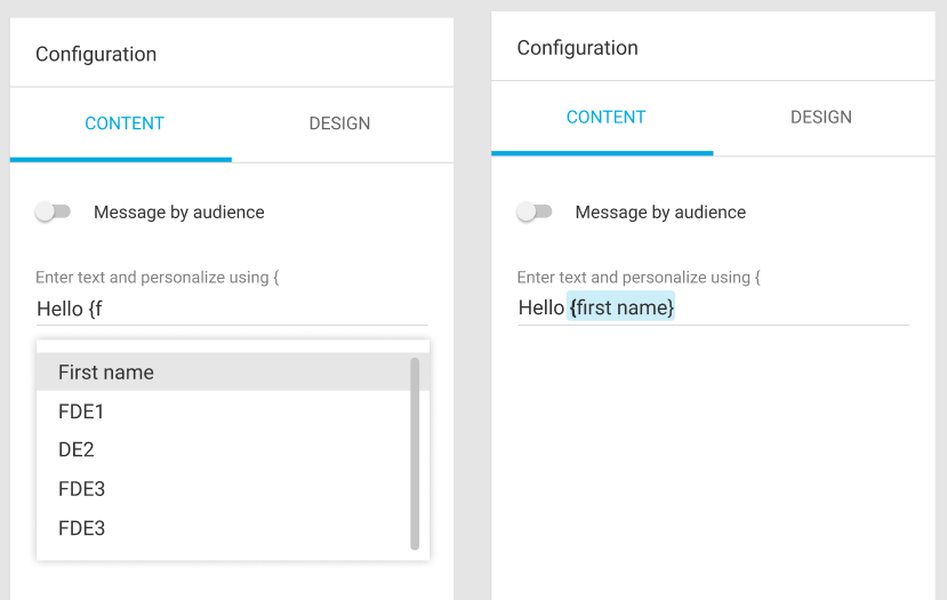
An example of a styled React Mentions component.
Proper styling can improve the user interface and make the interaction with prefilled data and mentions more intuitive.
FAQ
Why is my MentionsInput not editable when prefilled?
This is commonly caused by not using MentionsInput as a controlled component. Ensure you are passing the prefilled value from your component's state to the value prop and updating the state with the new value in the onChange handler.
How should the prefilled data for mentions be formatted?
Prefilled data containing mentions should follow a specific markup format, typically @{display_name}__id__, where display_name is the text shown in the input and id is the unique identifier for the mentioned entity. This allows the library to correctly parse and render the mentions.
Can I edit the text inside a prefilled mention like regular text?
By default, editing directly within the display text of a rendered mention in react-mentions can be challenging as the library often treats the entire mention as a single unit. Workarounds or customizations might be necessary for more granular editing within mentions.
What should I do if suggestions don't appear when typing after prefilling?
Ensure that your Mention component's data prop is correctly configured to provide suggestions based on the user's input. If you are fetching data asynchronously, verify that your data fetching function is being called and is returning data in the expected format.
How can I style the prefilled mentions differently?
You can use the styling capabilities provided by react-mentions, such as CSS, CSS modules, or inline styles, to apply specific styles to the rendered mentions. This can help visually distinguish them from plain text.
References
Last updated May 9, 2025