
Unlock Sales Excellence: Master the Art of Recording and Delivering Impactful Training Sessions
Seamlessly capture and distribute essential knowledge to empower your sales team anytime, anywhere.
Key Insights for Effective Training Recording
- Strategic Planning is Paramount: Before hitting record, define your learning objectives, outline content, and prepare supporting materials to ensure a focused and impactful training session.
- Leverage the Right Tools: Choose from a versatile array of screen recording software, webinar platforms, or dedicated corporate training solutions to match your specific content needs and desired level of polish.
- Optimize for Engagement and Accessibility: Enhance recordings with clear audio, visual aids, editing, and interactive elements. Ensure easy sharing via platforms like LMS or video hosting services for optimal salesperson consumption.
In today's fast-paced sales environment, providing accessible and effective training is crucial for equipping sales professionals with the knowledge and skills they need to succeed. Recording training sessions offers an invaluable resource, allowing salespeople to learn at their own pace, revisit key concepts, and ensure consistent messaging. This guide outlines the best practices, tools, and strategies for recording high-quality training sessions specifically tailored for sales teams, ensuring your content is not only comprehensive but also highly impactful and easily shareable.
The Foundation: Strategic Planning and Preparation
The success of any recorded training session begins long before you press the record button. Meticulous planning and preparation are essential to ensure the content is structured, clear, and directly addresses the learning objectives for your sales team.
Defining Clear Objectives and Content
Understanding Your Sales Audience
Start by identifying what your salesperson needs to learn. Is it a deep dive into new product features, a walkthrough of a revised sales process, strategies for handling common objections, or perhaps a practical role-playing scenario? Clearly defined objectives will dictate the content, format, and even the tools you choose.
Structuring Your Training Material
Develop a clear outline or script. For formal training, a detailed script ensures conciseness and comprehensive coverage. For more informal coaching, bullet points can suffice. Organize your content logically, breaking down complex topics into digestible segments. This modular approach is particularly beneficial for sales professionals who often have limited time for training and may need to access specific information quickly.
Gathering Supporting Media and Checking Equipment
Visual Aids and Demonstrations
Prepare all necessary supporting materials. This could include:
- Slides: For presentations or structured content.
- Documents: Any handouts or reference materials.
- Applications: If you're demonstrating software or a CRM system.
- Physical Products: For hands-on demonstrations.
Visuals enhance understanding and engagement, making the training more memorable and effective.
Essential Equipment Check
Quality audio is paramount. Invest in a good quality microphone (a headset mic or external microphone is preferable to a laptop's built-in). If including video of yourself, use a good webcam or even a mirrorless camera for professional results. Ensure adequate lighting to present yourself clearly and professionally. Always check for sufficient storage space, especially for longer recordings (at least 5GB for local recordings is a good benchmark).
Choosing the Right Tools for Capturing Your Training
The landscape of recording tools is vast, with options suitable for various training types and budgets. Selecting the appropriate tool is critical for producing a high-quality recording that is easy to create and share.
Screen Recording Software: Ideal for Demos and Tutorials
For training that involves demonstrating software, navigating processes on a computer, or presenting slides, screen recording software is indispensable. Key features to look for include simultaneous capture of screen, voice, and webcam, as well as annotation and basic editing capabilities.
Top Screen Recording Solutions
- Loom: User-friendly and excellent for quick tutorials and sharing sales training content with its seamless user experience and easy sharing links.
- Camtasia: A powerful choice offering robust screen recording and comprehensive video editing features for polished, professional results. It also supports creating quizzes and role-play simulations.
- Panopto: Designed for learning, it allows recording from multiple sources (presenter, slides, screen, multiple camera angles) and features embedded quizzes and automatically generated captions.
- OBS Studio: A free, open-source, and highly robust tool ideal for both live streaming and high-quality video recording, offering extensive customization for users comfortable with its setup.
- Snagit: Known for comprehensive screen capture and video recording with straightforward editing tools, perfect for quick, effective tutorials.
- Movavi Screen Recorder: Best for capturing desktop software training videos, offering excellent video and audio capture.
- Riverside.fm: Offers high-quality recording for training videos, with free and paid tiers suitable for various needs.
- iSpring Suite: A comprehensive authoring toolkit enabling the creation of high-quality video content with an intuitive interface, including interactive elements like quizzes and role-plays.
- OpenShot: A free, cross-platform, open-source video editing tool suitable for trimming, slicing, and creating video tutorials.
- Windows Snipping Tool (Windows 11): The built-in Windows Snipping Tool now includes basic screen recording capabilities, suitable for simple captures.
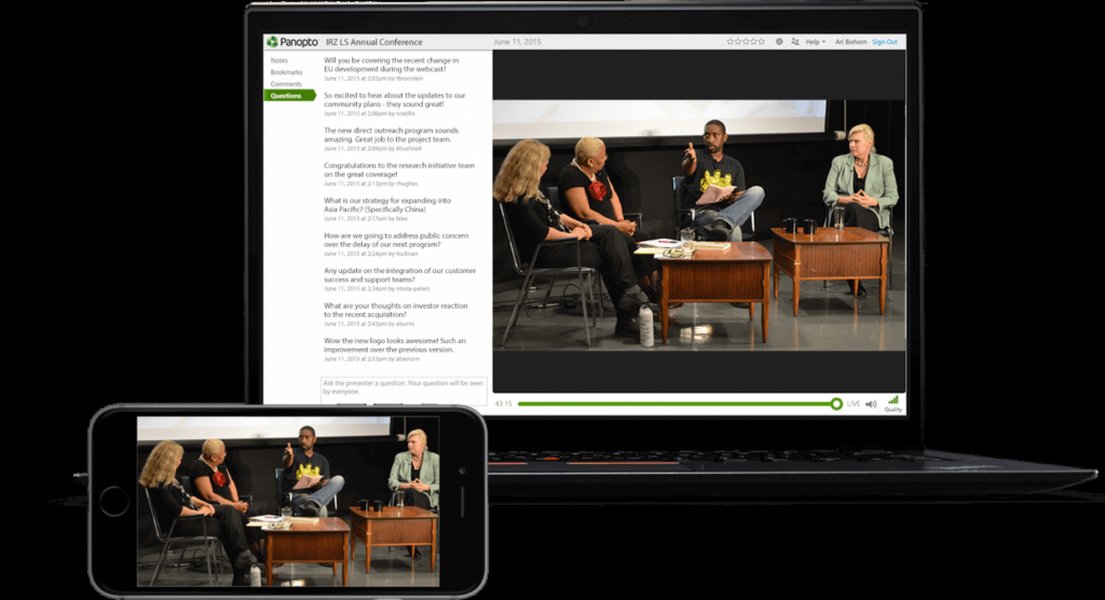
Panopto's interface for live stream and training video display, demonstrating multi-source recording capabilities.
Webinar and Meeting Platforms: Recording Live Sessions
If your training is delivered live, leverage the built-in recording features of virtual meeting platforms. These tools capture the session, including audio, screen shares, and participant interactions, making them convenient for post-session sharing.
Popular Platforms for Live Session Recording
- Zoom: Widely used for video conferences, it provides HD video/audio, screen sharing, and easy sharing options for recorded sessions. AI Companion can offer additional functionalities.
- GoTo Training: Allows organizers to record training sessions, including presenter screens, audio, and shared applications, with recordings available in your web account.
- Webex Training: Enables desktop users to record sessions on their computer or in the cloud, indicated by a prominent red recording icon.
Dedicated Corporate Training Solutions and Physical Demonstrations
Specialized Systems for Comprehensive Training
For organizations requiring extensive video libraries and advanced management features, dedicated corporate training video solutions are ideal.
- Brainshark: Specifically designed for sales training, offering content authoring and readiness scorecards, allowing sales reps to access content even offline.
- VALT by Intelligent Video Solutions: Utilizes high-quality IP cameras and microphones for pristine recordings, enabling an extensive video library for onboarding, skill training, and compliance, with robust security features.
Capturing In-Person Demonstrations and Role-Playing
For physical product demonstrations, role-playing scenarios, or in-person training, consider using dedicated cameras or even smartphones.
- Camcorder/Smartphone with Tripod: A simple setup for amateur levels, ensuring the relevant action is captured.
- High-Quality Mirrorless Cameras: For professional training videos, cameras like Sony A73 can record continuously for extended periods (15-30 minutes), offering superior video quality.
- OBS with Webcam/PC Screen Recording: For conference room training, you can set up a webcam to record the presenter and simultaneously use OBS to record the screen from a laptop/PC.
Optimizing Your Recorded Training for Maximum Impact
Beyond simply recording, enhancing your training videos makes them more engaging, accessible, and ultimately, more effective for sales professionals.
Editing and Enhancements: Polishing Your Content
Refining the Raw Footage
Even if you're using a simple screen recorder, take the time to edit. Trim dead air, remove errors, and cut unnecessary parts to keep the video concise and focused. Tools like Adobe Premiere Pro or DaVinci Resolve offer professional editing capabilities, while many screen recorders have built-in editors for basic tasks.
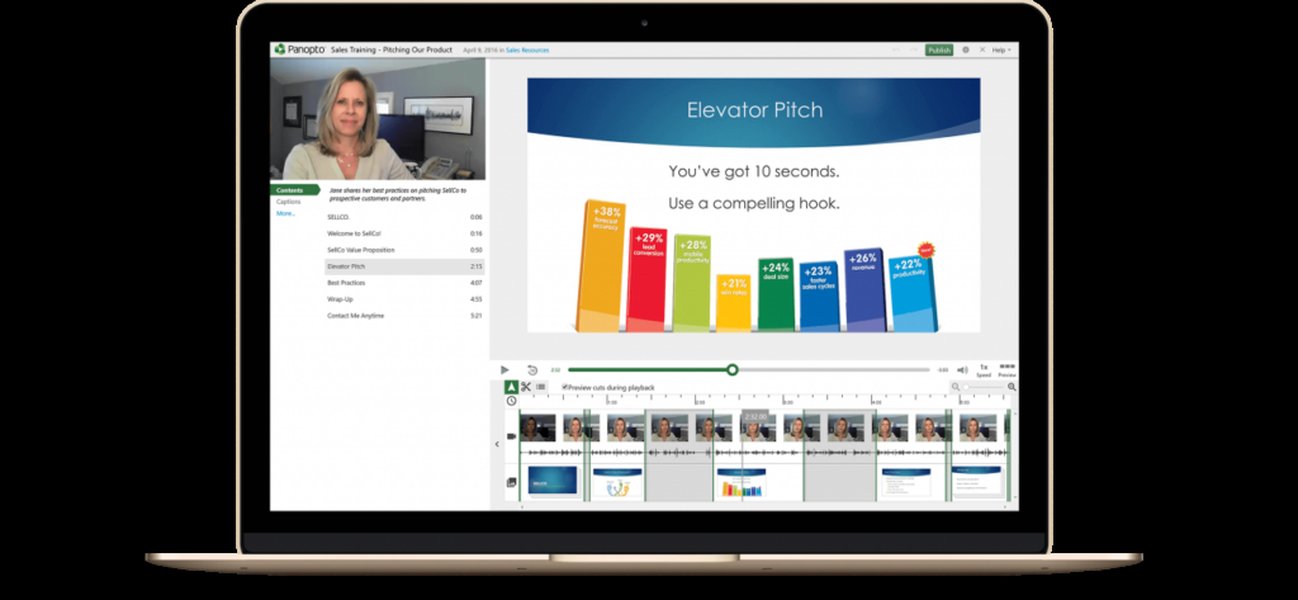
Panopto's video editing interface, illustrating options for refining recorded training sessions.
Enhancing Engagement and Accessibility
- Audio Quality: Ensure clear narration and consistent volume. Use noise reduction tools if needed.
- Visual Aids and Annotations: Add text overlays, highlights, arrows, or drawing tools to emphasize key points or call attention to specific features.
- Captions/Subtitles: Crucial for accessibility and for viewers who prefer to watch with sound off or who are not native speakers. Many platforms offer automatically generated captions.
- Chapters or Sections: Break down longer videos into navigable chapters or modules. This allows salespeople to jump directly to relevant topics without having to scrub through the entire recording.
- Interactive Elements: If supported by your chosen tool, incorporate quizzes, polls, or clickable hotspots to boost engagement and assess comprehension.
- Conciseness: Aim for shorter videos, ideally 5-15 minute modules, to maintain viewer attention.
This radar chart illustrates the key attributes of an effective sales training recording. The "Ideal Sales Training Recording" dataset represents a benchmark for high-quality content, emphasizing strong content clarity, audio quality, visual engagement, and ease of access. It also highlights the importance of interactive features and conciseness, which are crucial for salesperson retention and application. In contrast, the "Typical First Attempt" dataset shows common areas where initial recordings might fall short, such as lower scores in interactive features and conciseness. This chart visually underscores the areas to focus on when planning, recording, and editing training sessions to maximize their impact on sales team performance.
Leveraging Recorded Sales Calls for Coaching
One of the most powerful applications of recorded training for sales is the creation of a "call library." Recording actual sales calls (with consent) provides invaluable peer-to-peer coaching opportunities. These can be attached to CRM records (e.g., Salesforce) for easy access and review. Listening to recorded demos or pitches helps sales reps analyze their performance, identify areas for improvement, and learn from successful interactions.

A sales professional engaging with sales enablement training content on a laptop, highlighting the importance of accessible and relevant learning materials.
Sharing and Distributing Your Training Effectively
Once your training session is recorded and polished, the final step is to ensure it reaches your salespeople efficiently and securely. The method of distribution can significantly impact accessibility and utilization.
Platforms for Hosting and Distribution
Learning Management Systems (LMS)
Platforms like EdApp, Proprofs, and Zoho Showtime are excellent for managing and distributing training content. They allow you to create structured training modules, assign and track completion, and conduct quizzes or surveys, providing a centralized hub for all training materials. Panopto also integrates with leading video conferencing solutions to automate capture and make live training sessions instantly available on-demand.
Video Hosting Platforms with Sharing Features
For simpler sharing, various video hosting platforms offer direct link sharing, embedding capabilities, and secure access features.
- Loom: Generates shareable links for quick distribution via email or communication channels.
- Vimeo: Offers robust hosting with privacy controls and embedding options.
- StreamingVideoProvider: Provides secure hosting with features like user rights management, authentication, encryption, and even watermarking to prevent unauthorized sharing.
- Cloud Storage: Services like Google Drive or Dropbox facilitate easy storage and online sharing of video files.
Sales Enablement Platforms and Internal Knowledge Bases
Integrating training videos directly into tools sales professionals already use can significantly boost engagement.
- Sales Enablement Platforms: Tools like Vidyard can host recorded presentations, exercises, and resources, allowing sales teams to reference materials year-round. Gong software records and transcribes sales calls, generating actionable insights.
- Internal Knowledge Bases: Tools like CLIPr can transform recorded sessions into searchable knowledge bases, allowing users to pinpoint and share key topics within instructional videos.
Key Sharing Considerations for Sales Training

A visual representation of online sales training in progress, emphasizing the accessibility of digital learning.
Consider the following to maximize the effectiveness of your shared recordings:
- Direct Link Sharing: Easy for distribution via email or messaging apps.
- Embedding: Embed videos on internal wikis, intranets, or sales enablement platforms for seamless integration into existing workflows.
- Security: For sensitive content, ensure the platform offers robust security features like user rights management and encryption.
- Supplementary Materials: Always provide quick reference guides, transcripts, or quizzes to complement the video content.
- Contextualization: For internal sales training, ensure the content is highly contextualized to your organization's specific needs, products, and sales scenarios.
- Monetization: If you plan to sell the recorded training externally, platforms like StreamingVideoProvider and Teachable offer features like paywalls and piracy protection.
Optimizing Recorded Training: A Comprehensive Workflow
To summarize, a streamlined process ensures that your recorded training sessions are effective from conception to delivery.
This mindmap visually outlines the comprehensive process for recording and sharing training sessions with salespeople, from initial planning and tool selection to enhancement and distribution. It highlights the interconnectedness of each stage, emphasizing the importance of a structured approach to create high-quality, impactful, and easily accessible training materials. The mindmap serves as a quick reference guide, detailing the various considerations and tools at each step, ensuring a holistic strategy for effective sales training. By following these pathways, you can systematically address all crucial aspects of producing and delivering valuable training content.
The Impact of High-Quality Recorded Training on Sales Performance
The strategic deployment of high-quality recorded training videos offers profound benefits for sales teams. It enables salespeople to learn at their own pace, revisit complex concepts as needed, and ensures a standardized onboarding and coaching experience across the entire team. This flexibility and consistency contribute to better knowledge retention, more uniform messaging when engaging with prospects, and ultimately, a significant improvement in sales performance and productivity. By investing in effective recording and distribution methods, organizations can empower their sales force to be more knowledgeable, confident, and successful.
Frequently Asked Questions (FAQ)
What equipment do I need for a basic training recording?
How long should a sales training video be?
Can I use my existing meeting software to record training?
What's the best way to share large video files with a salesperson?
Should I include my face in the training video?
Conclusion
Recording training sessions for your sales team is a strategic investment that pays dividends in knowledge retention, consistent messaging, and ultimately, improved performance. By meticulously planning your content, selecting the right recording and editing tools, and choosing effective distribution platforms, you can create a robust library of accessible, engaging, and highly impactful training materials. This empowers your salespeople to continuously enhance their skills, ensuring they are always equipped to meet market demands and exceed sales targets.
Recommended Further Exploration
- How to create interactive elements in training videos for sales engagement?
- Best practices for leveraging recorded sales calls for coaching.
- Integrating training videos into a sales enablement platform.
- Strategies for measuring the effectiveness of sales training videos.