
Unveiling Redis Scalability: A Deep Dive into ElastiCache Architecture
Explore how Redis, particularly within AWS ElastiCache, achieves high performance and resilience through sharding, replication, and smart concurrency.
Redis is a highly popular in-memory data store, renowned for its speed and versatility. When applications demand low latency and high throughput, understanding how Redis scales and manages its internal architecture is crucial. This is especially true when leveraging managed services like AWS ElastiCache, which simplifies the deployment and operation of Redis clusters. Let's delve into the mechanisms that make Redis a scalable and resilient solution.
Key Insights into Redis Scalability with AWS ElastiCache
- Sharding for Horizontal Scalability: Redis Cluster divides your dataset across multiple nodes (shards), enabling linear performance scaling by distributing the workload. AWS ElastiCache allows for up to 500 shards.
- Replication for High Availability & Read Scaling: Each primary node can have multiple read replicas, which handle read requests and provide automatic failover, enhancing both performance and data durability. ElastiCache supports up to 5 replicas per primary.
- Managed Concurrency: While individual Redis nodes are single-threaded for command execution (ensuring atomicity), true concurrency is achieved by distributing requests across many nodes (primaries and replicas) in a cluster.
How Redis Achieves Scalability
Redis employs two primary strategies to scale: sharding and replication. These work in concert to provide both horizontal scalability (increasing capacity and write throughput) and read scalability, along with high availability.
Sharding: The Foundation of Horizontal Scaling
Sharding, also known as partitioning, is the process of dividing your data across multiple Redis instances or nodes. In a Redis Cluster, the entire keyspace is logically divided into 16,384 hash slots. Each key, based on its name (or a specified part of it using "hash tags"), is mapped to one of these slots using a CRC16 algorithm. Each primary node in the cluster is responsible for a subset of these hash slots.
From an AWS ElastiCache perspective:
- Cluster Mode Enabled: This is the primary method for horizontal scaling. Data is partitioned across multiple shards (referred to as "node groups" in ElastiCache terminology). You can scale out by adding more shards or scale in by removing them. ElastiCache can support up to 500 shards for Redis versions 5.0.6 and higher.
- Cluster Mode Disabled: This configuration operates with a single shard. Scaling in this mode is primarily vertical (upgrading to a more powerful node type) or by adding read replicas to the single primary node to offload read traffic.
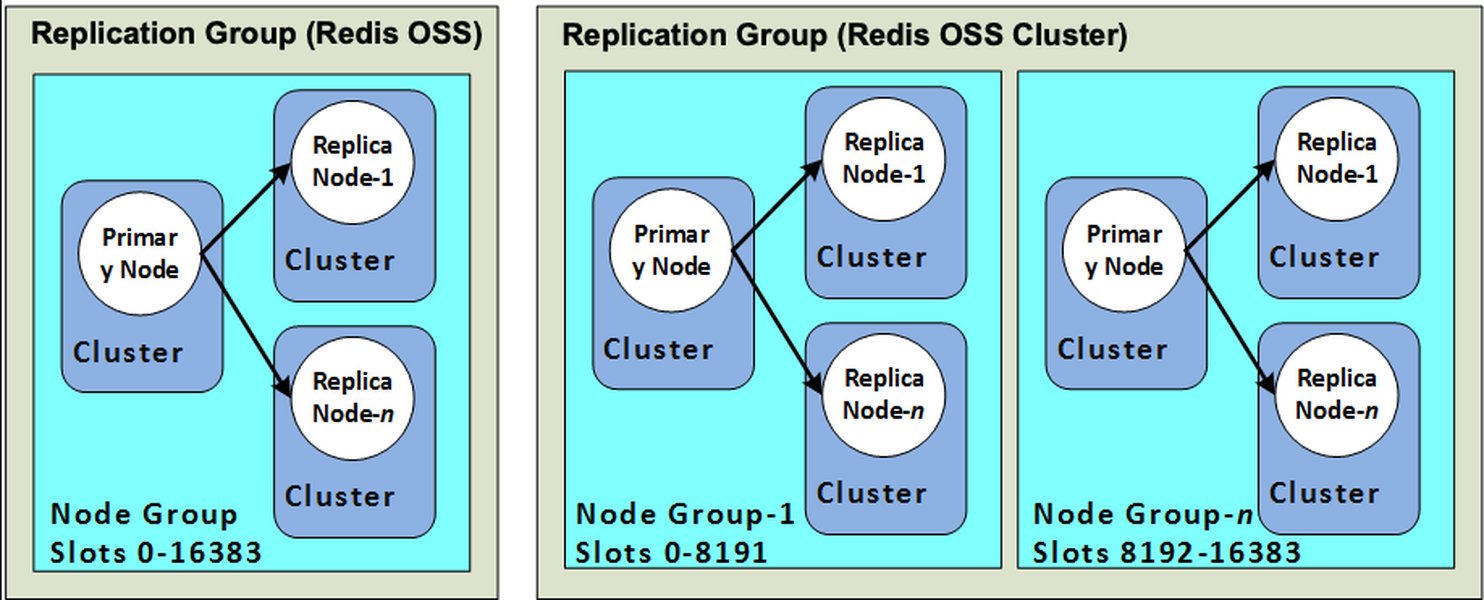
Diagram showing ElastiCache Node Groups, where each group (shard) consists of a primary node and replica nodes.
Replication: Ensuring Availability and Scaling Reads
Replication involves creating copies of data from a primary (master) node to one or more replica nodes. This serves two crucial purposes:
- High Availability: If a primary node fails, one of its replicas can be automatically promoted to become the new primary, minimizing downtime. AWS ElastiCache manages this failover process seamlessly.
- Read Scaling: Read requests can be distributed across the primary and its replica nodes, significantly increasing the overall read throughput of the system.
In ElastiCache, each shard can have one primary node and up to five read replicas. These replicas asynchronously copy data from their primary. For enhanced resilience, ElastiCache often places replicas in different Availability Zones (AZs) than their primary node.
Delving into Redis Internal Architecture via AWS ElastiCache
Understanding the components of a Redis cluster is key to grasping its operational capabilities, especially when managed by AWS ElastiCache.
Shards (Node Groups)
As mentioned, a shard (or node group in ElastiCache) is a fundamental unit of partitioning in a Redis cluster. It consists of a single primary node and zero to five replica nodes. Each shard is responsible for a subset of the 16,384 hash slots. When you create or modify an ElastiCache for Redis cluster (with cluster mode enabled), you define the number of shards, which directly impacts your cluster's write capacity and total data storage.
Nodes: Primaries and Replicas
Primary (Master) Nodes
Each shard has exactly one primary node. This node is responsible for:
- Handling all write operations for the hash slots it owns.
- Serving read operations (though reads can also be offloaded to replicas).
- Propagating data changes to its associated replica nodes.
Replica Nodes
Replica nodes are read-only copies of their primary node. Their main functions are:
- Serving read traffic, thereby reducing the load on the primary node and increasing overall read throughput.
- Providing data redundancy. In case of a primary node failure, ElastiCache can promote a healthy replica to become the new primary.
- Replication from the primary is asynchronous, meaning there can be a very brief lag, but it's generally minimal.
Hash Slots: The Key to Data Distribution
The Redis keyspace is divided into exactly 16,384 hash slots. To determine which slot a key belongs to, Redis calculates CRC16(key) % 16384. Each primary node in the cluster is assigned a range of these slots. When a client wants to operate on a key, a cluster-aware client library (or the Redis cluster proxy) calculates the hash slot for that key and directs the command to the correct primary node. This fixed number of slots simplifies cluster management, including resharding (moving slots between nodes).
Visualizing Redis Cluster Components
To better understand how these components interrelate in a Redis cluster managed by AWS ElastiCache, the following mindmap illustrates the hierarchical structure and key concepts:
(AWS ElastiCache)"] id1["Scaling Mechanisms"] id1a["Sharding (Horizontal)"] id1a1["Data Partitioning"] id1a2["16,384 Hash Slots"] id1b["Replication"] id1b1["Read Scaling"] id1b2["High Availability (HA)"] id2["Core Components"] id2a["Shards (Node Groups)"] id2a1["Primary Node (Master)"] id2a1a["Handles Writes"] id2a1b["Owns Slot Subset"] id2a2["Replica Nodes (0-5 per Primary)"] id2a2a["Handles Reads"] id2a2b["Provides Failover"] id2b["Nodes (Instances)"] id3["Concurrency Model"] id3a["Single-Threaded (per Node Command Execution)"] id3a1["Atomic Operations"] id3b["Distributed Load (Across Cluster)"] id3b1["Multiple Clients"] id3b2["I/O Multiplexing"] id4["AWS ElastiCache Specifics"] id4a["Cluster Mode (Enabled/Disabled)"] id4b["Managed Failover & Scaling"] id4c["Multi-AZ Deployment"]
Number of Master Nodes in Redis
In a Redis Cluster environment (cluster mode enabled), the number of master (primary) nodes is equal to the number of shards in the cluster. Each shard has exactly one master node. So, if your ElastiCache for Redis cluster is configured with 5 shards, it will have 5 master nodes.
For a standalone Redis setup (cluster mode disabled in ElastiCache), there is only one master node, which comprises the single shard. While Redis itself recommends a minimum of three master nodes for a production cluster to ensure high availability during network partitions, ElastiCache allows configurations starting from a single shard (and thus a single master).
How Concurrency is Maintained in Redis
Redis's approach to concurrency is often misunderstood. Here's a breakdown:
- Single-Threaded Command Execution: At the core, each Redis node processes commands sequentially using a single thread. This design choice simplifies development, ensures atomicity of operations (a command either fully completes or not at all without interruption), and avoids the complexities of locks for data structure access.
- I/O Multiplexing: While command execution is single-threaded, Redis uses an event loop and I/O multiplexing (e.g., epoll, kqueue) to handle multiple client connections concurrently. This means it can efficiently manage many simultaneous connections and pending operations without blocking on I/O for each one.
- Cluster-Level Concurrency: True parallelism and high concurrency for an application are achieved by distributing the workload across multiple nodes in a Redis Cluster.
- Different clients can simultaneously send commands to different primary nodes if the keys they are accessing map to different hash slots.
- Read operations can be distributed across primary nodes and their respective read replicas.
- Client-Side Coordination: Cluster-aware client libraries play a vital role by routing commands to the correct node responsible for the specific key (hash slot). If data is moved during resharding, clients are redirected.
- Application-Level Strategies: For operations involving multiple keys that need to be on the same node for atomicity (e.g., Lua scripts, transactions), developers can use "hash tags"
{}in key names to ensure these keys map to the same hash slot. For more complex distributed synchronization, patterns like distributed locks (e.g., using Redlock algorithm or simplerSETNXpatterns) can be implemented at the application layer, leveraging Redis's atomic primitives.
AWS ElastiCache manages the underlying infrastructure, ensuring that these concurrency mechanisms function effectively within the managed environment, handling failovers and node replacements transparently to maintain overall system concurrency and availability.
Comparing Redis Configurations: A Performance Outlook
The choice of Redis configuration significantly impacts its performance characteristics. The radar chart below provides a conceptual comparison of different setups often encountered with AWS ElastiCache, based on factors like scalability, availability, and complexity. Note that these are relative comparisons for illustrative purposes.
This chart illustrates that while a single node might be cost-effective and simple, multi-shard clusters offer superior scalability and availability, albeit with potentially higher costs and operational considerations (though AWS ElastiCache significantly mitigates the latter).
ElastiCache Redis Components Summary
The following table summarizes the key architectural components of Redis within an AWS ElastiCache environment:
| Component | Description | Role in AWS ElastiCache |
|---|---|---|
| Node | A single instance of a Redis server. | The fundamental building block; can be a primary or a replica. ElastiCache manages the underlying EC2 instances for these nodes. |
| Shard (Node Group) | A logical partition of the dataset, consisting of one primary node and its replicas (0-5). | The unit of data partitioning in Cluster Mode Enabled. ElastiCache allows configuring the number of shards to scale write throughput and storage. |
| Primary (Master) Node | The node within a shard responsible for handling write operations and coordinating replication for its subset of hash slots. | Each shard in ElastiCache has one primary node. Handles writes and can serve reads. |
| Replica Node | A read-only copy of a primary node. | Used for read scaling and high availability. ElastiCache can automatically promote a replica to primary upon failure of the original primary. Supports up to 5 replicas per primary. |
| Hash Slots | The 16,384 logical divisions of the Redis keyspace. | Keys are mapped to slots, and slots are distributed across shards. ElastiCache manages this distribution and rebalancing if needed. |
| Cluster Endpoint | A single endpoint for applications to connect to a Redis cluster (Cluster Mode Enabled). | Simplifies connectivity; client libraries use this to discover cluster topology. |
Setting up an ElastiCache Redis Cluster
For those looking to practically implement these concepts, AWS provides comprehensive tools and guides. The following video offers a walkthrough on creating and managing an ElastiCache for Redis instance, touching upon many of the configuration options discussed, including clustering for scalability and high availability.
This video demonstrates creating and managing an ElastiCache Redis instance in AWS, covering key configuration options including clustering.
Frequently Asked Questions (FAQ)
How does AWS ElastiCache handle failover in a Redis cluster?
Can I resize my ElastiCache for Redis cluster online?
What are "hash tags" in Redis and why are they important for clustering?
user:{1000}:name and user:{1000}:email will both map to the same slot because only "1000" is used for hashing. This is crucial for multi-key operations (like transactions or Lua scripts) that need to operate on keys residing on the same node.Is Redis replication synchronous or asynchronous?
WAIT command) if stronger consistency is required, at the cost of latency.Conclusion
Redis achieves impressive scalability and high availability through a sophisticated architecture centered around sharding (distributing data across 16,384 hash slots managed by multiple primary nodes) and replication (creating read replicas for load balancing and failover). AWS ElastiCache significantly simplifies the deployment, management, and scaling of Redis clusters by handling the operational complexities of these mechanisms. By understanding how shards, nodes, slots, and concurrency interact, developers can effectively leverage Redis within ElastiCache to build high-performance, resilient applications capable of handling demanding workloads.
Recommended Further Exploration
To deepen your understanding of Redis and ElastiCache, consider exploring these topics:
- What are the best practices for designing Redis key schemas for optimal performance?
- How does AWS ElastiCache for Redis handle security and access control?
- Compare Redis persistence options RDB vs AOF in an ElastiCache context.
- Explore advanced Redis data structures and their use cases in caching scenarios.
References
 docs.aws.amazon.com
docs.aws.amazon.com
docs.aws.amazon.com
 aws.amazon.com
docs.aws.amazon.com
aws.amazon.com
aws.amazon.com
docs.aws.amazon.com
docs.aws.amazon.com
aws.amazon.com
aws.amazon.com
docs.aws.amazon.com
aws.amazon.com
aws.amazon.com
docs.aws.amazon.com
docs.aws.amazon.com
aws.amazon.com
Last updated May 21, 2025