
Revitalize Your CPU Cooling: Finding the Perfect Successor to Your Corsair H80i v2
Navigate the world of modern 120mm AIOs to find an upgrade that meets or exceeds your H80i v2's legacy.
It's frustrating when a key component like your Corsair H80i v2 AIO CPU cooler ceases to function, but it also presents an opportunity to upgrade to newer technology. The H80i v2 was a stalwart in its class, known for its impressive cooling from a 120mm radiator, largely thanks to its extra-thick design. Finding a replacement that offers the same (or better) cooling prowess within similar dimensions requires careful consideration of today's AIO landscape. This guide will help you identify top-tier 120mm AIO coolers that can serve as excellent replacements, ensuring your CPU remains cool and performs optimally.
Understanding Your Corsair H80i v2: The Benchmark
Before diving into replacements, let's recall what made the Corsair H80i v2 a notable cooler. This context is crucial for evaluating alternatives:
- Radiator: It featured a 120mm radiator, but its standout characteristic was its extra-thick 49mm depth. This increased surface area significantly contributed to its cooling capability, often allowing it to compete with thinner 240mm AIOs in certain scenarios.
- Fans: It came with two Corsair SP120L PWM 120mm fans, designed for a push-pull configuration right out of the box. This maximized airflow through the dense radiator.
- Performance: It was designed for high-performance CPUs, offering robust cooling for its form factor.
- Software Control: Integration with Corsair iCUE software allowed for customization of fan speeds, pump speed, monitoring temperatures, and controlling RGB lighting.
Your goal is to find a 120mm AIO that either matches this substantial radiator thickness or employs other design efficiencies (like superior fan technology or pump design) to deliver equivalent or superior thermal performance and features.
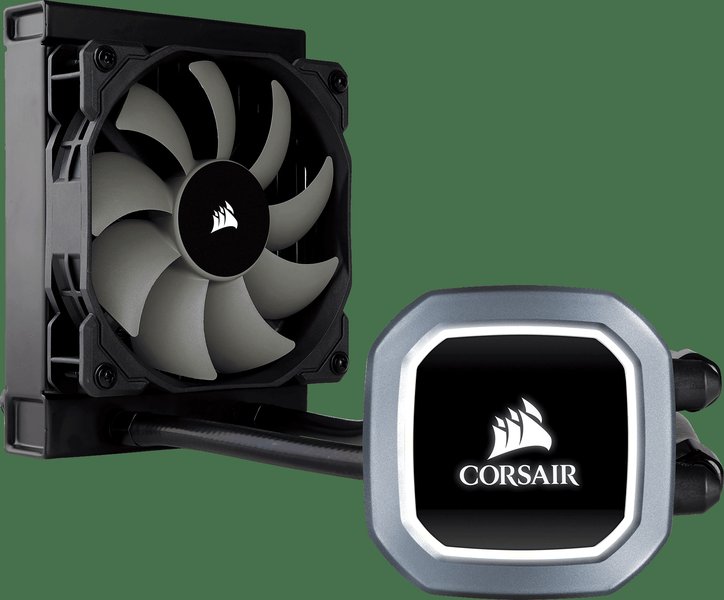
A modern Corsair 120mm AIO, such as the H60 series, illustrating the compact form factor you're looking for.
Top Picks at a Glance: Key Highlights
- Embrace New Features: Many modern 120mm AIOs now include innovative features like dedicated VRM cooling fans on the CPU block, enhancing overall system stability.
- Performance & Acoustics: Newer models often deliver improved thermal performance while operating more quietly than older generation AIOs like the H80i v2, thanks to advancements in pump and fan technology.
- Radiator Reality: While few 120mm AIOs match the H80i v2's 49mm radiator thickness, some achieve comparable or better cooling through highly efficient, albeit thinner, radiators (e.g., 38mm) combined with superior fan designs.
Critical Factors When Choosing Your Next 120mm AIO
Selecting the right replacement involves more than just matching the 120mm fan mount. Here are key aspects to consider:
Radiator Dimensions: More Than Just 120mm
The Significance of Radiator Thickness
The Corsair H80i v2's 49mm radiator thickness was its defining feature, providing a larger surface area for heat dissipation compared to standard 27mm-30mm thick 120mm radiators. When looking for a replacement, if you can't find a similarly thick radiator, ensure the chosen AIO compensates with other design aspects like high-efficiency fins, a powerful pump, or exceptional fans to achieve your desired cooling level. Some high-performance 38mm thick radiators can come very close or even exceed the performance of older 49mm designs due to technological advancements.
Fan Configuration and Quality: The Air Movers
Dual Fans vs. Single: The Push-Pull Advantage
Your H80i v2 included two fans for an immediate push-pull setup, maximizing airflow through its thick radiator. Many current 120mm AIOs ship with a single fan, though they often support adding a second. If opting for a model with one fan, ensure it's a high-static pressure model designed for radiator use. If you select an AIO with a thinner radiator, a single high-quality fan might suffice, but for thicker radiators (38mm+), a push-pull configuration is generally recommended for optimal performance.
Noise vs. Performance: Finding the Sweet Spot
The stock SP120L fans on the H80i v2 were effective but could be noisy under load, and some users reported bearing issues over time. Modern AIOs often feature fans with improved blade designs and bearing technology (like Fluid Dynamic Bearings) that offer a better balance of airflow, static pressure, and quiet operation. Look for reviews that specifically comment on noise levels at various RPMs.
Cooling Performance: Keeping Your CPU Chill
Beyond Raw Cooling: VRM and Component Cooling
A significant innovation in some newer AIOs, particularly from brands like ARCTIC and Enermax, is the inclusion of a small fan on the CPU water block housing. This fan directs airflow over the motherboard's Voltage Regulator Modules (VRMs) and surrounding components like RAM. This can be especially beneficial in compact cases with limited airflow or for systems with power-hungry CPUs, contributing to better system stability and longevity.
Socket Compatibility and Case Clearance: Ensuring a Perfect Fit
Verify that any potential replacement is compatible with your CPU socket (e.g., Intel LGA1700/1200/115x, AMD AM4/AM5). Also, double-check the overall dimensions (radiator plus fans) against your case's clearance, especially if considering a push-pull setup, to ensure it will fit without interference.
Software Ecosystem and Aesthetics: Personal Touches
If you appreciated the Corsair iCUE software for controlling your H80i v2's lighting and performance, you might prefer staying within the Corsair ecosystem with a model like the H60x RGB Elite. Other brands have their own software (e.g., NZXT CAM) or rely on motherboard RGB sync for lighting control. Consider your preferences for RGB lighting and software integration.
Top Contenders: Modern 120mm AIOs to Surpass Your H80i v2
Here are some of the best 120mm AIO coolers available as of May 2025 that offer specifications and performance profiles capable of matching or exceeding your Corsair H80i v2:
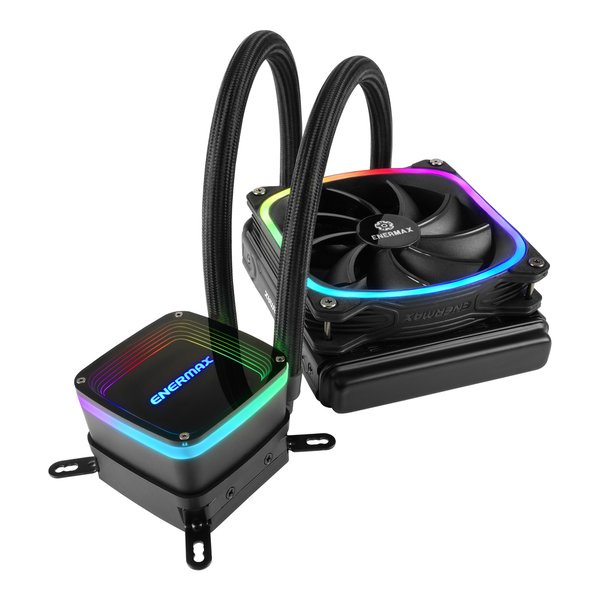
The Enermax AQUAFUSION 120, an example of a modern 120mm AIO with RGB lighting and advanced features.
ARCTIC Liquid Freezer II 120 / Liquid Freezer III 120
The ARCTIC Liquid Freezer series is consistently lauded for its exceptional performance-to-noise ratio and overall value. Key Features: Its radiator is typically 38mm thick, which, while thinner than the H80i v2's 49mm, is very efficiently designed. Coupled with ARCTIC's high-static pressure P-series fan(s) and an in-house developed pump, it delivers outstanding cooling. A standout feature is the small, quiet VRM fan integrated into the pump housing, which actively cools motherboard components around the CPU socket. Comparison to H80i v2: Often outperforms older 120mm AIOs, including the H80i v2, especially in noise-normalized tests. The VRM cooling is a significant advantage. The Liquid Freezer III series further refines this design. It generally comes with one fan but is optimized for push-pull if you add another.
Enermax LiqMaxFlo SR 120mm
Enermax has made a strong impression with its LiqMaxFlo series, offering robust cooling and innovative features. Key Features: This AIO also features a fan on top of the CPU block to provide airflow to the VRMs and surrounding M.2 slots. It boasts very good thermal performance with its included high-static pressure fan and an efficient radiator (around 38mm thick). It aims for a balance of strong cooling and low noise levels. Comparison to H80i v2: Considered a top performer in the 120mm AIO category, often matching or exceeding the H80i v2's thermal capabilities with potentially lower noise. The added VRM cooling is a clear upgrade.
Corsair iCUE H60x RGB Elite
If you want to stay within the Corsair ecosystem for iCUE compatibility, the H60x RGB Elite is a solid modern choice. Key Features: It features a standard thickness 120mm radiator (around 27mm) and comes with a Corsair SP120 RGB ELITE Series PWM fan. It offers good cooling performance for its size, customizable RGB lighting, and seamless integration with iCUE software for fan speed and lighting control. Comparison to H80i v2: While its radiator is thinner than the H80i v2's, its newer pump and fan technology provide efficient cooling. It will likely be quieter than the H80i v2. For raw cooling power on very high TDP CPUs, the H80i v2's thicker radiator might have an edge, but the H60x offers a more modern package with better acoustics and updated aesthetics.
Thermalright Aqua Elite 120 V3
Thermalright is known for offering high-performance cooling solutions at competitive prices, and the Aqua Elite 120 V3 continues this trend. Key Features: This AIO is praised for its excellent thermal performance, robust build quality, and appealing aesthetics, often including RGB lighting. It typically uses a standard thickness radiator and a high-performance PWM fan. Longer tubing can also aid in easier installation. Comparison to H80i v2: The Aqua Elite 120 V3 can provide comparable or better cooling than the H80i v2, often at a more attractive price point and with quieter operation. It's a strong contender if you're looking for maximum value and performance without necessarily needing specific software integration.
Be Quiet! Pure Loop 120mm
For users prioritizing silent operation without sacrificing too much performance, the Be Quiet! Pure Loop 120mm is an excellent candidate. Key Features: It features a decoupled pump to minimize vibrations and noise, along with a Pure Wings 2 PWM fan known for its quiet operation. The radiator is typically standard thickness. It also has an easy-to-access refill port for long-term maintenance. Comparison to H80i v2: It generally offers very competitive cooling performance for a 120mm AIO, with a primary focus on being one of the quietest options available. It may not have the absolute peak cooling of the thickest radiators but excels in acoustic performance.
Feature Comparison: 120mm AIO Cooler Showdown
To help visualize how these modern AIOs stack up against your H80i v2 and each other, the radar chart below provides an opinionated comparison across several key metrics. "Cooling Capacity" reflects raw thermal dissipation, "Quietness" indicates lower noise output (higher is better), "Radiator Impact" considers the radiator's design contribution (thickness and efficiency), "Fan Quality" assesses the included fan(s), "VRM Cooling" notes the presence of dedicated VRM cooling, and "Software & RGB" reflects the extent of software control and lighting features.
Navigating Your Upgrade Path: A Visual Guide
The mindmap below illustrates the key considerations and potential pathways when choosing a replacement for your Corsair H80i v2. It highlights the features of your old cooler, critical factors for your new purchase, and some of the top recommended alternatives along with their defining characteristics.
Baseline Specs"] idH80iRad["120mm Radiator
(Extra-Thick: 49mm)"] idH80iFans["Dual SP120L PWM Fans
(Push-Pull Configuration)"] idH80iSoftware["Corsair iCUE Integration
(Control & RGB)"] idConsider["Key Replacement Considerations"] idConsiderDim["Dimensions & Case Fit
(Radiator + Fans)"] idConsiderPerf["Cooling Performance Needs
(CPU TDP, Overclocking)"] idConsiderNoise["Acoustic Performance
(Quiet Operation Priority)"] idConsiderFeat["Advanced Features
(e.g., VRM Cooling)"] idConsiderEco["Software & RGB Ecosystem
(Preference for iCUE, etc.)"] idConsiderBudget["Budget Allocation"] idRecs["Top 120mm AIO Alternatives"] idArctic["ARCTIC Liquid Freezer II/III 120"] idArcticFeat["Efficient 38mm Radiator
Excellent P-Series Fan(s)
Integrated VRM Fan
Superb Noise/Performance"] idEnermax["Enermax LiqMaxFlo SR 120"] idEnermaxFeat["Strong Cooling Performance
Integrated VRM Fan
Good Fan Quality"] idCorsairNew["Corsair H60x RGB Elite"] idCorsairNewFeat["Modern Corsair Option
iCUE Compatibility
Good Aesthetics & RGB"] idThermalright["Thermalright Aqua Elite 120 V3"] idThermalrightFeat["Great Value Proposition
Solid Thermal Performance
Often Includes RGB"] idBeQuiet["Be Quiet! Pure Loop 120mm"] idBeQuietFeat["Emphasis on Silent Operation
Decoupled Pump
Refillable Loop"] idNewTech["Notable Advancements in Modern AIOs"] idNewTechVRM["Dedicated VRM Cooling Fans"] idNewTechFans["Quieter, More Efficient Fans
(e.g., FDB Bearings)"] idNewTechPumps["Improved Pump Designs
(Higher Flow, Lower Noise)"] idNewTechRad["Optimized Radiator Fin Density"]
Specification Overview: H80i v2 vs. Top Alternatives
This table provides a comparative glance at the key specifications of your Corsair H80i v2 against some of the leading 120mm AIO replacement options. Note that "Est. Performance" is a general indicator relative to other 120mm AIOs.
| Feature | Corsair H80i v2 (Baseline) | ARCTIC Liquid Freezer II/III 120 | Enermax LiqMaxFlo SR 120 | Corsair H60x RGB Elite | Thermalright Aqua Elite 120 V3 |
|---|---|---|---|---|---|
| Radiator Size (mm) | 120 | 120 | 120 | 120 | 120 |
| Radiator Thickness (mm) | 49 (Extra-Thick) | 38 (Thick & Efficient) | ~38 (Thick & Efficient) | ~27 (Standard) | ~27 (Standard, check specific model) |
| Included Fans | 2x 120mm SP120L PWM (Push-Pull) | 1x 120mm P-Series PWM (Supports Push-Pull) | 1x 120mm High-Performance PWM (Supports Push-Pull) | 1x 120mm SP RGB Elite PWM (Supports Push-Pull) | 1x 120mm TL-Series PWM (Supports Push-Pull) |
| VRM Cooling Fan | No | Yes | Yes | No | No |
| Software Control | Corsair iCUE | PWM Controlled (RGB via MB/Controller for some III versions) | PWM Controlled (RGB via MB/Controller) | Corsair iCUE | PWM Controlled (RGB via MB/Controller) |
| Typical Noise Level | Moderate to High | Very Low | Low to Moderate | Low | Low to Moderate |
| Est. Performance Rank (120mm class) | Good | Excellent | Excellent | Good | Very Good |
Expert Insights: 120mm AIOs in Action
The debate around the effectiveness of 120mm AIO coolers versus larger AIOs or high-end air coolers is ongoing. While they might not always top the absolute performance charts, modern 120mm AIOs offer a compelling solution for compact builds, specific aesthetic goals, or when direct air cooling of surrounding motherboard components is desired (as with models featuring VRM fans). The following video discusses the capabilities and common perceptions of 120mm AIOs, providing valuable context for your decision:
Video discussing the performance and viability of 120mm AIO CPU coolers.
Frequently Asked Questions (FAQ)
Is a 120mm AIO cooler sufficient for modern high-end CPUs?
What is VRM cooling on an AIO, and why is it beneficial?
Can I reuse my old Corsair H80i v2 fans on a new AIO?
How critical is radiator thickness for a 120mm AIO's performance?
How do I ensure a new 120mm AIO will fit my case and CPU socket?
Conclusion: Making the Right Choice for Your Build
Replacing your Corsair H80i v2 opens the door to leveraging the advancements in AIO cooling technology. While its 49mm thick radiator set a high bar for 120mm coolers, options like the ARCTIC Liquid Freezer II/III 120 and Enermax LiqMaxFlo SR 120 (with their 38mm radiators and innovative VRM cooling) offer compelling performance and features that can match or even surpass it, particularly in acoustics and overall system component cooling. If iCUE integration is paramount, the Corsair H60x RGB Elite is a worthy successor. Ultimately, the best choice will depend on your specific priorities regarding raw cooling power, noise levels, additional features like VRM cooling, and software ecosystem preference. Carefully consider the factors discussed and the specifications of each model to select an AIO that will keep your CPU cool for years to come.
Further Exploration: Recommended Queries
- What are the best performing 120mm AIO coolers for CPU overclocking?
- How do AIO coolers with VRM fans compare in real-world motherboard temperature reduction?
- Which 120mm AIO CPU coolers offer the best balance of silence and cooling performance?
- Should I consider upgrading to a 240mm AIO instead of another 120mm AIO if my case supports it?
References

Last updated May 21, 2025