
Caught a Phishing Scam? Here's Your Quick Guide to Reporting It!
Learn the essential steps to report suspicious emails, texts, and websites to protect yourself and others from cyber threats.
Phishing scams are deceptive attempts by fraudsters to steal your sensitive information, such as login credentials, credit card numbers, or personal identification details. They often arrive disguised as legitimate communications from banks, companies, or even government agencies. Reporting these attempts is a crucial step in combating cybercrime. Here’s a brief guide on how to do it effectively.
Key Reporting Highlights
Your First Line of Defense
- Forward Emails to Anti-Phishing Experts: Send suspicious emails directly to the Anti-Phishing Working Group at reportphishing@apwg.org. They collaborate globally to shut down scams.
- Notify Government Agencies: Report fraud, including phishing, to the Federal Trade Commission (FTC) via ReportFraud.ftc.gov and the FBI's Internet Crime Complaint Center at IC3.gov.
- Use Built-In Email Tools: Most email providers (like Gmail, Outlook, Yahoo) have simple "Report Phishing" buttons to flag malicious messages directly within the platform.
Before You Report: Immediate Actions
Handle Suspicious Messages Safely
Resist the Urge to Engage
First and foremost, do not click any links, download attachments, or reply to the suspicious message. Engaging with the content can trigger malware installation, confirm your email address is active, or lead you to fake login pages designed to steal your credentials.
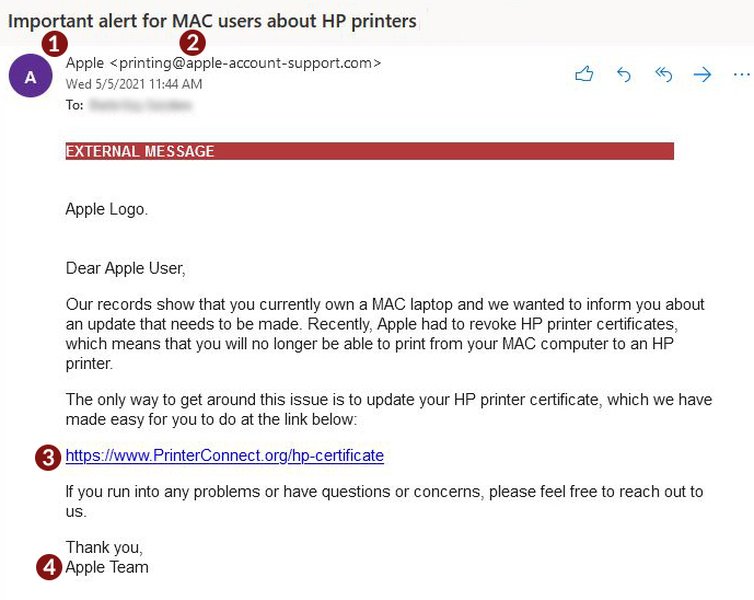
Example of a common phishing email impersonating a known brand.
Preserve the Evidence
To help investigators, keep the original message. If it's an email, forward it rather than just copying the text, as forwarding often preserves crucial header information that reveals the sender's true origin. For text messages (smishing), take a screenshot.
Verify Authenticity (If Necessary)
If you suspect a message might be legitimate but seems unusual, contact the supposed sender through a known, official channel (like their official website or customer service number), not by using the contact information provided in the suspicious message.
Where and How to Report Phishing Attempts
Choosing the Right Channels
Reporting options depend on the type of phishing attempt (email, text, website) and who is being impersonated. Here are the primary methods:
1. Reporting Phishing Emails
- Anti-Phishing Working Group (APWG): Forward the complete email (including headers) to
reportphishing@apwg.org. The APWG is a global coalition that uses these reports to fight phishing. This is a highly recommended step. - Your Email Provider:
- Gmail: Open the email, click the three vertical dots ('More') next to the reply button, and select "Report phishing."
- Outlook/Microsoft 365: Select the message, go to the "Report" button in the ribbon (or the three dots menu), and choose "Report Phishing."
- Yahoo Mail: Open the email, click the three horizontal dots, and select "Report phishing."
- The Impersonated Organization: If the email pretends to be from a specific company (e.g., your bank, Netflix, Amazon), visit that company's official website and look for instructions on how to report phishing or fraud. Do not use any links or contact details from the suspicious email itself.
- Your Employer's IT/Security Department: If you received the phishing email on your work account, follow your company's internal procedures for reporting suspicious emails, usually by forwarding it to your IT or security team.
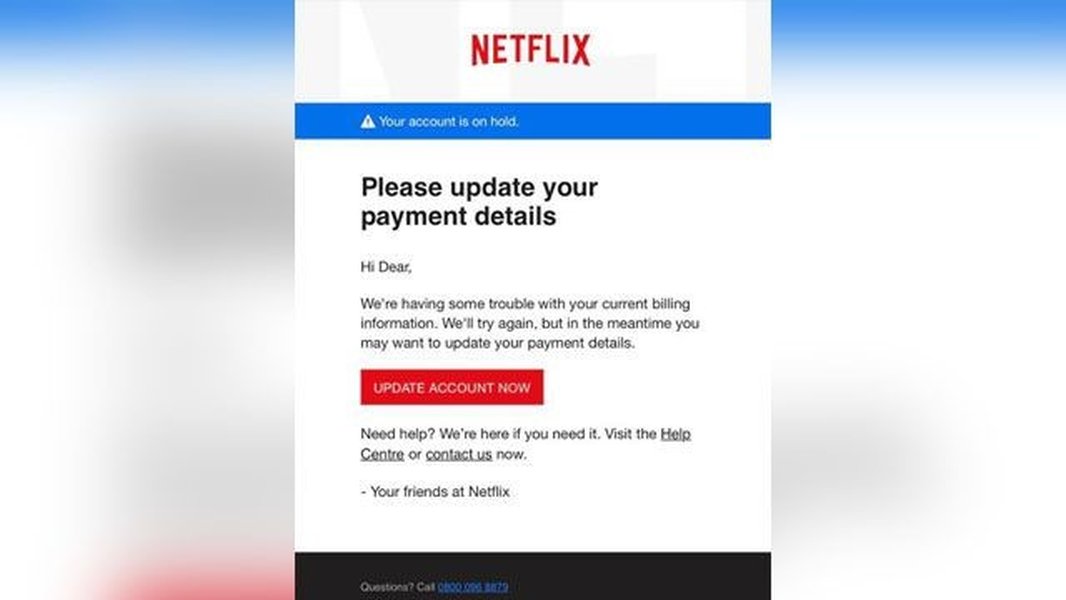
Phishing emails often create a sense of urgency, like this fake Netflix notification.
2. Reporting Phishing Text Messages (Smishing)
- Forward to 7726 (SPAM): Forward the suspicious text message to the short code
7726(which spells SPAM). This works for most major carriers in the US, Canada, and the UK. Your carrier will use this information to help block future scam texts. - Report to the FTC: You can also report smishing attempts at ReportFraud.ftc.gov.
3. Reporting Phishing Websites
- Google Safe Browsing: If you encounter a website you believe is designed to steal information, report it to Google Safe Browsing here: https://safebrowsing.google.com/safebrowsing/report_phish/. This helps get the site flagged as malicious in web browsers, protecting others.
- Browser Reporting Tools: Many web browsers also have built-in options to report suspicious websites, often found in the help or security menus.
4. Reporting to Government Agencies
- Federal Trade Commission (FTC): Report the phishing attempt at ReportFraud.ftc.gov. The FTC uses reports to build cases against scammers.
- FBI's Internet Crime Complaint Center (IC3): Report cybercrimes, including phishing, especially if it involves financial loss or significant impersonation, at IC3.gov.
- Cybersecurity and Infrastructure Security Agency (CISA): Report phishing via their website (cisa.gov/report), particularly if it seems targeted or related to critical infrastructure.
- Internal Revenue Service (IRS): If the phishing attempt impersonates the IRS, forward the email to
phishing@irs.gov. - Action Fraud (UK): If you are in the UK, forward phishing emails to
report@phishing.gov.uk.
Visualizing Reporting Effectiveness
Comparing Different Reporting Avenues
Choosing where to report can depend on factors like ease of use, potential impact, and the type of scam. This chart provides a comparative overview based on general effectiveness, though individual results may vary. Higher scores indicate better performance in that category.
Mapping the Reporting Process
A Visual Overview of Phishing Response
Understanding the flow of reporting a phishing attempt can make the process clearer. This mindmap outlines the typical stages from identifying a threat to taking appropriate action and following up.
Summary of Key Reporting Contacts
Quick Reference Table
This table summarizes the primary contacts and platforms for reporting various types of phishing attempts:
| Reporting Method | Contact / Link | Best For | Notes |
|---|---|---|---|
| Anti-Phishing Working Group (APWG) | Forward email to reportphishing@apwg.org |
General phishing emails | Global effort; forward the full email. |
| Federal Trade Commission (FTC) | ReportFraud.ftc.gov | General phishing, smishing, fraudulent websites | Collects data for law enforcement action. |
| FBI Internet Crime Complaint Center (IC3) | IC3.gov | Cybercrime involving financial loss, significant impersonation | Central hub for reporting internet crimes in the U.S. |
| Email Provider Tools | Built-in "Report Phishing" button (Gmail, Outlook, etc.) | Phishing emails received in your inbox | Quick and helps improve spam filters. |
| Google Safe Browsing | Google Safe Browsing Report Page | Malicious/phishing websites | Helps get harmful sites flagged in browsers. |
| Smishing Reporting Code | Forward text to 7726 (SPAM) |
Phishing text messages | Reports to mobile carriers (US, UK, Canada). |
| IRS Phishing | Forward email to phishing@irs.gov |
Emails impersonating the IRS | Specific channel for tax-related scams. |
| Action Fraud (UK) | Forward email to report@phishing.gov.uk |
Phishing emails (UK specific) | UK's national reporting centre for fraud and cyber crime. |
Understanding Phishing Reporting Visually
Video Guide: Staying Safe
For a visual explanation of how to identify and report phishing attempts, the following video provides useful insights and practical steps to protect your data.
This video covers key aspects of recognizing scam attempts and walks through the reporting process, reinforcing the importance of vigilance and prompt action in combating cyber threats.
What Happens After You Report?
The Impact of Your Report
While you might not receive a personal response after reporting a phishing attempt, your report contributes significantly to broader cybersecurity efforts:
- Disruption of Scams: Reports help organizations like APWG, FTC, and IC3 identify and track phishing campaigns. This information can lead to the shutdown of fraudulent websites, blocking of malicious email domains, and disabling of phone numbers used for smishing.
- Improved Security Filters: Reporting phishing emails to your provider (Gmail, Outlook) helps train their algorithms to better detect and filter similar threats in the future, protecting all users.
- Law Enforcement Action: Aggregated data from reports can provide evidence for investigations and legal actions against cybercriminals.
- Public Awareness: Reporting helps authorities and security companies understand emerging threats and issue warnings to the public.
After reporting, it's safe to delete the phishing message from your inbox or phone to avoid accidental interaction later.
If You Accidentally Engaged or Lost Information
Immediate Steps to Mitigate Damage
If you clicked a link, downloaded an attachment, or provided sensitive information:
- Change Your Passwords: Immediately change the password for any account potentially compromised, as well as any other accounts using the same password.
- Run Antivirus Software: Scan your device with reputable security software to check for malware.
- Contact Financial Institutions: If you shared financial details (bank account, credit card), contact your bank or card issuer immediately to report potential fraud and discuss blocking transactions or getting a new card/account number.
- Monitor Your Accounts: Keep a close eye on your bank statements, credit card activity, and online accounts for any unauthorized transactions or changes.
- Consider a Fraud Alert or Credit Freeze: Contact one of the three major credit bureaus (Equifax, Experian, TransUnion) to place a fraud alert on your credit file. This makes it harder for someone to open new accounts in your name. A credit freeze offers even stronger protection.
- Report the Incident: In addition to reporting the phishing attempt itself, report the identity theft or financial loss to the FTC at IdentityTheft.gov and potentially local law enforcement.
Frequently Asked Questions (FAQ)
Quick Answers on Phishing Reporting
Which reporting method is the most effective?
There isn't one single "most effective" method, as different channels serve different purposes. For broad impact and data sharing, reporting to APWG (reportphishing@apwg.org) and the FTC (ReportFraud.ftc.gov) is highly recommended. For immediate filtering improvements, using your email provider's "Report Phishing" button is very effective. Reporting phishing websites to Google Safe Browsing helps protect other internet users quickly. It's often best to report through multiple relevant channels if possible.
Does reporting phishing actually make a difference?
Yes, absolutely. While it might feel like a small action, each report contributes to a larger pool of data used by security organizations, email providers, and law enforcement. This data helps identify trends, block malicious sites and emails, improve security filters, and ultimately disrupt criminal operations. Your report is a valuable piece of the puzzle in the collective fight against cybercrime.
What should I do if I already clicked a link or gave information?
If you clicked a link, run an antivirus scan immediately. If you provided login credentials, change your password for that account and any others using the same password right away. If you shared financial information, contact your bank or credit card company immediately to report fraud and block your accounts/cards. Monitor your accounts closely and consider placing a fraud alert on your credit report. Report the incident to the FTC at IdentityTheft.gov.
Is it necessary to report every single spam email I receive?
While reporting every piece of junk mail isn't necessary, it's highly encouraged to report messages that are clearly deceptive and attempting to steal information (phishing), rather than just unwanted advertising (spam). Using your email provider's "Report Spam" or "Report Phishing" buttons is generally sufficient for routine unwanted mail and helps train filters. Focus your external reporting efforts (like to APWG or FTC) on clear phishing attempts that impersonate legitimate entities or ask for sensitive data.
Recommended Reading
Explore Further
- How can I reliably identify phishing emails and websites?
- What specific actions does the FTC take after receiving a phishing report?
- What are the steps to protect my identity if I suspect it was compromised by phishing?
- How do smishing scams work and how can I protect my mobile device?
References
Sources Used
Last updated April 26, 2025