
Unlock the Secrets: Turning Off Your 2001 BMW Z3's Engine Warning Light
A comprehensive guide to diagnosing and resetting the check engine light on your classic roadster.
The "Check Engine" or "Service Engine Soon" light illuminating on your 2001 BMW Z3 Roadster's dashboard can be concerning. While your first instinct might be to simply turn it off, this light is your car's way of telling you something needs attention. Ignoring it can mask potentially serious problems. This guide provides a detailed walkthrough on how to properly diagnose the cause and reset the light, ensuring your Z3 stays healthy and performs optimally.
Essential Insights: Key Takeaways
- Diagnose Before Resetting: The engine light signifies a detected fault. Always use an OBD-II scanner to read the Diagnostic Trouble Codes (DTCs) before attempting any reset. This identifies the root cause.
- OBD-II Scanner is Best: Using an On-Board Diagnostics II (OBD-II) scanner is the most reliable and recommended method to accurately read fault codes and reset the light after repairs are completed.
- Address the Root Cause: Simply clearing the light without fixing the underlying issue (e.g., a loose gas cap, faulty sensor) will likely result in the light reappearing shortly after. Proper repair is crucial.
Understanding the Check Engine Light
Why is the Light On?
The Check Engine Light (CEL), often labeled "Service Engine Soon" (SES) on BMWs like your 2001 Z3, is part of the vehicle's On-Board Diagnostics (OBD-II) system. When the Engine Control Unit (ECU) detects a problem within the engine, transmission, fuel system, or emissions system that could affect performance or emissions, it stores a specific Diagnostic Trouble Code (DTC) and illuminates the light to alert the driver.
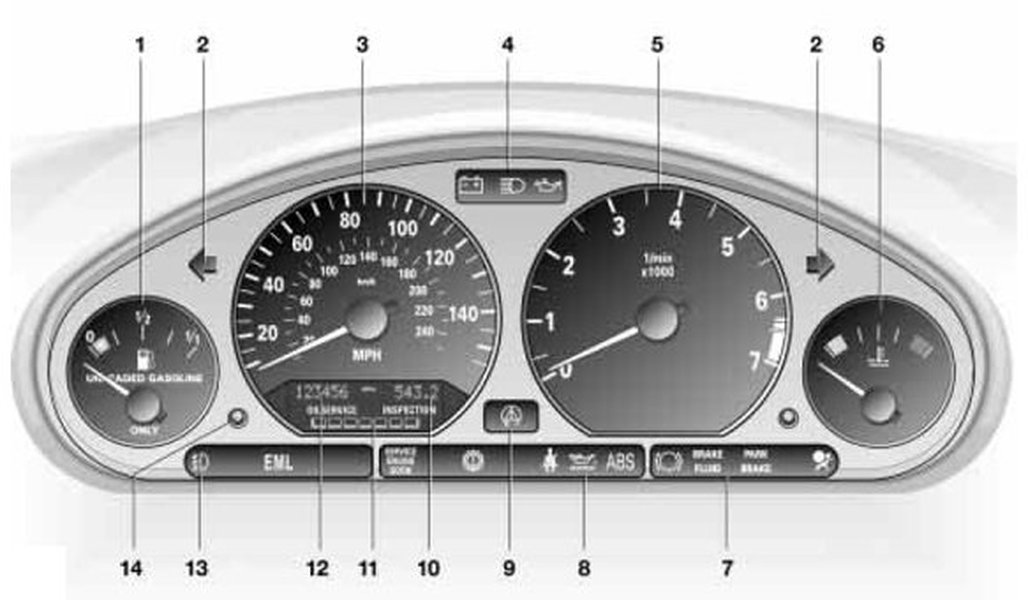
Typical BMW dashboard warning lights, including the Check Engine / Service Engine Soon symbol.
Common Triggers for the Light on a BMW Z3:
- Loose or Faulty Gas Cap: A surprisingly common cause. If the cap isn't sealing properly, it can trigger an evaporative emissions system code.
- Oxygen (O2) Sensor Failure: These sensors monitor exhaust gases and help regulate fuel mixture. Failure can impact fuel economy and emissions.
- Mass Airflow (MAF) Sensor Issues: Measures the amount of air entering the engine. A dirty or faulty MAF sensor can cause running problems.
- Spark Plug or Ignition Coil Problems: Leading to engine misfires, which the ECU will detect.
- Catalytic Converter Issues: A more serious problem, often resulting from unaddressed misfires or sensor issues.
- Vacuum Leaks: Cracked or disconnected vacuum hoses can disrupt the air-fuel mixture.
- Thermostat Malfunction: Affecting engine operating temperature.
Steady vs. Flashing Light: What's the Difference?
It's crucial to distinguish between a steady and a flashing check engine light:
- Steady Light: Indicates a less urgent fault has been detected. You should get the vehicle checked soon, but it's generally safe to drive moderately.
- Flashing Light: Signals a severe problem, often a significant engine misfire, that could quickly damage expensive components like the catalytic converter. If the light is flashing, reduce speed, avoid heavy acceleration, and get the vehicle inspected immediately. Do not continue driving if possible.
Step-by-Step Guide to Turning Off the Light
Step 1: Diagnose the Problem (Don't Skip This!)
Before attempting any reset, you MUST find out why the light came on. This requires reading the Diagnostic Trouble Codes (DTCs) stored in the ECU.
Using an OBD-II Scanner:
- Locate the OBD-II Port: In your 2001 BMW Z3, the port is usually located under the dashboard on the driver's side, near the steering column or pedals. It's a standardized 16-pin connector.
- Connect the Scanner: Purchase or borrow an OBD-II scanner (many affordable options exist online, or auto parts stores like AutoZone often offer free scanning services). Plug the scanner into the port.
- Read the Codes: Turn the ignition key to the "On" position (position 2, where dashboard lights illuminate) but do *not* start the engine. Follow the scanner's instructions to read the stored fault codes.
- Interpret the Codes: The scanner will display codes (e.g., P0301 for Cylinder 1 Misfire, P0442 for Small Evaporative Emission System Leak). Note these codes down. You can look them up online or consult a repair manual specific to BMWs to understand the potential issue.
Understanding the code is vital for performing the correct repair.

Connecting an OBD-II scanner is essential for diagnosing the check engine light.
Step 2: Address the Underlying Issue
Once you have the diagnostic code(s), perform the necessary repairs. This could range from simple fixes like tightening the gas cap or replacing an air filter, to more involved tasks like changing an oxygen sensor or ignition coil. If you are not comfortable performing the repair yourself, take the diagnostic information to a qualified mechanic, preferably one experienced with BMWs.
Step 3: Reset the Check Engine Light (After Repair)
After the underlying problem has been fixed, you can clear the light from the dashboard. Here are the common methods:
Method 1: Using the OBD-II Scanner (Recommended)
This is the most direct and safest way to clear the light and the stored codes.
- Connect the OBD-II scanner as described in Step 1.
- Turn the ignition to the "On" position (engine off).
- Navigate the scanner's menu to the option for "Clear Codes," "Erase Codes," or "Reset MIL" (Malfunction Indicator Lamp).
- Confirm the action. The check engine light should turn off immediately.
- Turn the ignition off, remove the scanner, and then start the engine to verify the light stays off.
Method 2: Disconnecting the Battery (Alternative)
This method forces a reset of the ECU by cutting its power supply. However, it's less precise and has drawbacks.
- Turn off the ignition completely and remove the key.
- Open the hood and locate the battery (typically in the engine bay or trunk on BMWs).
- Using an appropriate wrench (often 10mm), carefully loosen and disconnect the **negative (-) battery terminal** (usually black or marked with "-"). Ensure the disconnected cable cannot accidentally touch the terminal again.
- Wait for about 15-30 minutes. Some sources suggest as little as 30-60 seconds, but a longer duration ensures volatile memory is cleared.
- Reconnect the negative terminal securely and tighten the clamp.
- Start the car. The check engine light should be off.
Caveats: Disconnecting the battery will reset not only the check engine light but also other electronic modules, including radio presets, clock, trip odometer, and potentially adaptive settings for the transmission or throttle. The light might still reappear if the underlying fault wasn't fully resolved or if the ECU needs to complete its self-tests (drive cycles).
Method 3: Drive Cycles (Automatic Reset)
For some minor or intermittent issues (like a previously loose gas cap that's now tight), the check engine light might turn off on its own after the ECU completes a specific number of "drive cycles" without detecting the fault again. A drive cycle typically involves starting the car, driving it under various conditions (city/highway speeds), and shutting it off. This can take several trips over a few days. However, relying on this method isn't recommended for persistent lights.
Visualizing the Reset Process
Mindmap Overview
This mindmap illustrates the logical flow for addressing the check engine light warning on your BMW Z3:
(Warning, Check Soon)"] id1b["Flashing Light
(Severe! Stop Driving, Immediate Check Needed!)"] id2["2. Diagnose Problem (CRUCIAL!)"] id2a["Use OBD-II Scanner"] id2a1["Connect to Port (Under Dash)"] id2a2["Ignition ON (Engine OFF)"] id2a3["Read Fault Codes (DTCs)"] id2a4["Interpret Codes (Identify Issue)"] id2b["Common Z3 Causes"] id2b1["Loose Gas Cap"] id2b2["O2 Sensor"] id2b3["MAF Sensor"] id2b4["Misfires (Plugs/Coils)"] id2b5["Vacuum Leak"] id2b6["Catalytic Converter"] id3["3. Repair Underlying Issue"] id3a["DIY Repair (If Capable)"] id3b["Professional Mechanic (Recommended for Complex Issues)"] id4["4. Reset Light (AFTER Repair!)"] id4a["OBD-II Scanner (BEST Method)"] id4a1["Select 'Clear Codes' / 'Reset MIL'"] id4b["Battery Disconnect (Alternative)"] id4b1["Disconnect NEGATIVE (-) Terminal (15-30 min)"] id4b2["Reconnect Securely"] id4b3["Note: Resets Radio/Clock etc."] id4c["Drive Cycles (May self-clear minor issues)"] id5["5. Verify Fix"] id5a["Start Engine (Check Light OFF)"] id5b["Drive Vehicle (Monitor if Light Returns)"] id5c["If Light Returns -> Re-Diagnose / Further Repair Needed"]
This structured approach ensures you address the root cause effectively rather than just masking the symptom.
Comparing Reset Methods
Effectiveness Radar Chart
This chart compares the primary methods for dealing with the check engine light based on key factors. Note that "Ignoring the Light" is included as a baseline to highlight why it's not advisable. Scores are subjective estimations (1=Low, 5=High).
As the chart illustrates, using an OBD-II scanner after performing the necessary repairs offers the most reliable and complete solution, providing diagnostic value and ensuring the root cause is addressed.
Distinguishing Service Indicator Lights
Your BMW Z3 also has separate lights for scheduled maintenance intervals, such as "OIL SERVICE" or "INSPECTION." These are distinct from the Check Engine/Service Engine Soon light, which indicates a fault. Resetting these service indicators typically involves a different procedure, often using the trip odometer reset button or a specialized BMW reset tool.
Resetting Service Lights (Oil/Inspection):
While procedures can vary slightly, a common method for Z3s around this era involves:
- Turn the ignition key to position 1 (Accessory mode - radio on, but no dash warning lights except battery/oil pressure).
- Press and hold the trip odometer reset button on the instrument cluster.
- After about 5 seconds, the display should show "OIL SERVICE" or "INSPECTION" along with "RESET" or "RE."
- Release the button. Press and hold it again for another 5 seconds until the "RESET" message flashes.
- Release the button, then press and release it once quickly to confirm the reset. The new service interval should appear.
- Turn off the ignition.
Note: Some sources indicate that for certain Z3 models or specific resets, a dedicated BMW service reset tool plugging into the diagnostic port under the hood might be necessary. If the trip button method doesn't work for your service light, this might be the case.
This video demonstrates an oil change and service light reset process relevant to BMW Z3 models, potentially using methods applicable to your car.
The embedded video provides a visual guide for an oil change and service light reset on a related BMW Z3 M model. While specific steps might vary slightly for your 2001 Z3, the general principles of locating components and the potential need for specific reset procedures are well illustrated. It shows both the maintenance task and the subsequent indicator reset, emphasizing that these are often linked.
Common BMW Z3 Fault Codes and Solutions
Here's a table summarizing some common issues that trigger the Check Engine Light on a BMW Z3 and typical solutions. Remember, these are general guidelines; accurate diagnosis with an OBD-II scanner is essential.
| Common DTC Code(s) | Potential Problem Area | Common Causes | Possible Solutions |
|---|---|---|---|
| P0440, P0442, P0455, P0456 | Evaporative Emission (EVAP) System Leak | Loose/faulty gas cap, cracked EVAP hoses, faulty purge valve or canister | Tighten/replace gas cap, inspect hoses for cracks/leaks, test/replace valves/canister |
| P0171, P0174 | System Too Lean (Bank 1 / Bank 2) | Vacuum leak (intake manifold gasket, hoses), faulty MAF sensor, low fuel pressure, faulty O2 sensor | Inspect for vacuum leaks (smoke test), clean/replace MAF sensor, check fuel pressure, test/replace O2 sensors |
| P0172, P0175 | System Too Rich (Bank 1 / Bank 2) | Faulty MAF sensor, leaking fuel injector, faulty fuel pressure regulator, faulty O2 sensor | Test/replace MAF sensor, check fuel injectors, test fuel pressure regulator, test/replace O2 sensors |
| P0300, P0301-P0306 | Random or Specific Cylinder Misfire | Worn spark plugs, faulty ignition coil(s), faulty fuel injector(s), vacuum leak, low compression | Replace spark plugs, test/replace ignition coils, check fuel injectors, check for vacuum leaks, perform compression test |
| P0130-P0161 | Oxygen (O2) Sensor Circuit Malfunction | Faulty O2 sensor, wiring issue, exhaust leak near sensor | Test/replace O2 sensor(s), inspect wiring harness, check for exhaust leaks |
| P0420, P0430 | Catalyst System Efficiency Below Threshold (Bank 1 / Bank 2) | Failing catalytic converter, exhaust leak, faulty O2 sensors (upstream or downstream) | Check O2 sensors first, inspect for exhaust leaks, replace catalytic converter (often caused by unresolved misfires/rich conditions) |
This table provides a starting point for understanding potential issues related to specific fault codes frequently encountered on BMW Z3 models.
Frequently Asked Questions (FAQ)
Can I just ignore the Check Engine Light?
Ignoring the light is strongly discouraged. While the issue might be minor (like a loose gas cap), it could also indicate a serious problem that can lead to reduced fuel efficiency, higher emissions, poor performance, or even catastrophic engine damage if left unaddressed. A flashing light indicates a critical issue requiring immediate attention.
Will disconnecting the battery harm my 2001 Z3?
Disconnecting the battery generally won't harm the car's core systems, but it will erase temporary memory in various modules. This includes radio presets, clock settings, trip meter data, and adaptive learning values for the engine and transmission (which will relearn over time). Ensure you disconnect the negative terminal first and reconnect it last to minimize risks.
What's the difference between "Check Engine" and "Service Engine Soon"?
Functionally, for most vehicles including BMWs of this era, they mean the same thing: the OBD-II system has detected a fault. "Service Engine Soon" is simply the terminology BMW often used for the Malfunction Indicator Lamp (MIL). It is different from the "OIL SERVICE" or "INSPECTION" lights, which relate to scheduled maintenance intervals.
Do I need a special BMW scanner, or will a generic OBD-II scanner work?
A generic OBD-II scanner will work for reading standard powertrain fault codes (P-codes) and resetting the check engine light on your 2001 Z3. However, BMW-specific scanners can often access more detailed information from other vehicle modules (like ABS, airbags, transmission) and provide manufacturer-specific codes, which can be helpful for more complex diagnostics.
The light came back on after resetting. What now?
If the light returns, it means the underlying issue was either not correctly identified or not fully repaired, or a new issue has occurred. You will need to re-scan the vehicle for fault codes. Persistent or recurring issues often require more thorough diagnosis, potentially involving testing components or checking wiring, which may necessitate help from a qualified mechanic.
Recommended Next Steps & Searches
- Explore common OBD-II codes specifically for the BMW Z3 and understand what they indicate.
- Learn how to test the oxygen sensors on your 2001 BMW Z3, a frequent cause of check engine lights.
- Discover methods for performing a DIY vacuum leak test on your BMW Z3.
- Find recommendations for OBD-II scanners that offer enhanced compatibility with BMW vehicles.
References
Last updated May 5, 2025