
Creating Top-Notch Website Templates for Local Restaurants
A Comprehensive 2-Week Blueprint to Design and Launch Exceptional Restaurant Websites
Key Takeaways
- Strategic Planning: Define clear goals and requirements to ensure the website aligns with the restaurant’s brand and customer needs.
- Platform Selection: Choose the right website builder that offers customizable, restaurant-specific templates and essential features.
- Thorough Testing and Optimization: Ensure the website is fully functional, responsive, and optimized for SEO to provide an excellent user experience and enhance visibility.
Introduction
In today’s digital age, a compelling online presence is crucial for local restaurants aiming to attract and retain customers. A well-designed website not only showcases your menu and ambiance but also facilitates reservations, online orders, and customer engagement. This guide provides a detailed, step-by-step blueprint to create a top-notch website template for your local restaurant within a two-week timeline. By following these guidelines, you can ensure your website is both visually appealing and functionally robust, meeting the needs of your customers and enhancing your restaurant’s brand.
Step-by-Step Blueprint for Creating a Restaurant Website Template in 2 Weeks
Week 1: Planning and Design
Day 1-2: Define Your Goals and Requirements
Begin by outlining the primary objectives of your website. Consider the following aspects:
- Purpose: Determine whether the website’s main goal is to showcase the menu, facilitate online reservations, promote events, or a combination of these.
- Essential Features: List the necessary components such as menu display, contact information, reservation system, photo gallery, customer reviews, and social media integration.
- Target Audience: Identify your primary customers and tailor the website’s design and functionality to their preferences.
Day 3: Choose a Website Builder or Platform
Select a platform that offers restaurant-specific templates and customization options. Recommended platforms include:
- Squarespace: Renowned for its stylish and customizable templates, Squarespace is ideal for creating visually appealing websites with ease.
- Wix: Offers a user-friendly drag-and-drop interface with robust restaurant features like online ordering and reservations.
- Webflow: Provides advanced design control, making it suitable for professionals seeking highly customized results.
- WordPress: Highly flexible with a vast array of plugins, WordPress is perfect for those who require extensive customization and scalability.
- Shopify: Best suited for restaurants with a strong focus on online deliveries and e-commerce.
Day 4-5: Select a Template
Choose a template that aligns with your restaurant’s brand and offers responsive design. Key considerations include:
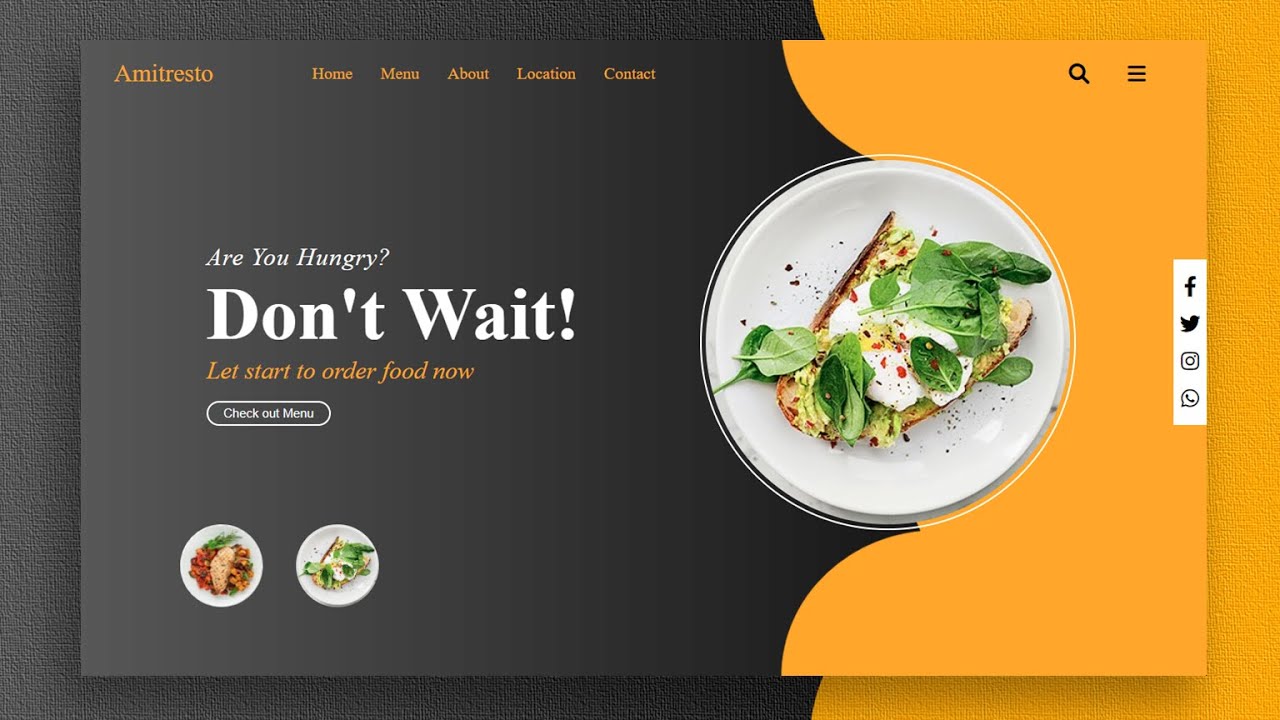
- Design Aesthetic: Look for templates that match your restaurant’s vibe, whether it's modern, rustic, minimalist, or vibrant.
- Functionality: Ensure the template supports essential features like menu display, reservation systems, and contact forms.
- Responsiveness: The template should be mobile-friendly to cater to users on various devices.
Recommended template sources:
- ThemeForest: Offers premium WordPress templates like "Grand Restaurant" and "Savory."
- Wix: Provides free, restaurant-specific templates with drag-and-drop customization.
- Canva: Features customizable templates suitable for quick setups.
- Framer: Offers professionally designed templates for modern websites.
- Astra Starter Templates: Provides over 20 free restaurant templates for WordPress users.
Day 6-7: Customize the Template
Begin tailoring the selected template to reflect your restaurant’s unique brand and offerings:
- Branding: Incorporate your logo, color scheme, and preferred fonts to maintain brand consistency.
- Visual Content: Upload high-quality images of your dishes, interior, ambiance, and team to create an inviting atmosphere.
- Content Creation: Develop compelling content for the homepage, about us section, and menu pages. Ensure the text is engaging and informative, highlighting your restaurant’s story and specialties.
Week 2: Development and Launch
Day 8-9: Integrate Essential Features
Enhance your website with functionalities that improve user experience and operational efficiency:
- Menu Section: Create a comprehensive menu page with clear categories, detailed descriptions, and pricing information.
- Reservation System: Implement an online reservation system using tools like OpenTable, Wix Bookings, or dedicated WordPress plugins.
- Location Services: Embed a Google Maps widget to help customers easily locate your restaurant.
- Social Media and Reviews: Add links to your social media profiles and integrate review widgets from platforms like Yelp and TripAdvisor to build credibility.
Day 10-11: Optimize for Mobile and SEO
Ensure your website is accessible and discoverable:
- Mobile Optimization: Verify that the website is fully responsive, providing a seamless experience across smartphones, tablets, and desktops.
- SEO Optimization: Utilize SEO tools available on platforms like Wix, Squarespace, or WordPress to optimize your site for local search terms (e.g., "best Italian restaurant in [city]"). Focus on meta titles, descriptions, alt tags for images, and keyword-rich content.
Day 12-13: Test and Review
Conduct thorough testing to ensure your website functions flawlessly:
- Functionality Testing: Check all links, forms, and interactive elements to ensure they work correctly.
- Content Review: Proofread all content to eliminate typos and ensure consistency in design elements.
- Feedback Collection: Gather constructive feedback from colleagues, friends, or potential customers to identify areas for improvement.
Day 14: Launch and Promote
Finalize your website and make it live:
-
Publishing: Use your chosen platform’s hosting services to publish the website.
-
Promotion: Share your website on social media platforms, local directories, and through email newsletters to drive traffic.
-
Advertising: Consider running targeted advertising campaigns to attract local customers and increase your restaurant’s visibility.
Recommended Platforms and Templates
Choosing the right platform is crucial for creating a functional and aesthetically pleasing website. Below is a detailed comparison of the best platforms for restaurant website templates:
| Platform | Key Features | Recommended Templates | URL |
|---|---|---|---|
| Squarespace | Stylish, highly customizable, mobile-responsive, SEO-friendly | Auburn, Pacific | Visit Squarespace |
| Wix | User-friendly drag-and-drop interface, integrated booking and ordering systems | Restaurant Templates, Bistro | Visit Wix |
| WordPress | High flexibility, extensive plugin ecosystem, scalable | Grand Restaurant, Savory, Astra Starter Templates | Visit ThemeForest |
| Webflow | Advanced design capabilities, professional-grade customization | Modern Restaurant Templates, Urban Eateries | Visit Webflow |
| Shopify | Excellent for e-commerce and online ordering, secure payment gateways | Restaurant Shopify Templates | Visit Shopify |
| Canva | Easy to use, quick customization, free templates | Restaurant Website Templates | Visit Canva |
| Framer | Professional designs, modern aesthetics, responsive layouts | Modern Restaurant Templates | Visit Framer |
| Hostinger | Affordable hosting, responsive templates, reliable performance | Restaurant Website Templates | Visit Hostinger |
| ThemeWagon | Free Bootstrap-based templates, mobile-responsive | Free Restaurant Templates | Visit ThemeWagon |
| Colorlib | SEO-friendly, mobile-responsive, modern designs | Colorlib Restaurant Templates | Visit Colorlib |
| RadiusTheme | Modern, clean designs specific to restaurants | RadiusTheme Restaurant Templates | Visit RadiusTheme |
Additional Tips for a Successful Restaurant Website
- High-Quality Visuals: Invest in professional photography to capture the essence of your restaurant. High-resolution images of your dishes, interior, and ambiance can significantly enhance the visual appeal of your website.
- Clear Navigation: Ensure that the website is easy to navigate. Use clear headings, intuitive menus, and a logical page structure to help visitors find information quickly.
- Engaging Calls-to-Action (CTAs): Incorporate compelling CTAs like “Reserve Your Table,” “Order Online,” or “Join Our Newsletter” to drive customer engagement and conversions.
- Customer Reviews and Testimonials: Displaying positive reviews and testimonials can build trust and encourage new customers to visit your restaurant.
- Social Media Integration: Link your website to your social media profiles to increase your online presence and engage with customers across multiple platforms.
- Blog or Events Page: Consider adding a blog or events page to share news, promotions, and upcoming events. This can help keep your content fresh and improve SEO.
- Secure and Fast Hosting: Choose a reliable hosting service to ensure your website loads quickly and remains secure. Slow-loading websites can deter potential customers.
- Analytics Integration: Implement analytics tools like Google Analytics to track visitor behavior, which can provide insights for continuous improvement.
Conclusion
Creating an exceptional website for your local restaurant within a two-week timeframe is entirely achievable with meticulous planning, the right tools, and a clear execution strategy. By defining your goals, selecting the appropriate platform, customizing your template, and thoroughly testing your website, you can establish a strong online presence that attracts and engages customers. Remember to focus on high-quality visuals, seamless functionality, and SEO optimization to ensure your website not only looks great but also performs exceptionally well in search engine rankings. With this comprehensive blueprint, your restaurant will be well-equipped to thrive in the competitive digital landscape.
References
- Website Builder Expert - Best Restaurant Website Builders
- ThemeForest - Restaurant Themes
- Wix - Restaurant Templates
- Canva - Restaurant Website Templates
- Webflow - Restaurant Website Templates
- BSS Commerce - Best Restaurant Website Builders
- RadiusTheme - Restaurant Website Templates
- Astra Starter Templates - Restaurant
- ThemeWagon - Free Restaurant Templates
- Colorlib - Restaurant Templates
- Website Planet - Best Restaurant Templates
Last updated January 21, 2025