
Project: Visualizing Sales Data using Histograms and Ogives for Retail Analysis
An in-depth guide to harnessing data visualization for actionable retail insights
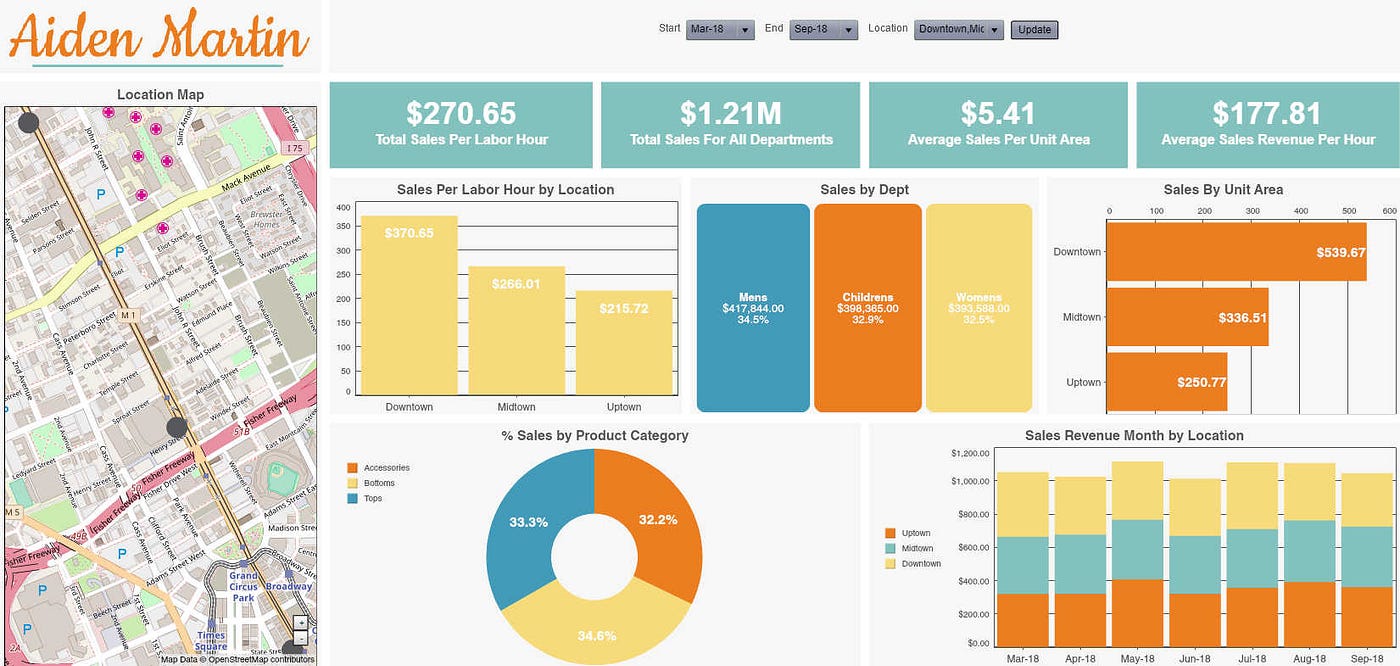
Key Takeaways
- Histograms reveal underlying sales distribution patterns – They help identify peak sales periods, data skewness, and the frequency of transactions across defined ranges.
- Ogives enable cumulative analysis – They demonstrate how sales accumulate over intervals or categories, which is essential for setting performance thresholds and detecting trends.
- Combined approach drives business insights – Integrating both visualizations translates to powerful recommendations for inventory management, marketing strategies, and sales forecasting.
Overview of the Project
This project is designed to guide you through creating visual representations of retail sales data using histograms and ogives. The main aim is to uncover and communicate actionable insights such as identifying peak sales times, understanding data distribution, understanding cumulative sales trends, and subsequently using these insights to inform business decisions.
Data visualization is a transformative approach to interpreting raw numerical data, and when applied to retail analysis, it supports strategic planning in areas like inventory optimization, promotional planning, and overall sales performance evaluation. By combining histogram analysis with ogive charts, you can enjoy a multi-faceted view of sales performance—evaluating both the individual data point distribution and the cumulative sales progression.
Project Objectives and Goals
Primary Objectives
- Data Collection & Preparation: Assemble comprehensive daily, weekly, or monthly sales data and ensure it is clean and structured.
- Histogram Analysis: Create histograms for identifying the frequency of sales transactions across various price or volume ranges.
- Ogive Construction: Plot cumulative frequency curves (ogives) to understand sales progress over time or within defined categories.
- Comparative Analysis: Compare different segments of sales data (e.g., product categories, store regions, time periods) to pinpoint trends and anomalies.
- Business Insights: Translate visual data insights into strategic business recommendations aimed at improving inventory management, refined marketing efforts, and accurate sales forecasting.
Secondary Goals
- Enhance data visualization skills using various analytical tools.
- Develop a comprehensive reporting framework integrating visualizations and narrative insights.
- Create interactive dashboards that support real-time decision-making in a retail context.
Detailed Project Steps
Step 1: Data Collection and Preparation
The foundation of an effective visualization project is robust data. Begin by collecting sales data that may encompass the following variables:
- Sales date and time
- Product or category information
- Sales revenue and quantity sold
- Store or regional information
Once you have the data, perform cleaning to remove inconsistencies, handle missing or anomalous values, and standardize data formats. Ensure date columns are correctly interpreted as datetime objects and that numerical figures are accurately formatted. Data transformation might also include generating new fields like weekly aggregates, month indicators, or derived metrics that further inform your analysis.
Key Considerations for Data Preparation
- Accuracy: Validate that data points correctly represent sales transactions.
- Consistency: Ensure all units of measure (e.g., currency, units sold) are consistent.
- Granularity: Decide on the level of detail needed—daily, weekly, or monthly—to suit your analysis.
Step 2: Exploratory Data Analysis (EDA)
Perform initial exploratory data analysis (EDA) to understand the general behavior of the sales data. This includes calculating summary statistics such as mean, median, standard deviation, and identifying trends or anomalies that may exist. Construct basic plots, including simple line charts or scatterings, to get an early view of data patterns. This step is crucial to determining the suitability of histograms and ogives for further analysis.
Exploratory Techniques
- Generate descriptive statistics for basic insights.
- Create preliminary visualizations to identify outliers and distribution shape.
- Segment data by product category or time periods to detect potential differences.
Step 3: Histogram Construction
Histograms are instrumental in examining the distribution of sales data. They present the frequency of data within specified bins—these bins could represent ranges such as sales revenue segments or transaction size ranges. To build effective histograms, consider the following aspects:
- Bin Selection: Choosing the correct bin size is critical. Too many bins might lead to an overly complex visualization, while too few could mask important data characteristics. Experiment with different bin sizes to identify the most meaningful visualization.
- Visualization Tools: Utilize popular libraries such as Python’s Matplotlib or Seaborn, Excel, or other data visualization tools to plot histograms. Each has its benefits, with programming libraries offering more customization and automation.
- Data Segmentation: Create histograms for various segments, such as different product categories or regions, to explore the distinct distributional characteristics across your retail operation.
Histograms not only provide insight into where sales cluster but also help in understanding aspects like data skewness (indicating if most transactions fall into low or high-value buckets) and variability. Using histograms, you can quickly identify if there are any unusual spikes or outliers that warrant further investigation.
Step 4: Ogive Construction
An ogive, or cumulative frequency graph, builds upon the histogram analysis by showing the running total of frequencies. That is, an ogive helps to illustrate how cumulative sales figures progress through successive bins or time periods.
- Cumulative Frequency: Calculate the cumulative frequency from your histogram data. Each point on the ogive represents a cumulative total up to that bin.
- Plotting the Ogive: Use visualization tools to plot these cumulative frequencies, highlighting significant percentiles such as 25th, 50th (median), and 75th percentiles. This can pinpoint at what point a major portion of sales accumulates.
- Comparative Analysis: Compare ogives for different segments—such as varying time periods or product types—to see the pace at which sales accumulate.
The ogive is particularly useful in determining thresholds that might trigger different business actions, such as restocking inventory once cumulative sales reach a certain level or evaluating the effectiveness of marketing campaigns during specific periods.
Step 5: Analysis and Business Insights
After creating both histograms and ogives, combine your findings to generate deeper business insights. Here are some key aspects to assess:
- Peak Sales Identification: Determine periods or events where sales significantly spike. Histograms can indicate which sales ranges are most frequent, while ogives reveal when cumulative sales surpass notable thresholds.
- Seasonal Analysis: Compare visualizations across different time frames. For example, compare holiday seasons versus non-peak periods to understand seasonal trends.
- Threshold Effects: Ogives can help pinpoint the moment when cumulative sales reach a crucial percentage, providing guidance for timely restocking or promotional efforts.
- Product Category Performance: Segment the data by product type to understand which categories drive overall sales. This can support targeted marketing efforts and refined inventory management.
By analyzing these aspects, you can derive actionable recommendations such as adjusting marketing budgets, optimizing product placement, or even rethinking inventory strategies to better align with the observed sales trends.
Step 6: Visualization Tools and Techniques
Several tools can assist in creating histograms and ogives, each with its own strengths. Below is an example of a comparative table of popular tools and their features.
| Tool | Key Features | Usage |
|---|---|---|
| Python (Matplotlib/Seaborn) | Highly customizable, supports advanced statistical plots, automation-friendly | Ideal for comprehensive analysis and scripting workflows |
| Excel | User-friendly, readily available, good for quick visualizations | Great for small datasets and interactive chart manipulation |
| Tableau/PowerBI | Interactive dashboards, robust data connectivity, visual storytelling | Useful for presenting real-time insights and sharing interactive reports |
This table emphasizes the importance of choosing the right tools based on your project scope and the complexity of the data analysis required. Using powerful libraries like Python’s visualization packages can enhance both the depth and flexibility of your visualizations.
Step 7: Presentation and Reporting
After finalizing your data visualizations and analysis, the next step is to compile a comprehensive report and presentation. This documentation should clearly explain your methodology, showcase your visualizations, and detail the insights drawn from the analysis.
- Report Compilation: Outline your data collection methods, cleaning process, visualization steps, and analytical conclusions in a well-structured report.
- Dashboard Creation: Develop interactive dashboards using tools like PowerBI, Tableau, or Python’s Dash, allowing stakeholders to explore data in real time.
- Actionable Recommendations: Conclude your report with strategic recommendations—such as inventory adjustments, targeted promotions, or updated sales strategies—that directly result from your visual findings.
- Feedback Loop: Incorporate stakeholder feedback to refine future analyses. This iterative improvement promotes a deeper understanding of market trends over time.
Step 8: Iterative Improvement and Future Enhancements
Data visualization is a dynamic process. As new sales data becomes available, iteratively refine your histograms and ogives to capture recent trends. Future enhancements might include:
- Real-Time Data Integration: Linking your visualizations to live sales data feeds to continuously monitor performance.
- Advanced Analytics: Incorporating predictive modeling and machine learning to forecast sales trends based on historical patterns.
- Interactive Tools: Developing web-based interactive visualizations that allow users to drill down into specific segments or time periods.
- Comparative Analysis: Expanding the project to include multi-dimensional comparisons, such as overlaying competitor sales data or market averages.
This continuous process of refinement ensures that your visualization techniques remain relevant and aligned with evolving business needs.
Project Implementation Strategy
Timeline and Milestones
Below is an example timeline for implementing this project, broken down into weekly milestones:
| Week | Milestone | Tasks |
|---|---|---|
| Week 1-2 | Data Collection & Cleaning | Gather retail sales data, clean inconsistencies, and preprocess data for analysis. |
| Week 3 | Exploratory Data Analysis | Generate summary statistics, perform preliminary visualizations, and refine data segmentation. |
| Week 4 | Histogram Construction | Define appropriate bin sizes and create detailed histograms for various sales metrics. |
| Week 5 | Ogive Construction | Calculate cumulative frequencies and plot ogives to illustrate sales progression. |
| Week 6 | Comparative Analysis | Segment data by product or period, compare visualizations, and derive actionable insights. |
| Week 7 | Reporting & Dashboard Development | Compile findings into a detailed report; create interactive dashboards for stakeholder review. |
| Week 8 | Iteration & Final Touches | Incorporate feedback, refine visualizations and recommendations, finalize documentation. |
Tools and Technologies Summary
For optimal results, this project should leverage a combination of data analysis tools and visualization platforms. Here’s a summary of recommended technologies:
- Data Analysis: Python with Pandas and NumPy, or Excel for simpler datasets.
- Visualization: Python libraries (Matplotlib, Seaborn), PowerBI, or Tableau for interactive dashboards.
- Reporting: Jupyter Notebook for combining code with narrative, or traditional document editors for final reporting.
Upscaling and Business Impact
Leveraging Visual Data for Strategic Advantage
Once your visualizations are in place, the insights derived can transform retail business strategies. Histograms, by offering a clear view of data distribution, immediately highlight the most common sales ranges and potential gaps in performance. Ogives supplement this by illustrating how sales accumulate over time, providing an intuitive understanding of when critical thresholds are met.
This dual-visual approach underpins several key strategic actions:
- Inventory Management: With accurate identification of peak sales intervals, businesses can better plan restocks and avoid inventory shortages.
- Marketing Strategies: Recognizing seasonal trends and identifying specific periods of high cumulative sales enables targeted promotions and advertising efforts.
- Sales Forecasting: Historical cumulative trends informed by ogives can feed into predictive models, offering improved forecasts of future sales volumes.
- Operational Efficiency: Visual insights can lead to more efficient scheduling of staff and resources during high-demand periods.
Adopting this analytical framework ultimately fosters a data-driven culture within retail organizations, where every decision is underpinned by rigorous analysis and clear visual evidence.
Expanding the Project Scope
While the initial project focuses on histograms and ogives, there is significant potential for expansion:
- Multi-variable Analysis: Integrate additional variables such as promotional events, customer demographics, or geographic data to deepen insights.
- Interactive Visualizations: Develop web-based applications that allow users to filter data by different dimensions (e.g., time period, product category) and view custom histograms and ogives.
- Predictive Analytics: Combine historical cumulative sales data with statistical modeling to predict future trends and inform strategic planning.
These enhancements not only improve the utility of the initial analysis but also elevate the strategic impact of data visualization within the retail sector.
Conclusion
In summary, this project provides a detailed roadmap for visualizing retail sales data using histograms and ogives—a combined approach that delivers both distributional and cumulative perspectives essential for modern business analytics. By meticulously preparing and segmenting the data, constructing insightful visualizations, and translating these into actionable business insights, retailers can make informed decisions that drive efficiency, profitability, and growth. The integration of histograms to assess frequency distribution with ogives to monitor cumulative performance offers a powerful framework that supports strategic planning in inventory management, marketing, and sales forecasting. This comprehensive project not only enhances data visualization skills but also reinforces the value of a data-driven approach in the competitive retail landscape.
References
- Histogram Examples - Piktochart
- Plotting Histograms in Python - GeeksforGeeks
- Histogram Examples - wpDataTables
- Ogive Graph Tutorial - Study.com
- Ogive Graph in Excel - MyExcelOnline
More
Last updated February 18, 2025