
Unlocking the Potential: What a Roslyn Code Generator Needs to Thrive
A Comprehensive Guide to Building and Utilizing C# Code Generation
Roslyn, the .NET Compiler Platform SDK, has revolutionized how developers interact with C# and Visual Basic code. Far beyond being just a compiler, Roslyn acts as a platform, exposing rich APIs that allow for in-depth code analysis, transformation, and generation. This capability to programmatically understand and manipulate code opens up immense possibilities, particularly for automating repetitive tasks and enforcing best practices through code generation.
A Roslyn code generator essentially needs several core components and an understanding of how they interact within the .NET compilation pipeline. These generators operate at compile-time, inspecting existing code and "injecting" new source files into the compilation. This means the generated code becomes part of the final assembly, providing full IntelliSense support and seamless integration.
Key Insights into Roslyn Code Generators
- Core Functionality: Roslyn code generators empower developers to automate repetitive code patterns and enhance applications by dynamically creating C# source code at compile time, reducing manual effort and potential errors.
- Integration and Lifecycle: They are designed to run as part of the project compilation, allowing access to the existing compilation's syntax trees and additional files, and their output is seamlessly integrated into the final assembly, providing full IntelliSense and build-time benefits.
- Practical Applications: From generating boilerplate code for strongly-typed IDs and smart enums to creating factories and automating observability, Roslyn source generators offer powerful solutions for metaprogramming and improving code quality and maintainability.
The Foundation: Understanding Roslyn
Roslyn as a Platform
At its heart, Roslyn transforms the C# and Visual Basic compilers from opaque black boxes into accessible platforms. This "compiler as a service" paradigm exposes the entire compilation pipeline through a set of APIs. Developers can now inspect, analyze, and even modify code at various stages, from parsing source files into syntax trees to performing semantic analysis and emitting executable assemblies. This is crucial for code generation, as it provides the necessary tools to represent and construct C# code programmatically.
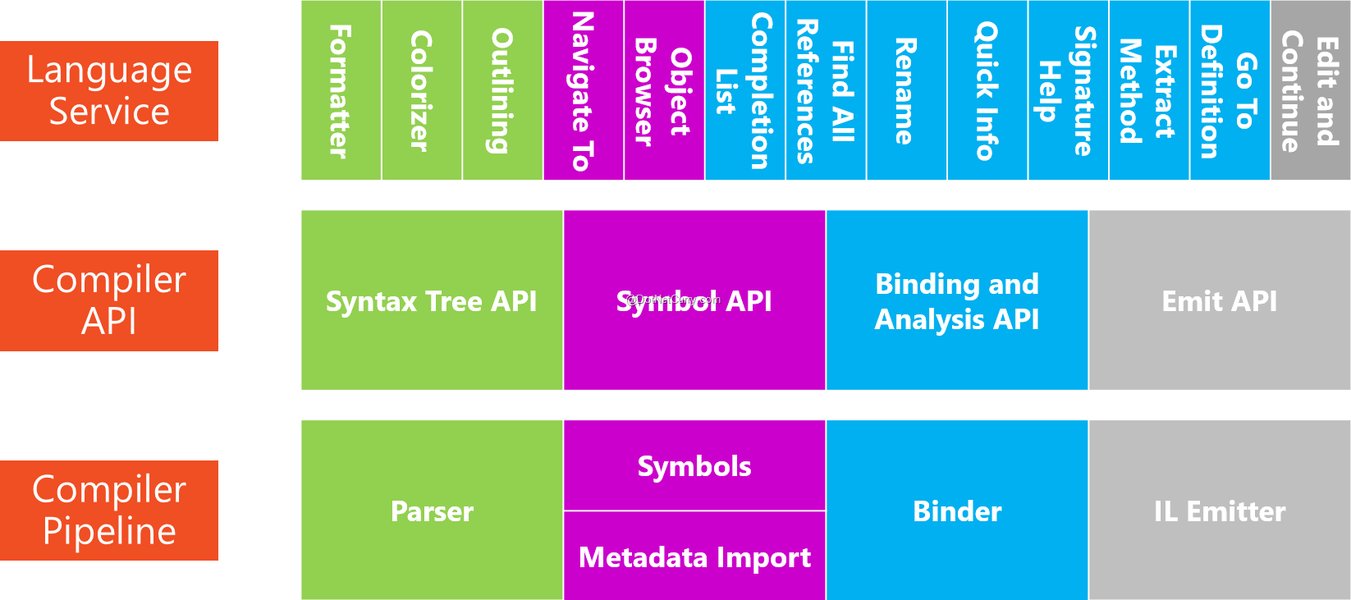
The Roslyn compiler platform as a service, showing its role in code analysis and generation.
Syntax Trees and Semantic Models
A core concept in Roslyn is the Syntax Tree. When source code is parsed, Roslyn builds an immutable, hierarchical representation of the code, capturing its structure down to the smallest tokens (keywords, identifiers, operators, etc.). This tree is the foundation upon which code generators operate. By understanding how to construct these syntax trees programmatically, developers can define the structure of the code they wish to generate.
While syntax trees represent the textual structure, the Semantic Model provides deeper insights into the code's meaning. It allows generators to understand types, symbols, and relationships between different parts of the code. For instance, a generator might need to know the return type of a method or the properties of a class to generate accurate and functionally correct code. Access to the semantic model enables more intelligent and context-aware code generation.
Essential Components of a Roslyn Code Generator
To create a functional Roslyn code generator, several key elements are required:
1. The Generator Class (ISourceGenerator/IIncrementalGenerator)
The heart of any Roslyn code generator is a class that implements either the ISourceGenerator or, preferably, the IIncrementalGenerator interface. Incremental generators, introduced with .NET 6, are designed for better performance by only regenerating code when necessary, based on changes in the input compilation. This is crucial for maintaining a responsive development environment, especially in large projects.
Within this class, you define the logic for what code should be generated. This typically involves:
Analyzing Existing Code
Generators can read the contents of the compilation, including existing C# source files and any "additional files" (non-C# files like JSON or XML schemas). This allows generators to inspect user-defined code, identify specific types or attributes, and use external data to drive the generation process. For example, a generator could read a JSON schema and produce C# classes that match its structure.
Generating New Source Code
The primary output of a source generator is one or more strings representing C# source code. While it's possible to build these strings manually using StringBuilder, the more robust and recommended approach is to use Roslyn's SyntaxFactory to construct syntax trees programmatically. This ensures that the generated code is syntactically correct and well-formatted. Tools like Roslyn Quoter can be immensely helpful here, showing the syntax tree structure for a given C# code snippet.
2. Triggering Mechanisms: Attributes and Syntax Receivers
For a generator to know *when* and *where* to generate code, it needs a triggering mechanism:
Attributes
A common approach is to define custom attributes that developers apply to their classes, properties, or methods. The source generator then looks for these attributes within the compilation. This allows developers to "opt-in" to code generation for specific parts of their codebase, making the process declarative and intuitive. For instance, a [StronglyTypedId] attribute can trigger the generation of boilerplate for a strongly-typed ID.
Syntax Receivers
For more complex scenarios, a SyntaxReceiver can be registered. This component "listens" for specific syntax patterns in the code (e.g., any class declaration, or specific method calls) and collects relevant information to be processed by the main generator logic. This is particularly useful when generation logic is based on code structure rather than explicit attributes.
3. Packaging and Distribution: NuGet
To make a Roslyn code generator easily discoverable and usable by other developers, it should be packaged as a NuGet package. This package typically includes:
- The generator assembly itself (often a .NET Standard 2.0 or higher class library).
- Any runtime dependencies the generator needs.
- MSBuild targets that ensure the generator runs correctly during the build process.
When a project references the NuGet package, the Roslyn compiler automatically discovers and runs the generator during compilation. This means the generated code becomes available to the project's compilation without needing to be checked into source control directly.
4. Build Integration and IDE Support
For a seamless developer experience, Roslyn code generators require proper integration with the build pipeline and IDEs like Visual Studio or JetBrains Rider. The generated code needs to appear in IntelliSense and be debuggable as if it were hand-authored. Roslyn handles much of this automatically, but generators must be designed to emit valid C# code that the IDE can parse and understand in near real-time.
Key aspects of build integration and IDE support include:
- Compile-Time Execution: Generators run as part of the project compilation process.
- No Modification of Existing Code: Generators can add new source files but cannot modify existing user code directly. This separation ensures predictability and avoids unexpected side effects.
- Diagnostics: Generators can produce warnings or errors (diagnostics) if they encounter issues or cannot generate code as expected, guiding the user to fix problems.
- Incremental Builds: Leveraging
IIncrementalGeneratorensures that only necessary code is regenerated, leading to faster build times.
Comparing Roslyn Generators with Traditional Code Generation
Historically, C# developers have used various methods for code generation, such as T4 templates, CodeDOM, or even simple string builders. Roslyn Source Generators offer distinct advantages over these traditional approaches:
An insightful discussion on the capabilities and applications of C# Source Generators.
The video above delves into the nuances and practical applications of C# Source Generators, highlighting their role in modern .NET development. It explains how they differ from older methods like reflection, emphasizing their compile-time nature and ability to integrate directly into the compilation process, leading to more performant and maintainable applications.
| Feature | Roslyn Source Generators | T4 Templates | String Builders / CodeDOM |
|---|---|---|---|
| Integration with Compilation | First-class support; runs during compilation, generated code becomes part of the assembly. | External tool; requires specific MSBuild setup or manual execution. | Manual process; generated code often needs to be physically added to project. |
| IDE Experience (IntelliSense) | Excellent; generated code is fully visible to IntelliSense and debuggers. | Limited; generated code might not be immediately visible or easily debuggable. | None, unless files are physically saved and included. |
| Access to Compilation Model | Full access to Syntax Trees and Semantic Models. | Limited or no direct access to the live compilation model. | None; typically relies on reflection or pre-defined schemas. |
| Debugging Generated Code | Can be debugged like any other C# code. | Challenging or requires specialized tools. | Depends on how code is integrated; typically hard. |
| Performance | Designed for incremental compilation, leading to faster build times. | Can be slow, especially for complex templates. | Fast at generation, but doesn't optimize compilation process. |
| Use Cases | Boilerplate removal (e.g., INotifyPropertyChanged, strongly-typed IDs, smart enums), metaprogramming. | Generating files from various data sources (e.g., database schema, XML). | Simple, ad-hoc code generation, often for small, controlled scenarios. |
Practical Applications of Roslyn Code Generators
Roslyn code generators excel in scenarios where repetitive or boilerplate code can be automatically generated based on conventions, attributes, or external data. Some common use cases include:
- Reducing Boilerplate: Automatically implementing interfaces like
INotifyPropertyChanged, generating factory methods, or creating data transfer objects (DTOs). - Strongly-Typed IDs: Generating custom value types for IDs to prevent primitive obsession and enhance type safety.
- Smart Enums: Creating rich enum-like classes with additional properties and behaviors.
- Dependency Injection: Automating constructor injection or service registration.
- API Clients and SDKs: Generating client code from OpenAPI/Swagger specifications.
- Unity Development: Streamlining common Unity patterns, e.g., generating component boilerplate or event handlers.
Challenges and Considerations
While powerful, Roslyn code generators come with their own set of considerations:
- Complexity of Syntax API: Working directly with Roslyn's Syntax API can be verbose and complex for generating intricate code structures. Helper methods and extension methods are often used to simplify this.
- Debugging Generators: Debugging the generator itself (not the generated code) can be challenging, often requiring attaching a debugger to the MSBuild process or Visual Studio instance.
- Maintaining Generated Code Readability: Ensuring that the generated code is clean and readable is important, even if developers don't typically edit it directly.
- Performance Impact: While incremental generators mitigate this, overly complex or inefficient generators can still impact build times.
Assessing the Efficacy of Roslyn Code Generators
To provide a structured overview of what a Roslyn Code Generator needs and its capabilities, here's a radar chart assessing various aspects based on common development needs and the strengths of Roslyn.
This radar chart visually represents the strengths of a typical Roslyn Code Generator compared to an ideal scenario. It highlights areas where Roslyn excels, such as integration with the build pipeline and boilerplate reduction, while also indicating aspects that can be challenging, like the initial complexity of working with the Syntax API.
Frequently Asked Questions
What is the main purpose of a Roslyn Code Generator?
Can Roslyn Code Generators modify existing code?
How are Roslyn Code Generators integrated into a .NET project?
What is the difference between ISourceGenerator and IIncrementalGenerator?
ISourceGenerator is the original interface for source generators. IIncrementalGenerator, introduced in .NET 6, is an improved version that allows generators to be more efficient by only regenerating code when relevant inputs change. This significantly improves build performance for large projects.Can Roslyn Code Generators be used with Unity?
Conclusion
A Roslyn Code Generator is a powerful tool in the .NET developer's arsenal, enabling sophisticated compile-time metaprogramming. It fundamentally needs a well-defined generator class (ideally implementing IIncrementalGenerator), a robust mechanism for triggering generation (such as attributes or syntax receivers), and proper packaging via NuGet for seamless integration. By understanding Roslyn's core concepts—especially syntax trees and semantic models—developers can craft intelligent generators that automate boilerplate, enforce consistency, and significantly improve code quality and maintainability. While there's an initial learning curve in mastering the Roslyn APIs, the long-term benefits in terms of developer productivity and application performance make it a worthwhile investment.
Recommended Further Exploration
- How to write an incremental Roslyn source generator?
- Explore advanced patterns for Roslyn code generation.
- Discover practical applications of source generators in real-world projects.
- Learn how to debug Roslyn source generators in Visual Studio.
References

Last updated May 21, 2025