
Checking Rotor Assembly Rotation in Flow Simulation
A Comprehensive Guide to Evaluating Rotational Behavior in SolidWorks Flow Simulation
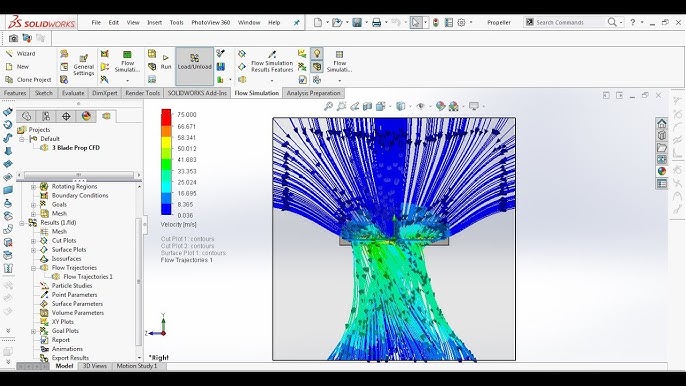
Key Highlights
- Rotating Reference Frame & Sliding Mesh: Define a rotating reference or use a sliding mesh approach to simulate continuous movement.
- Fluid Forces and Dynamic Analysis: Analyze forces, moments, and net torque acting on the rotor using flow simulation results, and verify these via dynamic studies.
- Thorough Simulation Setup: Emphasize accurate model setup, fine meshing, proper boundary conditions, and time-dependent analysis for transient effects.
Introduction
In many fluid systems, particularly in sight flow indicators, confirming whether a rotor assembly will rotate under fluid dynamic forces is critical. SolidWorks Flow Simulation offers a robust suite of tools that allow designers and engineers to not only model the fluid behavior around a rotor but also predict the resulting rotational behavior. This article outlines a detailed approach to evaluate whether your rotor assembly will rotate in a sight flow indicator after running a flow simulation. We will cover setting up your model, defining boundary conditions and rotating regions, and analyzing simulation results with a focus on physical and dynamic aspects.
Understanding the Simulation Methodology
Establishing the Simulation Environment
The initial step in ensuring the rotor assembly in your sight flow indicator rotates during a simulation is to precisely set up your simulation environment. This involves:
Model and Geometry Setup
Start by creating or importing the sight flow indicator model that includes all critical components, particularly the rotor assembly. The rotor should be modeled as a distinct component capable of independent rotation. This isolation allows you to accurately define the movement without interference from other components of the assembly.
The geometry configuration must ensure that the rotor is positioned within a well-defined flow path. This is crucial because the rotor’s rotation is induced by the flow forces generated by the fluid’s velocity and pressure gradients.
Setting up the Fluid Domain
Once your model is set up, the next step is to define the fluid domain where the simulation will occur. Specify the fluid properties (such as density and viscosity) and assign them based on your experimental or operational conditions. Establish realistic inlet velocities or pressure boundaries along with suitable outlet conditions. This rigorous definition of the fluid domain is essential as it lays the foundation for how fluid dynamics will interact with your rotor.
Application of Rotating Reference Frames and Sliding Mesh Techniques
SolidWorks Flow Simulation provides two main techniques for incorporating rotational effects: the rotating reference frame and the sliding mesh method.
Rotating Reference Frame
In this method, the rotor assembly is defined within a local rotating frame, which allows you to specify the axis of rotation and assign an angular velocity. This approach isolates the rotor from the static elements of the model and applies the rotational motion to the fluid within a designated region. It is particularly useful when the simulation focuses on static behavior or steady-state conditions after a specific period.
To set up a rotating reference frame:
- Create the rotor assembly as an independent component.
- Identify the axis around which the rotor will rotate.
- Define the local rotating region using SolidWorks' dedicated features. Specify the angular velocity (RPM) that reflects your design or experimental conditions.
- Apply the correct boundary conditions around the rotor’s domain to ensure that the transition from static fluid to moving fluid is accurately captured.
Sliding Mesh Technique
The sliding mesh method is ideal for transient (time-dependent) analyses where the rotor movement needs to be visualized and analyzed over time. This method involves creating a mesh interface where the rotor can slide relative to the stator. It captures the interaction between the rotor even more precisely since it accounts for the actual displacement of the rotor relative to stationary components.
When implementing the sliding mesh method:
- Enable the time-dependent analysis mode to observe how the rotor movement evolves over successive time steps.
- Select the "Local Region (Sliding Mesh)" option for the rotor and define the rotation parameters, ensuring the mesh transitions are smooth and refined.
- Pay close attention to the time step selection; a smaller time step (often less than 1/50th of the rotor's revolution period) increases accuracy, ensuring that transient effects are adequately captured.
Analyzing Forces and Motion
Extracting Fluid-Structure Interaction Data
The central goal of your simulation is to determine whether the rotor experiences a net torque sufficient to initiate and sustain rotation. This can be done through several analysis steps.
Force and Pressure Distribution Analysis
During flow simulation, the software computes pressure distributions and velocity fields around the rotor assembly. Analyze these results by focusing on surface forces, which are typically generated by combinations of:
- Pressure Forces: Pressure differences across the rotor surfaces contribute to net forces acting on the rotor.
- Shear Stresses: Resulting from fluid viscosity, these stresses generate additional tangential forces that influence rotational movement.
By integrating these forces over the rotor’s surface, you can compute the net moment (torque) acting about the rotation axis. Use this torque value to determine if the net rotational force is sufficient to overcome resistance factors such as friction, bearing loads, or other constraints.
Dynamic and Motion Study Incorporation
For a dynamic validation, additional motion or dynamic studies may be necessary. SolidWorks Motion Simulation allows you to use the computed fluid forces as inputs to simulate the time-dependent rotational behavior of the rotor. This is particularly critical if the simulation involves transient phenomena where the rotor’s speed and acceleration change over time.
To execute a dynamic study:
- Use the results from the fluid simulation to determine the forces and moments acting on the rotor.
- Apply these forces within a motion study setup, ensuring that all constraints such as fixed bearings and frictional resistances are correctly applied.
- Simulate the rotor’s dynamic response over time, observing its angular acceleration and steady-state rotation rate.
Validation and Interpretation of Results
Comparison with Real-World Data and Theoretical Considerations
Once your simulation and dynamic study successfully predict rotor behavior, the final step is to validate these results. Compare the simulation outputs with real-world measurements if available, or use theoretical calculations to confirm that the following conditions hold true:
- Torque Balance: Ensure that the net torque from aerodynamic forces exceeds the resisting torques due to friction and other mechanical constraints.
- Angular Velocity Matching: Verify that the predicted steady-state rotor angular velocity is consistent with the level of fluid flow and design parameters of the rotor.
In cases where discrepancies appear, it might be necessary to adjust the simulation parameters. These adjustments could include refining the mesh, recalibrating boundary conditions, or considering additional physical effects such as turbulence, cavitation, or variable fluid properties.
Visual Verification
Apart from numerical measures, a visual inspection of simulation results plays a critical role in confirming rotor rotation. Utilize SolidWorks' flow visualization tools:
- Velocity Vectors and Streamlines: Analyze the fluid velocity vectors and streamlines in the rotor’s vicinity; a swirling or tangential pattern is a strong indicator of rotational forces acting on the rotor.
- Surface Goals: Define surface goals for torque and force data. In particular, monitoring parameters such as Force[Z] and Torque[Z] can help confirm directional rotational behavior and quantify the rotation speed.
- Time-Dependent Graphs: Examine graphs that plot the rotor’s angular velocity or accumulated rotation angle over simulation time. These graphs provide a clear depiction of how the rotor accelerates, if at all, through the fluid medium.
Detailed Simulation Setup Considerations
Step-by-Step Procedural Guidelines
Below is a detailed procedural guideline table that consolidates the key steps required to ensure an accurate setup and evaluation:
| Step | Action | Purpose |
|---|---|---|
| 1 | Import/Design the Model | Ensure the rotor is modeled as an independent, movable assembly in the sight flow indicator. |
| 2 | Define Fluid Domain | Set fluid properties and boundary conditions to replicate operational flow conditions. |
| 3 | Apply Rotating Region/Sliding Mesh | Specify rotation parameters such as the rotation axis and angular velocity. |
| 4 | Mesh the Model | Ensure a refined mesh, particularly around the rotor, for accurate force calculation. |
| 5 | Run the Flow Simulation | Compute pressure distributions, velocity fields, and identify areas of interest concerning the rotor. |
| 6 | Analyze Forces and Moments | Determine net torque on the rotor by integrating surface pressures and shear stress data. |
| 7 | Conduct a Motion Study | Utilize dynamic simulation to visualize rotor rotation over time and account for inertia and friction. |
| 8 | Validate Results | Compare simulation data with theoretical predictions or experimental observations. |
Advanced Considerations
Coupled Fluid-Structure Interaction (FSI)
While many scenarios can be effectively modeled using the outlined methods, some advanced cases require a fully coupled FSI analysis. This is especially true when the rotor’s movement significantly alters the flow field, which in turn affects the rotor’s motion in a continuous feedback loop. Although SolidWorks Flow Simulation does not inherently support a fully integrated FSI process, an iterative approach may be employed:
- Run the initial flow simulation to obtain the fluid forces on the rotor.
- Use these forces in a separate motion study, which simulates rotor rotation.
- Based on the rotor’s displacement or rotation, update the flow simulation boundary conditions.
- Iterate the process until the simulation results converge to a stable solution.
This iterative method can bridge the gap between independent flow and motion analyses and provide a more holistic view of rotor behavior under variable operating conditions.
Impacts of Simulation Parameters
Several simulation parameters can significantly affect the accuracy of your predictions:
- Mesh Density: A finer mesh, particularly near the rotor and its interfaces, enhances the accuracy of simulated forces though it increases computational time.
- Time Step: In transient analyses, choosing an appropriate time step is critical; too large a step may smooth out transient effects, while too small a step can unnecessarily prolong the simulation.
- Boundary Conditions: Realistic boundary conditions reflect operational parameters accurately. They must be carefully set so that the flow enters, interacts with, and exits the simulation zone as it would in actual conditions.
- Rotational Constraints: Defining proper constraints on the rotor’s movement (e.g., friction or bearing resistance) is crucial to predict realistic rotational behavior.
Interpreting Final Results
Data Analysis and Verification
After running the simulation and post-processing the results, spend ample time verifying the output:
- Confirm that the simulated net torque on the rotor is unbalanced by static resisting forces.
- Use graphs and visualization tools to monitor the angular velocity trend over the simulation period.
- Cross-verify with theoretical predictions or experimental data to ensure that the simulation reflects expected physical behavior.
Visual confirmation, accompanied by numerical data, offers robust evidence regarding the rotor's behavior under the applied fluid forces.
Conclusion and Final Thoughts
In conclusion, verifying the rotation of a rotor assembly in a sight flow indicator using SolidWorks Flow Simulation involves a careful, multi-step process. Begin by accurately modeling your system and defining the proper fluid domain and boundary conditions. Use either the rotating reference frame or sliding mesh techniques to simulate the rotor movement. Detailed analysis of force distributions, subsequent integration for net torque, and corroborative motion studies are essential for establishing whether the produced forces overcome resistive elements such as friction.
By integrating these simulation methodologies and employing both time-dependent and steady-state analyses, engineers can gain high confidence in the predicted behavior of the rotor assembly. More importantly, this comprehensive approach not only validates the performance of the sight flow indicator in simulated conditions but also provides a benchmark for further improvements and design optimizations in practical applications.
References
- SolidWorks Forums - Discussion on Rotating Reference Frames
- Two Approaches for Rotating Frames in Flow Simulation - MLC CAD Systems
- SolidWorks Flow Simulation Tutorial Using Rotating Reference Frame - GrabCAD
- Flow Simulation – Local Rotating Reference Frame - CATI
- Sliding Mesh Method in SolidWorks Flow Simulation
Recommended Further Queries
Last updated February 20, 2025