
Unlocking AI Integration: Choosing the Fastest Ruby Gem for Your MCP Server Today
A detailed guide to building Model Context Protocol servers in Ruby, focusing on speed, features, and the best options available as of April 14, 2025.
Quick Insights: Building Your Ruby MCP Server
- Fast-MCP Emerges as the Top Choice: Based on recent activity and feature set (as of April 2025),
fast-mcpoffers the most comprehensive and modern approach for quickly building robust MCP servers in Ruby, supporting various transports and framework integrations. - Expose Capabilities Efficiently: MCP allows your application to securely expose tools (callable functions), resources (contextual data), and prompts (structured interactions) to AI models, enhancing their capabilities.
- Integration Options Abound: Gems like
fast-mcp,mcp-rb, andmcp-railscater to different needs, from standalone servers and lightweight DSLs to deep integration within existing Rails applications.
Understanding the Model Context Protocol (MCP)
The Model Context Protocol (MCP) is designed to standardize and secure the communication channel between Large Language Models (LLMs) or other AI systems and external applications or services. Instead of relying on bespoke APIs or complex prompt engineering for every interaction, MCP provides a structured way for an AI model to discover and utilize capabilities exposed by your application. These capabilities typically fall into three categories:
- Tools: Functions or methods within your application that the AI can invoke, often with specific arguments. This allows the AI to perform actions, like sending an email, querying a database, or summarizing text using your application's logic.
- Resources (Context): Data or information provided by your application that the AI can access for context. This could be user profiles, project files, real-time data feeds, or documentation relevant to the task at hand.
- Prompts: While not always explicitly defined as a separate MCP component in the gems, the protocol facilitates structured interactions, often guided by the available tools and resources, effectively allowing for more sophisticated prompting strategies.
Building an MCP server involves creating an endpoint (using protocols like HTTP, STDIO, or SSE) that speaks this language, allowing AI models to connect, authenticate (if required), and interact with the defined tools and resources.
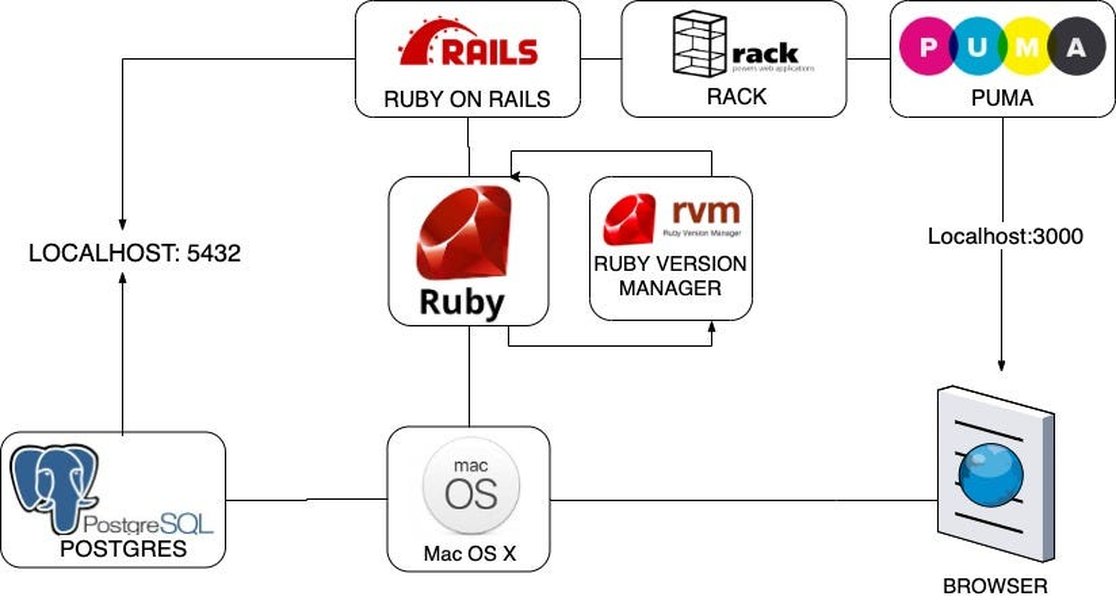
Visualizing the Tech Stack
Integrating an MCP server often involves understanding how it fits within your existing application stack, such as a Ruby on Rails application depicted here.
Evaluating Ruby Gems for MCP Server Development (April 2025)
Several Ruby gems facilitate the creation of MCP servers. Choosing the right one depends on your specific needs, existing application framework (like Rails or Sinatra), and desired speed of implementation. Based on the information available up to April 14, 2025, here's an analysis of the prominent options:
1. Fast-MCP: The Modern & Feature-Rich Contender
fast-mcp stands out as a recent and actively developed Ruby implementation of MCP, designed specifically for easy integration of AI models with Ruby applications. It aims to abstract away the complexities of the protocol, offering a clean Ruby interface.
Key Features:
- Tools API: Define Ruby functions that AI models can call securely. Includes argument validation using Dry-Schema, ensuring inputs are correct.
- Resources API: Share contextual data from your application with AI models.
- Multiple Transports: Supports STDIO (standard input/output, often for local processes), HTTP, and SSE (Server-Sent Events for real-time updates), providing flexibility in how AI models connect.
- Framework Integration: Designed to work seamlessly with Rails, Sinatra, or any Rack-compatible application. Offers Rails generators for quick setup (`bin/rails generate fast_mcp:install`) and conventions like `ActionTool::Base` and `ActionResource::Base`.
- Authentication: Built-in support for token-based authentication to secure your MCP endpoints.
- Security: Includes features like DNS rebinding protection.
- Real-time Updates: Allows subscriptions to resource changes, enabling more interactive AI applications.
- Active Development: Shows recent updates (e.g., version 1.1.0 as of April 13, 2025), indicating ongoing maintenance and improvement.
Why it's Good for Getting Started Fast:
fast-mcp directly addresses the need for rapid development. Its generators for Rails, clear structure for defining tools/resources using Ruby classes, and built-in support for common requirements like validation and authentication significantly reduce setup time. Its focus on providing a clean, expressive Ruby API makes it approachable.
Ruby Powering AI Integration
Gems like `fast-mcp` leverage Ruby's elegance to simplify complex AI integrations via MCP.
2. MCP-RB: The Lightweight DSL Approach
mcp-rb offers a more minimalistic framework for building MCP servers, employing a Domain-Specific Language (DSL) similar to Sinatra. It allows you to define resources and tools directly within a configuration file or script.
Key Features:
- Sinatra-like DSL: Provides a simple, declarative way to define server components (name, version, resources, tools).
- Core MCP Support: Implements essential MCP features for exposing resources and tools.
- Testing Tools: Includes utilities for testing and formatting MCP definitions.
Suitability:
It's a viable option if you prefer a DSL approach or are building a very simple MCP server, perhaps integrating with Sinatra. However, compared to fast-mcp, it appears less feature-rich, lacking built-in support for multiple transports, advanced validation schemas, or integrated authentication mechanisms out-of-the-box based on the provided descriptions.
3. MCP-Rails: Tight Integration for Rails Apps
mcp-rails builds upon mcp-rb to provide seamless integration specifically for Ruby on Rails applications. It leverages Rails conventions and infrastructure.
Key Features:
- Rails Route Integration: Enhances Rails routes with MCP-specific metadata.
- Automatic Discovery: Can automatically find and register MCP tools and resources within your Rails app.
- Strong Parameters: Utilizes Rails' strong parameters for validating arguments passed to MCP tools.
- Custom MIME Type: Registers `application/vnd.mcp+json` for MCP responses.
Suitability:
If your existing application is built with Rails and you want the tightest possible integration, mcp-rails is a strong candidate. However, it inherits the potential limitations of its underlying dependency, mcp-rb, and might be less flexible if you need features exclusively offered by fast-mcp or if your application isn't Rails-based.
4. Other Mentioned Gems
- MCProto (mcp.so/server/mcproto): Described as a gem for running or *chaining* MCP servers with custom Ruby logic. This suggests it might be more focused on orchestration or advanced use cases rather than quickly building a single server endpoint.
- model-context-protocol-rb (dickdavis/model-context-protocol-rb): Another Ruby implementation, seemingly focused on providing stable MCP server support but potentially less comprehensive than
fast-mcpregarding features like transports and framework integration helpers. - rails-mcp-server (from Answer D / Mario Chavez article): Appears to be another Rails-specific integration, potentially similar in goal to
mcp-rails. Its focus seems to be enhancing AI-assisted development within a Rails context. - mcp-server-rubygems (from Answer D): This is highly specialized for interacting with RubyGems metadata and not suitable for general-purpose MCP server development.
Cross-Checking for New Options
Based on the analysis of the provided answers dated up to April 14, 2025, fast-mcp emerges as the most modern, actively developed, and feature-complete option presented for quickly building a general-purpose MCP server in Ruby, especially considering its integration helpers, multiple transport support, and security features. While other gems exist, they either cater to specific niches (Rails integration, RubyGems data) or appear less comprehensive or recently updated compared to fast-mcp.
Feature Comparison of Key Ruby MCP Gems
This table summarizes the key differences between the main contenders for building your MCP server quickly:
| Feature | Fast-MCP | MCP-RB | MCP-Rails |
|---|---|---|---|
| Primary Approach | Class-based, Expressive API | Lightweight, Sinatra-like DSL | Rails Integration Layer (uses mcp-rb) |
| Ease of Use (Quick Start) | High (especially with Rails generators) | Moderate (simple DSL) | High (for existing Rails apps) |
| Rails Integration | Yes (built-in support, generators) | No (requires mcp-rails or manual setup) | Yes (primary purpose) |
| Sinatra/Rack Integration | Yes (via Rack middleware) | Yes (Sinatra-like DSL) | No (Rails specific) |
| Transport Support | STDIO, HTTP, SSE | Implied (likely HTTP via Rack) | Inherited from mcp-rb (likely HTTP) |
| Argument Validation | Yes (Dry-Schema integration) | Basic / Manual | Yes (via Rails Strong Parameters) |
| Authentication | Yes (Token-based) | Manual implementation needed | Leverages Rails auth patterns |
| Real-time Updates (SSE) | Yes | No (mentioned) | No (mentioned) |
| Recent Activity (as of Apr 2025) | High (v1.1.0 mentioned) | Moderate | Moderate (depends on mcp-rb) |
Visualizing Gem Strengths: A Radar Chart Perspective
To provide a visual comparison, this radar chart assesses the perceived strengths of fast-mcp, mcp-rb, and mcp-rails across key development aspects. Scores are based on the descriptions provided in the source materials, representing relative strengths rather than absolute metrics. A higher score indicates a stronger perceived capability in that area.
As visualized, fast-mcp demonstrates strong capabilities across most areas, particularly in feature set, security, and modernity, making it a compelling choice for rapid development. mcp-rails excels specifically in Rails integration, while mcp-rb offers simplicity via its DSL.
Mapping the MCP Server Ecosystem in Ruby
This mindmap illustrates the core concepts of building an MCP server using Ruby gems, highlighting the key components and relationships discussed.
Tools API (Dry-Schema)
Resources API
STDIO, HTTP, SSE
Rails/Sinatra/Rack Integration
Auth & Security"] id2b["mcp-rb"] id2b1["Features:
Lightweight
Sinatra-like DSL
Core MCP Support"] id2c["mcp-rails"] id2c1["Features:
Builds on mcp-rb
Tight Rails Integration
Route Metadata
Strong Params"] id2d["Other Gems"] id2d1["MCProto (Chaining/Orchestration)"] id2d2["model-context-protocol-rb (Core Implementation)"] id2d3["rails-mcp-server (Rails Specific)"] id3["Implementation Steps (fast-mcp example)"] id3a["Installation (bundle add)"] id3b["Configuration (Initializer)"] id3c["Define Tools (FastMcp::Tool subclasses)"] id3d["Define Resources (FastMcp::Resource subclasses)"] id3e["Register Components"] id3f["Run & Test (MCP Inspector)"] id4["Considerations"] id4a["Existing Framework (Rails, Sinatra, etc.)"] id4b["Required Features (Transports, Auth, Validation)"] id4c["Development Speed vs. Complexity"] id4d["Security (Auth Tokens, Allowed Origins)"]
Getting Started Quickly with Fast-MCP
Based on the provided information, here’s a practical guide to setting up an MCP server using fast-mcp, the recommended gem for rapid development:
1. Installation
Add fast-mcp to your application's Gemfile:
# Add to your Gemfile
gem 'fast-mcp'
Then run bundler:
bundle installFor Rails applications, use the provided generator for a quicker setup:
bundle add fast-mcp # Adds and installs the gem
bin/rails generate fast_mcp:install
This command typically creates an initializer file (e.g., config/initializers/fast_mcp.rb) and potentially folders for your tools and resources (e.g., app/mcp/tools/, app/mcp/resources/).
2. Configuration (Example for Rails Initializer)
Edit the initializer file (config/initializers/fast_mcp.rb) to configure your server and register components. Adjust the name, version, and security options as needed.
# config/initializers/fast_mcp.rb
require 'fast_mcp'

# Example: Load your tool/resource classes if needed (Rails autoloads typically handle this)
# Dir[Rails.root.join('app', 'mcp', '**', '*.rb')].each { |file| require file }

FastMcp.mount_in_rails(
  Rails.application,
  name: 'my-awesome-app-mcp',
  version: '1.0.0',
  # Configure security (IMPORTANT!)
  # allowed_origins: ['http://localhost:3000', 'https://yourapp.com'], # Example
  # auth_token: ENV['MCP_AUTH_TOKEN'] # Use environment variables for secrets
) do |server|
  # Register tools - assumes YourToolClass is defined in app/mcp/tools/your_tool_class.rb
  server.register_tool(YourToolClass)

  # Register resources - assumes YourResourceClass is defined in app/mcp/resources/your_resource_class.rb
  server.register_resource(YourResourceClass)

  # You can register multiple tools/resources
  # server.register_tools([ToolA, ToolB])
  # server.register_resources([ResourceX, ResourceY])
end
3. Defining a Tool
Create a class that inherits from FastMcp::Tool (or ActionTool::Base in Rails conventions). Define its description, arguments (using Dry-Schema), and the call method.
# app/mcp/tools/your_tool_class.rb
class YourToolClass < FastMcp::Tool # Or ActionTool::Base
  description "Performs a specific capability, like summarizing text."

  # Define expected arguments and their types/validations
  arguments do
    required(:text_to_summarize).filled(:string).description("The input text.")
    optional(:max_words).filled(:integer, gt?: 0).description("Maximum word count for the summary.")
  end

  # The method AI will call
  def call(text_to_summarize:, max_words: 50)
    # Implement your application's logic here
    summary = your_app_summarization_logic(text_to_summarize, max_words)

    # Return the result (must be JSON-serializable)
    { summary: summary }
  rescue => e
    # Handle errors gracefully
    error("Failed to summarize: #{e.message}")
  end

  private

  def your_app_summarization_logic(text, limit)
    # Replace with your actual implementation
    "Summary of '#{text.slice(0, 30)}...' limited to #{limit} words."
  end
end
4. Defining a Resource
Create a class inheriting from FastMcp::Resource (or ActionResource::Base). Define its unique URI and the content method to return the data.
# app/mcp/resources/your_resource_class.rb
class YourResourceClass < FastMcp::Resource # Or ActionResource::Base
  # Unique identifier for this resource
  uri "data://project/current_user_profile"

  description "Provides the profile data for the currently logged-in user."

  # Method to fetch and return the resource content
  # The content must be JSON-serializable (Hash, Array, String, Number, Boolean, Nil)
  def content
    # Fetch data from your application (e.g., current user)
    # user = Current.user # Example - depends on your app's auth
    user_data = {
      id: 123,
      name: "Alice",
      preferences: { theme: "dark", notifications: true }
      # Ensure no sensitive data is exposed unintentionally
    }
    user_data
  rescue => e
    # Handle errors if data cannot be fetched
    error("Could not retrieve user profile: #{e.message}")
    nil # Return nil or an appropriate error structure
  end
end
5. Running and Testing
Start your Ruby application (e.g., rails server). The MCP server should now be running, typically accessible via an HTTP endpoint managed by fast-mcp (check its documentation or the Rails mount point). You can test it using tools like the official MCP Inspector:
# Install the inspector if you haven't already
npm install -g @modelcontextprotocol/inspector

# Run the inspector against your running server's MCP endpoint
# The exact command depends on how fast-mcp exposes the server (e.g., STDIO pipe or HTTP URL)
# Example for HTTP (check fast-mcp docs for the correct URL/port):
# mcp-inspector http://localhost:YOUR_MCP_PORT --token YOUR_MCP_AUTH_TOKEN
This setup provides a foundation for exposing your application's capabilities to AI models quickly and securely using fast-mcp.
Understanding MCP Concepts Visually
The following video provides a general overview of the Model Context Protocol, explaining its purpose and how servers function. While it may not be Ruby-specific, the core concepts are universally applicable and can help contextualize the role of the Ruby gems discussed.
This guide explains the significance of MCP as a potential standard for AI-application interaction, covering the fundamental ideas behind exposing tools and context, which are central to building effective MCP servers regardless of the implementation language.
Frequently Asked Questions (FAQ)
What is the main benefit of using MCP?
The primary benefit of MCP is providing a standardized, secure way for AI models to interact with your application's specific capabilities (tools) and data (resources). This avoids complex prompt engineering for simple tasks and allows AI to leverage your application's logic and context more effectively and reliably.
Why is `fast-mcp` recommended for getting started quickly?
fast-mcp is recommended for speed due to its modern design, comprehensive feature set (multiple transports, validation, authentication), active development, and focus on ease of integration, particularly with Rails (via generators) and other Rack frameworks. It aims to minimize the boilerplate code needed to set up a functional MCP server.
Do I need MCP if I only use basic prompts?
If your AI interactions are simple and don't require the AI to perform actions within your application or access specific, dynamic context, you might not need MCP. However, as soon as you want the AI to reliably use your application's functions (e.g., "summarize this document using our internal summarizer") or access real-time data (e.g., "what's the status of order #123?"), MCP provides a structured and more robust solution than trying to manage this solely through prompts.
How important is security when building an MCP server?
Security is crucial. An MCP server exposes parts of your application to an external system (the AI model). You must ensure proper authentication (e.g., using secure tokens, as supported by fast-mcp) to prevent unauthorized access. You should also carefully define which tools and resources are exposed and validate all inputs (arguments) received from the AI to prevent potential injection attacks or unintended actions. Features like DNS rebinding protection in gems like fast-mcp add another layer of security.
References
- fast-mcp GitHub Repository - GitHub
- mcp-rb Overview - MCP Market
- mcp-rails Details - The Ruby Toolbox
- model-context-protocol-rb GitHub Repository - GitHub
-
MCProto Overview - mcp.so
- Ruby Toolbox - Fast-MCP - The Ruby Toolbox
- MCP-RB RubyGems Page - RubyGems.org
Recommended Reading
Last updated April 14, 2025