
Unlock Security & Performance Insights: Mastering Salesforce Shield Data with CRM Analytics
Leverage Event Logs, Real-Time Monitoring, Custom Alerts, and Asset Tracking in One Powerful Platform.
Salesforce CRM Analytics, when combined with Salesforce Shield's Event Monitoring capabilities, provides a robust platform for enhancing security, understanding user adoption, optimizing performance, and ensuring compliance. You can transform raw event log data into actionable insights, monitor activities as they happen, receive timely alerts on critical metrics, and keep track of important asset changes.
Highlights: Key Capabilities
- Comprehensive Reporting: Build detailed reports and dashboards using Salesforce Shield event log data directly within CRM Analytics to visualize user activity, security events, and performance metrics.
- Near Real-Time Monitoring: Work with event data refreshed frequently (often within 15 minutes) and leverage real-time event streams for immediate insights into critical activities like logins or API usage.
- Automated Alerts & Notifications: Configure custom notifications within CRM Analytics to alert users or teams via Salesforce, email, or dashboard indicators when specific data thresholds or conditions are met.
Building Reports on Salesforce Shield Event Log File Data
To analyze the rich data captured by Salesforce Shield's Event Monitoring, you need to bring it into CRM Analytics. This involves accessing the event logs and then using CRM Analytics tools to build insightful reports and dashboards.
Accessing Event Log Data
First, ensure you have the necessary permissions and subscriptions (Salesforce Shield or the Event Monitoring add-on). There are several ways to access the event log data:
Event Log Files (ELFs)
These are downloadable files containing detailed event records. You can access them via:
- Event Log File Browser: Found in Salesforce Setup, this tool allows you to easily explore and download ELFs for specific event types and date ranges.
- APIs: Programmatically access ELFs for integration with external systems or custom analysis pipelines.
Event Log Objects (Beta)
This newer method stores event data directly in standard Salesforce objects (e.g., `LoginEvent`, `ReportEvent`).
- Queryable Data: Allows you to query event data using SOQL or Salesforce Platform APIs, similar to how you query standard objects like Accounts or Contacts.
- Lower Latency: Data is typically available in these objects within about 15 minutes of the event occurring, facilitating near real-time analysis compared to daily ELFs.
For instance, you could query the `ReportEventLog` object to see how many rows users are accessing in reports:
SELECT SUM(RowCount)
FROM ReportEventLog
GROUP BY UserId
Creating Reports and Dashboards in CRM Analytics
Once you have a way to access the data, you use CRM Analytics (formerly Tableau CRM, Einstein Analytics) to visualize it:
Event Monitoring Analytics App
Salesforce provides a dedicated CRM Analytics app specifically for Event Monitoring data. This app includes:
- Data Integration: Pre-configured dataflows to import event log data (from ELFs or Event Log Objects) into CRM Analytics datasets. These dataflows often augment the event data with user information for better context.
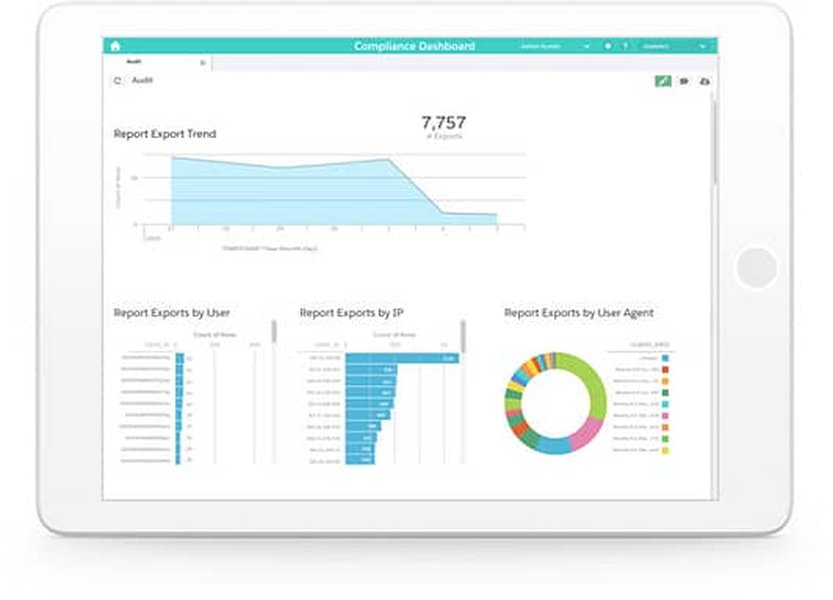
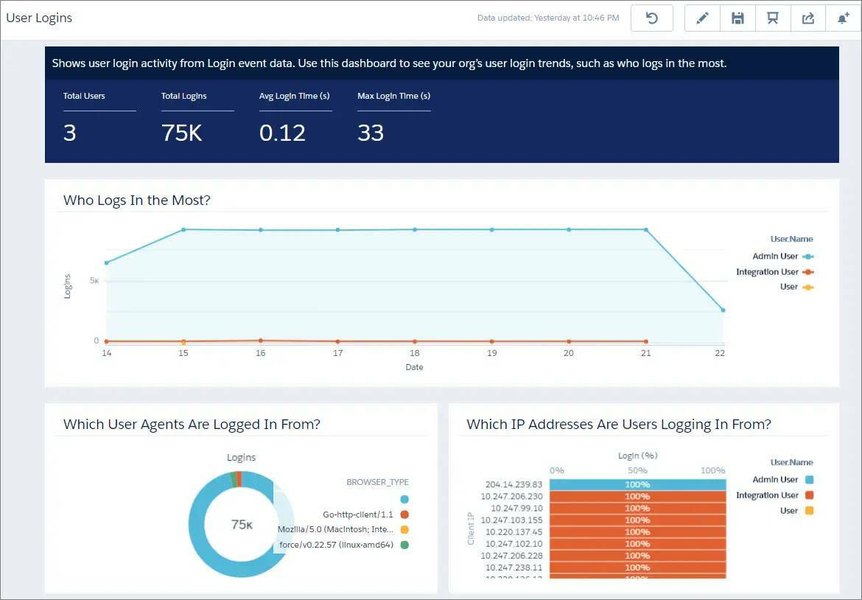
- Pre-built Dashboards: Ready-to-use dashboards for common use cases like monitoring logins, data exports, report usage, API calls, Apex execution, and page performance (URI events).
- Customization: Use Analytics Studio to modify existing dashboards or build new ones from scratch. You can create custom lenses, charts, tables, and metrics tailored to your specific monitoring needs. For example, you could build a dashboard focusing solely on Report Export events to track who is exporting sensitive data.
Working with Items in Real Time
While true real-time processing depends on the specific feature, CRM Analytics offers near real-time capabilities for monitoring Salesforce events and data.
Understanding "Real-Time" in Context
In the context of CRM Analytics and Event Monitoring:
- Near Real-Time: Refers to data availability with low latency, often within minutes. Event Log Objects (beta) provide data approximately 15 minutes after the event occurs. Standard CRM Analytics dataset refreshes can also be scheduled frequently.
- Streaming: Real-Time Event Monitoring can stream certain standard events (like logins, logouts, URI events) via the Salesforce Streaming API. This data can be consumed by external applications or potentially fed into CRM Analytics through custom integrations for immediate visualization, though direct real-time streaming *into* CRM Analytics dashboards isn't a standard out-of-the-box feature for all event types.
Items Available for Near Real-Time Analysis
You can monitor several types of items with low latency using CRM Analytics:
- Event Log Objects (Beta): As mentioned, queryable objects like `LoginEvent`, `ApiEvent`, `ReportEvent` become available relatively quickly for analysis in dashboards.
- Standard Salesforce Data: Regular CRM data (Accounts, Opportunities, Cases, etc.) can be synchronized into CRM Analytics datasets frequently (e.g., every 15-30 minutes) to provide up-to-date operational dashboards.
- Key Performance Indicators (KPIs): Dashboards can display KPIs derived from recently refreshed datasets, giving a timely view of business performance or system activity.
Embedding CRM Analytics dashboards directly onto Salesforce record pages or home pages ensures users see the latest available data within their workflow.
Sending Custom Notifications When Metrics Are Found
CRM Analytics allows you to proactively alert users when key metrics, including those derived from Shield event data, reach specific thresholds or meet defined criteria.
Configuring Notifications
Using CRM Analytics Smart Notifications
This is the primary method within CRM Analytics:
- Select a Metric: Choose a metric (e.g., number of failed logins, volume of data exports, sales target progress) displayed in a dashboard widget (like a number or chart).
- Define Criteria: Set the conditions that trigger the notification (e.g., metric exceeds X, falls below Y, equals Z).
- Set Notification Frequency: Choose how often the condition should be checked.
- Choose Recipients & Channels:
- Notifications appear in the user's Salesforce notification bell icon.
- Users can opt to receive email alerts.
- A tracking tile can be added to the CRM Analytics Home page.
- Conditional formatting on the dashboard widget itself can visually highlight when criteria are met.
Integrating with Other Tools
- Salesforce Flows: Trigger Salesforce Flows based on CRM Analytics data changes (requires specific setup) to perform complex actions or send customized notifications.
- External Systems (SIEM, Slack): Event Monitoring data, especially real-time streams, can be integrated with Security Information and Event Management (SIEM) tools or collaboration platforms like Slack to trigger alerts based on rules defined in those systems.
- Security Center Custom Metrics (Beta): Create custom metrics in Salesforce Security Center based on standard or custom objects, which can potentially be monitored for alerting purposes, enhancing security posture visibility.
These notifications enable proactive responses, such as investigating a surge in failed login attempts (potential attack) or celebrating when a sales team hits a crucial target.
Monitoring Assets for Change and Notifying Users
You can keep track of changes within CRM Analytics itself and ensure relevant users are informed. "Assets" here typically refer to dashboards, lenses, datasets, or reports within CRM Analytics.
Tracking Asset Updates and Usage
- CRM Analytics Home Page: This page often highlights recently viewed, created, or modified assets, providing a quick overview of activity.
- Event Monitoring Data: Indirectly monitor asset usage by analyzing event log data for dashboard views (URI events) or report executions (`ReportEvent`).
Notifying Users of Changes
Subscriptions
Users can subscribe to specific dashboard widgets or lenses.
- Scheduled Updates: Receive periodic email snapshots of the subscribed widget, showing the latest data.
- Conditional Subscriptions: Similar to notifications, users can subscribe to be alerted only when certain data conditions within the widget are met.
Following Dashboards
Users can "follow" a dashboard.
- Chatter Feed Updates: When a followed dashboard is updated or receives comments in Chatter, the user gets notified in their Chatter feed. This facilitates collaboration around specific analytics assets.
Workflow Integration
While direct "asset modified" triggers are limited, you can:
- Set notifications (as described previously) on metrics within a dashboard. If the underlying data (e.g., a dataset derived from Shield logs) changes significantly, triggering the metric condition, users will be notified, indirectly informing them of relevant changes.
- Use Salesforce Flow or custom development to monitor specific metadata changes or dataset update statuses if more granular asset change tracking is required.
These features ensure users stay informed about the analytics assets most important to them, whether it's tracking KPI changes derived from Shield data or collaborating on a shared security dashboard.
Comparing Event Data Access Methods
Choosing the right way to access Salesforce Shield event data for CRM Analytics depends on your specific needs regarding timeliness, ease of use, and analytical depth. The table below compares the main methods:
| Method | Data Availability | Access Mechanism | Primary Use Case | Pros | Cons |
|---|---|---|---|---|---|
| Event Log Files (ELFs) | Typically Daily (24hr delay) | Setup Browser / API Download | Historical analysis, Compliance auditing, Batch processing | Comprehensive data, Standardized format | Significant delay, Requires download/processing |
| Event Log Objects (Beta) | Near Real-Time (~15 min delay) | SOQL / Platform APIs / CRM Analytics Connector | Operational dashboards, Faster incident response, Trend analysis with recent data | Queryable in Salesforce, Lower latency than ELFs, Integrates well with CRM Analytics | Still in Beta (as of recent info), May not cover all event types initially |
| Real-Time Event Monitoring (Streaming API) | Real-Time (Seconds delay) | Streaming API (Requires client/middleware) | Immediate threat detection, Real-time alerting via external tools (e.g., SIEM) | Lowest latency for specific standard events | Covers fewer event types than ELFs, Requires development effort to consume stream, Direct CRM Analytics integration complex |
Visualizing Monitoring Capabilities
This radar chart provides an opinionated assessment of different aspects of monitoring within Salesforce using CRM Analytics and Event Monitoring features. It compares the relative strengths across dimensions like reporting depth, real-time capability, ease of setup, notification flexibility, and the granularity of asset monitoring.
Note: This chart represents a qualitative assessment for illustrative purposes. Actual effectiveness may vary based on specific implementation and requirements.
Understanding Performance and Adoption with Event Monitoring
Salesforce Shield's Event Monitoring provides critical data not just for security but also for understanding how users interact with Salesforce and how the platform is performing. Analyzing this data in CRM Analytics helps identify bottlenecks, improve user adoption, and ensure security policies are effective. The video below offers insights into leveraging Event Monitoring data for these purposes.
This video explains how event log files capture detailed information about user interactions, application performance, and security events. By visualizing this data (for example, using CRM Analytics), organizations can gain insights into page load times, popular features, user login patterns, report usage, and potential security vulnerabilities like excessive data exports. Understanding these patterns is crucial for optimizing the Salesforce environment and ensuring users are adopting the platform effectively and securely.
Mapping the Salesforce Monitoring Ecosystem
This mindmap illustrates the relationship between Salesforce Shield Event Monitoring, CRM Analytics, and the key functionalities discussed: accessing data, reporting, real-time analysis, notifications, and asset monitoring.
The mindmap shows how Event Monitoring provides the raw data foundation. CRM Analytics then acts as the engine for integrating, analyzing, visualizing, and acting upon this data, enabling reporting, near real-time insights, automated alerts, and monitoring of the analytics assets themselves.
Visualizing Event Monitoring Concepts
Understanding how Event Monitoring data is accessed and visualized is key. Salesforce provides tools and interfaces to facilitate this process, enabling administrators and analysts to turn raw logs into meaningful insights for security, performance, and adoption analysis.
Conceptual representation of Salesforce Shield, encompassing Event Monitoring.
Example interface for downloading Event Log Files, a primary source for historical analysis.
These images illustrate the branding associated with Salesforce Shield, which includes Event Monitoring, and an example of the interface used to access the underlying Event Log Files. This data, once downloaded or accessed via Event Log Objects, forms the basis for reports and dashboards created within CRM Analytics.
Frequently Asked Questions (FAQ)
Do I need Salesforce Shield to use Event Monitoring data in CRM Analytics?
Yes, generally. Access to detailed Event Log Files and Real-Time Event Monitoring typically requires either a Salesforce Shield subscription or the purchase of the Salesforce Event Monitoring add-on product. Check your Salesforce edition and licenses for specifics.
How "real-time" is the Real-Time Event Monitoring feature?
Real-Time Event Monitoring streams specific standard events (like LoginEventStream, LogoutEventStream, UriEventStream) via the Streaming API with latency typically measured in seconds. However, consuming and acting on this stream usually requires middleware or a client application. Event Log Objects offer near real-time data (approx. 15 mins delay) directly queryable within Salesforce and CRM Analytics, which is often sufficient for operational monitoring.
Can I create alerts based on any data field in CRM Analytics?
You can set notifications based on aggregated metrics displayed in dashboard widgets (numbers, charts). You define thresholds or conditions for these summary metrics. Alerting directly on raw, individual record field changes within a dataset is less common via standard notifications; this typically requires custom solutions or monitoring changes in aggregated views.
What's the difference between CRM Analytics Notifications and Subscriptions?
Notifications are typically event-driven alerts sent when a specific data condition or threshold is met (e.g., "Notify me when failed logins exceed 50"). They appear in the Salesforce bell icon and optionally via email. Subscriptions are usually time-based, providing regular snapshots of a widget or dashboard via email (e.g., "Email me this chart every Monday morning"), although they can also be conditional.
Can I monitor changes to the structure of a CRM Analytics dashboard itself?
Standard features like 'Following' a dashboard primarily notify about data updates or Chatter conversations related to it. Monitoring structural changes (e.g., adding/removing charts, changing filters) typically requires leveraging Salesforce's setup audit trail (for metadata changes) or implementing version control practices for your CRM Analytics assets, possibly using tools like Salesforce DX or third-party solutions.
References
- Event Log Objects - Salesforce Help
- Set and Send Smart Notifications - Salesforce Help
- Personalize Your Analytics Experience - Salesforce Trailhead
- Use Data Cloud Event Monitoring for Security, Performance, and Adoption - Salesforce Developers
- Real-Time Event Monitoring Overview - Salesforce Developers
- Salesforce Shield - Salesforce Help
- Event Log File Browser - Salesforce Help
Recommended Reading
Last updated April 11, 2025