
Unveiling the Secrets of SAP's RESB Table: Daily Data Shifts and RSNUM Demystified
Explore the dynamic world of material reservations, why data appears fresh daily, and how unique identifiers are born.
The SAP table RESB is a cornerstone in managing material availability and requirements within an organization. Understanding its behavior, particularly the nature of its data and the generation of key identifiers like RSNUM, is crucial for anyone working with SAP's material management or production planning modules. This exploration, current as of May 8, 2025, delves into the intricacies of RESB.
Key Insights at a Glance
- RESB tracks active material reservations and dependent requirements, making it a highly dynamic table reflecting real-time operational needs.
- The perception of RESB content being "recreated daily" stems from frequent updates driven by business processes, MRP runs, and data extraction routines for reporting, rather than the table structure itself being rebuilt.
- RSNUM (Reservation Number) is a unique, system-generated identifier assigned to each new reservation document, ensuring traceability and order linkage. Its values change as new reservations are created and old ones are processed or deleted.
Understanding the SAP Table RESB: Its Core and Components
The RESB table is a standard transparent table within SAP systems, including SAP R/3 and S/4HANA. Its primary function is to store detailed information about material reservations and dependent requirements. These are internal documents that signify a need to earmark or allocate specific materials for future use, such as for production orders, maintenance tasks, cost centers, or other consumption events.
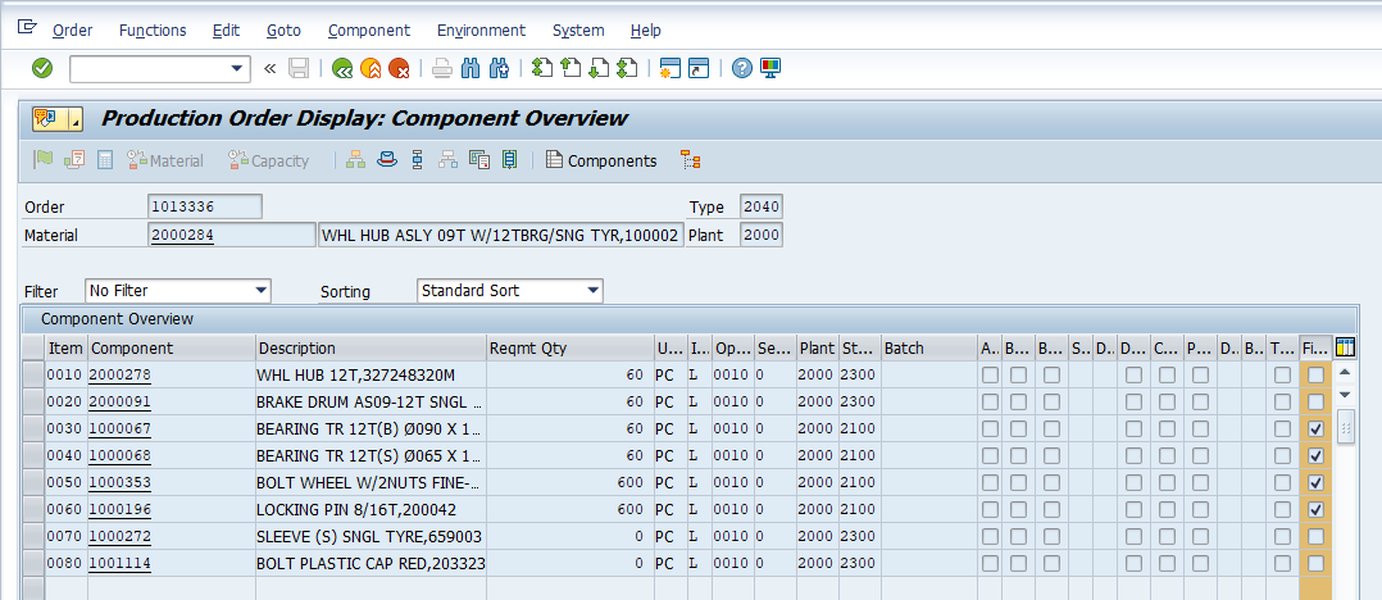
A typical SAP screen showing details related to a material reservation, data often stored in or related to RESB.
Core Purpose and Functionality
RESB plays a vital role in the Material Management (MM) module, specifically within Inventory Management (MM-IM), and Production Planning (PP). By holding line-item details of reservations, it ensures that materials are effectively planned and made available, preventing stockouts and enabling smooth operational flows. Reservations can be created manually by users (e.g., via transaction MB21) or generated automatically by the system, for instance, as a result of Material Requirements Planning (MRP) runs or when production orders are created.
Key Fields in RESB
The RESB table comprises numerous fields that capture the specifics of each reservation item. Understanding these fields is key to interpreting the data accurately. Below is a table summarizing some of the most important fields:
| Field Name | Data Element | Description | Typical Data Type |
|---|---|---|---|
| MANDT | MANDT | Client | CLNT |
| RSNUM | RSNUM | Number of Reservation / Dependent Requirement | NUMC(10) |
| RSPOS | RSPOS | Item Number of Reservation / Dependent Requirement | NUMC(4) |
| RSART | RSART | Record type (e.g., 'AR' for automatic, 'MR' for manual reservation) | CHAR(2) |
| BDART | BDART | Requirement type | CHAR(2) |
| MATNR | MATNR | Material Number | CHAR(18) or CHAR(40) in S/4HANA |
| WERKS | WERKS_D | Plant | CHAR(4) |
| LGORT | LGORT_D | Storage Location | CHAR(4) |
| BDMNG | BDMNG | Requirement Quantity | QUAN |
| ENMNG | ENMNG | Quantity Withdrawn | QUAN |
| XLOEK | XLOEK | Deletion Indicator | CHAR(1) |
| KZEAR | KZEAR | Final Issue for Reservation Indicator | CHAR(1) |
| AUFNR | AUFNR | Order Number (e.g., Production Order) | CHAR(12) |
This table highlights some of the critical data points stored in RESB, facilitating the tracking and management of material commitments.
How RESB Integrates with SAP Processes
RESB does not exist in isolation. It is tightly integrated with various SAP modules and processes:
- Production Orders: When a production order (table AFKO, AUFK) requires components, reservations are often created in RESB, linking the material requirement directly to the order.
- Network Activities: In project systems, network activities can also trigger reservations for necessary materials.
- Sales Orders: Dependent requirements arising from sales orders (table VBBE) can lead to entries in RESB.
- Purchase Requisitions: If a reserved material is not in stock, the reservation can trigger the creation of a purchase requisition (table EBAN) to procure it.
- Material Requirements Planning (MRP): MRP runs analyze demand and supply, potentially generating dependent requirements that are stored in RESB until they are converted or fulfilled.
The Dynamic Nature of RESB Content: Why It Appears Recreated Daily
Your observation that the content of RESB seems to be recreated every day is common. However, it's crucial to understand that this is typically due to the highly dynamic nature of the data it holds and various system processes, rather than the table structure itself being deleted and rebuilt daily.
Active and Current Reservations Drive Change
RESB stores active and current reservations. As business operations proceed:
- New production orders are released, creating new material demands.
- Existing orders are modified or completed, changing or closing reservations.
- Materials are issued against reservations, updating their status.
- Manual reservations are created or cancelled based on ad-hoc needs.
Daily Data Refreshes for Reporting and Analytics
Many organizations extract data from SAP into Business Intelligence (BI) tools (like Power BI, Tableau) or data warehouses (like SAP BW, or other external systems like Celonis) for reporting and analysis. These systems often require a daily snapshot of current data.
- Full Loads: Sometimes, tables like RESB are extracted entirely each day to ensure the analytical system has the most up-to-date information, especially if tracking changes is complex. This "full refresh" can make it seem like the source table's content is newly generated.
- Delta Loads with Reconciliation: Even with delta loads (extracting only changes), periodic full reconciliations or specific staging processes might clear and reload data segments.
Impact of MRP Runs and Batch Jobs
SAP systems frequently run batch jobs, often overnight:
- MRP Runs: Material Requirements Planning (MRP) can significantly alter RESB. MRP recalculates material needs, potentially deleting old dependent requirements/reservations and creating new ones based on the latest planning situation.
- Other Automated Processes: Archiving jobs might remove old, completed reservations. Collective processing of orders or deliveries can also impact reservation statuses en masse.
Lifecycle of Reservations
Reservations have a lifecycle. They are created, materials are withdrawn against them, and eventually, they are marked as "final issue" or deleted (either manually or automatically). This constant turnover, especially in high-volume environments, contributes to the perception of daily "recreation" because the set of active reservations changes significantly from one day to the next.
Transient Nature in Specific Implementations
In some custom scenarios or specific SAP industry solutions, RESB data (or a related temporary table) might be used in a more transient way, where data is staged, processed, and then cleared more aggressively as part of a defined daily or periodic workflow. This is less standard for RESB itself but can occur in related custom reporting or interface processes.
Unpacking the RSNUM Column: The Reservation Identifier
The RSNUM field is the primary key for identifying a reservation document in SAP. Understanding its generation and behavior is key to working with RESB data.
What is RSNUM?
RSNUM stands for "Number of Reservation / Dependent Requirement." It is a unique, 10-digit numerical character (NUMC(10)) field. Each reservation document (which can contain multiple line items, each with its own RSPOS - Item Number) is assigned a unique RSNUM.
How is RSNUM Generated?
The RSNUM is generated internally and automatically by the SAP system whenever a new reservation document is created. This occurs:
- When a user manually creates a reservation (e.g., using transaction MB21).
- When the system automatically creates a reservation (e.g., due to a production order release or an MRP run generating a dependent requirement that becomes a reservation).
RSNUM is unique within a client. Users typically cannot directly input or change an RSNUM; it is a system-controlled field.
Why RSNUM Values Might Appear Recreated Daily
The perception that RSNUM values are "recreated every day" is directly linked to the dynamic content of the RESB table itself:
- New Reservations, New RSNUMs: Each new reservation document created gets a brand new, unique
RSNUM. If many new reservations are generated daily (e.g., from daily MRP runs or high production turnover), you will see many newRSNUMs appearing. - Deletion/Archiving of Old Reservations: As old reservations are fulfilled, closed, or archived, their corresponding
RSNUMs (and associated RESB entries) are removed from the active table. - Combination Effect: The combination of new
RSNUMs being generated and old ones disappearing can lead to a significantly different set ofRSNUMvalues in RESB on a day-to-day basis. This makes it appear as if the entire sequence ofRSNUMs is regenerated, especially if the daily volume of new reservations is high.
RSNUM assigned to a specific, still-active reservation will persist. It's the *population* of RSNUMs that changes due to the lifecycle of the reservation documents, not that individual, existing RSNUMs are arbitrarily changed for ongoing reservations.
Visualizing RESB Data Volatility Factors
The degree to which RESB data changes daily can vary significantly based on several operational factors. The radar chart below illustrates how different factors might contribute to this volatility in conceptual scenarios. A higher score (closer to the edge) indicates a greater impact on data churn within RESB.
This chart helps visualize that in environments with frequent MRP runs, high production changes, and daily data extractions for business intelligence, the RESB table will exhibit much higher data turnover.
Conceptual Map of RESB and Its Ecosystem
To better understand the SAP table RESB and its interconnectedness, the following mind map illustrates its core aspects, relationships, and the factors influencing its data dynamics. It provides a bird's-eye view of RESB's role within the SAP environment.
Reservation &
Dependent Requirements] id1.1[Material Earmarking] id1.2[Inventory Management (MM-IM)] id1.3[Production Planning (PP)] id2[Key Fields] id2.1[RSNUM: Reservation No.] id2.2[RSPOS: Item No.] id2.3[RSART: Record Type (Manual/Auto)] id2.4[BDART: Requirement Type] id2.5[MATNR: Material No.] id2.6[WERKS: Plant] id2.7[BDMNG: Requirement Qty] id3[RSNUM Column Characteristics] id3.1[Unique Identifier for Reservation Doc] id3.2[System-Generated via Number Range] id3.3[Non-Editable by User] id3.4[Links RESB to other Docs (Orders)] id4[Data Dynamics:
Perception of 'Daily Recreation'] id4.1[Reflects Active & Current Data] id4.2[Daily BI/Data Warehouse Refreshes] id4.3[Impact of MRP Runs] id4.4[Automated Batch Job Processing] id4.5[Lifecycle of Reservation Documents
(Creation, Processing, Deletion/Archiving)] id5[Key SAP Integrations] id5.1[Production Orders (AFKO, AUFK)] id5.2[Purchase Requisitions (EBAN)] id5.3[Network Activities (Project Systems)] id5.4[Sales Requirements (VBBE)] id6[Common Associated Transactions] id6.1[MB21: Create Reservation] id6.2[MB22: Change Reservation] id6.3[MB23: Display Reservation] id6.4[CO01/CO02: Create/Change Prod. Order] id6.5[MD01/MD02: MRP Run]
This mind map highlights that RESB is central to material planning and is influenced by various master data, transactional data, and system processes.
Creating Reservations in SAP: A Practical Look
Understanding how reservations are created is fundamental to grasping why RESB's content is so dynamic. The transaction MB21 is commonly used for manually creating material reservations. The following video provides a brief overview of this process.
This video demonstrates the MB21 transaction for creating material reservations in SAP, which directly populates the RESB table.
When a user executes MB21 and saves a new reservation, the SAP system generates a unique RSNUM and records the details (material, quantity, plant, movement type, etc.) as new entries in the RESB table. Similarly, automated processes like production order creation or MRP runs also populate RESB, contributing to its ever-changing dataset.
Frequently Asked Questions (FAQ)
Is the entire RESB table itself deleted and recreated daily?
Generally, no. The RESB table structure is a standard SAP object and is not typically deleted and recreated. What users often observe is a significant change in the content (data records) of the RESB table. This is due to the high volume of new reservations being created, existing ones being processed or closed, and background jobs like MRP runs or data extraction processes for BI systems that might refresh or replace large sets of data daily. The table itself persists, but its data is highly dynamic.
Can I manually change an RSNUM after a reservation is created?
No, the RSNUM (Reservation Number) is a system-generated key field. SAP assigns it uniquely when a reservation document is created, using internal number range logic. It is not intended to be manually changed by users. This ensures data integrity and the uniqueness of reservation identifiers across the system.
What are some common SAP transactions related to RESB data?
Several transactions interact with or display data that populates RESB:
- MB21: Create Reservation
- MB22: Change Reservation
- MB23: Display Reservation
- MB24: Display Reservations by Material
- MB25: Display Reservations by Account Assignment
- CO01/CO02/CO03: Create/Change/Display Production Order (which can generate reservations)
- MD04: Stock/Requirements List (displays reservations among other planning elements)
How does Material Requirements Planning (MRP) affect the RESB table?
MRP runs (e.g., via transactions MD01, MD02, or MD01N in S/4HANA) play a significant role in populating and changing RESB. When MRP identifies a net requirement for a material (e.g., a component for a planned order), it can create dependent requirements. These dependent requirements are often stored in RESB. If planning parameters change, or if supply/demand situations shift, subsequent MRP runs might delete existing dependent requirements from RESB and create new ones, leading to substantial daily changes in the table's content.
Recommended Further Exploration
- Explore how the SAP RESB table links to production order components.
- Investigate the differences in RESB table functionality between SAP ECC and S/4HANA.
- Learn about best practices for archiving data from the SAP RESB table to manage system performance.
- Discover techniques for using ABAP to select and analyze data from the RESB table effectively.
References
Last updated May 8, 2025