
SAQL Queries for Deriving EPT Metrics in Salesforce
Unlocking Insights on Experienced Page Time for Internal and Experience Cloud Sites
Key Takeaways
- Essential Insight 1: SAQL enables precise querying of EPT metrics, allowing real-time analysis of page load times for enhanced user experience on internal and Experience Cloud sites.
- Essential Insight 2: Objects like LightningUsageByPageMetrics can be leveraged to complement datasets, providing comprehensive data on page performance metrics for better decision-making.
- Essential Insight 3: By crafting targeted SAQL queries, organizations can identify outliers and optimize performance, ensuring faster load times and improved site reliability.
Understanding SAQL and EPT Metrics
SAQL, or Salesforce Analytics Query Language, is a powerful tool for manipulating and analyzing data within Salesforce environments. It allows users to write queries that go beyond standard interfaces, enabling the derivation of key metrics such as Experienced Page Time (EPT). EPT measures the actual page load time experienced by end-users, which is crucial for internal sites and Experience Cloud implementations. This metric helps in identifying performance bottlenecks, ensuring optimal user engagement, and maintaining high standards of digital experience.
In the context of internal Salesforce sites and Experience Cloud, EPT data can be sourced from objects like LightningUsageByPageMetrics. This object captures detailed logs of page interactions, including load times, browser types, and user sessions. By loading complementary objects, such as those from event logs or usage datasets, analysts can enrich their queries to provide a holistic view of performance metrics.
SAQL queries typically involve loading data from datasets, applying filters, aggregations, and transformations to derive meaningful insights. For instance, a basic SAQL query might start by selecting data from a dataset and then applying functions like count(), average(), or filter() to focus on EPT values. This process is essential for organizations aiming to monitor and improve site performance proactively.
The Role of EPT in Salesforce Analytics
EPT is not just a metric; it's a gateway to understanding user interactions with Salesforce pages. According to Salesforce documentation, EPT outlier values, such as those exceeding 60 seconds, are often filtered out to focus on realistic performance data. This ensures that queries derive accurate insights without being skewed by anomalies. For internal sites, where employees rely on quick access to data, optimizing EPT can lead to increased productivity. Similarly, for Experience Cloud sites, which often serve external users, low EPT values are critical for customer satisfaction and retention.
Querying EPT involves integrating data from various sources. The LightningUsageByPageMetrics object, for example, logs page view events that can be queried to calculate averages, identify trends, and detect issues. Complementary objects, such as those from the EventRelayFeedback or standard Salesforce logs, can be loaded to add layers of context, like user demographics or device types, enhancing the analysis.
Key Components of a SAQL Query for EPT
A typical SAQL query for EPT metrics includes several components: data loading, filtering, aggregation, and output. For instance, you might load data from LightningUsageByPageMetrics and filter for specific sites or time periods. Aggregations could involve calculating the average EPT or counting occurrences above a threshold. This structured approach ensures queries are efficient and targeted.
Examples of SAQL Queries for EPT Metrics
Delving into practical examples, SAQL queries can be tailored to derive EPT metrics for both internal Salesforce sites and Experience Cloud sites. These queries often begin with loading the relevant dataset, followed by operations to extract and analyze EPT data. Below, we'll explore specific queries that address common scenarios, such as calculating average EPT, identifying high-load pages, and integrating complementary objects.
For internal sites, queries might focus on employee-facing pages, while Experience Cloud queries could target public-facing portals. By using functions like sample() or filter(), you can ensure the data is representative and relevant. Let's break this down with real-world examples drawn from Salesforce best practices.
Basic SAQL Query for Average EPT on Internal Sites
A foundational query to calculate the average EPT for internal sites involves selecting data from LightningUsageByPageMetrics and applying aggregation. Here's a step-by-step example:
- Load the dataset: Start with q = load "LightningUsageByPageMetrics";
- Filter for internal sites: Use where 'SiteType' == "Internal" to narrow down the data.
- Aggregate EPT: Group by relevant fields and calculate the average, e.g., | avg(EPT) group by PageName.
The full query might look like this: q = load "LightningUsageByPageMetrics"; q = filter q by 'SiteType' == "Internal"; q = group q by 'PageName'; q = foreach q generate 'PageName' as 'PageName', avg('EPT') as 'AverageEPT';
This query provides insights into which internal pages have the highest average EPT, allowing for targeted optimizations.
Enhancing Queries with Complementary Objects
To complement the above, you can load additional objects like user logs. For example: q = cogroup q by 'UserId' with otherDataset by 'UserId'; This integrates user-specific data, offering a more nuanced view of EPT variations.
Advanced Queries for Experience Cloud Sites
For Experience Cloud sites, queries often need to handle higher variability due to external users. An advanced query might involve filtering outliers and calculating percentiles. Example: q = load "LightningUsageByPageMetrics"; q = filter q by 'SiteType' == "ExperienceCloud" and 'EPT' < 60; q = group q by 'PageName'; q = foreach q generate 'PageName' as 'PageName', percentile('EPT', 95) as '95thPercentileEPT';
This query derives the 95th percentile EPT, helping identify pages that perform poorly for the majority of users. By loading complementary objects, such as browser performance data, you can further refine this: q = cogroup q by 'BrowserType' with browserData by 'BrowserType';
Query for EPT Outliers and Trends
To detect EPT outliers, use: q = load "LightningUsageByPageMetrics"; q = filter q by 'EPT' > 10; q = group q by 'Date'; q = foreach q generate 'Date' as 'Date', count('EPT') as 'OutlierCount';
This helps in trending EPT issues over time, crucial for both internal and Experience Cloud sites.
Integrating Complementary Objects and Data Sources
Beyond LightningUsageByPageMetrics, other objects like EventRelayFeedback or standard SOQL logs can be loaded to complement SAQL queries. This integration allows for a richer analysis, combining EPT data with event statuses or user feedback. For instance, you might use SAQL's union or cogroup functions to merge datasets, providing a comprehensive view of page performance metrics.
In practice, loading these objects involves specifying them in the query load statement and then applying joins or filters. This approach ensures that your EPT metrics are not isolated but contextualized within broader Salesforce data ecosystems.
Best Practices for Loading and Querying Objects
When working with objects like LightningUsageByPageMetrics, always apply filters to limit data scope, such as by date or user type. This not only improves query efficiency but also enhances the accuracy of derived metrics. Additionally, using SAQL's sample function can help in analyzing representative subsets of data, reducing processing time without sacrificing insights.
Table: Comparison of SAQL Queries for EPT Metrics
| Query Type | Purpose | Key Objects Used | Example Output |
|---|---|---|---|
| Average EPT Calculation | Compute mean EPT for pages | LightningUsageByPageMetrics | Average EPT per page name |
| Percentile Analysis | Identify high-performance thresholds | LightningUsageByPageMetrics, EventRelayFeedback | 95th percentile EPT values |
| Outlier Detection | Spot anomalies in page loads | LightningUsageByPageMetrics, SOQL Logs | Count of EPT values over threshold |
This table summarizes different SAQL query types, highlighting their purposes and the objects they utilize. It serves as a quick reference for deriving EPT metrics effectively.
Visualizing EPT Data with Images
Visual elements can greatly enhance the understanding of EPT metrics. The following images provide insights into effective data visualization in Salesforce, directly relating to how SAQL queries can be used to drive dashboard creations for internal and Experience Cloud sites.
In this section, we dive deeply into the context of these visuals. For instance, the first image illustrates Salesforce dashboards that display EPT data, emphasizing how queries can transform raw metrics into actionable insights. This ties back to our discussion on SAQL, where queries not only derive data but also feed into visualizations that highlight performance trends.
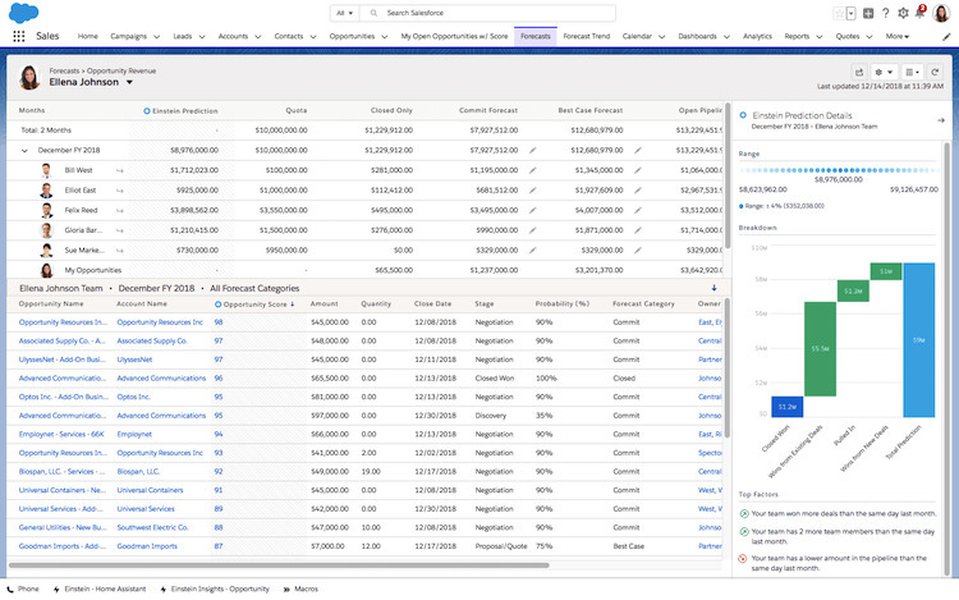
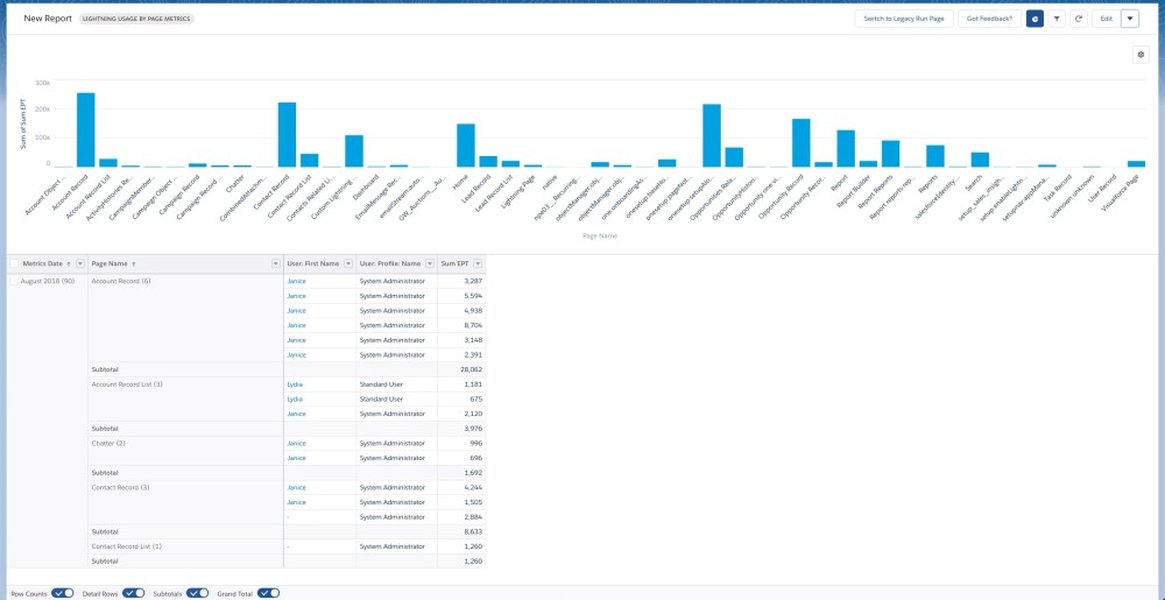
These images underscore the importance of EPT in dashboard design, showing how SAQL-derived data can be visualized to monitor site performance, ultimately leading to better user experiences on internal and Experience Cloud platforms.
Embedding a Relevant YouTube Video
To further illustrate SAQL basics and their application to queries like those for EPT metrics, we've embedded a video that breaks down the anatomy of a SAQL query. This video is particularly relevant as it covers fundamental concepts that directly apply to deriving EPT metrics, such as data loading and aggregation.
In this deep dive, the video explores how SAQL queries can be structured for advanced analytics, providing context on why mastering these queries is essential for performance monitoring in Salesforce. It complements our examples by offering visual and step-by-step guidance on query construction.
FAQ Section
-
What is EPT and why is it important?
EPT, or Experienced Page Time, measures the actual load time users experience on Salesforce pages, helping to optimize performance for better user satisfaction.
-
How do I start writing SAQL queries?
Begin with basic loads and filters using datasets like LightningUsageByPageMetrics, then build up with aggregations as shown in the examples.
-
Can SAQL queries be used for real-time monitoring?
Yes, SAQL supports real-time data manipulation, making it ideal for monitoring EPT metrics dynamically.
References
Last updated April 11, 2025