
Comprehensive Guide to Using Scapy's SCTPChunkInit in Python
Crafting and Manipulating SCTP INIT Chunks for Reliable Network Communications
Key Takeaways
- Understanding SCTPChunkInit: Grasp the fundamental components and purpose of the SCTP INIT chunk within the SCTP handshake process.
- Scapy Integration: Learn how to effectively utilize Scapy to craft, manipulate, and send SCTP INIT packets for various networking scenarios.
- Best Practices: Implement best practices to ensure accurate packet crafting, secure communications, and efficient network testing.
Introduction to SCTP and Scapy
SCTP - Stream Control Transmission Protocol
Stream Control Transmission Protocol (SCTP) is a transport-layer protocol, serving a similar role to TCP and UDP but with enhanced features geared towards reliability and message-oriented communication. Unlike TCP, SCTP supports multi-homing and multi-streaming, which provide resilience against network failures and reduce head-of-line blocking, respectively.
SCTP is widely used in applications where reliable and ordered message delivery is crucial, such as telecommunications signaling (e.g., SS7, SIGTRAN) and web applications requiring robust session management.
Scapy - A Powerful Packet Manipulation Tool
Scapy is a versatile Python-based tool used for network packet crafting, manipulation, sending, and sniffing. Its capabilities extend across a broad spectrum of protocols, allowing users to create bespoke packets, analyze network traffic, and perform network discovery and security assessments.
Scapy's modular architecture and extensive library of protocol layers make it an invaluable asset for network engineers, cybersecurity professionals, and developers seeking to interact directly with network protocols at a granular level.
Understanding SCTPChunkInit
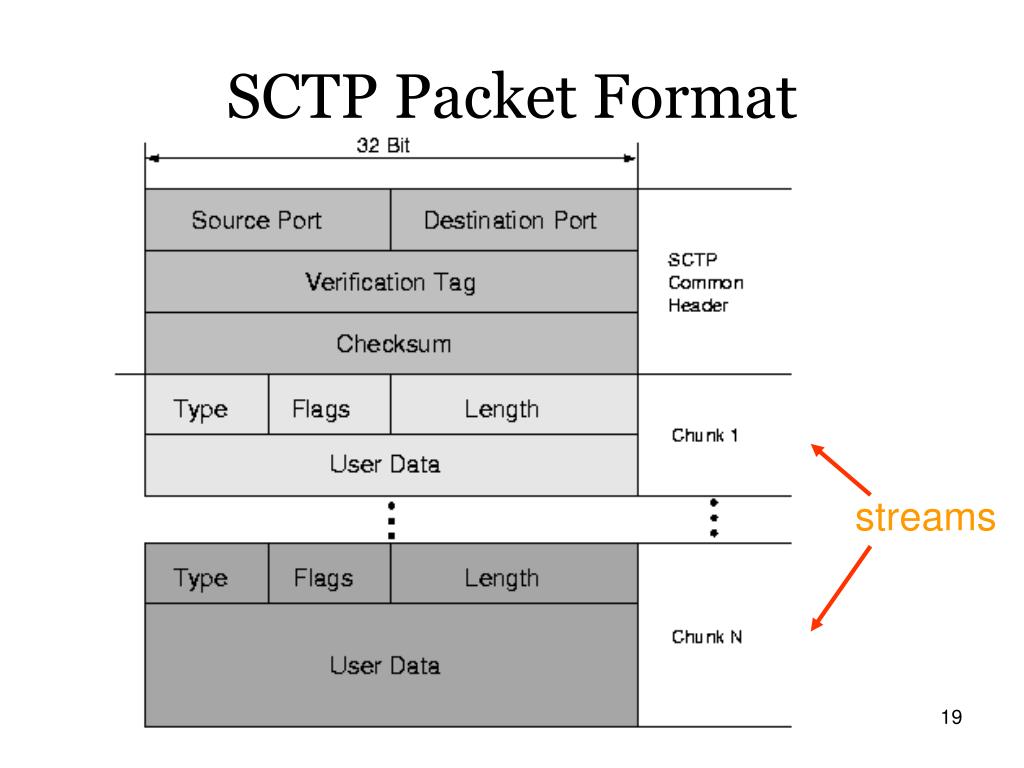
The SCTPChunkInit class in Scapy represents the INIT chunk of the SCTP protocol, which is integral to establishing an SCTP association between two endpoints. The INIT chunk initiates the handshake process, conveying critical parameters that define the capabilities and expectations of the initiator.
Crafting an SCTP INIT Chunk Using Scapy
Setting Up Your Environment
Before diving into crafting SCTP INIT chunks with Scapy, ensure that your development environment meets the necessary prerequisites:
- Python Installation: Scapy is a Python library, so having Python 3.x installed is essential.
- Scapy Installation: Install Scapy using pip:
pip install scapy - Root/Administrator Privileges: Crafting and sending raw packets typically require elevated privileges.
- Network Configuration: Ensure that your network settings allow for the sending of custom packets and that your firewall rules permit SCTP traffic.
Writing the SCTPChunkInit Code
Defining the IP Layer
The IP layer defines the source and destination IP addresses for the SCTP packet. This layer is crucial as it determines where the packet will be routed in the network.
Defining the SCTP Layer
The SCTP layer specifies the source and destination ports, as well as the Verification Tag (vtag). The vtag is pivotal in associating packets with their respective SCTP associations.
Creating the SCTPChunkInit
The SCTPChunkInit class encapsulates the INIT chunk’s parameters, such as the initiation tag, receiver window size, number of streams, and initial Transmission Sequence Number (TSN).
Assembling the Packet
Packet assembly involves stacking the IP layer, SCTP layer, and SCTPChunkInit in the correct order. The '/' operator in Scapy facilitates this layering.
Detailed Code Example
from scapy.all import *
from scapy.layers.inet import IP
from scapy.layers.sctp import SCTP, SCTPChunkInit

# Define the IP layer with source and destination addresses
ip_layer = IP(src="192.168.1.100", dst="192.168.1.101")

# Define the SCTP layer with source and destination ports
sctp_layer = SCTP(sport=5000, dport=5000, tag=0)

# Create the SCTP INIT chunk with necessary parameters
init_chunk = SCTPChunkInit(
    init_tag=123456789,      # Association initiation tag
    a_rwnd=15000,             # Advertised receiver window credit in bytes
    n_out_streams=10,         # Number of outbound streams
    n_in_streams=10,          # Number of inbound streams
    init_tsn=1000              # Initial Transmission Sequence Number
)

# Assemble the complete packet
packet = ip_layer / sctp_layer / init_chunk

# Display the packet structure for verification
packet.show()

# (Optional) Send the crafted packet on the network
# send(packet)
Explanation of the Code Components
Let's dissect the above code to understand each component's role and significance:
- Importing Necessary Modules: The
scapy.allmodule is imported to access Scapy's functionalities, and specific layers like IP and SCTP are imported for clarity. - IP Layer: Defines the source (
src) and destination (dst) IP addresses:ip_layer = IP(src="192.168.1.100", dst="192.168.1.101") - SCTP Layer: Specifies the source and destination ports along with the Verification Tag (vtag). For an INIT chunk, the vtag is typically set to 0:
sctp_layer = SCTP(sport=5000, dport=5000, tag=0) - SCTPChunkInit: Constructs the INIT chunk with essential parameters:
init_tag: A unique identifier for the SCTP association.a_rwnd: Advertised receiver window credit, indicating the buffer capacity of the receiver.n_out_streams&n_in_streams: Define the number of outbound and inbound streams, facilitating multi-streaming capabilities.init_tsn: The initial Transmission Sequence Number, marking the starting point for data transmission.
init_chunk = SCTPChunkInit( init_tag=123456789, a_rwnd=15000, n_out_streams=10, n_in_streams=10, init_tsn=1000 ) - Assembling the Packet: Layers are stacked using the '/' operator to form the complete packet:
packet = ip_layer / sctp_layer / init_chunk - Displaying the Packet: The
packet.show()function provides a structured view of the packet's contents, aiding in verification and debugging. - Sending the Packet: The
send(packet)function transmits the crafted packet over the network. This step is optional and requires appropriate privileges.
Advanced Customizations and Enhancements
Adding Parameters to SCTPChunkInit
The SCTPChunkInit class allows for the inclusion of additional parameters to tailor the INIT chunk to specific requirements. These parameters can extend the protocol's capabilities, such as enabling add-ons like authentication or setting specific window sizes.
For example, adding an Address Parameter to specify multiple IP addresses (multi-homing):
from scapy.layers.sctp import SCTPParamAddress

# Define additional SCTP parameters
address_param = SCTPParamAddress(addr="192.168.1.100")

# Create the SCTP INIT chunk with the address parameter
init_chunk = SCTPChunkInit(
    init_tag=123456789,
    a_rwnd=15000,
    n_out_streams=10,
    n_in_streams=10,
    init_tsn=1000,
    params=[address_param]
)
Handling the SCTP Handshake Process
Crafting an SCTP INIT chunk is typically the first step in establishing an SCTP association. The handshake process involves:
- Sending INIT: The initiator sends an SCTP INIT chunk to the responder.
- Receiving INIT ACK: The responder replies with an INIT ACK chunk, acknowledging the initiation.
- Sending COOKIE ECHO: The initiator sends a COOKIE ECHO chunk to confirm the association.
- Receiving COOKIE ACK: The responder acknowledges with a COOKIE ACK, finalizing the handshake.
Scapy can be utilized to craft and analyze each stage of this handshake, enabling thorough testing and simulation of SCTP-based communications.
Debugging and Testing Your SCTP Packets
Effective debugging ensures that the crafted packets conform to protocol specifications and achieve the intended communication objectives. Here are some strategies:
- Packet Inspection: Use
packet.show()to inspect packet layers and fields. - Wireshark Integration: Capture and analyze sent packets using Wireshark to verify correct formation and routing.
- Error Handling: Implement try-except blocks to catch and handle exceptions during packet crafting or sending.
- Logging: Log packet details and transmission statuses for post-analysis.
Practical Applications of SCTPChunkInit with Scapy
Network Testing and Simulation
Crafting custom SCTP INIT packets enables network engineers to simulate various scenarios, such as:
- Load Testing: Simulate multiple SCTP associations to test server handling capacities.
- Protocol Compliance: Ensure that network devices correctly interpret and respond to SCTP INIT chunks.
- Performance Benchmarking: Measure response times and resource utilization under different initialization parameters.
Security Testing and Analysis
Security professionals can leverage SCTP INIT packet crafting to:
- Vulnerability Assessment: Identify potential weaknesses in SCTP implementations by sending malformed or atypical INIT chunks.
- Intrusion Detection Testing: Validate the efficacy of IDS/IPS systems in detecting and responding to SCTP-based attacks.
- Firewall Rules Validation: Ensure that firewall configurations appropriately handle SCTP traffic, including INIT chunks.
Educational Purposes
For learners and educators, Scapy provides a hands-on platform to explore and understand SCTP:
- Protocol Mechanics: Visualize and comprehend the structure and flow of SCTP handshake processes.
- Interactive Learning: Experiment with different INIT chunk parameters to observe their effects on association establishment.
- Research and Development: Develop and test new features or enhancements to SCTP within controlled environments.
Best Practices When Using SCTPChunkInit
Ensuring Correct Parameter Values
Accurate parameter configuration is vital for successful SCTP association establishment. Adhere to the following guidelines:
- Unique Initiation Tag: Use a unique
init_tagto prevent association conflicts. - Appropriate Window Size: Set
a_rwndbased on the expected data flow and receiver capacity. - Stream Limits: Configure
n_out_streamsandn_in_streamsaccording to application requirements. - Valid TSN: Ensure the
init_tsnis within a valid range to avoid sequence issues.
Handling Network Permissions and Privileges
Crafting and sending raw packets typically necessitate elevated privileges. To manage this:
- Run as Administrator/Root: Execute scripts with necessary permissions to prevent permission-related errors.
- Use Virtual Environments: Isolate dependencies and manage permissions within virtual environments for security.
- Limit Scope: Restrict packet sending to controlled networks to avoid unintended network disruptions.
Maintaining Security and Compliance
While crafting custom packets is powerful, it carries inherent risks:
-
Legal Considerations: Ensure compliance with local laws and regulations regarding network traffic manipulation.
-
Network Policies: Adhere to organizational policies to prevent unauthorized packet crafting that could breach security protocols.
-
Responsible Usage: Utilize packet crafting tools for legitimate purposes, such as testing and education, to uphold ethical standards.
SCTPChunkInit Field Parameters
| Field | Description | Type | Default |
|---|---|---|---|
| init_tag | Unique identifier for the SCTP association initiation. | Integer (32-bit) | None |
| a_rwnd | Advertised receiver window credit in bytes, indicating buffer capacity. | Integer (32-bit) | None |
| n_out_streams | Number of outbound streams the sender can support. | Integer (16-bit) | None |
| n_in_streams | Maximum number of inbound streams the sender can handle. | Integer (16-bit) | None |
| init_tsn | Initial Transmission Sequence Number for data transmission. | Integer (32-bit) | None |
| params | Optional list of additional SCTP parameters. | List | Empty List |
Conclusion
Mastering the use of SCTPChunkInit within Scapy empowers network professionals to craft precise SCTP INIT packets tailored to specific networking scenarios. Whether for testing, simulation, or educational purposes, the ability to manipulate SCTP associations at a granular level enhances understanding and control over reliable message-oriented communications.
By adhering to best practices, ensuring parameter accuracy, and maintaining security compliance, users can leverage Scapy’s powerful features to advance their network engineering and security endeavors effectively.
References
Last updated February 2, 2025