
Unlock the Secrets to Safely Holding Your Bitcoin for the Long Haul
Discover the essential strategies and tools to secure your BTC investment against potential threats and ensure long-term peace of mind.
Key Highlights for Secure Bitcoin Holding
- Cold Storage Reigns Supreme: For long-term holding ("hodling"), offline storage methods like hardware wallets are universally recommended to protect your Bitcoin from online threats like hacking and malware.
- Master Your Private Keys & Seed Phrase: True ownership means controlling your private keys. Securely backing up your seed phrase (recovery phrase) offline is non-negotiable for preventing irreversible loss.
- Prioritize Self-Custody Over Exchanges: Avoid leaving significant amounts of Bitcoin on exchanges long-term. Transferring your BTC to a wallet where you control the keys (self-custody) minimizes risks associated with third-party failures or hacks.
Understanding Bitcoin Ownership: The Power of Private Keys
Before diving into storage methods, it's crucial to understand what "holding" Bitcoin truly means. Unlike traditional assets stored in banks, Bitcoin exists on a decentralized digital ledger called the blockchain. Your ownership isn't tied to a physical coin but to a secret piece of cryptographic data: your private key.
What Are Private Keys?
Think of a private key as the master key to your Bitcoin vault. It's a long, secret string of characters that grants the ability to access and spend the Bitcoin associated with a specific public address (which is like your account number). Anyone who possesses your private key can control your Bitcoin. Therefore, protecting this key is the absolute foundation of securing your holdings.
Why Self-Custody Matters ("Not Your Keys, Not Your Coins")
This popular crypto phrase highlights a fundamental truth: if you don't directly control the private keys associated with your Bitcoin, you don't truly own it. When you leave your Bitcoin on an exchange or with another third-party custodian, you are trusting them to secure the keys for you. While convenient for trading, this introduces counterparty risk – the risk that the custodian could be hacked, go bankrupt, or restrict your access. For long-term holding, self-custody, where you manage your own keys, offers the highest level of control and security.
Choosing Your Fortress: Bitcoin Wallet Types Explained
A Bitcoin "wallet" doesn't store the Bitcoin itself (that lives on the blockchain), but rather stores and manages your private keys. Wallets come in various forms, primarily categorized as "hot" or "cold," based on their connection to the internet.
Hot Wallets: Convenience vs. Risk
Hot wallets are connected to the internet. They include mobile apps, desktop software, and web-based wallets (often integrated into exchanges).
- Pros: Convenient for frequent transactions, easy access.
- Cons: Vulnerable to online attacks, malware, phishing scams. Not recommended for storing large amounts or for long-term holding.
- Best Use: Small amounts for trading or everyday spending.
Cold Wallets: The Gold Standard for Security
Cold wallets (or cold storage) keep your private keys completely offline, isolating them from internet-based threats. This is the strongly recommended approach for securing Bitcoin you plan to hold for the long term.
Hardware Wallets: The Top Recommendation
These are physical, electronic devices specifically designed to secure private keys offline. They often resemble USB drives or small calculators. To authorize a transaction, you connect the device to a computer or mobile phone, but the private key never leaves the hardware wallet itself. It signs the transaction internally and broadcasts the signed transaction without exposing the key.
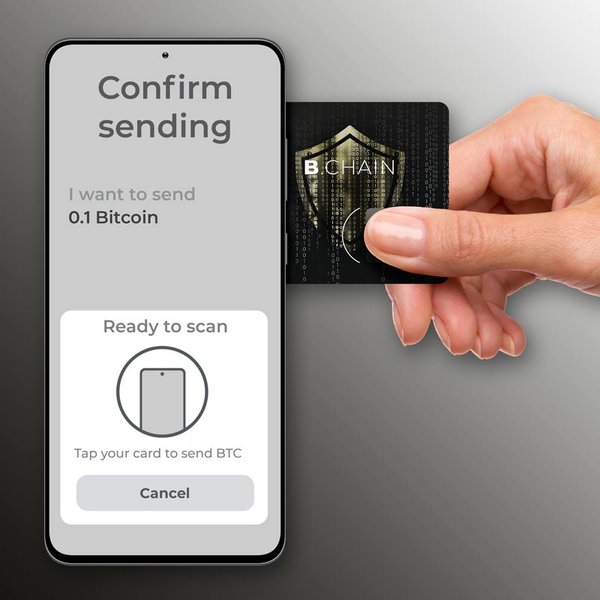
A typical hardware wallet, designed for secure offline storage of private keys.
- Pros: Highest level of security against online threats, user controls keys, robust against malware.
- Cons: Cost involved, slightly less convenient for quick transactions, requires physical device management.
- Best Use: Long-term holding ("hodling") of significant Bitcoin amounts.
Paper Wallets: A Basic Offline Option
A paper wallet involves printing your public and private keys (often as QR codes) onto a piece of paper. The keys are generated offline, ensuring they haven't been exposed to the internet.
- Pros: Completely offline, potentially low cost (if generated securely).
- Cons: Paper is fragile (susceptible to fire, water damage, fading), requires careful generation process to avoid compromise, less user-friendly for spending.
- Best Use: Basic, low-cost cold storage if handled with extreme care and stored securely.
Other Cold Storage Methods
This can include storing keys on an air-gapped (never connected to the internet) computer, offline USB drives, or even using specialized services like Bitcoin Vaults offered by some institutions (though self-custody is generally preferred for individual holders).
The Ultimate Security Setup: Hardware Wallets Deep Dive
Given their balance of security and usability, hardware wallets are the most frequently recommended solution for long-term Bitcoin holders.
How Hardware Wallets Work
When you set up a hardware wallet, it generates your private keys offline within a secure chip on the device. These keys remain isolated. When you want to send Bitcoin:
- You initiate the transaction on a connected computer or mobile app (the "hot" interface).
- The transaction details are sent to the hardware wallet for verification.
- You physically confirm the transaction details (amount, recipient address) on the hardware wallet's screen.
- The hardware wallet signs the transaction using the private key stored securely inside it.
- The signed transaction (which doesn't contain the private key) is sent back to the computer/app to be broadcast to the Bitcoin network.
Popular Hardware Wallet Choices
Several reputable brands offer high-quality hardware wallets. Some commonly mentioned and trusted options include:
- Ledger (e.g., Ledger Nano S Plus, Ledger Nano X, Ledger Stax)
- Trezor (e.g., Trezor Model One, Trezor Safe 3, Trezor Safe 5)
- Coldcard (Often favored by Bitcoin maximalists for its air-gap capabilities)
- BitBox (Known for its security features and ease of use)
- Foundation Devices (Passport)
It's crucial to purchase hardware wallets directly from the manufacturer or authorized resellers to avoid tampering.
Setting Up Your Hardware Wallet
The setup process typically involves:
- Initializing the device and setting a secure PIN code.
- Generating a new set of private keys.
- Crucially, backing up the **seed phrase** (also called recovery phrase or mnemonic phrase).
Never Lose Access: Mastering Seed Phrase Management
Perhaps the most critical aspect of self-custody is managing your seed phrase. This is your ultimate backup.
What is a Seed/Recovery Phrase?
During wallet setup (especially hardware wallets), you'll be given a sequence of 12 or 24 random words. This seed phrase is a human-readable representation of your wallet's master private key. It allows you to recover all your Bitcoin addresses and funds associated with that wallet if your device is lost, stolen, damaged, or reset.
Generating and Storing Your Seed Phrase Securely
This step cannot be overemphasized:
- Write It Down Physically: Use pen and paper. Never type it into a computer, phone, password manager, or cloud storage. Never take a photo of it. The goal is to keep it completely offline.
- Verify Accuracy: Double-check the spelling and order of the words.
- Store Securely: Keep the physical copy safe from physical threats. Consider:
- Fireproof and waterproof safes.
- Storing multiple copies in different, secure locations (e.g., safe deposit box, trusted family member's safe - consider splitting the phrase).
- Using metal seed storage solutions (e.g., plates made of steel or titanium) which are more durable than paper against fire and water.
- Keep it Secret: Never share your seed phrase with anyone. Treat it as sensitively as your private keys themselves.

Securing your seed phrase is like locking your Bitcoin in a virtual vault.
The Peril of Losing Your Seed Phrase
If you lose your hardware wallet AND you lose your seed phrase backup, your Bitcoin associated with that wallet will likely be lost forever. There is no central authority to appeal to for recovery. Responsibility rests entirely with you.
Radar Chart: Comparing Bitcoin Storage Methods
To help visualize the trade-offs between different storage options, this radar chart compares common methods based on key factors relevant to holding Bitcoin. Note that these scores are relative assessments for typical use cases.
As the chart illustrates, hardware wallets offer the best combination of security, control, and long-term suitability, despite a moderate cost and setup complexity. Exchanges offer maximum convenience but sacrifice control and long-term security. Hot wallets provide convenience with self-custody but lack robust security. Paper wallets offer high security potential but low convenience and high physical risk.
Enhancing Security: Advanced Techniques and Best Practices
Beyond choosing the right wallet, adopting strong security habits is essential for protecting your Bitcoin holdings.
Multisignature (Multisig) Wallets
For enhanced security, especially with significant amounts, consider multisig wallets. These wallets require multiple private keys (held by different people or stored in different locations/devices) to authorize a single transaction. For example, a 2-of-3 multisig setup might require signatures from any two out of three designated keys. This adds redundancy (if one key is lost) and security (a thief needs to compromise multiple keys).
Essential Security Habits
- Strong Authentication: Use strong, unique passwords for any exchange accounts or software wallets. Enable Two-Factor Authentication (2FA), preferably using authenticator apps (like Google Authenticator or Authy) or hardware security keys (like YubiKey) rather than SMS-based 2FA.
- Keep Software Updated: Regularly update your hardware wallet firmware and any software wallet applications. Updates often contain critical security patches.
- Secure Your Devices: Ensure the computers and mobile devices you use to interact with your wallets are free from malware. Use reputable antivirus software.
Avoiding Common Threats
- Phishing Scams: Be wary of unsolicited emails, messages, or websites asking for your private keys, seed phrase, or login credentials. Verify website URLs carefully. Hardware wallets help protect against malware trying to steal keys directly, but phishing can still trick you into sending funds to the wrong address.
- Malware: Avoid downloading software from untrusted sources. Malware can log keystrokes, steal clipboard data (potentially swapping addresses), or compromise software wallets.
- Physical Security: Store your hardware wallet and seed phrase backups securely to prevent physical theft. Avoid advertising your Bitcoin holdings, which could make you a target.
Transferring Bitcoin Securely (Moving from Exchange to Cold Storage)
When moving Bitcoin from an exchange to your hardware wallet:
- Generate a receiving address on your hardware wallet. Ensure the device is connected to a trusted interface (like the manufacturer's official app).
- Carefully verify the receiving address displayed on the hardware wallet's screen matches the one shown in the software interface. This prevents malware from swapping the address.
- Copy the verified receiving address.
- Initiate the withdrawal from the exchange, pasting the verified address as the destination.
- Double-check the address on the exchange withdrawal confirmation page one last time before confirming. Small test transactions are often recommended first.
Mindmap: Visualizing Your Bitcoin Security Strategy
This mindmap provides a visual overview of the key concepts involved in securely holding Bitcoin, helping you structure your approach.
Video Guide: Securing Your Crypto Assets
Visual guides can be very helpful. This video provides insights into securing your cryptocurrency, aligning with the principles discussed here, focusing on practical steps you can take in 2025.
The video emphasizes starting with robust security foundations, particularly relevant for anyone serious about holding Bitcoin long-term. It discusses hardware wallets like the Ledger Flex, reinforcing the importance of cold storage solutions and proper setup procedures to safeguard your digital assets effectively.
Comparing Key Aspects of Bitcoin Storage Solutions
This table summarizes the core differences between the main types of Bitcoin wallets to help you choose the best fit for your needs, especially for long-term holding.
| Feature | Hot Wallet (Software/Mobile/Web) | Hardware Wallet (Cold Storage) | Paper Wallet (Cold Storage) | Exchange Wallet (Custodial) |
|---|---|---|---|---|
| Private Key Control | Usually Yes (Self-Custody) | Yes (Self-Custody) | Yes (Self-Custody) | No (Held by Exchange) |
| Security Level (vs Online Threats) | Low | Very High | High (if generated securely) | Moderate (Depends on Exchange Security) |
| Convenience (for Transactions) | High | Moderate | Very Low | Very High |
| Cost | Usually Free | $50 - $200+ | Very Low (Print cost) | Free (Trading fees apply) |
| Backup Method | Seed Phrase (Store Offline) | Seed Phrase (Store Offline) | The Paper Itself (+Copies) | Managed by Exchange (Limited user control) |
| Setup Complexity | Low | Moderate | Moderate (Needs care) | Very Low |
| Best Use Case | Small amounts, frequent spending/trading | Long-term holding, large amounts, maximum security | Basic, low-cost long-term storage (handle with care) | Active trading, temporary storage (not for holding) |
Frequently Asked Questions (FAQ)
What is the absolute safest way to store Bitcoin long-term?
The consensus points towards using a reputable hardware wallet (cold storage) combined with securely storing your seed phrase backup offline (e.g., engraved on metal plates, stored in multiple secure locations). For very large amounts, a multisignature (multisig) setup using multiple hardware wallets offers an even higher level of security.
Should I keep my Bitcoin on an exchange?
It is strongly advised not to store large amounts of Bitcoin or any Bitcoin intended for long-term holding on an exchange. Exchanges are targets for hackers, and you don't control the private keys ("not your keys, not your coins"). Only keep funds on an exchange that you are actively trading or willing to risk losing.
What happens if I lose my hardware wallet?
Losing the physical device itself is not catastrophic, provided you have securely backed up your seed phrase. You can purchase a new hardware wallet (from the same or even a different compatible brand) and use your seed phrase to restore access to all your Bitcoin.
How often should I check my cold storage?
You don't need to connect your hardware wallet frequently just to check your balance. You can safely monitor your balance using a public address viewer or a watch-only wallet on your phone or computer, which doesn't require exposing your private keys. Only connect your cold storage device when you need to send funds or potentially update firmware (after verifying the update's legitimacy).
Is multisig necessary for everyone?
Multisignature setups add complexity and are generally not necessary for smaller holdings. However, for individuals or entities holding substantial amounts of Bitcoin where the consequences of loss would be severe, multisig provides a significant security upgrade by eliminating single points of failure.
Recommended Further Exploration
- Which hardware wallet is better for beginners, Ledger or Trezor?
- What are the exact steps to securely create a Bitcoin paper wallet completely offline?
- Can you provide a detailed explanation of how Bitcoin multisignature wallets work and how to set one up?
- What are the most durable and secure methods for storing my seed phrase backup long term?
References
Last updated May 4, 2025