
Building a Fort Knox for Your Enterprise: A Comprehensive CA Blueprint
Unlocking unparalleled security and digital trust with a meticulously planned Certificate Authority for your 2500-employee enterprise.
Key Insights for a Secure Enterprise CA
- Two-Tier PKI Architecture: A robust design separating an offline Root CA from online Issuing CAs is paramount for maximum security, drastically reducing the attack surface for the most critical component.
- Hardware Security Modules (HSMs): Integrating FIPS 140-2 Level 2/3 certified HSMs for both Root and Issuing CA private key protection is non-negotiable for tamper-resistant key storage and cryptographic processing.
- Layered Security Controls: A comprehensive security strategy must encompass stringent physical access controls, granular logical access via RBAC and MFA, proactive malware protection, segmented network infrastructure, and rigorous administrative and procedural policies.
Establishing and maintaining a secure Certificate Authority (CA) is a cornerstone for any modern enterprise aiming to safeguard its digital ecosystem. For an organization with 2500 employees and a skilled IT team, a private enterprise Public Key Infrastructure (PKI) offers unparalleled control over authentication, encryption, and digital signatures. This detailed plan outlines the essential components—from infrastructure and software to multifaceted security controls and cost considerations—required to build and operate a highly resilient and secure CA.
Strategic PKI Hierarchy Design
A fundamental decision for enterprise PKI is its hierarchical design. A two-tier PKI architecture is widely recommended due to its enhanced security posture and operational flexibility. This design segregates the most critical component, the Root CA, from day-to-day operations.
Offline Root CA: The Unassailable Foundation
The Root CA serves as the absolute trust anchor of the entire PKI. For maximum security, it must be a standalone, offline, and air-gapped system. Its primary function is to issue certificates solely to the Intermediate or Issuing CAs. Keeping it disconnected from any network significantly minimizes its exposure to cyber threats, rendering it virtually uncompromisable if properly managed. When operations necessitate bringing the Root CA online (e.g., for issuing a new intermediate CA certificate or renewing its own), this should occur under strict procedural controls within a highly isolated, segmented network, followed by immediate disconnection.
Online Issuing CA(s): The Operational Workhorses
The Issuing CAs, also known as Subordinate CAs, are the online components responsible for issuing certificates to end entities within the enterprise. These entities include users, devices, internal web services, VPNs, and applications. Integrating Issuing CAs with Active Directory (AD CS) streamlines processes such as user account management and certificate auto-enrollment. Deploying multiple Issuing CAs ensures high availability and load balancing, preventing a single point of failure in certificate issuance and revocation services.
Hardware and Software Foundations
Robust Hardware Requirements
The physical infrastructure supporting the CA is critical. Each component must be selected for its reliability, performance, and security features.
Offline Root CA Hardware:
- Server: A dedicated physical server (e.g., modern server-grade CPU, 32GB ECC RAM) running a minimal installation of Windows Server (e.g., Server Core) to reduce the attack surface.
- Hardware Security Module (HSM): A FIPS 140-2 Level 3 compliant HSM is essential for securing the Root CA's private key. This dedicated hardware device provides a secure, tamper-resistant environment for key generation, storage, and cryptographic operations.
- Storage: Encrypted internal enterprise-grade SSDs (e.g., 1TB) for the operating system and CA database.
- Backup Media: Secure, encrypted external hard drives or USB drives for offline backups of the Root CA and its private key.
- UPS: A dedicated Uninterruptible Power Supply to ensure power stability during operations.
Online Issuing CA(s) Hardware (Minimum two for redundancy):
- Servers: Dedicated physical or virtual servers (e.g., dual 12-core Xeon CPUs, 64GB+ RAM each) running Windows Server (e.g., Windows Server 2022/2025). These servers will be members of the Active Directory domain.
- HSM (Optional but Recommended): While not strictly mandatory for Issuing CAs, integrating FIPS 140-2 Level 2/3 compliant HSMs for their private keys significantly elevates overall security, especially for high-assurance PKI deployments.
- Storage: High-performance internal storage with redundant configurations (RAID) for the operating system, CA database, and Certificate Revocation Lists (CRLs).
- Network Interface Cards (NICs): Multiple 10 Gbps NICs for network segmentation and redundancy.
Supporting Infrastructure:
- Web Servers: Dedicated web servers (e.g., IIS) for hosting Certificate Enrollment Web Services and CRL Distribution Points (CDP)/Authority Information Access (AIA) publishing. These should be separate from the Issuing CAs for enhanced security.
- Network Devices: Redundant firewalls, switches, and routers to support the CA infrastructure with advanced security features.

Modern data center infrastructure providing a secure environment for CA operations.
Essential Software Components
The chosen software stack must facilitate seamless PKI operations while adhering to stringent security standards.
- Operating System: Windows Server 2022 Standard or Datacenter Edition for all CA servers, selected for its robust security features and Active Directory integration.
- Certificate Services: Microsoft Active Directory Certificate Services (AD CS), the core role for managing the CA hierarchy. This includes:
- Certification Authority: The primary component for issuing and managing certificates.
- Certification Authority Web Enrollment: Enables users to request certificates via a web browser.
- Online Responder (OCSP): Provides real-time certificate status checking for faster revocation information.
- Management Tools: PowerShell scripting for automation, Group Policy for configuring certificate templates and auto-enrollment.
- Monitoring and SIEM: Integration with a Security Information and Event Management (SIEM) system (e.g., Splunk, Azure Sentinel) for centralized logging, real-time alerting, and anomaly detection.
- Backup and Recovery: Robust backup solutions (e.g., Veeam or native Windows Server Backup) capable of securely backing up AD CS components, including the CA database and private keys, with encrypted off-site storage.
- Antimalware Software: Enterprise-grade endpoint protection with real-time scanning and application whitelisting on all CA servers and administrative workstations.
Facilities and Environmental Aspects
The physical environment hosting the CA equipment is as critical as its logical security. It must provide robust protection against both environmental hazards and malicious physical access.
Dedicated Secure Enclosure for the Root CA:
- Location: Housed in a physically secure, isolated room or vault within a primary data center, separate from general data center operations. The room should not be on the ground floor or adjacent to public areas.
- Construction: Reinforced concrete walls, ceiling, and floor. Solid core steel doors with steel frames, anti-tamper hinges, and no windows. Ballistic-rated materials or a UL-rated vault door for enhanced resistance against forcible entry.
- Environmental Controls:
- Temperature and Humidity: Precision cooling and humidity control systems (e.g., 20-22°C and 40-50% humidity) to ensure optimal hardware operation and longevity.
- Fire Suppression: Non-water-based fire suppression system (e.g., inert gas such as FM-200 or NOVEC 1230) to prevent equipment damage. Smoke detectors and early warning systems.
- Power: Dedicated, redundant power circuits from Uninterruptible Power Supplies (UPS) and backup generators capable of sustaining operations for 48+ hours. Surge protection and dual power feeds with automatic transfer switches.
- Water Leak Detection: Sensors and drip pans to detect and contain any water leaks.
- Physical Separation: The Root CA server should be housed within its own locked cabinet or secure vault cage, distinct from other network hardware.
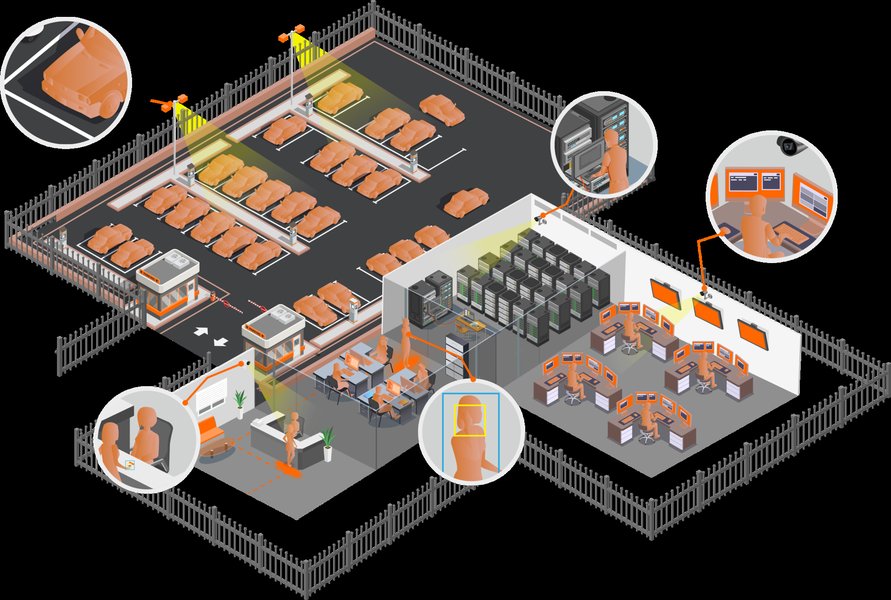
Multi-level security measures protecting a data center, essential for CA infrastructure.
Data Center for Issuing CAs and Supporting Infrastructure:
These components will reside in a professionally managed data center or server room, adhering to standard industry best practices for physical security and environmental controls.
- Rack Security: Issuing CAs and supporting servers should be housed in locked server racks within the data center.
- Access Control: Biometric authentication, keycard access, and 24/7 monitored CCTV with recorded logs for all ingress/egress. Security guards with visitor verification and escort policies.
- Redundant HVAC and Power: Standard data center provisions for continuous operation.
Network Infrastructure and Security
Network design is crucial to isolate the CA infrastructure and prevent unauthorized access.
Network Segmentation:
- Root CA: Entirely offline and air-gapped. When temporarily connected for administration, it should be on a highly isolated, segmented network dedicated solely for CA administration.
- Issuing CAs: Reside on a dedicated, highly secured network segment (VLAN) within the corporate network. This segment must be logically separated from other network zones (e.g., user networks, production application networks) by robust firewalls.
- CRL/AIA Distribution Points: Publicly accessible web servers hosting CRLs and AIA information should be located in a Demilitarized Zone (DMZ) or a heavily secured network segment, completely separate from the CA servers.
Firewall Rules and Security Features:
- Perimeter Firewalls: Next-generation firewalls with deep packet inspection deployed at network perimeters.
- Host-Based Firewalls: Configured on all CA servers with strict whitelist rules, allowing only necessary communication ports (e.g., LDAP, HTTP for CRL/AIA, RPC for CA management) between the Issuing CAs and other authorized systems (e.g., Active Directory, web servers, client machines for auto-enrollment).
- Intrusion Detection/Prevention Systems (IDS/IPS): Deployed on CA network segments to monitor for suspicious activity and prevent intrusions.
- Encrypted Communications: All administrative sessions and data transfers related to the CA must use strong, encrypted protocols (e.g., TLS 1.2/1.3, IPsec).
- Secure DNS: Implement secure DNS resolution for proper certificate validation and distribution.
Radar chart illustrating the critical security dimensions for a robust enterprise CA. Each axis represents a key area of security, with higher scores indicating stronger protection measures. This visual assessment helps in identifying areas of strength and potential focus for improvement in a comprehensive CA security strategy.
Comprehensive Security Controls
A multi-layered security approach is essential to protect the CA's integrity, confidentiality, and availability, aligning with frameworks like NIST SP 800-53 and CIS Critical Security Controls.
Physical Security: Guardians of the Hardware
- Access Management: Strictly limit access to authorized personnel only via multi-factor authentication (e.g., biometric scan + keycard + PIN) at every entry point. All access attempts and entries must be logged and regularly reviewed.
- Surveillance: 24/7 video monitoring of the Root CA facility and data center with tamper-resistant cameras. Footage should be retained for an extended period (e.g., 90+ days).
- Forcible Entry Protection:
- Reinforced Barriers: Reinforced steel doors, electromagnetic locks, and walls constructed to resist forced entry attempts.
- Man-trap Entry: A double-door system where one door must close before the other opens, preventing tailgating.
- Intrusion Detection Systems: Motion sensors, vibration sensors, door/window contacts, and tamper-evident seals on equipment, connected to a central security monitoring system with immediate alerts to security personnel and law enforcement.
- Security Guards: On-site security personnel providing regular patrols and rapid response to alerts.
- Secure Storage: HSMs and backup media stored in safes or secure vaults within the physically protected room.
Logical Access Control: Fortifying Digital Gates
- Role-Based Access Control (RBAC): Implement granular RBAC, assigning roles (e.g., CA Administrator, Certificate Manager, Auditor, Backup Operator) with the principle of least privilege.
- Multi-Factor Authentication (MFA): Mandate strong MFA (e.g., smart cards, hardware tokens, biometrics) for all privileged access to CA servers and related systems.
- Dedicated Administrative Accounts: Use separate, highly privileged accounts exclusively for CA administration, distinct from regular user accounts. These accounts should not have internet access or email.
- Privileged Access Workstations (PAWs): Dedicated, hardened workstations used solely for CA administration, with limited software, strict network access, and regular security audits.
- Session Monitoring: Implement tools to monitor and record administrative sessions on CA servers for audit purposes.
- Credential Management: Centralized and audited credential management for all CA-related accounts.
Malware Protection: Defending Against Digital Intruders
- Application Whitelisting: Allow only approved software to run on CA servers.
- Antimalware Software: Real-time scanning, regular updates, and scheduled full scans on all CA servers and administrative workstations.
- Regular Patching: A rigorous patch management process to ensure all operating systems and software on CA infrastructure are kept up-to-date with the latest security patches.
- No Internet Access: The Root CA must never be connected to the internet. Issuing CAs will have highly restricted internet access, typically only for CRL/AIA publishing.
Network Security: Segmenting and Shielding
- Network Segmentation: Logical separation of CA infrastructure from the rest of the network using VLANs and firewalls.
- IDS/IPS: Deploy network and host-based IDS/IPS to monitor traffic for suspicious activity.
- DoS Protection: Implement measures to protect against Denial-of-Service (DoS) attacks targeting the CA infrastructure.
- Secure Protocols: Use strong, encrypted protocols (e.g., TLS 1.2/1.3, IPsec) for all communications.
- Secure Configuration: Implement secure configurations for all network devices, disabling unnecessary services and ports.
(Biometrics, MFA, Logs)"] A2["24/7 Video Surveillance"] A3["Forcible Entry Protection
(Reinforced Doors, Mantrap, IDS)"] A4["Secure Storage (HSMs, Backups)"] B["Logical Access Control"] B1["Role-Based Access Control (RBAC)"] B2["Multi-Factor Authentication (MFA)"] B3["Dedicated Admin Accounts"] B4["Privileged Access Workstations (PAWs)"] B5["Session Monitoring"] C["Malware Protection"] C1["Application Whitelisting"] C2["Endpoint Protection (Antivirus/Antimalware)"] C3["Rigorous Patch Management"] C4["No Internet Access (Root CA)"] D["Network Security"] D1["Network Segmentation (VLANs, Firewalls)"] D2["IDS/IPS Deployment"] D3["Secure Protocols (TLS 1.2/1.3, IPsec)"] D4["Strict Firewall Rules"] E["Administrative & Procedural Controls"] E1["Comprehensive CA Policy & CPS"] E2["Regular Audits (Internal/External)"] E3["Incident Response Plan (PKI Specific)"] E4["Key Management Policy (Dual Control, Split Knowledge)"] E5["Staff Training & Awareness"] E6["Change Management Process"]
Mindmap illustrating the interconnected layers of security controls necessary for protecting an enterprise Certificate Authority, emphasizing physical, logical, malware, network, and administrative safeguards.
Administrative and Procedural Controls: The Human Element and Policy
- CA Policy and Certificate Practice Statement (CPS): Comprehensive formal documents detailing the rules, procedures, and responsibilities for certificate issuance, renewal, revocation, and management.
- Audit Logs: All CA operations, administrative actions, and security events must be logged and regularly reviewed by independent audit personnel.
- Incident Response Plan: A well-defined, regularly tested incident response plan specifically for PKI compromise scenarios, including procedures for certificate revocation, CA restoration, and forensic analysis.
- Key Management Policy: Strict policies and procedures for generating, storing, backing up, recovering, and revoking CA private keys. This includes secure key ceremonies for Root CA key generation, employing dual control and split knowledge.
- Change Management: A formal process for all changes to the CA system, ensuring proper review, approval, and documentation.
- Regular Audits: Periodic internal and external security audits of the CA infrastructure and its operations, ensuring compliance with relevant frameworks (e.g., NIST SP 800-53, ISO 27001, CIS Critical Security Controls).
- Training: Regular security awareness and specialized PKI administration training for all personnel involved in CA operations.
- Separation of Duties: Roles and responsibilities are divided among multiple individuals to prevent any single person from compromising the entire CA.
Understanding Your Investment: Cost Estimates
The initial investment and ongoing operational costs for a secure enterprise CA can vary significantly based on vendor choices, specific hardware specifications, software licensing models, and regional labor costs. The estimates below provide a rough approximation for an enterprise of 2500 employees.
| Category | Sub-Item | Estimated Initial Cost (USD) | Estimated Annual Recurring Cost (USD) | |
|---|---|---|---|---|
| Hardware | Offline Root CA Server & HSM | $40,000 - $80,000 | - | |
| Online Issuing CA Servers (2 units) | $30,000 - $60,000 | - | ||
| HSMs for Issuing CAs (Optional, 2 units) | $20,000 - $80,000 | - | ||
| Dedicated Web Servers (CRL/AIA) | $8,000 - $16,000 | - | ||
| Network Gear (Firewalls, Switches) | $10,000 - $50,000 | - | ||
| Software Licenses | Windows Server OS Licenses (all CAs) | $8,000 - $20,000 | - | |
| Antimalware/Endpoint Protection | Included in enterprise license | $25,000 - $75,000 | ||
| SIEM Solution (Initial/Enterprise) | $10,000 - $100,000+ | Variable, e.g., $10,000 - $50,000 | ||
| Backup Software | $5,000 - $20,000 | - | ||
| Facilities & Environmental | Secure Root CA Room Construction | $20,000 - $100,000+ | - | |
| Environmental Controls (HVAC, Fire) | $10,000 - $50,000 | - | ||
| Physical Security Systems (Biometrics, CCTV, Alarm) | $15,000 - $75,000 | - | ||
| Professional Services/Labor | PKI Design & Implementation (Consulting) | $20,000 - $100,000+ | - | |
| Ongoing Administration (FTE) | - | $80,000 - $150,000 | ||
| Security Audits (External) | - | $10,000 - $30,000 | ||
| Training | $5,000 - $15,000 | - | ||
| Total Estimated Cost | Initial Investment: | ~$250,000 - $750,000+ | Annual Recurring: | ~$115,000 - $305,000+ |
Note: These figures are indicative. Exact costs will depend on specific vendor agreements, compliance requirements, and existing infrastructure.
Visualizing Enterprise CA Setup
To further illustrate the practical aspects of setting up an enterprise CA, the following video provides a walkthrough of installing Active Directory Certificate Services and configuring an Enterprise Root Certificate Authority. This is a crucial foundational step in the broader plan discussed.
This video demonstrates the installation and configuration of Active Directory Certificate Services (AD CS) and an Enterprise Root Certificate Authority on Windows Server. It covers essential steps that form the basis for establishing a functional enterprise PKI, allowing IT teams to understand the initial setup process for their internal CA infrastructure.
Frequently Asked Questions (FAQ)
What is a two-tier PKI and why is it recommended?
Why are Hardware Security Modules (HSMs) so important for a CA?
What are the key physical security measures for a CA environment?
How does network segmentation protect the CA?
What is the role of a Certificate Policy (CP) and Certificate Practice Statement (CPS)?
Conclusion
Building and operating a secure enterprise Certificate Authority for an organization of 2500 employees is a significant undertaking that demands meticulous planning and execution across all domains—hardware, software, facilities, network infrastructure, and a robust suite of security controls. By adopting a two-tier PKI hierarchy, leveraging Hardware Security Modules, implementing comprehensive physical and logical access controls, and adhering to rigorous administrative and procedural guidelines, an enterprise can establish a trusted and resilient PKI. This strategic investment not only enhances the organization's security posture against evolving cyber threats but also provides a strong foundation for secure digital identity management, ensuring data integrity, confidentiality, and non-repudiation across all internal operations.
Recommended Further Exploration
- Explore best practices for enterprise PKI design and implementation to optimize your certificate authority.
- Discover the advanced capabilities of Hardware Security Modules (HSMs) and their role in fortifying PKI security.
- Understand the specific NIST SP 800-53 controls relevant to Certificate Authorities for comprehensive compliance.
- Learn about the secure implementation and configuration of Active Directory Certificate Services (AD CS) in enterprise environments.