
Unleash Your Android's Full Potential: A Deep Dive into Shizuku for Frame Rate Optimization
Discover how Shizuku empowers non-rooted Android devices to overcome frame rate limitations and enhance gaming fluidity.
- Shizuku's Core Functionality: Shizuku is a powerful Android tool that allows applications to access system APIs with elevated privileges, typically without requiring root access. This capability is crucial for advanced system customizations, including frame rate adjustments.
- Overcoming Frame Rate Locks: "Shizuku lock frame" (Shizuku锁帧) refers to using Shizuku to bypass system-imposed frame rate caps in games and applications, enabling users to achieve higher and more stable frame rates for a smoother experience.
- Versatile Applications: Beyond unlocking frame rates, Shizuku facilitates broader system optimizations, such as adjusting screen resolution, managing background processes, and even addressing thermal throttling, making it an indispensable tool for Android enthusiasts.
In the evolving landscape of Android gaming and application performance, users often encounter frustrating limitations imposed by device manufacturers or system services. These "frame locks" (锁帧) restrict the maximum frame rate of games or apps, often to conserve battery, manage thermals, or stabilize overall device performance. While these measures might be well-intentioned, they frequently compromise the fluid experience that high-refresh-rate displays are designed to deliver. This is where Shizuku emerges as a revolutionary solution, offering a pathway to unlock and optimize frame rates without the need for intricate and often risky rooting procedures.
Understanding the "Frame Lock" Phenomenon on Android
Frame locking is a common practice across various Android devices, particularly from manufacturers like Xiaomi, Honor, and others. It essentially dictates the maximum frames per second (FPS) an application can render, often capping it at 30, 50, or 60 FPS, even if the device's hardware and display are capable of much higher refresh rates (e.g., 90Hz or 120Hz). This limitation can manifest in a choppy, less responsive gaming experience, undermining the visual fidelity and competitive edge for players.
The primary motivations behind these system-imposed frame rate caps include:
- Thermal Management: Sustained high frame rates generate significant heat, which can lead to thermal throttling—a process where the device reduces performance to prevent overheating, further impacting stability.
- Battery Conservation: Rendering more frames consumes more power, leading to faster battery drain. Locking frames helps extend battery life, especially during prolonged gaming sessions.
- Performance Stability: By setting a fixed frame rate, manufacturers aim to provide a consistent, albeit limited, performance baseline, avoiding erratic fluctuations that could be perceived as lag or instability.
Shizuku: The Gateway to Elevated System Control
Shizuku is an open-source Android application that acts as a bridge, allowing other applications to execute privileged commands and access system APIs that would typically require root access. Its key innovation lies in achieving this elevated access through Wireless ADB (Android Debug Bridge) or a similar debugging interface, thereby bypassing the need for a full root of the device. This makes Shizuku an incredibly valuable tool for a broad spectrum of Android users who seek advanced customization without the complexities and potential risks associated with rooting.
How Shizuku Empowers Frame Rate Adjustments
Shizuku's utility in addressing frame rate limitations stems from its ability to interact with core Android system services and processes. By granting specific helper applications (often referred to as "FPS unlockers," "GFX tools," or system optimizers) the necessary permissions, Shizuku enables them to:
- Bypass OEM/System Locks: Many devices, especially Xiaomi's (including PocoPhones), employ proprietary services (e.g., "Joyose") that actively cap game frame rates. Shizuku, in conjunction with tools like Ice Box (小黑屋), can disable or manage these services, effectively removing the artificial frame rate ceiling.
- Modify Game or System Files: Certain tools leverage Shizuku's privileges to directly alter game configuration files or system display parameters, forcing higher frame rates (e.g., 90 FPS or 120 FPS) that the device's hardware supports but is otherwise restricted from achieving.
- Adjust Global Refresh Rates: Shizuku can facilitate tools like Android-Screener to globally lock the display's refresh rate to a higher value (e.g., 120Hz), ensuring a consistently smoother experience across the entire system, not just in specific applications.
The Mechanism Behind Shizuku's Privilege Escalation
Shizuku operates by establishing a secure communication channel between the user's device and the Android system server, typically initiated through wireless debugging. This mechanism effectively grants applications a level of privilege akin to a partial root, but without the inherent security vulnerabilities or warranty invalidation often associated with full rooting. When an application needs to perform a privileged operation (e.g., changing a system setting), it sends a request to Shizuku, which then forwards the request to the Android system server. The results are then returned to the requesting application via Shizuku.
Core Steps for Shizuku Setup (Non-Root)
Setting up Shizuku for non-rooted devices typically involves a few key steps:
- Enable Developer Options: This is the foundational step for advanced Android customization. Navigate to "Settings" > "About phone" and repeatedly tap the "Build number" until developer options are unlocked.
- Enable USB Debugging and Wireless Debugging: Within the newly accessible "Developer options," enable both "USB debugging" and "Wireless debugging." Wireless debugging is particularly crucial for Shizuku's non-root functionality.
- Pair with Code: Open the Shizuku app. You'll typically find an option to "Connect devices through connection code" in the Wireless Debugging settings. A unique pairing code will be displayed. Enter this code into the Shizuku app's notification or pairing interface.
- Launch Shizuku Service: Once the pairing is successful, Shizuku will launch its service, establishing the necessary bridge for privileged API access.
It's important to note that for some devices, the Shizuku service might need to be re-launched after each device reboot due to how Wireless ADB operates.
Practical Applications: Using Shizuku to Unlock Frame Rates
The "Shizuku lock frame" concept primarily revolves around integrating Shizuku with other specialized applications. Here’s a detailed look at how this is accomplished:
Enhancing Gaming Performance
For gamers, Shizuku offers a tangible improvement by allowing games to run at their peak performance. For instance, in games like Genshin Impact, which might be capped at 45-50 FPS on certain devices, Shizuku can help achieve higher frame rates, such as a stable 90 FPS or even 120 FPS, provided the device hardware supports it.
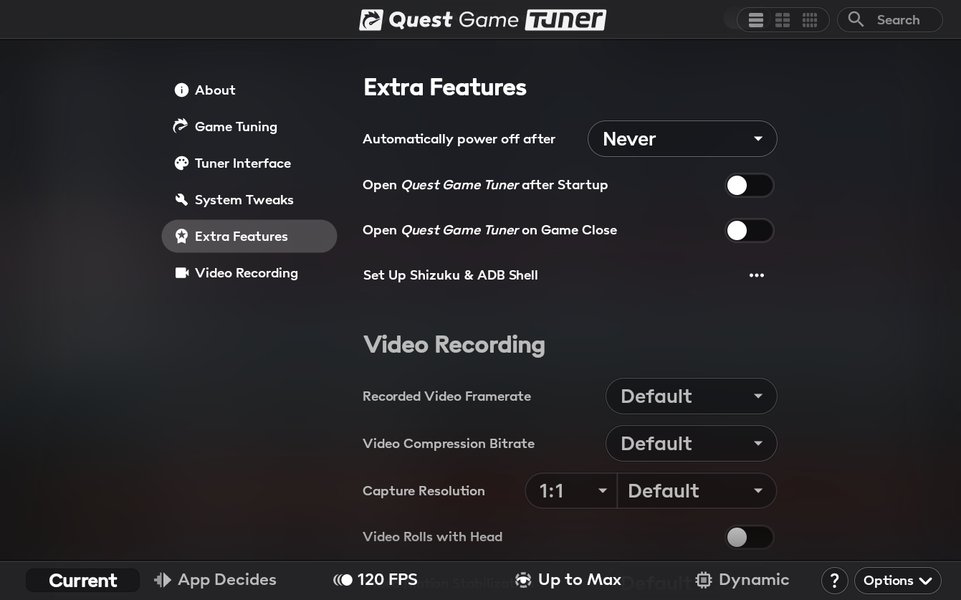
An example of a game tuner interface, illustrating the granular control Shizuku can enable for optimizing game performance.
The general workflow for game-specific frame rate unlocking involves:
- Install Shizuku and a Compatible Helper App: Download Shizuku from a reliable source (e.g., Google Play Store or its official GitHub). Then, acquire a relevant helper app such as "90 FPS Tool," "FPS Unlocker," or a GFX tool that integrates with Shizuku.
- Authorize Helper App via Shizuku: After setting up and launching the Shizuku service, grant the helper application the necessary permissions through Shizuku's interface.
- Disable System Optimization Services: If your device uses specific background services (like "Joyose" in Xiaomi/Poco devices) that impose frame rate caps, use a tool like Ice Box (小黑屋) with Shizuku's authorization to freeze or disable these services.
- Apply Frame Rate Settings: Within the helper app, select your desired frame rate (e.g., 90 FPS or 120 FPS) and apply the changes.
- Test and Monitor: Launch the game and use an FPS counter (some helper apps include this functionality, or you can use dedicated FPS monitoring apps like TakoStats) to confirm the unlocked frame rate.
Beyond Gaming: System-Wide Optimization
Shizuku's capabilities extend beyond individual games. It can be utilized for broader system optimizations:
- Global High Refresh Rate Lock: Tools like Android-Screener, supported by Shizuku, can force a global high refresh rate (e.g., 120Hz) across the entire system. This ensures a consistent fluidity in UI navigation, app transitions, and general usage.
- Resolution and DPI Adjustment: Android-Screener also allows users to modify screen resolution and DPI (Dots Per Inch), which can further enhance visual clarity or improve performance by reducing rendering load.
- App Management and Freezing: Shizuku works seamlessly with apps like Ice Box to "freeze" or disable unnecessary background applications and system services. This can lead to improved battery life, reduced thermal throttling, and a cleaner Android experience by preventing these apps from consuming resources or interfering with performance.
- Access to Advanced Settings: Shizuku can enable access to advanced system settings, such as App Ops (for granular permission control) and facilitating app data backups (with tools like Swift Backup Pro), all without requiring full root.
A Comparison of Frame Rate Optimization Approaches
The table below provides a structured comparison of different methods for achieving desired frame rates on Android, highlighting Shizuku's unique position.
| Method | Description | Root Required? | Pros | Cons | Typical Use Case |
|---|---|---|---|---|---|
| Shizuku (with helper apps) | Leverages Wireless ADB to grant elevated privileges to apps, allowing modification of system settings, including frame rates. | No | Safe, no root needed, bypasses many OEM locks, broad app compatibility. | Requires developer options/wireless debugging setup, service might need re-launch after reboot. | Unlocking game FPS, system-wide refresh rate control, app freezing. |
| Rooting (e.g., Magisk) | Gains full administrator access to the Android operating system, allowing deep system modifications. | Yes | Ultimate control, widest range of modifications possible, persistent changes. | Voids warranty, security risks, potential for device bricking, may prevent certain apps (e.g., banking apps) from running. | Advanced customization, flashing custom ROMs, extreme performance tuning. |
| In-Game Settings | Direct options provided within a game to adjust graphics quality, resolution, and frame rate. | No | Safest, manufacturer-supported, easy to use. | Limited options, often capped by system, may not fully utilize hardware. | Basic performance tuning, ensuring stability within game's design. |
| OEM Game Boosters | Proprietary software from device manufacturers designed to optimize gaming performance. | No | Easy to use, integrated with system, may offer some performance gains. | Often limited in effectiveness, may introduce own frame caps, not fully customizable. | Casual gaming, basic optimization without external tools. |
Assessing the Impact of Shizuku-Enabled Frame Rate Optimization
To better understand the multifaceted impact of using Shizuku for frame rate optimization, we can visualize its influence across several key dimensions. The radar chart below provides an opinionated analysis of Shizuku's capabilities and implications:
The radar chart visually represents how Shizuku-based optimization typically performs across different aspects. A high score in "Performance Boost" indicates significant improvements in frame rates and fluidity. "Ease of Use" considers the setup complexity. "Safety & Stability" reflects the low risk compared to rooting. "Battery Impact" and "Thermal Management" show the trade-offs, as higher frame rates can increase power consumption and heat. Finally, "Customization Scope" highlights the versatility Shizuku offers for various system tweaks.
Navigating the Shizuku Ecosystem: A Mindmap of Key Concepts
To further illustrate the interconnectedness of Shizuku's functionalities and its role in Android optimization, the following mindmap provides a visual overview of its key concepts and associated tools.
This mindmap visually organizes the various aspects of Shizuku, from its fundamental capabilities to its specific applications in frame rate optimization and broader system management. It also highlights the necessary setup steps and important considerations for users.
Visualizing Frame Rate Optimization: A Key Resource
Understanding how Shizuku interacts with various tools to unlock frame rates is often best grasped through visual demonstrations. One highly relevant resource is a video that showcases how to use Shizuku to achieve higher frame rates in popular mobile games like PUBG or BGMI.
"Unlock 120FPS in BGMI & PUBG Using Shizuku – No Root" - This video provides a practical guide on leveraging Shizuku to unlock higher frame rates in specific games, demonstrating the setup and application of helper tools.
This video is particularly relevant because it directly addresses a common user query: how to achieve ultra-high frame rates in competitive mobile games. It demystifies the process, showing the necessary steps to install Shizuku, acquire the companion FPS unlocker app, and configure them to bypass the default frame rate caps. The visual walkthrough is invaluable for users who prefer hands-on guidance, illustrating how Shizuku acts as the underlying mechanism to grant the required permissions to third-party tools, which then directly modify game or system settings to enable higher FPS. The video reinforces the notion that high refresh rates are not just a luxury but a performance enhancer, and Shizuku makes this accessible without the complex rooting process.
Important Considerations and Best Practices
While Shizuku offers significant advantages, users should be aware of potential risks and best practices:
- Battery and Thermals: Forcing higher frame rates inevitably increases CPU/GPU usage, leading to higher power consumption and increased device temperature. Monitor your device's thermals and battery life, and consider adjusting settings if excessive heat or rapid battery drain occurs.
- Game Bans: Using third-party tools to modify game performance, especially in online competitive games, might violate the game's terms of service and could lead to account bans. Always exercise caution and research the specific game's policies before using such tools.
- System Stability: While Shizuku is generally safe, improperly configuring helper applications or disabling critical system services can lead to app crashes or system instability. Always download tools from trusted sources (e.g., GitHub, Google Play Store) and follow instructions carefully.
- Reboot Behavior: The Shizuku service often needs to be re-launched after a device reboot on non-rooted setups. This is a minor inconvenience but important to remember for consistent performance.
- Device Compatibility: While Shizuku is widely compatible, the effectiveness of specific helper tools and the ease of setup can vary between Android versions and device manufacturers. Some devices might require additional steps or have unique limitations.
Frequently Asked Questions (FAQ)
What exactly does "Shizuku lock frame" mean?
Is Shizuku a root tool?
What are the main benefits of using Shizuku for frame rate optimization?
Are there any risks associated with using Shizuku to unlock frame rates?
Do I need a computer to set up Shizuku?
Conclusion
Shizuku stands out as an indispensable tool for Android users seeking to maximize their device's performance, particularly in the realm of frame rate optimization. By cleverly leveraging ADB and wireless debugging, it democratizes access to system-level controls that were once exclusive to rooted devices. The ability to bypass OEM-imposed frame locks, enable higher refresh rates, and streamline system processes offers a significantly enhanced user experience, especially for avid mobile gamers. While careful consideration of battery life, thermals, and potential game policies is advised, Shizuku provides a powerful, relatively safe, and increasingly popular pathway to a more fluid and responsive Android environment.
Recommended Further Exploration
- How to efficiently set up Shizuku using wireless ADB for seamless operation?
- What are the most effective companion applications that integrate with Shizuku for optimizing Android gaming performance?
- What are the comprehensive risks and benefits associated with unlocking frame rates on Android devices?
- How can common issues and troubleshooting steps for Shizuku setup and functionality be addressed?