
How to Create a "Show Me" Guide or TV Show
An in-depth guide on developing your visual presentation or television experience
Essential Insights
- Conceptualization: Clearly define your idea and purpose, whether it's for a TV show or an interactive "Show Me" guide.
- Step-by-Step Process: Break down production or tutorial tasks into manageable phases, including planning, scripting, production, and post-production.
- Visual & Interactive Elements: Utilize graphics, text, images, and interactive components to effectively convey your message or narrative.
Understanding Your Project
Creating a “Show Me” guide or developing a TV show both require a solid foundational framework. While the end goal may differ, they share commonalities in planning, production, and post-production phases. Whether your project is an interactive tutorial aimed at educating an audience or a narrative TV show designed for entertainment, the underlying steps include conceptualization, budgeting, scriptwriting, production, post-production, and distribution.
Below, we explore these steps in detail, merging the best practices from creating instructional guides and television productions. This integrated approach ensures you harness the power of visual storytelling and streamlined processes.
Phase 1: Conceptualization
Defining Your Vision
Begin by establishing a clear vision for your project. Ask yourself: Are you creating an interactive “Show Me” guide for educational purposes, or are you crafting a visual narrative in the form of a TV show? Regardless of the objective, a robust conceptual framework is essential.
Identifying the Theme and Purpose
Define the central theme and the message you intend to communicate. For a TV show, consider your genre, target audience, character development, and plot outline. For a "Show Me" guide, pinpoint the specific task or process you wish to demonstrate. Key aspects to consider include:
- Genre and Tone: Choose whether your TV show is dramatic, comedic, reality-based, or documentary-style. For guides, decide if your tone is formal, casual, or humorous.
- Audience: Understand who your viewer is. Tailoring the content to fit audience expectations is paramount.
- Outcome: Whether educating or entertaining, clarify the end result and desired impact of your project.
Phase 2: Planning and Budgeting
Developing a Roadmap
Meticulous planning will serve as your project's backbone. Create detailed outlines, timelines, and cost estimates. This phase covers both “Show Me” guides and TV shows alike.
Budget Considerations
Estimate the financial requirements for your project. Budgeting involves allocating funds for pre-production, production, and post-production activities:
| Stage | Key Costs | Examples |
|---|---|---|
| Pre-Production | Scriptwriting, location scouting, equipment rentals | Hiring a writer, scouting locations, initial research |
| Production | Filming, crew salaries, set design | Director fees, camera crew, wardrobe |
| Post-Production | Editing, special effects, sound design | Editor fees, special effects software, color grading |
In addition to financial planning, timeline scheduling and task delegation are equally important.
Phase 3: Scriptwriting and Storyboarding
Mapping the Journey
A well-crafted script is the backbone of any successful visual project. It provides a blueprint from which to work and helps ensure that all aspects—from dialogue to camera angles—are planned before production begins.
Key Elements in Scriptwriting
The process involves several crucial components:
- Dialogue: Clear and engaging conversations that move the narrative forward.
- Characters: Well-developed personas that resonate with your audience.
- Scene Setting: Detailed descriptions of settings to create an immersive environment.
- Storyboard: Visual representations of key scenes for easier collaboration with the production team.
For "Show Me" guides, consider drafting a step-by-step walkthrough and include annotations, sketches, or screenshots. This preparation makes the recorded demonstration more fluid and engaging.
Phase 4: Production and Filming
Executing the Vision
Whether using high-end equipment for a television production or screen capture software for a tutorial, production is where your concept comes to life.
Key Elements of Production
Here are the critical steps:
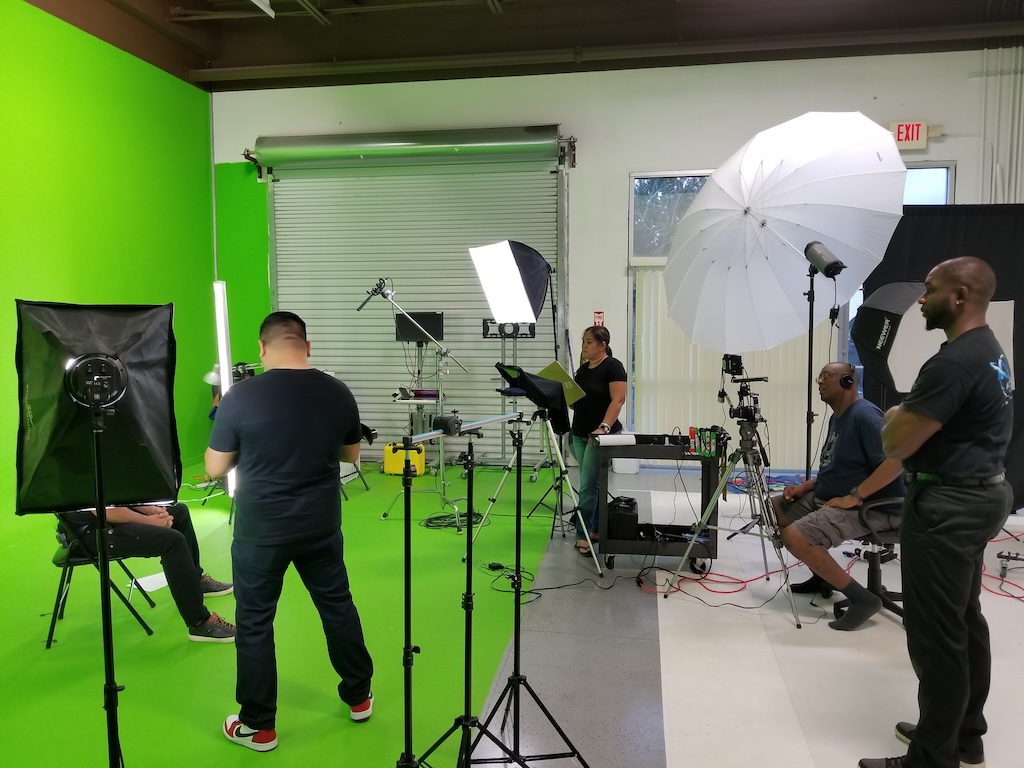
- Set Up and Equipment: Assemble all the necessary equipment—cameras, lights, microphones, and backdrops. For "Show Me" guides, ensure your recording device is stable and high-quality.
- Team Coordination: Gather your team, including directors, producers, camera operators, editors, and assistants. Clear communication and coordination are vital for smooth operations.
- Rehearsals: Conduct run-throughs to ensure timing and delivery are perfect, especially if interactive elements are involved.
- Recording: Whether filming live action or recording a screen demonstration, focus on clarity. For TV shows, capture multiple takes if needed. For guides, ensure each step is clearly recorded with visuals that support the narration.
A tip for tutorials: consider using annotation tools during recording to highlight critical areas of the process.
Phase 5: Post-Production and Editing
Refining Your Work
Post-production is the stage where raw footage transforms into a polished final product. This phase is integral for both TV shows and "Show Me" tutorials.
Editing Essentials
The editing process includes:
- Video Editing: Cut unnecessary footage, arrange clips in a logical sequence, and add transitions.
- Special Effects and Graphics: Enhance visual appeal through animations, special effects, and infographics, which are essential in engaging tutorials.
- Sound Design: Incorporate background music, sound effects, and voiceovers. Adjust sound levels to ensure dialogue clarity.
- Color Grading: Ensure consistent lighting and color tone throughout your footage.
Many editing software solutions like Adobe Premiere Pro, Final Cut Pro, or even simpler tools can be used. For interactive guides, adding hover effects or clickable elements during post-production may help improve usability.
Phase 6: Distribution and Promotion
Sharing Your Creation
With your project completed, the final step is to distribute your work to your target audience. The strategies differ slightly depending on whether you have created a TV show or a "Show Me" guide.
For TV Shows
Distribution channels for a TV show include:
- Broadcast Networks: Traditional television channels still offer opportunities for exposure.
- Streaming Services: Platforms like Netflix, Amazon Prime, Hulu, and others provide a modern distribution route.
- Online Platforms: YouTube, Vimeo, and other video-sharing platforms can also serve as viable options.
- Film Festivals and Special Screenings: Consider showcasing your work at events to build buzz and secure further distribution deals.
For "Show Me" Guides
To reach your audience effectively:
- Website Integration: Host your guide on a dedicated section of your website for easy access.
- Social Media: Share snippets, teasers, or complete tutorials on platforms like Facebook, Instagram, or LinkedIn.
- Educational Platforms: Consider posting on educational communities or forums where users seek step-by-step tutorials.
- Content Marketing: Optimize your guide with keywords and SEO tactics to reach audiences searching for related information.
Adding Interactive Elements and Enhancing User Engagement
Optimizing the User Experience
For “Show Me” guides, interactivity can significantly boost user engagement. Incorporate elements that allow the user to navigate through your content in a dynamic way.
Features to Consider
Enhancing your guide with the following features ensures a rich user experience:
- Interactive Widgets: Use clickable icons or buttons that provide additional information when hovered over.
- Embedded Media: Insert short video loops or GIFs that illustrate each step.
- Annotations and Captions: Clearly label important sections within your visuals to guide the viewer’s attention.
- Feedback Mechanisms: Allow users to leave comments or suggestions which can help refine future presentations and tutorials.
Combining Creativity with Technology
Leveraging Tools and Platforms
Modern technology offers a variety of tools to facilitate both TV show production and interactive tutorial creation. Whether you are using specialized apps like ShowMe or comprehensive editing suites, these tools streamline the creative process.
Recommended Tools and Platforms
- Editing and Production: Adobe Premiere Pro, Final Cut Pro, or DaVinci Resolve for video editing; these provide robust post-production capabilities.
- Design and Visuals: Canva and Microsoft Create can help design attractive graphics for your guides and show concepts.
- Interactive Platforms: Tools such as Wix or integrated web development platforms can help embed interactive elements into your guide.
- Recording Tools: Screen recording software and dedicated cameras or mobile devices with high-definition capture are essential for crisp visuals.
Bringing It All Together
From Concept to Completion
The process of creating a “Show Me” guide or TV show is multifaceted. It involves clear concept development, meticulous planning and budgeting, creative scriptwriting and storyboarding, synchronized production and filming, and dedicated post-production and editing. Finally, leveraging effective distribution channels ensures that your audience can easily access your content.
By following these detailed steps, you position your project for success. The key lies in blending creative vision with precise execution. Whether your goal is to educate through an interactive visual guide or entertain and inspire with a captivating TV series, the comprehensive approach outlined above ensures a methodical and effective path from initial ideas to a finished product.
References
- A Step-by-Step Guide to Developing a TV Show - C-I Studios
- Guide on How to Make a TV Show - Teleprompter
- How to Create a Reality Show - WikiHow
- Creating a TV Show, Step-by-Step - Daisie Blog
- Microsoft Create - Design Tools
Recommended
 squarespace.com
Last updated March 12, 2025