
Unlock the Next Steps: Signing, Notarizing, and Uploading Your EMB Document Seamlessly
A clear guide to finalizing your document after LM's signature for submission to the Environmental Management Bureau.
After obtaining LM's signature on your document, the next crucial steps involve adding your own signature, getting the document properly notarized, and finally uploading it to the Environmental Management Bureau (EMB) online portal. This process is vital for many EMB submissions, particularly for applications like the Environmental Compliance Certificate (ECC), where notarized documents ensure authenticity and legal validity. Following the correct procedure prevents delays and potential rejection of your submission.
Essential Highlights
- Sequential Signing: Ensure LM signs first. Your signature follows, often requiring specific placement or digital association if using electronic methods.
- Mandatory Notarization: Notarization is typically required for EMB documents like sworn statements or IEE Checklists, verifying signer identity and signature authenticity. Both traditional in-person and Remote Online Notarization (RON) methods are available.
- EMB Portal Upload: The final, notarized document must be uploaded to the EMB's online system, usually as a PDF file under a specific size limit (e.g., 10MB).
Step-by-Step Guide: From Signature to Submission
Navigating the process after LM's initial signature requires careful attention to detail to meet legal and administrative requirements. Here’s a breakdown:
Step 1: Confirm LM's Signature and Document Integrity
Verify Completion
Before proceeding, double-check that LM has indeed signed the document in the designated area. Crucially, ensure the document is complete, with no blank spaces left unfilled. Notaries are generally advised not to notarize incomplete documents to prevent potential fraud or alterations after notarization.
Understand Document Status
If LM has already signed, the document is partially executed. Your role is to complete the signing process as the next required signatory before it can be notarized.
A notary reviewing a document for completeness before proceeding.
Step 2: Add Your Signature
Choosing Your Signing Method
You can sign the document either physically (wet signature) or electronically, depending on the requirements and the method of notarization you plan to use.
- Physical Signature: If you plan on traditional in-person notarization, print the document and sign it with ink in the appropriate section.
- Electronic Signature: If using Remote Online Notarization (RON) or if electronic signatures are permitted for the specific EMB requirement, you can sign digitally. Platforms used for RON often incorporate secure electronic signing features. Ensure the electronic signature method complies with legal standards, clearly linking your identity to the signature and the document.
Executing the Signature
Sign the document clearly. If signing physically after LM, ensure your signature is placed correctly. If signing electronically as part of a RON process, you'll typically add your signature digitally within the platform before connecting with the notary.
This video demonstrates the process of self-signing a document digitally, a common step before electronic notarization.
The video above illustrates how digital signing platforms facilitate adding your signature to a document electronically. While the platform shown may differ, the core concept applies: securely affixing your digital signature to the document before it moves to the notarization stage. This is particularly relevant when using Remote Online Notarization services.
Step 3: Notarize the Document
Notarization is a formal process where a commissioned Notary Public verifies your identity, witnesses your signature (or takes your acknowledgment of a prior signature), and certifies the document. This step is often mandatory for official submissions to agencies like the EMB.

Notarization involves identity verification and witnessing the signature.
Understanding Notarial Acts
Two common notarial acts are Acknowledgments and Jurats:
- Acknowledgment: You appear before the notary and declare ("acknowledge") that you willingly signed the document. For an acknowledgment, the document might have been signed beforehand, but you must appear in person (or remotely via video) before the notary to acknowledge it.
- Jurat: You must sign the document in the physical presence (or via live video for RON) of the notary, and swear or affirm that the statements in the document are true.
The specific type required may depend on the document or EMB regulations.
Choosing a Notarization Method: In-Person vs. Remote Online Notarization (RON)
You have two primary options for notarization:
Traditional In-Person Notarization
This involves physically meeting a Notary Public. You'll need to:
- Locate a notary (banks, libraries, shipping centers often have them).
- Bring the signed (or unsigned, if a Jurat is required) document and valid government-issued photo ID.
- Appear physically before the notary.
- Sign the document in their presence, or acknowledge your signature.
- The notary verifies your ID, completes the notarial certificate, signs, and affixes their official seal or stamp.
Remote Online Notarization (RON)
RON allows notarization via secure audio-visual technology. This method offers convenience and speed.
- Choose a licensed RON platform (e.g., Notarize, BlueNotary, DocuSign Notary).
- Upload the document (usually PDF) to the platform.
- Verify your identity through multi-factor authentication (e.g., ID scan, knowledge-based questions, biometric analysis).
- Connect with a commissioned remote notary via live video call.
- Electronically sign the document under the notary's observation.
- The notary electronically signs and applies their digital seal and certificate. The session is typically recorded for security.
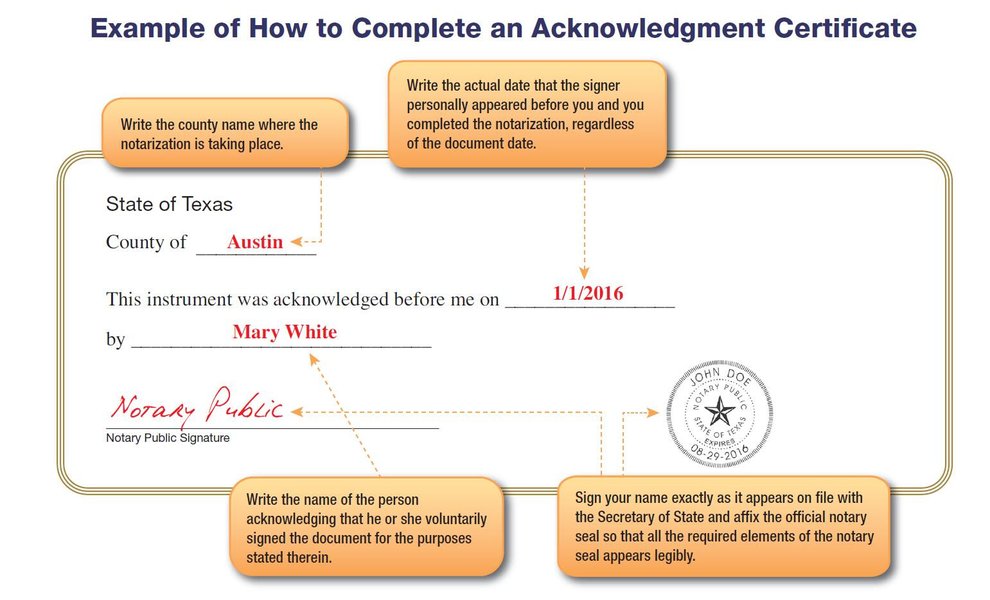
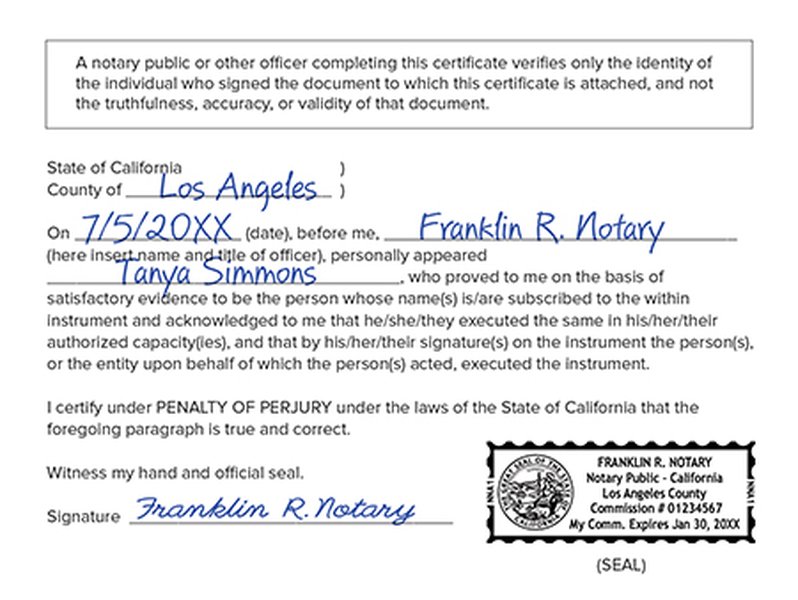
Example of a notarial certificate (Acknowledgment) added to a document.
Comparison of Notarization Methods
The following table summarizes the key differences between traditional in-person notarization and Remote Online Notarization (RON):
| Feature | In-Person Notarization | Remote Online Notarization (RON) |
|---|---|---|
| Location | Physical presence required at notary's location or agreed meeting point. | Can be done from anywhere with internet access using a computer/smartphone with camera/mic. |
| Convenience | Requires travel and scheduling; may have limited hours. | Highly convenient; often available 24/7; no travel needed. |
| Speed | Can be quick if notary is available, but travel time adds up. | Process can often be completed in minutes once connected. |
| Identity Verification | Manual check of physical ID by the notary. | Multi-factor authentication (ID analysis, KBA, credential analysis, biometrics). |
| Signatures | Wet ink signature on physical paper. | Secure electronic signature on digital document. |
| Record Keeping | Notary keeps a physical journal entry. | Secure digital record, including audio-visual recording of the session and audit trail. |
| Security | Relies on physical ID check and notary's diligence. | Advanced security protocols, encryption, tamper-evident seals, recorded sessions. |
| Document Format | Physical paper document. Needs scanning for digital submission. | Digital document (e.g., PDF). Ready for electronic upload. |
Choosing the right method depends on your location (RON availability varies by jurisdiction), urgency, comfort with technology, and specific EMB requirements.
Visualizing Notarization Factors
The radar chart below provides an opinionated comparison between Traditional In-Person Notarization and Remote Online Notarization (RON) across several key factors. This visualization helps illustrate the trade-offs you might consider when deciding which method suits your needs best for the EMB document submission. Scores range from 1 (Low) to 5 (High).
As illustrated, RON generally scores higher on convenience, speed, accessibility, digital integration, and security aspects like identity verification and record keeping, while traditional notarization might sometimes be perceived as more cost-effective depending on notary fees and travel costs.
Mapping the Document Finalization Process
This mindmap visually outlines the sequential steps involved from the moment LM signs the document to its successful upload on the EMB site.
This map highlights the key decision points (signing method, notarization method) and actions required at each stage to ensure compliance and successful submission.
Step 4: Upload the Notarized Document to the EMB Site
Once the document bears all required signatures and has been properly notarized, the final step is uploading it to the designated EMB online portal.
Prepare the File
Format and Size
EMB systems typically require documents to be uploaded in PDF format. Check the specific instructions on the EMB portal (e.g., ECC Online System, Environmental Compliance Assistance Center) for file size limitations, which are often around 10MB per file. If you had the document notarized in person, you will need to scan the entire document, including the notary's seal and signature page, into a single PDF file.
Required Documents
Ensure you are uploading the correct document. For instance, ECC applications often require the upload of a signed and notarized Sworn Statement or a notarized Initial Environmental Examination (IEE) Checklist with an accountability statement.
Navigate the EMB Portal
Login and Locate Upload Section
Log in to your account on the relevant EMB online system. Navigate to the section corresponding to your application or submission where document uploads are required.
Upload Process
Follow the portal's instructions for uploading. This usually involves browsing for your prepared PDF file, selecting it, and clicking an "Upload" or "Submit" button. You may need to categorize the document type during the upload process.
Confirmation
After uploading, look for a confirmation message indicating success. It's advisable to check your submission status periodically through the portal.
Frequently Asked Questions (FAQ)
Can I use Remote Online Notarization (RON) for EMB documents?
Generally, yes, provided RON is legally permitted in the relevant jurisdiction(s) and the specific EMB process doesn't explicitly require wet signatures or in-person notarization. RON offers a secure, legally valid method for notarizing documents electronically, which are then ready for digital upload. Always confirm specific EMB guidelines if unsure.
What happens if I upload a document without notarization?
If the EMB requires a document to be notarized (like an ECC sworn statement), uploading an unnotarized version will likely lead to the rejection of that document or the entire submission. This can cause significant delays in processing your application or request. It's crucial to ensure all notarization requirements are met *before* uploading.
Does the notary need to see LM sign the document too?
Not necessarily. The notarization typically pertains to the signature being made or acknowledged in the notary's presence (physical or virtual). If you are the one appearing before the notary to sign or acknowledge your signature after LM has already signed, the notary's focus is on verifying *your* identity and witnessing *your* act. However, all required signatures should be on the document before the final notarization is completed.
What ID is acceptable for notarization?
Acceptable identification typically includes current, government-issued photo IDs like a driver's license, passport, state-issued ID card, or military ID. The ID must contain a photograph, signature, physical description, and an identifying number. Expired IDs are usually not accepted. Requirements can vary slightly by state or RON platform.
Recommended Next Steps & Queries
To deepen your understanding or address specific aspects of this process, consider exploring these related topics:
- What are the specific document requirements for uploading an ECC application to the EMB?
- Which Remote Online Notarization platforms are most suitable for official document submissions?
- How can I confirm the legal validity of electronic signatures and notarizations in my specific region?
- Where can I find a detailed guide on using the EMB online portal for submitting documents?
References
 support.squarespace.com
Last updated May 1, 2025