
Unlocking Efficiency: Crafting Your Ideal Real Estate CRM Backend Page with PGP Insights
A comprehensive guide to building a simple yet powerful CRM page for your real estate application, addressing key features and 'PGP' considerations.
Developing a simple Customer Relationship Management (CRM) backend page for a real estate application is crucial for streamlining operations, managing client interactions, and tracking properties effectively. The term "PGP" in your query can be interpreted in a couple of ways in this context: it might refer to managing specific entities like "Property Group Partners" or similar organizational structures, or it could imply an emphasis on "Pretty Good Privacy" (PGP) for enhanced data security. This guide will cover the foundational elements of a real estate CRM page and then explore how these "PGP" aspects can be integrated.
Key Highlights for Your Real Estate CRM
- Core Functionality is King: A simple CRM must excel at managing contacts, tracking leads, and organizing property listings to provide tangible benefits to real estate professionals.
- Understanding "PGP": Whether "PGP" signifies specific "Property Group" management or robust "Pretty Good Privacy" encryption, integrating this focus will tailor the CRM to more specific needs.
- Simplicity and Scalability: The backend page should be user-friendly, focusing on essential features initially, but built with scalability in mind to accommodate future growth and complexity.
Core Features of a Simple Real Estate CRM Backend Page
A successful real estate CRM backend page, even a simple one, needs to provide a centralized platform for agents and brokers to manage their daily tasks efficiently. Here are the essential features:
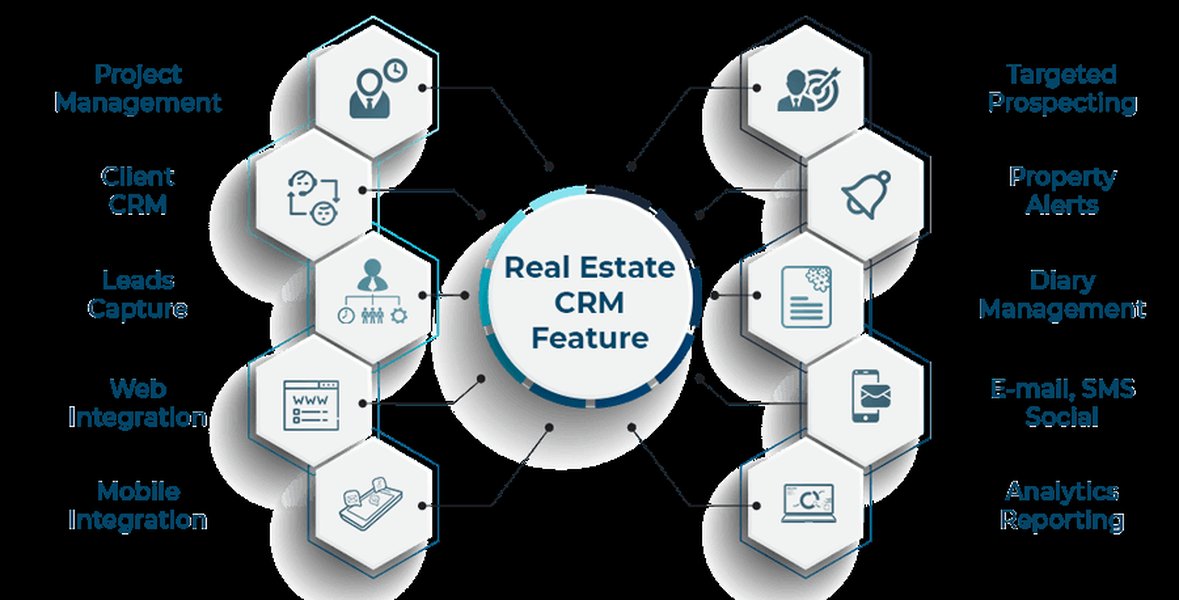
Key features often found in Real Estate CRM systems.
Contact and Client Management
Centralized Client Database
At its heart, a CRM is about managing relationships. This feature involves storing comprehensive information about clients, prospects, sellers, and other contacts. Details should include:
- Contact information (names, phone numbers, emails, addresses).
- Client preferences (property types, budget, location interests).
- Interaction history (calls, meetings, emails, notes).
- Key dates (birthdays, anniversaries) for personalized outreach.
This centralized repository ensures all team members have access to up-to-date client information, facilitating better service and follow-up.
Lead Tracking and Management
From Prospect to Client
Effectively capturing, nurturing, and converting leads is vital in real estate. This functionality should allow:
- Capturing leads from various sources (website forms, social media, listing portals, manual entry).
- Assigning leads to specific agents.
- Tracking lead status and progress through a sales funnel (e.g., New, Contacted, Qualified, Showing, Offer Made, Closed).
- Automated reminders for follow-ups to ensure no lead falls through the cracks.
Property Listing Management
Organizing Your Portfolio
Managing property information efficiently is crucial. The CRM should enable users to:
- Add and manage property listings with details like address, price, size, number of bedrooms/bathrooms, features, photos, and virtual tours.
- Link properties to specific clients (e.g., matching listings to buyer preferences).
- Track listing status (e.g., For Sale, For Rent, Under Contract, Sold, Rented).
- Integrate with MLS (Multiple Listing Service) where applicable, or allow easy export/import of property data.
Task Management and Automation
Streamlining Daily Operations
Automating repetitive tasks frees up agents to focus on client interaction and deal-making. Key automation features include:
- Automated follow-up email sequences for new leads.
- Task reminders for appointments, showings, and deadlines.
- Workflow automation for common processes (e.g., new lead assignment, contract milestones).
- Automated birthday or anniversary greetings.
Communication Tools
Integrated Client Interaction
Seamless communication is key. While a simple CRM might not have all advanced features, basic integrations are helpful:
- Email integration to send and track emails directly from the CRM.
- SMS integration (potentially, for quick updates).
- Logging of calls and meetings.
- Templates for common communications.
Reporting and Basic Analytics
Gaining Insights from Data
Even a simple CRM should offer basic reporting to help agents and managers understand performance:
- Lead source effectiveness.
- Sales pipeline overview.
- Agent activity and performance.
- Property viewing statistics.
Interpreting "PGP" in Your Real Estate CRM
The term "PGP" can significantly shape the focus and additional functionalities of your CRM backend page. Let's explore the two primary interpretations:
1. PGP as "Property Group Partners" (or similar organizational focus)
If "PGP" refers to managing distinct property groups, partners, or specific client segments (e.g., luxury properties, commercial developments, specific investor groups), the CRM page would need features to cater to this. This could involve:
- Data Segmentation: Ability to categorize and manage contacts, properties, and leads associated with specific "Property Groups" or partners.
- Custom Fields: Additional fields to capture data relevant to these groups (e.g., partnership details, group investment criteria, specific property portfolio metrics).
- Access Control: Role-based access to ensure that partners or group managers only see relevant information.
- Group-Specific Reporting: Analytics tailored to the performance of individual property groups or partners.
- Collaboration Tools: Features to facilitate communication and task sharing among members of a specific property group or partnership.
For instance, a backend page might display a table of "Property Groups," allowing users to drill down into each group's associated listings, clients, and performance metrics.
2. PGP as "Pretty Good Privacy" (Data Encryption)
If "PGP" refers to Pretty Good Privacy, the focus shifts to enhancing data security through encryption. Real estate transactions involve sensitive personal and financial information, making robust security paramount. Integrating PGP principles would involve:
- Data Encryption: Implementing encryption for sensitive data at rest (in the database) and in transit. While PGP itself is a specific protocol often used for email and file encryption, its principles (public-key cryptography) can guide broader data protection strategies.
- Key Management: Secure generation, storage, and management of encryption keys. For PGP-specific encryption, this would involve managing public and private PGP keys for users or the system.
- Secure Communication: Ensuring that communications containing sensitive data (e.g., client financial details shared via the CRM's internal messaging) are encrypted.
- Access Audits: Logging access to sensitive data and decryption events.
Implementing PGP encryption typically involves using libraries like GnuPG (for Python or PHP via shell execution) or other cryptographic libraries specific to your backend programming language. The goal is to protect data from unauthorized access and ensure client confidentiality.
Visualizing CRM Feature Importance
To better understand the priorities for a simple yet effective real estate CRM, the following chart illustrates the relative importance of key features. A higher score indicates greater importance for establishing a solid foundation. Security, while always crucial, gains even more prominence if "PGP" implies a strong focus on data protection.
This radar chart helps visualize how different features contribute to the overall effectiveness of a real estate CRM, and how a specific "PGP" interpretation might shift priorities, particularly towards enhanced data security or specialized group management functionalities.
Structuring Your Real Estate CRM: A Mindmap Overview
A mindmap can help illustrate the interconnected components of a simple real estate CRM backend page, including how "PGP" considerations might fit in.
(Details, History, Preferences)"] id1b["Lead Management
(Capture, Tracking, Funnel)"] id1c["Property Database
(Listings, Details, Status)"] id1d["Task & Workflow Automation
(Reminders, Follow-ups)"] id1e["Communication Hub
(Email/SMS Logs, Templates)"] id1f["Basic Reporting & Analytics"] id2["'PGP' Integration Focus"] id2a["Property Group Partners Focus"] id2aa["Data Segmentation by Group"] id2ab["Custom Fields for Groups"] id2ac["Group-Specific Reporting"] id2ad["Partner Access Control"] id2b["Pretty Good Privacy (Security) Focus"] id2ba["Data Encryption (At Rest, In Transit)"] id2bb["PGP Key Management (If applicable)"] id2bc["Secure Communication Channels"] id2bd["Access Audits & Controls"] id3["Backend Technology Considerations"] id3a["Programming Language
(e.g., PHP, Python, Node.js)"] id3b["Framework
(e.g., Laravel, Django, Express)"] id3c["Database
(e.g., MySQL, PostgreSQL, MongoDB)"] id3d["API Design (for frontend/mobile)"] id4["Key Development Principles"] id4a["User-Friendliness & Simplicity"] id4b["Scalability for Future Growth"] id4c["Integration Capabilities (MLS, Email)"] id4d["Overall System Security"]
This mindmap provides a visual hierarchy of the elements involved in creating your CRM page, from foundational features to specialized "PGP" considerations and underlying technology choices.
Technology Stack and Implementation Snippets
The choice of backend technology depends on your team's expertise and project requirements. Common choices include Python (with frameworks like Django or Flask) for its robust libraries and scalability, or PHP (with frameworks like Laravel or Symfony) for its widespread adoption in web development.
Conceptual Backend Snippet (PHP Example)
Below is a highly simplified conceptual PHP snippet illustrating how you might fetch and display data for a "Property Group" on a CRM backend page. This is not a complete script but demonstrates basic logic.
<?php
// Conceptual PHP snippet for a real estate CRM backend page

// --- Database Connection (Simplified) ---
// In a real application, use a secure method for credentials and connection.
$host = 'localhost';
$dbname = 'realestate_crm_db';
$username = 'crm_user';
$password = 'secure_password'; // Store securely, not hardcoded!

try {
    $pdo = new PDO("mysql:host=$host;dbname=$dbname;charset=utf8mb4", $username, $password);
    $pdo->setAttribute(PDO::ATTR_ERRMODE, PDO::ERRMODE_EXCEPTION);
} catch (PDOException $e) {
    // In a real app, log this error and show a user-friendly message.
    die("Database connection failed: " . $e->getMessage());
}

// --- Feature: Displaying Property Group Information (Example) ---
// Assuming 'pgp_id' is passed via GET request, e.g., crm_page.php?pgp_id=1
$propertyGroupId = isset($_GET['pgp_id']) ? (int)$_GET['pgp_id'] : null;
$propertyGroupData = null;
$groupListings = [];

if ($propertyGroupId) {
    // Fetch Property Group details
    // IMPORTANT: Always use prepared statements to prevent SQL injection.
    $stmtGroup = $pdo->prepare("SELECT group_name, manager_name, contact_email FROM property_groups WHERE id = :id");
    $stmtGroup->bindParam(':id', $propertyGroupId, PDO::PARAM_INT);
    $stmtGroup->execute();
    $propertyGroupData = $stmtGroup->fetch(PDO::FETCH_ASSOC);

    // Fetch listings associated with this Property Group
    $stmtListings = $pdo->prepare("SELECT property_address, price, status FROM properties WHERE group_id = :group_id ORDER BY status, price DESC");
    $stmtListings->bindParam(':group_id', $propertyGroupId, PDO::PARAM_INT);
    $stmtListings->execute();
    $groupListings = $stmtListings->fetchAll(PDO::FETCH_ASSOC);
}

// --- HTML Output (Simplified: to be integrated into your page structure) ---
// This PHP block would typically be part of a larger HTML file.

/*
// Example of how you might start displaying this data in HTML:
if ($propertyGroupData) {
    echo "<h4>Property Group: " . htmlspecialchars($propertyGroupData['group_name']) . "</h4>";
    echo "<p>Manager: " . htmlspecialchars($propertyGroupData['manager_name']) . " | Email: " . htmlspecialchars($propertyGroupData['contact_email']) . "</p>";

    if (!empty($groupListings)) {
        echo "<h5>Associated Listings:</h5>";
        echo "<ul>";
        foreach ($groupListings as $listing) {
            echo "<li>" . htmlspecialchars($listing['property_address']) . " - $" . number_format($listing['price']) . " (" . htmlspecialchars($listing['status']) . ")</li>";
        }
        echo "</ul>";
    } else {
        echo "<p>No listings found for this group.</p>";
    }
} else if ($propertyGroupId) {
    echo "<p>Property Group not found.</p>";
} else {
    echo "<p>Select a Property Group to view details.</p>"; // Or display a list of all groups
}
*/

// --- PGP Encryption Snippet (Conceptual for "Pretty Good Privacy") ---
// If you were using GnuPG via command line with PHP:
/*
function encrypt_data_with_gpg($data, $recipient_key_id) {
    $encryptedFile = tempnam(sys_get_temp_dir(), 'gpg_encrypted_');
    $inputFile = tempnam(sys_get_temp_dir(), 'gpg_input_');
    file_put_contents($inputFile, $data);

    // Ensure recipient_key_id is properly sanitized if it comes from user input.
    // This example assumes the key is already imported into the GPG keyring.
    $command = sprintf("gpg --encrypt --armor --recipient %s --output %s %s",
        escapeshellarg($recipient_key_id),
        escapeshellarg($encryptedFile),
        escapeshellarg($inputFile)
    );

    shell_exec($command . ' 2>&1'); // Add error handling

    $encrypted_data = file_get_contents($encryptedFile);
    unlink($inputFile);
    unlink($encryptedFile);
    return $encrypted_data; // This would be ASCII armored PGP data
}

// $sensitive_client_data = "Client Bank Account: 123456789";
// $pgp_recipient_fingerprint = "FINGERPRINT_OF_PUBLIC_KEY"; // The recipient's PGP public key ID
// $encrypted_info = encrypt_data_with_gpg($sensitive_client_data, $pgp_recipient_fingerprint);
// echo "<pre>Encrypted Data:\n" . htmlspecialchars($encrypted_info) . "</pre>";
*/

?>
Important Considerations for the Snippet:
- Security: The snippet uses prepared statements for database queries to prevent SQL injection. In a real application, ensure all inputs are validated and sanitized. Database credentials should be stored securely, not hardcoded.
- Error Handling: Robust error handling is essential for a production environment.
- PGP Encryption: The PGP encryption part is highly conceptual. Implementing PGP requires careful key management and use of appropriate libraries (like GnuPG for PHP or Python, or Bouncy Castle for Java). The `shell_exec` approach for GPG should be used with extreme caution due to security implications and might not be suitable for all environments. Using dedicated cryptographic libraries is generally preferred.
- Modularity: In a larger application, database logic, business logic, and presentation (HTML) would be separated (e.g., using an MVC pattern).
Table: Core Real Estate CRM Features and Benefits
This table summarizes the key features discussed and their primary benefits for a real estate business.
| Feature | Description | Primary Benefit(s) | "PGP" Focus Enhancement Example |
|---|---|---|---|
| Contact Management | Centralized storage of client details, preferences, and interaction history. | Improved client relationships, personalized service, efficient follow-ups. | Encrypting sensitive contact notes using PGP principles. |
| Lead Tracking & Management | Capture, assign, and track leads through the sales pipeline. | Higher conversion rates, ensures no lead is missed, better sales forecasting. | Segmenting leads based on "Property Group" interest. |
| Property Listings Management | Manage property details, status, images, and link to clients. | Organized property portfolio, easy matching of properties to buyers. | Detailed fields for "Property Group" specific attributes (e.g., investment yield). |
| Task Management & Automation | Automate repetitive tasks like reminders and follow-up emails. | Increased efficiency, reduced manual workload, consistent processes. | Automated reporting workflows for "Property Group" performance. |
| Communication Tools | Integrated email, SMS logging, and communication templates. | Streamlined client communication, documented interaction history. | Secure messaging module with end-to-end encryption hints (if PGP security focus). |
| Reporting & Analytics | Generate reports on leads, sales, agent activity. | Data-driven decision making, performance monitoring, identifying trends. | Granular reports on "Property Group" ROI or PGP-encrypted data access logs. |
| Data Security (General) | Protecting all CRM data through access controls, backups, and standard security practices. | Builds trust, ensures compliance, protects sensitive business and client information. | Implementing PGP for encrypting specific highly sensitive documents or data fields. |
This video discusses considerations for choosing a simple CRM, which is relevant for new or solo agents and aligns with the request for a "simple CRM page".
Frequently Asked Questions (FAQ)
What are the absolute must-have features for a simple real estate CRM backend page? +
For a simple real estate CRM, the core must-haves include:
- Contact Management: To store and organize client information.
- Lead Tracking: To manage potential clients from initial contact to deal closure.
- Property Listing Management: To keep track of available and sold/rented properties.
- Task Management/Reminders: To help agents stay on top of appointments and follow-ups.
- Basic Reporting: To get an overview of activities and performance.
How does "PGP" influence the CRM page design and functionality? +
The influence of "PGP" depends on its interpretation:
- If "Property Group Partners": The CRM would need features to segment data by these groups, manage partner-specific information, track group performance, and potentially offer role-based access for partners. The design might include dashboards or views tailored to these groups.
- If "Pretty Good Privacy": The focus would be on enhanced data security. This means incorporating encryption mechanisms (like PGP or similar strong encryption) for sensitive data, secure key management, and robust access controls. The backend page itself might not look different, but the underlying data handling would be more secure.
What backend technologies are suitable for developing a real estate CRM page? +
Several backend technologies are well-suited:
- PHP: Widely used for web development, with mature frameworks like Laravel and Symfony that expedite development. Many existing CRM solutions and real estate scripts are PHP-based.
- Python: Known for its readability and extensive libraries. Frameworks like Django and Flask are excellent for building robust and scalable web applications, including CRMs. Python is also strong in data handling and analytics.
- Node.js: Uses JavaScript, allowing for full-stack development with a single language if you're also using JavaScript on the frontend. It's efficient for I/O-bound applications.
- Ruby on Rails: Emphasizes convention over configuration, which can lead to rapid development.
How can I ensure data security in my real estate CRM? +
Ensuring data security is critical. Key measures include:
- Secure Authentication & Authorization: Implement strong password policies, multi-factor authentication (MFA), and role-based access control (RBAC) to ensure users only access data they are permitted to see.
- Data Encryption: Encrypt sensitive data both in transit (using HTTPS/TLS) and at rest (encrypting database fields or entire databases). This is where PGP principles can be applied for specific data elements.
- Input Validation & Sanitization: Protect against common web vulnerabilities like SQL injection and Cross-Site Scripting (XSS) by validating all user inputs.
- Regular Security Audits & Updates: Keep all software (OS, web server, database, frameworks, libraries) up to date with security patches. Conduct regular security audits or penetration testing.
- Secure API Design: If your backend exposes APIs, ensure they are secured using tokens, rate limiting, and proper authentication.
- Secure Key Management: If using encryption, manage cryptographic keys securely, potentially using a dedicated key management service or HSM.
- Backups and Disaster Recovery: Regularly back up data and have a plan for data recovery.
Recommended Next Steps & Further Research
To delve deeper into creating your real estate CRM, consider exploring these related queries:
- How to design a user-friendly dashboard for a real estate CRM?
- What are the best practices for lead management automation in real estate software?
- Compare backend frameworks like PHP Laravel vs Python Django for CRM development.
- Implementing secure data handling and encryption in web applications for sensitive industries.
References
This response synthesized information from various sources, including the following relevant references:
Last updated May 6, 2025