
Can Cisco Packet Tracer Handle a 500-User Network Simulation?
Exploring the possibilities and practical steps for designing large-scale networks within this powerful educational tool.
Yes, designing and simulating a network infrastructure intended to support 500 users is definitely achievable within Cisco Packet Tracer. While primarily an educational tool with certain limitations compared to real-world hardware, Packet Tracer provides the necessary components and features to model complex network topologies, making it suitable for learning, planning, and testing configurations for networks of this scale.
Highlights: Key Insights
- Feasibility Confirmed: Cisco Packet Tracer supports the creation of relatively large network simulations, including those designed for 500 users, by allowing the addition and configuration of numerous routers, switches, and end devices.
- Strategic Design is Crucial: Successfully simulating a 500-user network requires careful planning, primarily involving network segmentation through subnetting and VLANs to manage traffic, enhance security, and overcome single broadcast domain limitations.
- Awareness of Limitations: While powerful for education, Packet Tracer has performance constraints dependent on the host computer's resources and a simplified command set compared to actual Cisco IOS. Understanding these limitations is key to a successful simulation.
Understanding Cisco Packet Tracer's Capabilities
What is Packet Tracer and How Does it Scale?
Cisco Packet Tracer is a visual simulation software developed by Cisco Systems. Its main purpose is to help students and professionals learn networking concepts and practice configuring Cisco devices without needing physical hardware. It allows you to create virtual network topologies by dragging and dropping routers, switches, PCs, servers, wireless devices, and various cable types onto a logical workspace.
While not designed to perfectly replicate the performance stress of a live 500-user production network, Packet Tracer excels at simulating the design, configuration, and logical behavior of such a network. You can implement core networking principles required for this scale, including:
- Adding hundreds of end devices (PCs, laptops).
- Deploying multiple switches (Access, Distribution layers).
- Implementing routers or Layer 3 switches for inter-network communication.
- Configuring essential services like DHCP and DNS.
- Setting up security features and access controls.
The primary constraints you might encounter relate to the processing power of your computer, which can slow down simulations with a very high number of active devices, and the fact that Packet Tracer simulates a subset of real Cisco IOS commands.
Essential Design Principles for a 500-User Network
Structuring Your Network for Success
A flat network topology is unsuitable for 500 users due to broadcast domain limitations and manageability issues. A structured, hierarchical approach is necessary, incorporating segmentation techniques.
Hierarchical Network Design
A typical approach involves multiple layers:
- Access Layer: Switches directly connecting end-user devices (PCs, laptops, printers) to the network. For 500 users, you'll need multiple access switches, potentially grouped by department or floor.
- Distribution Layer: Aggregates traffic from the access layer switches. This layer often handles inter-VLAN routing, policy enforcement, and provides redundancy. Layer 3 switches are commonly used here.
- Core Layer (Optional but Recommended): Provides high-speed backbone connectivity, connecting distribution layer switches. For a 500-user network, a collapsed core/distribution layer might suffice, but a dedicated core offers better scalability.
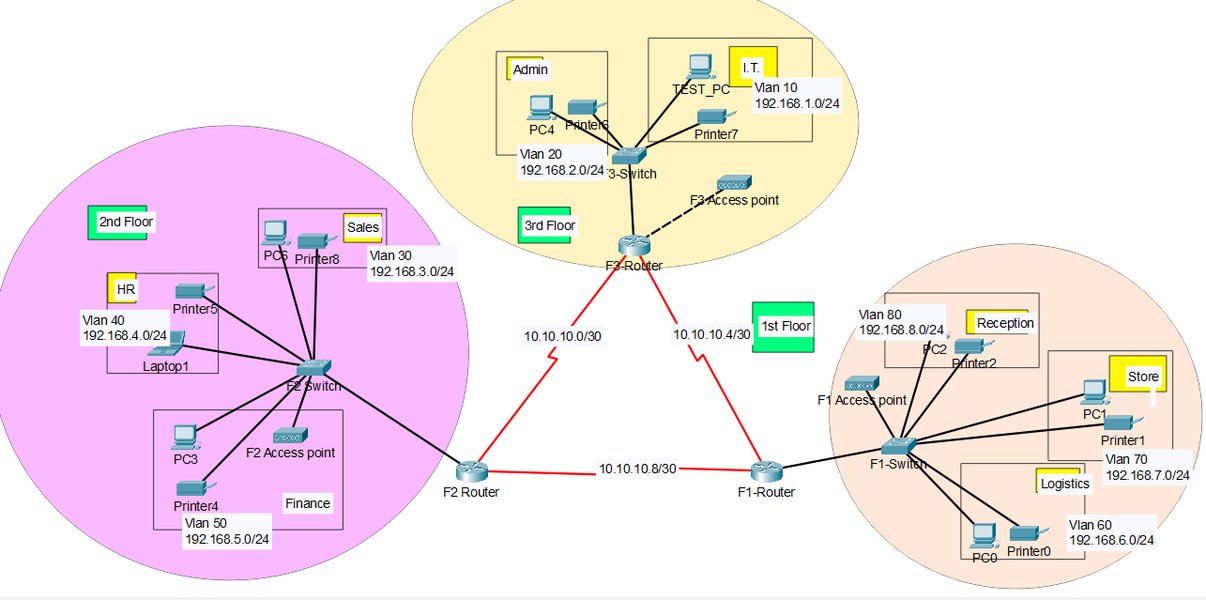
A visual representation of a network topology, similar to what can be built in Packet Tracer.
IP Addressing and Subnetting
A single standard Class C subnet (e.g., 192.168.1.0/24) provides only 254 usable host addresses, which is insufficient for 500 users. You must divide the network into multiple smaller IP subnets.
- Requirement: You need at least 500 unique IP addresses for user devices, plus addresses for routers, switches (management), servers, and potentially printers or IP phones.
- Solution: Use a larger address block (like a Class B or multiple Class Cs) and apply subnetting. Variable Length Subnet Masking (VLSM) can help allocate IP addresses efficiently based on the needs of each segment. For example, you could divide the 500 users into 5 logical groups (VLANs) of 100 users. Each group would require a subnet capable of supporting at least 100 hosts (e.g., a /25 subnet mask, providing 126 usable IPs).
VLANs (Virtual Local Area Networks)
VLANs are essential for segmenting a large network logically, even if users are connected to the same physical switch. They improve performance by limiting broadcast traffic, enhance security by isolating departments or user types, and simplify network management.
- Implementation: Create different VLANs (e.g., VLAN 10 for Sales, VLAN 20 for Marketing, VLAN 30 for Tech Support).
- Assignment: Assign switch ports to specific VLANs.
- Trunking: Configure trunk links between switches and between switches and routers to carry traffic for multiple VLANs.
Inter-VLAN Routing
Since VLANs create separate broadcast domains (and effectively separate networks), devices in different VLANs cannot communicate directly. You need a Layer 3 device (a router or a Layer 3 switch) to route traffic between them.
- Router-on-a-Stick: A router connected to a switch via a single trunk link, configured with subinterfaces for each VLAN.
- Layer 3 Switch: A switch capable of performing routing functions, often using Switched Virtual Interfaces (SVIs) for each VLAN. This is generally preferred for performance in larger LANs.
Visualizing Network Design Aspects
Radar Chart: Key Factors in Designing a 500-User Packet Tracer Network
This radar chart provides an opinionated assessment of the importance and complexity of various factors when designing a 500-user network simulation in Cisco Packet Tracer. Higher scores indicate greater significance or complexity.
As the chart illustrates, careful planning around subnetting, VLANs, and routing is highly important. While managing the sheer number of devices and potential performance impact are considerations, the core networking concepts are paramount for a functional design.
Step-by-Step Simulation in Packet Tracer
Building Your 500-User Network Virtually
1. Plan Your Topology and Addressing
- Define your hierarchical structure (Access, Distribution, Core).
- Decide on the number of VLANs and their purpose (e.g., by department, floor).
- Choose an appropriate IP address range (e.g., 10.0.0.0/8, 172.16.0.0/12, or multiple 192.168.x.0/24 blocks).
- Perform subnetting to allocate address blocks to each VLAN/segment. Ensure each subnet has enough host addresses plus extras for growth.
Example Subnetting Plan
Let's assume we divide 500 users into 5 groups of 100, using the 192.168.0.0 block and /25 subnets (126 usable hosts each):
| VLAN ID & Name | Network Address | Subnet Mask | Usable IP Range | Usable Hosts | Gateway (Example) |
|---|---|---|---|---|---|
| VLAN 10 (Sales) | 192.168.1.0 | 255.255.255.128 (/25) | 192.168.1.1 - 192.168.1.126 | 126 | 192.168.1.1 |
| VLAN 20 (Marketing) | 192.168.1.128 | 255.255.255.128 (/25) | 192.168.1.129 - 192.168.1.254 | 126 | 192.168.1.129 |
| VLAN 30 (Tech) | 192.168.2.0 | 255.255.255.128 (/25) | 192.168.2.1 - 192.168.2.126 | 126 | 192.168.2.1 |
| VLAN 40 (HR) | 192.168.2.128 | 255.255.255.128 (/25) | 192.168.2.129 - 192.168.2.254 | 126 | 192.168.2.129 |
| VLAN 50 (Management) | 192.168.3.0 | 255.255.255.128 (/25) | 192.168.3.1 - 192.168.3.126 | 126 | 192.168.3.1 |
This table outlines a possible IP addressing scheme for segmenting 500 users into five manageable groups using VLANs and /25 subnets within Packet Tracer.
2. Place Devices in Packet Tracer
- Drag and drop routers (e.g., 2911 series) or Layer 3 switches (e.g., 3650 series) for routing.
- Add multiple Layer 2 switches (e.g., 2960 series) for the access layer. You'll likely need several to accommodate 500 connections physically (or logically represent them).
- Add PCs, laptops, servers, and potentially wireless access points as required. You don't necessarily need to add exactly 500 PCs; a representative sample per subnet (e.g., 5-10) is usually sufficient for testing connectivity and configurations.
- Connect devices using appropriate cable types (Copper Straight-Through, Crossover, Fiber).
3. Configure Devices
- Switches:
- Create the planned VLANs (e.g.,
vlan 10,name Sales). - Assign access ports to their respective VLANs (e.g.,
interface range fa0/1 - 24,switchport mode access,switchport access vlan 10). - Configure trunk ports connecting switches and the router/L3 switch (e.g.,
interface g0/1,switchport mode trunk).
- Create the planned VLANs (e.g.,
- Router/Layer 3 Switch (Inter-VLAN Routing):
- If using a router (Router-on-a-Stick): Configure subinterfaces on the physical interface connected to the switch trunk (e.g.,
interface g0/0.10,encapsulation dot1q 10,ip address 192.168.1.1 255.255.255.128). - If using a Layer 3 Switch: Create SVIs for each VLAN (e.g.,
interface vlan 10,ip address 192.168.1.1 255.255.255.128). Enable IP routing (ip routing).
- If using a router (Router-on-a-Stick): Configure subinterfaces on the physical interface connected to the switch trunk (e.g.,
- End Devices (PCs):
- Assign static IP addresses, subnet masks, and default gateway addresses according to your plan.
- Alternatively, configure a DHCP server (on a router, L3 switch, or dedicated server) to assign IPs automatically per VLAN/subnet.
4. Test and Verify
- Use the
pingcommand from PCs to test connectivity:- Ping the default gateway.
- Ping another PC within the same VLAN.
- Ping a PC in a different VLAN (tests inter-VLAN routing).
- Ping server addresses.
- Use Packet Tracer's Simulation Mode to visualize packet flow step-by-step, which is excellent for troubleshooting issues like incorrect routing, firewall rules, or VLAN configurations.
- Check routing tables (
show ip route) on the router/L3 switch and ARP tables (show arp) on devices.
Conceptualizing the Network Structure
Mindmap: Core Components of a 500-User Network Design
This mindmap illustrates the key concepts and components involved in designing a scalable network for 500 users within Cisco Packet Tracer, emphasizing the hierarchical structure and segmentation techniques.
Enhancing Your Packet Tracer Skills
Video Tutorial: Building Larger Networks
Visual guides can be extremely helpful when learning complex configurations. This video demonstrates connecting multiple sites, which involves similar principles to building a large single-site network with segmentation, such as routing and interconnecting different network segments. While it focuses on connecting separate sites, the configuration techniques for routers and switches are applicable to managing different subnets/VLANs within a single large network like the 500-user scenario.
Watching tutorials like this can provide practical insights into configuring routing protocols, trunk links, and managing IP addresses across different network parts, skills directly relevant to simulating your 500-user environment.
Frequently Asked Questions (FAQ)
Why can't I just use one big network (like 192.168.1.0/24) for 500 users?
What's the main benefit of using VLANs in this scenario?
Will Packet Tracer run slowly with 500 devices?
Can I configure DHCP in Packet Tracer for 500 users?
What are the main differences between Router-on-a-Stick and Layer 3 Switches for Inter-VLAN routing?
Layer 3 Switch: Performs routing internally using Switched Virtual Interfaces (SVIs). Routing occurs at hardware speeds, making it much faster and more scalable than ROAS, especially for larger networks. It's generally the preferred method for inter-VLAN routing within a campus LAN.
Recommended Next Steps
- Learn how to configure VLANs and Inter-VLAN routing in Cisco Packet Tracer for network segmentation.
- Explore the concept of subnetting and how to calculate appropriate subnets for a large user base.
- Discover how to set up a DHCP server in Packet Tracer to manage IP addresses across different VLANs.
- Understand the differences and use cases for Router-on-a-Stick versus Layer 3 switching in network design.
References
Last updated May 5, 2025