
Unlock Network Mastery: Simulating Traffic Flow with Leaky & Token Buckets
Discover how to model crucial traffic shaping algorithms using Linux tools and open-source software for optimized network performance.
Understanding and simulating traffic shaping algorithms like the Leaky Bucket and Token Bucket is essential for managing network congestion, ensuring Quality of Service (QoS), and optimizing resource utilization. These algorithms control the rate and burstiness of data transmission. This guide explores how to simulate them using the powerful Linux tc (Traffic Control) utility and other open-source alternatives.
Key Insights: Simulating Traffic Shapers
- Linux
tcis a primary tool for simulating both Token Bucket (directly withtbf) and Leaky Bucket (approximated usingpfifowith rate limits ortbfwith specific configurations). - Open-source programming libraries and scripts (e.g., in Python) offer granular control for simulating the core logic of these algorithms, ideal for learning and custom applications.
- Token Bucket allows controlled bursts of traffic, while Leaky Bucket enforces a constant output rate, smoothing out bursts more strictly.
The Core Algorithms: Leaky Bucket vs. Token Bucket
Before diving into simulations, let's briefly understand these two fundamental traffic shaping mechanisms.
Leaky Bucket Algorithm
Imagine a bucket with a small hole at the bottom. Water (data packets) is poured into the bucket. Regardless of how quickly water is added, it leaks out through the hole at a constant rate. If too much water is poured in too quickly, the bucket overflows, and the excess water (packets) is lost (discarded).
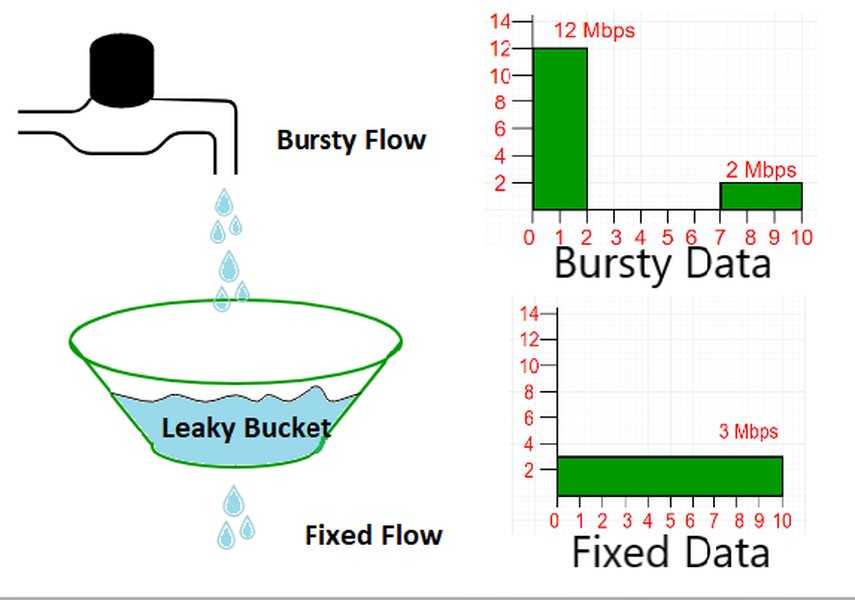
Visual representation of the Leaky Bucket algorithm.
Key Characteristics:
- Output Rate: Enforces a strict, constant average output rate.
- Burst Handling: Smooths out bursty traffic. Bursts are absorbed up to the bucket's capacity; excess is typically discarded.
- Congestion Control: Effective in preventing network congestion by ensuring a predictable traffic flow.
Token Bucket Algorithm
This algorithm uses a bucket that collects "tokens" at a fixed rate. To transmit a packet, a certain number of tokens must be "spent" from the bucket. If enough tokens are available, the packet is sent immediately. If not, the packet might be queued or discarded. The bucket has a finite capacity, limiting the maximum number of tokens that can be accumulated, thus limiting the maximum burst size.
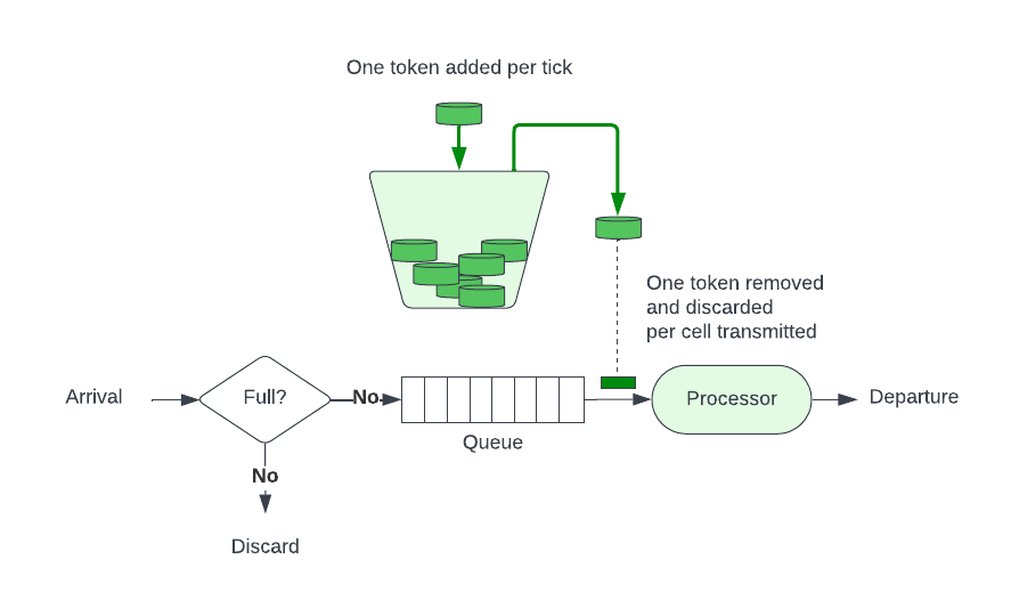
Visual representation of the Token Bucket algorithm.
Key Characteristics:
- Output Rate: Enforces an average rate but allows for bursts.
- Burst Handling: Can accommodate bursts of traffic up to the token bucket's capacity.
- Flexibility: Generally more flexible than the Leaky Bucket as it allows for temporary increases in traffic rate.
Algorithm Comparison: A Visual Snapshot
The radar chart below provides a comparative view of the Leaky Bucket and Token Bucket algorithms based on several key operational characteristics. This helps in understanding their suitability for different traffic management scenarios. The scores are relative, with higher values indicating a stronger emphasis or capability in that specific characteristic (e.g., a higher score in "Burst Handling" means it's better at accommodating traffic bursts).
This chart highlights that Leaky Bucket excels in output rate consistency and strict enforcement, while Token Bucket offers superior burst handling and flexibility for variable traffic patterns.
Simulating with Linux tc (Traffic Control)
The tc command, part of the iproute2 package in Linux, is a powerful utility for configuring kernel-level packet scheduling, allowing for sophisticated traffic shaping. Ensure iproute2 is installed: on Debian/Ubuntu, use sudo apt update && sudo apt install iproute2.
Simulating Token Bucket with tbf
The Token Bucket Filter (tbf) qdisc (queuing discipline) in tc directly implements the token bucket algorithm.
Example:
This command sets up a token bucket on interface eth0 with an average rate of 1 megabit per second (Mbps), a burst capacity of 10 kilobytes (KB), and a latency parameter.
sudo tc qdisc add dev eth0 root tbf rate 1mbit burst 10kb latency 50msdev eth0: Specifies the network interface.root: Attaches the qdisc at the root of the interface's queuing hierarchy.tbf: Selects the Token Bucket Filter.rate 1mbit: The sustained rate at which tokens are replenished (and thus data can be sent on average).burst 10kb: The size of the token bucket (maximum burst allowed). This is also often referred to as 'bucket_size' or 'buffer'.latency 50ms: The maximum amount of time a packet can sit in TBF before being dropped. Helps in controlling delays.
To remove the qdisc: sudo tc qdisc del dev eth0 root
You can also use Hierarchical Token Bucket (HTB) for more complex scenarios involving classes of traffic, where HTB itself uses token bucket principles for its classes.
Simulating Leaky Bucket with tc
Linux tc does not have a dedicated "leaky bucket" qdisc. However, its behavior (a constant output rate and packet dropping on overflow) can be approximated using tbf with a very small burst size or by combining pfifo (Packet First-In, First-Out) with a rate-limiting mechanism.
Approximation using tbf:
By setting a small burst size with tbf, you minimize the allowed burstiness, forcing traffic closer to a constant rate.
sudo tc qdisc add dev eth0 root tbf rate 1mbit burst 1kb latency 50ms limit 2kbburst 1kb: A very small burst size forces the output to be more constant.limit 2kb: Maximum number of bytes that can be queued in the TBF. This simulates the bucket capacity; excess packets beyond this (plus burst) would be dropped.
Approximation using pfifo_fast (default) and policing (more complex):
Another approach involves using a simple FIFO queue and then applying a policer to enforce a rate, which is conceptually similar to how a leaky bucket discards excess traffic.
# This is more complex and typically involves tc filters and actions
# Example of setting up a simple FIFO queue with a limited size
sudo tc qdisc add dev eth0 root pfifo limit 100
# Then, one might use a policer with a filter, e.g.:
# sudo tc filter add dev eth0 protocol ip parent root basic police rate 1mbit burst 10k drop
The key is to ensure that traffic exits at a steady rate and that excess traffic beyond a certain buffer is dropped, mimicking the leaky bucket's overflow mechanism.
Programmatic Simulation & Other Open-Source Tools
Beyond tc, you can simulate these algorithms programmatically or use other specialized open-source tools.
Python Simulations
Python is excellent for simulating the logic of these algorithms due to its readability and extensive libraries.
Leaky Bucket in Python:
import time

class LeakyBucket:
    def __init__(self, capacity, rate):
        # capacity: max items bucket can hold
        # rate: items leaked per second
        self.capacity = capacity
        self.rate = rate  # items per second
        self.current_level = 0
        self.last_leak_time = time.time()

    def _leak(self):
        now = time.time()
        elapsed_time = now - self.last_leak_time
        leaked_amount = elapsed_time * self.rate
        self.current_level = max(0, self.current_level - leaked_amount)
        self.last_leak_time = now

    def add_packet(self, packet_size=1):
        self._leak()
        if self.current_level + packet_size <= self.capacity:
            self.current_level += packet_size
            print(f"Packet added. Current level: {self.current_level:.2f}/{self.capacity}")
            return True
        else:
            print(f"Packet dropped. Bucket full. Current level: {self.current_level:.2f}/{self.capacity}")
            return False

# Example Usage
# leaky_bucket = LeakyBucket(capacity=10, rate=1) # 10 items capacity, 1 item/sec leak rate
# for i in range(15):
#     leaky_bucket.add_packet()
#     time.sleep(0.5) # Add packets faster than leak rate
Token Bucket in Python:
import time

class TokenBucket:
    def __init__(self, capacity, fill_rate):
        # capacity: max tokens bucket can hold
        # fill_rate: tokens added per second
        self.capacity = float(capacity)
        self.fill_rate = float(fill_rate)
        self.tokens = float(capacity) # Start full
        self.last_refill_time = time.time()

    def _refill(self):
        now = time.time()
        elapsed_time = now - self.last_refill_time
        tokens_to_add = elapsed_time * self.fill_rate
        self.tokens = min(self.capacity, self.tokens + tokens_to_add)
        self.last_refill_time = now

    def consume(self, tokens_required=1):
        self._refill()
        if self.tokens >= tokens_required:
            self.tokens -= tokens_required
            print(f"Consumed {tokens_required} tokens. Tokens remaining: {self.tokens:.2f}")
            return True
        else:
            print(f"Not enough tokens. Required: {tokens_required}, Available: {self.tokens:.2f}. Request denied.")
            return False

# Example Usage
# token_bucket = TokenBucket(capacity=10, fill_rate=1) # 10 tokens capacity, 1 token/sec refill
# for i in range(15):
#     if token_bucket.consume():
#         print(f"Request {i+1} allowed.")
#     else:
#         print(f"Request {i+1} denied.")
#     time.sleep(0.5) # Try to consume faster than refill rate
Other Open-Source Tools & Libraries
- GitHub Repositories: Numerous projects on GitHub provide implementations and simulators for Leaky Bucket and Token Bucket algorithms in various languages (C, Java, Go, etc.). Examples include
dschurholz/buckets(Python simulation) or libraries for specific frameworks. - OpenResty/NGINX: While primarily web servers/proxies, they can implement rate limiting using Lua scripts that often employ token bucket or leaky bucket logic for HTTP request management (e.g.,
lua-resty-limit-traffic). - Network Simulators: Tools like OMNeT++ or NS-3 are powerful discrete event network simulators that can model complex network scenarios, including various queuing disciplines and traffic shaping algorithms. They are more suited for research and in-depth performance analysis.
Visualizing the Concepts: A Mindmap
This mindmap illustrates the relationships between traffic shaping, the Leaky Bucket and Token Bucket algorithms, and the primary methods for their simulation. It provides a high-level overview of the concepts discussed.
The mindmap shows how both algorithms contribute to traffic shaping and can be simulated using similar categories of tools, with Linux tc being a prominent option for network-level control.
Comparing Leaky Bucket and Token Bucket
The following table summarizes the key differences, advantages, and disadvantages of the Leaky Bucket and Token Bucket algorithms to help you choose or understand their behavior in simulations.
| Feature | Leaky Bucket | Token Bucket |
|---|---|---|
| Primary Goal | Enforce a constant output rate, smooth bursts | Allow controlled bursts while maintaining an average rate |
| Output Traffic | Smooth, constant rate | Can be bursty (up to token capacity), then sustained rate |
| Packet Handling (on congestion/excess) | Typically discards packets if bucket overflows | Can discard packets or queue them if tokens are insufficient (depending on implementation) |
| Burst Accommodation | Limited; absorbs bursts into the bucket, but output remains constant | Good; allows bursts as long as tokens are available |
| Flexibility | Less flexible; strict output rate | More flexible; adapts to bursty traffic patterns |
| Idle Periods | No credit accumulated during idle periods (output is always at leak rate if data is present) | Accumulates tokens during idle periods (up to capacity), allowing larger future bursts |
Implementation in Linux tc |
Approximated (e.g., tbf with small burst, pfifo + policer) |
Directly implemented (tbf, htb) |
| Common Use Cases | Traffic policing, ensuring constant bit rate (CBR) services | Rate limiting APIs, traffic shaping for variable bit rate (VBR) services, Quality of Service (QoS) |
Understanding Traffic Control with tc
For a deeper dive into how Linux tc can be used for traffic shaping, including practical demonstrations, the following video provides a valuable introduction. It covers the basics of tc and how to apply it to simulate various network conditions and control traffic flow.
This video, "Shaping Linux Traffic with tc," demonstrates using tc to manipulate network traffic, relevant for simulating rate limits and behaviors akin to Leaky/Token Bucket algorithms.
The video explains how tc interacts with network interfaces and queuing disciplines to manage outgoing (and sometimes incoming) traffic. Concepts like qdiscs (queuing disciplines), classes, and filters are foundational to using tc effectively for simulating algorithms like Token Bucket with tbf or approximating Leaky Bucket behavior. Understanding these components allows for precise control over bandwidth, latency, and packet loss, which are crucial for accurate simulations.
Frequently Asked Questions (FAQ)
What is the main difference between Leaky Bucket and Token Bucket?
The Leaky Bucket algorithm enforces a constant output rate, smoothing out bursts. Excess traffic is typically discarded. The Token Bucket algorithm allows for controlled bursts of traffic up to the number of available tokens, while still maintaining an average rate. It's generally more flexible for handling variable traffic.
Can Linux `tc` perfectly simulate a Leaky Bucket?
While `tc` doesn't have a qdisc explicitly named "leaky bucket," its behavior can be closely approximated. Using the Token Bucket Filter (`tbf`) with a very small burst size and a limit effectively mimics the constant output rate and overflow characteristics of a leaky bucket. Alternatively, combining `pfifo` with policing can achieve a similar effect.
Is Linux `tc` available on operating systems other than Linux?
The `tc` command and its associated `iproute2` utilities are specific to the Linux kernel's networking stack. Other operating systems have their own tools for traffic shaping (e.g., `pf` with `altq` on BSD systems, or QoS mechanisms in Windows), but they do not use the `tc` command directly.
What are common real-world use cases for these algorithms?
Both are used for rate limiting and traffic shaping. Token Bucket is widely used in API rate limiting, ISP bandwidth management (allowing bursts), and Quality of Service (QoS) for applications. Leaky Bucket is often used for traffic policing to ensure a constant bit rate (CBR), such as in ATM networks or to smooth jitter in real-time data streams.
Are there GUI tools for managing Linux `tc` configurations?
Yes, while `tc` is a command-line tool, some open-source projects aim to provide a graphical user interface for it. One example is `tc-gui`, a Python-based web GUI for managing `tc` rules, which can simplify the process of setting up and viewing traffic shaping configurations.
Recommended Further Exploration
To deepen your understanding, consider exploring these related topics:
- How does Hierarchical Token Bucket (HTB) in Linux tc allow for complex bandwidth allocation?
- What are the performance implications of using different queuing disciplines with Linux tc?
- Can I simulate network latency and packet loss in conjunction with Leaky Bucket or Token Bucket using tc?
- Explore advanced traffic policing techniques using Linux tc filters and actions.
References
Last updated May 13, 2025