
Streamlining Software Order Management: Beyond Excel's Boundaries
Transforming Excel-based software requests into an automated, report-driven workflow for enhanced efficiency and accountability.
Key Insights for Effective Software Order Management
- Hybrid Approach is Optimal: Begin with enhanced Excel templates for initial data capture and simple tracking, then transition to a dedicated Order Management System (OMS) or robust Project Management Software for advanced automation, multi-departmental collaboration, and comprehensive reporting.
- Automated Tracking and Categorization: A specialized software system centralizes all software orders (creation, development, maintenance), providing real-time status updates and the ability to automatically categorize orders as "achieved" or "not achieved" based on predefined criteria.
- Comprehensive Reporting for Decision Making: Modern systems offer built-in analytics and reporting tools that allow for detailed breakdowns of order status, performance metrics by department, and insights into bottlenecks, far surpassing Excel's manual reporting capabilities.
Managing software orders—whether for creation, development, or maintenance—that originate in Excel and are received from various company sections requires a robust system to track progress and generate insightful reports categorizing orders as "achieved" or "not achieved." While Excel offers initial flexibility, its limitations in scalability, real-time updates, and advanced automation necessitate a more sophisticated solution for comprehensive management. This response will explore a dual approach: leveraging Excel for initial data input and enhancing its capabilities, coupled with transitioning to a dedicated Order Management System (OMS) or project management software for streamlined workflows, multi-departmental collaboration, and automated reporting.
The Evolution from Excel to Integrated Systems
Many organizations begin their order management journey with Excel due to its accessibility and ease of use. However, as the volume and complexity of software orders grow, the manual effort, potential for errors, and lack of real-time visibility inherent in Excel become significant bottlenecks. The ideal solution involves a strategic migration from a basic Excel framework to a more powerful, integrated software system.
Leveraging Excel for Initial Order Capture and Basic Tracking
For initial data entry and rudimentary tracking, Excel remains a viable starting point. It allows for the creation of structured tables where each row represents a software order, and columns capture essential details such as:
- Order ID and Date: Unique identifiers and timestamps for received requests.
- Order Type: Categorization as "Create," "Develop," or "Maintain."
- Submitting Section: Identification of the company department requesting the software service.
- Description: A brief overview of the required software work.
- Assigned Team/Individual: Who is responsible for the order.
- Current Status: Manual updates like "Received," "In Progress," "Under Review," "Completed," or "Cancelled."
- Due Date: The target completion date for the order.
To enhance Excel's utility, features like data validation (using drop-down lists for order types and statuses) can enforce consistency and reduce errors. Conditional formatting can visually highlight orders based on their status or impending deadlines. Pivot tables can be used for basic summary reports, showing counts of orders by type or by submitting section. However, these are largely manual processes, and real-time collaboration across multiple sections can be challenging without advanced shared network configurations.
Transitioning to a Dedicated Order Management System (OMS)
For efficient and scalable management of software orders, especially when dealing with multiple company sections and complex workflows, a dedicated Order Management System (OMS) is highly recommended. While traditionally associated with physical product sales, modern OMS platforms are flexible enough to manage service-based "orders" like software creation, development, and maintenance. These systems centralize data, automate processes, and provide robust reporting capabilities.
Key Features of an OMS for Software Orders:
- Centralized Order Hub: Consolidates all software orders from various departments into a single, accessible platform. This provides a unified view for all stakeholders.
- Automated Workflows: Automates the routing of orders to appropriate teams (e.g., "creation" orders to the R&D team, "maintenance" orders to the support team). It can also automate status updates and notifications to relevant parties, reducing manual intervention.
- Real-time Tracking and Visibility: Provides live updates on the status of each order, allowing internal stakeholders to track progress without manual inquiries. This transparency is crucial for managing expectations and identifying bottlenecks early.
- Custom Fields and Categorization: Allows for the creation of custom fields to track specific software-related attributes (e.g., programming language, dependencies, related modules). Orders can be categorized and sub-categorized based on their type (create, develop, maintain) and status (achieved, not achieved).
- Integration Capabilities: Can integrate with other internal systems such as project management tools, CRM (for internal customer requests), accounting systems (for tracking software development costs), and even directly with Excel for seamless initial data import.
- Role-Based Access and Collaboration: Different company sections can have specific roles and permissions, ensuring data security and relevant access while fostering collaborative order fulfillment.
The Core Components of an Integrated System
An effective software order management system must be built on several foundational components that cater to the lifecycle of software requests, from initiation to resolution.
Order Intake and Processing Across Sections
The system should provide intuitive interfaces for different company sections to submit software orders. This could be via a dedicated portal, an integrated form, or even through automated import from a shared Excel file. Once an order is submitted, the system should automatically route it to the responsible team or individual based on the order type and predefined rules. For example, a "new software creation" request might go to the innovation department, while a "bug fix" request might go directly to the maintenance team.
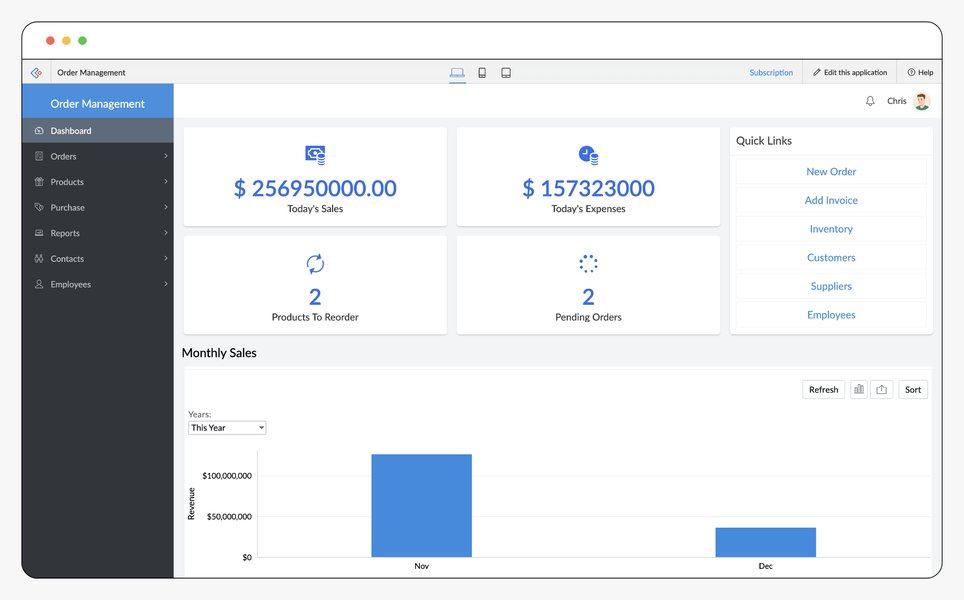
An intuitive dashboard for managing software orders across various stages.
Lifecycle Management: Create, Develop, Maintain
Each order type will have a distinct lifecycle. The system should support this by allowing configurable workflows:
- Create: For new software initiatives, the workflow might include stages like "Concept Review," "Requirements Gathering," "Design," "Initial Development," "Testing," and "Deployment."
- Develop: For enhancements or feature additions to existing software, stages might involve "Feature Request," "Design Implementation," "Coding," "Unit Testing," "Integration," and "Release."
- Maintain: For bug fixes, performance improvements, or security updates, the workflow could include "Issue Identification," "Bug Triage," "Fix Development," "Regression Testing," and "Patch Deployment."
The system needs to allow for status updates at each stage, indicating progress and accountability.
Automated Status Updates and Notifications
A critical aspect of an efficient system is the ability to provide real-time updates without manual intervention. This can be achieved through:
- Triggered Notifications: Automatic emails or in-app alerts sent to relevant stakeholders (e.g., the submitting section, the project manager) when an order status changes (e.g., from "In Progress" to "Completed").
- Dashboard Views: Personalized dashboards that provide a quick overview of orders assigned to a user or department, their current status, and impending deadlines.
- Audit Trails: A complete history of all actions and status changes for each order, ensuring transparency and accountability.
Advanced Reporting and Categorization: Achieved vs. Not Achieved
The ultimate goal is to generate reports that provide clear insights into the success rate of software orders, categorizing them as "achieved" or "not achieved." This requires defining clear criteria for each category within the system.
Defining "Achieved" and "Not Achieved"
The definition of "achieved" and "not achieved" should be configurable based on your company's metrics. Common criteria include:
- Achieved: Order fully completed, delivered to the requesting section, tested, and approved within the agreed-upon timeframe and budget.
- Not Achieved: Order cancelled, significantly delayed beyond acceptable limits, failed to meet key requirements, or deemed incomplete for any reason.
The system should allow for custom statuses that feed into these broad categories, such as "Completed (On Time)," "Completed (Delayed)," "Cancelled (Scope Change)," or "Pending (Blocked)."
Generating Comprehensive Reports
An OMS or project management software will offer robust reporting tools far superior to Excel's capabilities. These tools allow you to:
- Filter and Group Data: Generate reports based on order type, submitting section, assigned team, date range, and current status.
- Visualize Performance: Create charts (bar, pie, line) and graphs to visually represent the number of achieved vs. not achieved orders, trends over time, or performance by department.
- Identify Bottlenecks: Analyze data to pinpoint where orders are getting stuck, which teams are overloaded, or common reasons for "not achieved" statuses.
- Exportable Reports: Generate reports in various formats (PDF, CSV, Excel) for sharing with management or for further analysis.
This radar chart illustrates the perceived capabilities of different systems for managing software orders. Dedicated OMS/PM Software significantly outperforms Excel in key areas critical for complex organizational needs.
Comparing Management Approaches
To further illustrate the benefits of moving beyond Excel, here's a comparative table outlining the capabilities of Excel versus a dedicated OMS or project management software for managing software orders.
| Feature | Excel-Based Management | Dedicated OMS / Project Management Software |
|---|---|---|
| Order Intake | Manual entry, form-based input, shared spreadsheet. Prone to inconsistencies. | Automated portals/forms, API integrations, structured data capture. Consistent and streamlined. |
| Order Types (Create, Develop, Maintain) | Managed via dropdowns or manual categorization. Limited enforcement. | Configurable custom fields and workflows for each type. Enforced structure. |
| Multi-Section Input | Possible via shared network drives; high risk of version conflicts and errors. | Role-based access, collaborative dashboards, real-time updates for all sections. |
| Real-time Tracking | Manual updates; requires frequent refreshing. Not truly real-time. | Automated status changes, instant visibility across the organization. |
| Workflow Automation | Minimal, often requires VBA macros. Complex to build and maintain. | Built-in workflow engines for routing, notifications, and task assignments. |
| Categorization (Achieved/Not Achieved) | Manual status updates; requires manual aggregation for reporting. | Automated status progression, rule-based categorization, clear definitions. |
| Reporting & Analytics | Basic pivot tables and charts; manual data manipulation for complex reports. | Advanced dashboards, customizable reports, graphical insights, performance KPIs. |
| Scalability | Limited, becomes cumbersome with increasing order volume or complexity. | Highly scalable, designed to handle large volumes of orders and users. |
| Integration with Other Systems | Limited to manual import/export or basic linking. | Robust APIs for seamless integration with CRM, ERP, accounting, etc. |
| Data Security & Access Control | Basic file permissions; no granular access control within the sheet. | Granular user roles and permissions, data encryption, audit trails. |
Choosing the Right System: Examples and Considerations
Several software solutions can fulfill the requirements for managing software orders. The choice often depends on your company's size, budget, and specific needs for integration and customization.
Popular Order Management Systems (OMS)
While often tailored for e-commerce, these platforms can be adapted:
- Microsoft Dynamics 365 Intelligent Order Management: A comprehensive enterprise-level solution that automates order tracking, inventory (which could be mapped to software licenses or components), and fulfillment processes. It offers strong reporting and integration capabilities.
- Salesforce Order Management: A powerful platform for tracking sales and orders, with robust capabilities for customization, reporting, and integration with Salesforce's extensive ecosystem (CRM, Service Cloud).
- Sage Order Management Software: Focuses on streamlining the order lifecycle, from entry to fulfillment, with strong integration options for accounting systems.
- Zoho Inventory (with Order Management capabilities): A more budget-friendly option suitable for small to medium businesses, offering multi-channel order tracking and status reporting. Zoho Creator can also be used to build custom OMS applications without extensive coding.
Robust Project Management Software
Many project management tools can be configured to manage "software orders" as projects or tasks:
- Jira Software: Excellent for tracking software development, issues, and project workflows (creation, development, maintenance). Highly customizable with reporting dashboards.
- Asana / Trello / Monday.com: Flexible platforms that can be adapted to manage workflows, assign tasks, track statuses, and generate progress reports for software orders.
- Smartsheet: Combines spreadsheet interface with project management capabilities, offering automation and reporting features.
This mindmap illustrates the interconnected components and considerations for building a comprehensive software order management system, from initial Excel use to the benefits of dedicated software.
Considerations for Implementation
- Data Migration: Plan how to migrate existing Excel data into the new system. Most OMS/PM software supports bulk imports from CSV or Excel files.
- Customization: Assess the level of customization required for your specific software order types, workflows, and reporting needs.
- User Training: Ensure adequate training for all company sections that will interact with the new system to maximize adoption and efficiency.
- Integration Needs: Identify other internal systems (e.g., HR for team assignments, finance for budget tracking) that need to integrate with the order management system.
Visualizing Software Order Management in Action
To provide a clearer understanding of how a software order management system functions, consider the following video. It demonstrates how an order tracking system can be developed using Excel VBA, showcasing some advanced capabilities that can be built if a dedicated OMS is not immediately feasible. While an OMS offers far greater scalability and automation, this video highlights how customized solutions can be created even within Excel to meet specific tracking needs, such as managing the various stages of software orders.
An overview of an order tracking system developed using Excel VBA. This video illustrates the potential for advanced customization within Excel, using features like MultiPages, Frames, TextBoxes, ComboBoxes, OptionBoxes, and Labels to create a more dynamic order management interface. While not a full OMS, it shows how complex tracking and input can be designed in Excel, providing a bridge between basic spreadsheets and dedicated software solutions.
Frequently Asked Questions (FAQ)
What are the primary benefits of using a dedicated OMS over Excel for software orders?
Can an OMS track the specific types of software orders like creation, development, and maintenance?
How does an OMS handle orders received from multiple company sections?
Is it possible to migrate existing Excel-based software order data into a new OMS?
What kind of reports can be generated to categorize orders as "achieved" or "not achieved"?
Conclusion
Effectively managing software orders, from initial request to final report, necessitates a shift from reliance on basic Excel spreadsheets to a more integrated and automated solution. While Excel can serve as a starting point for data capture, a dedicated Order Management System (OMS) or a robust Project Management Software offers the scalability, automation, real-time visibility, and comprehensive reporting capabilities required for complex multi-departmental workflows. By implementing such a system, organizations can streamline the entire software order lifecycle—covering creation, development, and maintenance—and gain invaluable insights through accurate categorization and performance metrics, ultimately leading to enhanced efficiency and improved accountability across all company sections.
Recommended Further Exploration
- How to evaluate and select the best order management system for software development
- Best practices for integrating Excel data into an OMS
- Custom workflow automation for software lifecycle management
- KPIs and metrics for tracking software project success and failure