
Discover How to Play Random Sounds on Sonos Speakers
A Comprehensive Guide to Building a Web-Based Sonos Sound Player
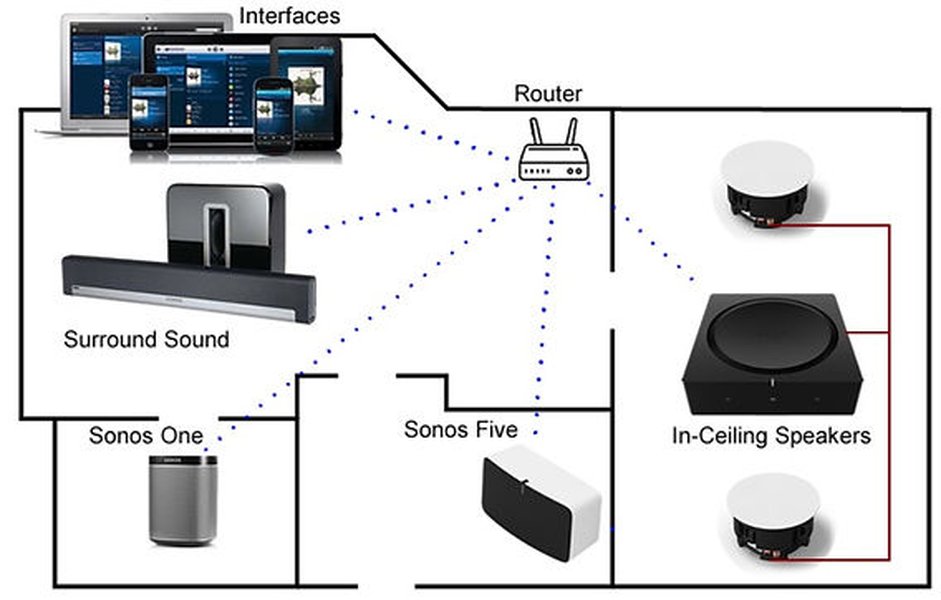
Key Highlights
- Modular Architecture: Server-side API integration with client-side controls using HTML, CSS, and JavaScript.
- Sonos API Integration: Methods to discover speakers, manage playback, and execute random sound selection.
- Interactive and Visual Interface: Utilizes modern libraries with a radar chart and an embedded video tutorial.
Introduction
This guide details how to build a web-based program that plays random sounds on multiple Sonos speakers individually. The program is structured around a server-side component that communicates with the Sonos API and a front-end interface that allows users to control sound playback. We detail key code segments, integration points, and performance considerations to help you create a robust solution.
System Architecture and Key Components
1. Overview of the Architecture
The solution is divided into two main parts – the server-side API and the client-side web interface:
-
Server-Side API
The server-side application is responsible for interfacing with the Sonos API, discovering available speakers, and sending commands to play random sounds. We recommend using Node.js paired with Express to handle HTTP requests and manage communication with the Sonos system through the Node-Sonos or SoCo libraries.
-
Client-Side Interface
This component offers an intuitive UI to control playback. With HTML, CSS, and JavaScript, users can select speakers, trigger random sounds, and view the status of their Sonos devices.
Server-Side Implementation
Setting Up the Environment
First, ensure that Node.js is installed. Then, initialize your project and install the necessary packages including Express, body-parser, and a Sonos-compatible library (e.g., node-sonos or SoCo for Python environments if you prefer Python instead).
Example: Node.js Server Code
Below is an example of the server-side code that sets up API endpoints for discovering speakers and playing random sounds:
// Import required modules
const express = require('express');
const bodyParser = require('body-parser');
const sonosApi = require('sonos'); // You may use the 'node-sonos' library

const app = express();
app.use(bodyParser.json());

// Define an array of sound file URLs
const randomSounds = [
  'https://example.com/sound1.mp3',
  'https://example.com/sound2.mp3',
  'https://example.com/sound3.mp3'
];

// Endpoint to discover available Sonos speakers
app.get('/api/speakers', async (req, res) => {
  try {
    // This function should connect to your Sonos discovery library
    const speakers = await sonosApi.getAllSpeakers(); // Adjust depending on API/library
    res.json(speakers);
  } catch (error) {
    res.status(500).json({ error: 'Failed to discover speakers.'});
  }
});

// Endpoint to play a random sound on a specific Sonos speaker
app.post('/api/speakers/:id/play', async (req, res) => {
  const speakerId = req.params.id;
  // Select a random sound from our list
  const soundUrl = randomSounds[Math.floor(Math.random() * randomSounds.length)];
  try {
    // Call method to play URI on the specific speaker id
    await sonosApi.playSound(speakerId, soundUrl); // Replace with the actual call for your library
    res.json({ message: `Playing sound on speaker ${speakerId}` });
  } catch (error) {
    res.status(500).json({ error: 'Failed to play sound on the specified speaker.'});
  }
});

// Example endpoint to adjust speaker volume dynamically
app.post('/api/speakers/:id/volume', async (req, res) => {
  const speakerId = req.params.id;
  const { volume } = req.body;
  try {
    await sonosApi.setVolume(speakerId, volume);
    res.json({ message: `Volume set to ${volume} on speaker ${speakerId}` });
  } catch (error) {
    res.status(500).json({ error: 'Failed to set volume on the specified speaker.'});
  }
});

// Start the server
const port = process.env.PORT || 3000;
app.listen(port, () => {
  console.log(`Server running on port ${port}.`);
});
Key Considerations for Server-Side
-
API Authentication:
Ensure that your Sonos API credentials and any required keys are stored securely. Follow Sonos documentation for authentication protocols.
-
Asynchronous Operations:
API calls to Sonos are often asynchronous. Using async/await or Promises in Node.js is highly recommended for manageability.
-
Error Handling:
Robust error handling is necessary to manage API failures, network issues, or invalid input.
Client-Side Implementation
Building the Web Interface
The front-end is built using HTML, CSS, and JavaScript. It fetches speaker data, provides a button for playing random sounds, and updates the user about the state of each speaker.
Example: HTML and JavaScript for Client-Side
This example outlines the HTML structure and scripts for your client-side application:
// Example: index.html
<!DOCTYPE html>
<html lang="en">
<head>
    <meta charset="UTF-8">
    <meta name="viewport" content="width=device-width, initial-scale=1.0">
    <title>Sonos Random Sound Player</title>
    <style>
      body {
          font-family: Arial, sans-serif;
          background: #f4f4f4;
          margin: 0;
          padding: 20px;
      }
      .speaker-control {
          background: #fff;
          padding: 15px;
          margin: 10px 0;
          border: 1px solid #ddd;
      }
      button {
          padding: 10px;
          margin-top: 5px;
          cursor: pointer;
      }
    </style>
</head>
<body>
    <h1>Sonos Random Sound Player</h1>
    <div id="speakers"></div>
    <script>
      async function fetchSpeakers() {
          const response = await fetch('/api/speakers');
          const speakers = await response.json();
          const speakersDiv = document.getElementById('speakers');
          speakers.forEach(speaker => {
              const div = document.createElement('div');
              div.className = 'speaker-control';
              div.innerHTML = `
                  <strong>${speaker.name}</strong>
                  <br>
                  <button onclick="playRandomSound('${speaker.id}')">Play Random Sound</button>
              `;
              speakersDiv.appendChild(div);
          });
      }

      async function playRandomSound(speakerId) {
          const response = await fetch('/api/speakers/' + speakerId + '/play', {
              method: 'POST',
              headers: {
                'Content-Type': 'application/json'
              }
          });
          const result = await response.json();
          console.log(result.message);
      }

      document.addEventListener('DOMContentLoaded', fetchSpeakers);
    </script>
</body>
</html>
This structure provides a clean and responsive interface for users to interact with their Sonos speakers. It allows speaker discovery and integrates simple command triggers, such as playing random sounds.
Visual Insights with a Radar Chart
The following radar chart (embedded below) represents a conceptual evaluation of various components of our solution from 0 to 10. This is an opinion-based visualization of how well the solution addresses critical aspects:
Comparative Overview Table
The table below summarizes the functionalities and key challenges for each major component of the system:
| Component | Functionality | Key Considerations |
|---|---|---|
| Server-Side API | Discovery of speakers, random sound playback, volume control | API authentication, asynchronous handling, error management |
| Client-Side Interface | Display speakers list, controls for random sound, user feedback | Responsive design, clear UI, API integration |
| Randomization Logic | Selection of random sound from a sound library | Ensures variability, consistency in sound playback |
| Integration with Sonos | Using Sonos Control API / Node-Sonos library | Seamless communication, robust command execution |
Embedded Video Tutorial
For additional context, check out this video tutorial which covers similar implementations and offers further insight on controlling Sonos speakers via a web-based interface:
Frequently Asked Questions
How do I secure communication with the Sonos API?
Can I customize the sound library used for random playback?
randomSounds array with URLs or file paths to your own sound files.
What libraries or frameworks are recommended for this project?
References
-
Sonos Control API Documentation - Sonos
- Sonos Web Project on GitHub - Sonos Web
- Home Assistant Community - Home Assistant
- Example Sonos Controller - GitHub
- Node Sonos HTTP API - SourceForge
Recommended Queries
Last updated April 3, 2025