
Understanding Spring CI/CD
Streamlining Development and Deployment with Continuous Integration and Continuous Deployment in Spring Framework
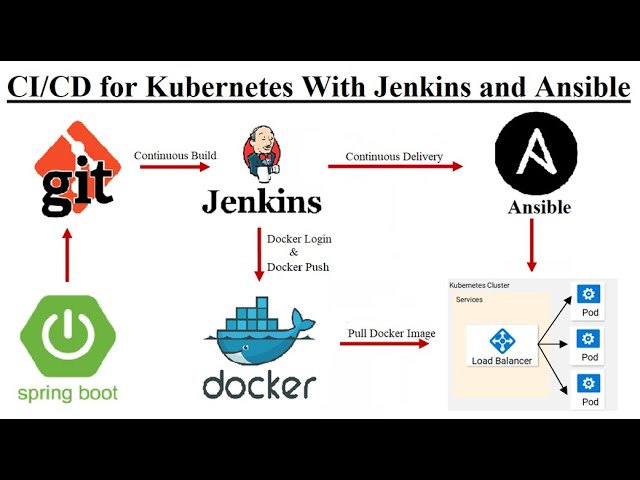
Key Takeaways
- Automation Enhances Efficiency: Implementing CI/CD automates the build, test, and deployment processes, significantly speeding up the development lifecycle.
- Quality Assurance: Continuous testing and code analysis ensure high-quality code and early detection of issues.
- Scalability and Consistency: Containerization and standardized deployment pipelines enable scalable and consistent application deployments across various environments.
Introduction to Spring CI/CD
Spring CI/CD refers to the integration of Continuous Integration (CI) and Continuous Deployment (CD) practices within applications built using the Spring Framework, particularly Spring Boot. The primary objective of CI/CD is to automate the stages of software development, including building, testing, and deploying applications, thereby enhancing efficiency, reducing errors, and accelerating the release cycle.
Understanding Continuous Integration and Continuous Deployment
What is Continuous Integration (CI)?
Continuous Integration is a development practice where developers frequently merge their code changes into a shared repository, preferably multiple times a day. Each merge triggers an automated build and testing sequence, allowing teams to detect integration issues early. The key benefits of CI include:
- Early detection of bugs and errors.
- Improved collaboration among developers.
- Reduction of integration problems during the release phase.
What is Continuous Deployment (CD)?
Continuous Deployment extends the principles of CI by automating the deployment of code changes to production environments. Every change that passes the automated tests is deployed directly to production, ensuring that the application is always in a releasable state. The advantages of CD include:
-
Faster delivery of new features and updates.
-
Reduced manual intervention and errors during deployment.
-
Enhanced ability to respond to market changes swiftly.
Integrating CI/CD with Spring Boot
Setting Up the Pipeline
Implementing CI/CD for Spring Boot applications involves creating a pipeline that automates the steps from code commit to deployment. The typical stages in a Spring CI/CD pipeline include:
1. Source Code Management
Developers commit their code changes to a version control system like Git. This central repository serves as the single source of truth for the application's codebase.
2. Build Automation
The build process involves compiling the application and managing dependencies. Tools like Maven or Gradle are commonly used in Spring Boot projects to handle build automation.
3. Automated Testing
Automated tests, including unit tests, integration tests, and sometimes performance tests, are executed to ensure that the code changes do not introduce new issues. Frameworks like JUnit and TestNG are typically employed for testing in Spring applications.
4. Code Analysis
Static code analysis tools like SonarCloud are integrated into the pipeline to evaluate code quality, coverage, and adherence to coding standards. This step helps in maintaining high code quality and identifying potential vulnerabilities.
5. Containerization
Packaging the application into containers using Docker ensures consistency across different environments. Containerization abstracts the underlying infrastructure, allowing the application to run uniformly regardless of where it is deployed.
6. Deployment
The final stage involves deploying the application to various environments such as staging, production, or cloud platforms. Deployment can be automated using tools like Jenkins, GitHub Actions, GitLab CI/CD, or CircleCI.
7. Monitoring and Feedback
Post-deployment monitoring tools track the application's performance and stability. Feedback from monitoring is used to make continuous improvements to the development and deployment processes.
Tools Commonly Used in Spring CI/CD Pipelines
| Stage | Tools | Description |
|---|---|---|
| Source Code Management | Git, GitHub, GitLab | Version control systems for managing code repositories. |
| Build Automation | Maven, Gradle | Tools for compiling code and managing dependencies. |
| Automated Testing | JUnit, TestNG | Frameworks for writing and executing automated tests. |
| Code Analysis | SonarCloud, Codecov | Tools for analyzing code quality and coverage. |
| Containerization | Docker | Platform for creating and managing containerized applications. |
| CI/CD Automation | Jenkins, GitHub Actions, GitLab CI/CD, CircleCI | Tools for automating the CI/CD pipeline stages. |
| Deployment | Heroku, AWS, Kubernetes | Platforms for hosting and deploying applications. |
| Monitoring | Prometheus, Grafana | Tools for monitoring application performance and health. |
Benefits of Implementing CI/CD in Spring Applications
Enhanced Code Quality
Continuous testing and code analysis tools ensure that code adheres to quality standards. Automated tests catch bugs early in the development process, reducing the likelihood of defects reaching production.
Faster Delivery
Automation of the build, test, and deployment processes significantly reduces the time required to release new features and updates. This agility allows organizations to respond quickly to market demands and user feedback.
Reduced Manual Errors
Automating repetitive tasks eliminates the potential for human error during builds and deployments. This consistency ensures that each deployment follows the same reliable process.
Improved Collaboration
CI/CD fosters better collaboration among development, testing, and operations teams by providing a shared pipeline and clear visibility into the development process. This transparency enhances teamwork and communication.
Scalability
Containerization and orchestration tools like Kubernetes enable applications to scale seamlessly to handle increased traffic and demand. CI/CD pipelines can be configured to support scaling operations without manual intervention.
Implementing CI/CD: Step-by-Step Guide
1. Setting Up Version Control
Begin by initializing a Git repository for your Spring Boot application. Platforms like GitHub, GitLab, or Bitbucket can host your repository, providing a centralized location for code collaboration.
2. Configuring Build Automation with Maven or Gradle
Use Maven or Gradle to manage your project's build process. These tools handle compiling the code, managing dependencies, and packaging the application. For Spring Boot, Gradle is often preferred for its flexibility and performance.
3. Writing Automated Tests
Develop a comprehensive suite of tests, including unit tests for individual components and integration tests for interaction between components. Utilizing frameworks like JUnit and TestNG will facilitate the creation and execution of these tests.
4. Setting Up Static Code Analysis
Integrate tools like SonarCloud into your pipeline to perform static code analysis. These tools assess code quality, detect vulnerabilities, and measure test coverage, providing actionable insights to improve the codebase.
5. Containerizing the Application with Docker
Create a Dockerfile to define the application's container image. Containerization ensures that the application runs consistently across different environments by encapsulating all dependencies.
  # Use an official OpenJDK runtime as a parent image
  FROM openjdk:17-jdk-alpine

  # Set the working directory
  WORKDIR /app

  # Copy the executable JAR file into the container
  COPY target/myapp.jar myapp.jar

  # Expose the application port
  EXPOSE 8080

  # Run the application
  ENTRYPOINT ["java","-jar","myapp.jar"]
6. Automating the CI/CD Pipeline
Choose a CI/CD tool like Jenkins, GitHub Actions, GitLab CI/CD, or CircleCI to automate your pipeline. Below is an example configuration using GitHub Actions:
// .github/workflows/ci-cd.yml
name: CI/CD Pipeline

on:
  push:
    branches: [ main ]

jobs:
  build:
    runs-on: ubuntu-latest

    steps:
    - name: Checkout Code
      uses: actions/checkout@v2

    - name: Set up JDK 17
      uses: actions/setup-java@v2
      with:
        java-version: '17'

    - name: Build with Gradle
      run: ./gradlew build

    - name: Run Tests
      run: ./gradlew test

    - name: Code Analysis with SonarCloud
      uses: SonarSource/sonarcloud-github-action@v1
      with:
        args: >
          -Dsonar.projectKey=your_project_key
          -Dsonar.organization=your_org
          -Dsonar.host.url=https://sonarcloud.io

    - name: Build Docker Image
      run: docker build -t your_dockerhub_username/myapp:${{ github.sha }} .

    - name: Push Docker Image
      run: |
        echo "$DOCKER_PASSWORD" | docker login -u "$DOCKER_USERNAME" --password-stdin
        docker push your_dockerhub_username/myapp:${{ github.sha }}

    - name: Deploy to AWS
      uses: aws-actions/amazon-ecs-deploy-task-definition@v1
      with:
        task-definition: your_task_definition
        service: your_service
        cluster: your_cluster
        wait-for-service-stability: true
7. Deploying to Cloud Platforms
Deploy your containerized Spring Boot application to cloud platforms like AWS, Heroku, or Kubernetes. Using platforms like AWS CodePipeline and CodeBuild can further automate and streamline the deployment process.
Best Practices for Spring CI/CD
Maintain a Single Source of Truth
Ensure that the version control system is the authoritative source for all code and configurations. This practice minimizes discrepancies and ensures consistency across different environments.
Implement Comprehensive Testing
Develop a robust suite of automated tests covering unit, integration, and end-to-end scenarios. Comprehensive testing reduces the risk of defects and enhances the reliability of the application.
Use Immutable Infrastructure
Adopt the principle of immutable infrastructure by deploying containers or virtual machines that are not modified after deployment. This approach enhances consistency and simplifies rollback procedures.
Automate Everything
Automate as many stages of the CI/CD pipeline as possible, including builds, tests, deployments, and monitoring. Automation reduces manual errors and accelerates the release process.
Monitor and Log Effectively
Implement comprehensive monitoring and logging to track application performance and detect issues early. Tools like Prometheus and Grafana can provide real-time insights into application health.
Common Challenges and Solutions
Complex Pipeline Configuration
Configuring CI/CD pipelines can be complex, especially for large projects. To mitigate this, use pipeline as code practices and modularize pipeline configurations to simplify maintenance and updates.
Ensuring Security
Securing the CI/CD pipeline is critical to prevent unauthorized access and deployments. Implement role-based access controls, secure credentials management, and regular security audits to safeguard the pipeline.
Managing Dependencies
Handling dependencies effectively is essential to prevent build failures. Use dependency management tools like Maven or Gradle and regularly update dependencies to ensure compatibility and security.
Maintaining Pipeline Performance
As the number of pipeline stages increases, performance can degrade. Optimize pipeline performance by parallelizing tasks, caching dependencies, and minimizing unnecessary steps.
Future Trends in Spring CI/CD
GitOps Integration
GitOps is an emerging paradigm that uses Git repositories as the single source of truth for both application code and infrastructure configurations. Integrating GitOps with Spring CI/CD pipelines enhances declarative infrastructure management and promotes better synchronization between code and deployments.
AI and Machine Learning Enhancements
The incorporation of AI and machine learning into CI/CD pipelines promises smarter automation and predictive analytics. These technologies can optimize pipeline efficiency, predict potential failures, and automate remediation processes.
Serverless Deployments
Serverless architectures are gaining popularity for deploying Spring Boot applications. CI/CD pipelines are evolving to support serverless deployments, offering benefits like reduced operational overhead and scalable resource management.
Enhanced Security Practices
With the increasing emphasis on security, future CI/CD pipelines will incorporate more advanced security measures, including automated vulnerability scanning, secret management, and compliance checks as integral parts of the deployment process.
Conclusion
Implementing CI/CD practices in Spring Boot applications revolutionizes the software development lifecycle by automating critical processes, ensuring high code quality, and enabling rapid and reliable deployments. By leveraging tools like Jenkins, GitHub Actions, Docker, and cloud platforms such as AWS and Heroku, developers can build robust pipelines that enhance collaboration, reduce errors, and accelerate delivery. Adhering to best practices and staying abreast of emerging trends will further optimize CI/CD pipelines, driving continuous improvement and innovation in Spring-based projects.
References
Last updated February 6, 2025