
Converting SQL Dump to CSV with Python
Step-by-step guide and sample code for data extraction and conversion
Key Highlights
- Understand the SQL Dump Structure: Identify INSERT statements which typically contain the data.
- Choose Your Tools: Use Python libraries like
pandas,sqlite3, or custom scripts for parsing. - Implement and Automate Conversion: Write scripts that parse the dump, extract data into data structures, and export to CSV files.
Overview
Converting a SQL dump file into CSV format using Python is an effective way to restructure your database exports for further analysis, data sharing, or migration. This process typically involves parsing the SQL file to extract relevant data from the statements, especially the SQL INSERT commands, and then writing the extracted data to a CSV file using either built-in Python modules or powerful libraries like pandas.
There are several approaches to achieve this conversion:
- Using a dedicated Python script to parse and reformat SQL INSERT statements directly.
- Utilizing Python’s
pandaslibrary to handle SQL data through database connectors and then exporting the DataFrame to a CSV. - Employing command-line tools and packages like
sqlcsvsqlwhich provide built-in utilities for format conversion.
Detailed Methods
Method 1: Parsing SQL Dump File Directly
This method is based on reading the SQL dump text file and parsing the INSERT statements manually. Here, the key steps include:
Step 1: Read SQL Dump File
Open and read the SQL dump file using standard Python file I/O methods. The content of the file will include several SQL statements such as CREATE, INSERT, and others.
Step 2: Extract Data from INSERT Statements
Use Python’s regular expressions (re module) to capture the text between the VALUES syntax. A regular expression can target these lines:
# Example extraction logic using regex
import re

with open('dump.sql', 'r') as file:
    sql_content = file.read()

# Regular expression pattern for INSERT statements
pattern = re.compile(r'INSERT INTO `.*?` VALUES (.*?);', re.DOTALL)
matches = pattern.findall(sql_content)

data = []
for match in matches:
    # Clean unnecessary characters and split values
    values = match.split('),(')
    for item in values:
        # Clean up the surrounding parentheses and split by comma
        cleaned = item.replace('(', '').replace(')', '').strip().split(',')
        data.append(cleaned)
Step 3: Write Data to CSV
Once the data is extracted into a list of rows, you can utilize Python’s csv module or pandas to write the data to a CSV file. For example:
import csv

# Define headers if known
headers = ["column1", "column2", "column3"]

with open('output.csv', 'w', newline='') as csvfile:
    writer = csv.writer(csvfile)
    writer.writerow(headers)
    writer.writerows(data)
Method 2: Using the Pandas Library
pandas is one of the most popular libraries for data manipulation. Using this method, you can connect to your SQL database or parse the SQL dump after extracting its content:
Step 1: Extract Data
If the SQL dump is from a live database, you can retrieve the data by executing a SELECT query via a database connection. For file dumps, you might have to parse the text file to extract the INSERT statement values.
Step 2: Convert Data into a DataFrame
Convert the extracted data into a pandas DataFrame. This provides powerful data manipulation functionalities and an easy-to-use CSV export method:
import pandas as pd

# Assuming 'data' is a list of lists obtained from the SQL dump
headers = ["column1", "column2", "column3"]  # update these as per your file's structure
df = pd.DataFrame(data, columns=headers)
Step 3: Export the DataFrame to CSV
Export the DataFrame content to CSV using the to_csv method:
df.to_csv('output.csv', index=False)
Method 3: Database Connection and Exporting (for live databases)
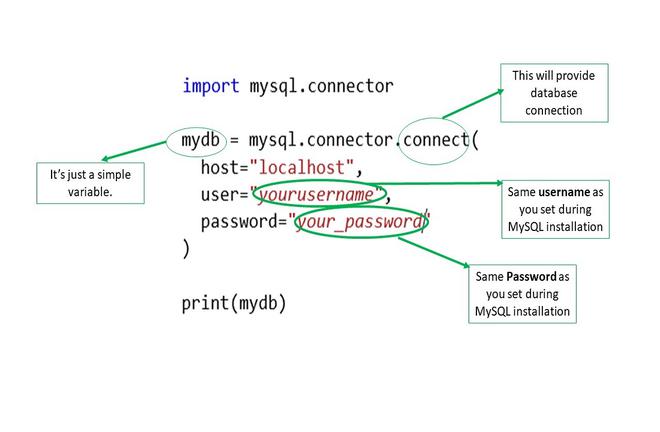
If you want to convert data directly from an SQL database, you can connect to the database, execute a query, and then export the results. Below is an example using SQLite:
Step 1: Connect to the Database
Establish a connection to the database using the appropriate library. For SQLite:
import sqlite3

# Connect to SQLite database
connection = sqlite3.connect('your_database.db')
cursor = connection.cursor()
Step 2: Execute a Query
Run a SELECT query to fetch the data you need:
query = "SELECT * FROM your_table"
cursor.execute(query)
data = cursor.fetchall()
Step 3: Create a DataFrame and Export
Retrieve column names and use pandas for conversion:
import pandas as pd

# Extract column names from cursor description
colnames = [col[0] for col in cursor.description]
df = pd.DataFrame(data, columns=colnames)
df.to_csv('output.csv', index=False)

cursor.close()
connection.close()
Combined Comparison and Table of Approaches
| Method | Description | Tools/Libraries Used | Pros |
|---|---|---|---|
| Direct Parsing | Parse raw SQL dump file for INSERT statements manually | Python re module, csv |
Simple, no DB connection required |
| Pandas-Based Extraction | Convert parsed data into a DataFrame | pandas |
Efficient data handling, easy CSV export |
| Database Connection | Query live SQL database and fetch data | Database connectors (sqlite3, mysql-connector-python), pandas |
Real-time data extraction |
Additional Tips and Tools
Beyond the basic methods described, you may wish to explore specialized tools and packages:
Scripts and Packages
Several open-source projects are available to help with this conversion:
-
A Python script named
mysqldump_to_csv.pythat directly targets MySQL dumps, available on GitHub. -
The
sqlcsvsqlutility offers command-line conversion between SQL and CSV formats.
Each of these tools brings unique benefits; for example, direct parsing scripts are generally simpler but may require adjustments based on your SQL dump's structure. In contrast, using pandas in combination with a database connection provides a robust solution for larger datasets.
Example Full Script Using Pandas and SQLite
The following Python script demonstrates the entire process of connecting to a database, fetching data, and exporting it into a CSV file:
import sqlite3
import pandas as pd

def sql_dump_to_csv(db_path, query, output_csv):
    # Connect to the SQLite database
    connection = sqlite3.connect(db_path)
    cursor = connection.cursor()

    # Execute the query
    cursor.execute(query)
    data = cursor.fetchall()

    # Retrieve column names from the cursor
    colnames = [description[0] for description in cursor.description]

    # Create a DataFrame and export to CSV
    df = pd.DataFrame(data, columns=colnames)
    df.to_csv(output_csv, index=False)

    # Clean up the connection
    cursor.close()
    connection.close()

# Example usage
db_path = 'your_database.db'
query = "SELECT * FROM your_table"
output_csv = 'output.csv'
sql_dump_to_csv(db_path, query, output_csv)
This example demonstrates the key steps: establishing a connection, executing a query, data manipulation through pandas, and finally writing the results to a CSV file.
References
- mysqldump_to_csv - GitHub
- Export SQL to CSV - LikeGeeks
- MySQL Dump to CSV - GitHub
- SQL to CSV via Python - adonline
- sqlcsvsql Package - PyPI
Recommended Further Queries
Last updated March 17, 2025