
Single Sign-On Between Web App and Safari Extension Without Cookie Sharing
Achieving Seamless User Authentication in a Privacy-Conscious Environment
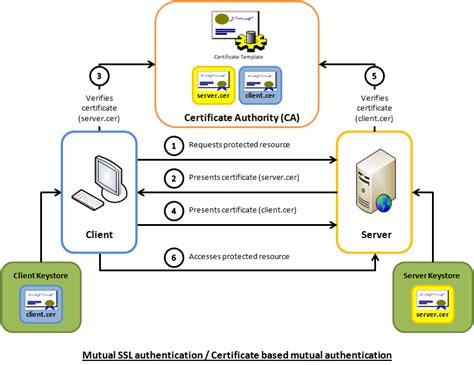
Key Takeaways
- Leverage Modern Authentication Protocols: Utilize OAuth 2.0 and OpenID Connect to enable secure token-based authentication.
- Utilize Apple's Authentication APIs: Implement ASWebAuthenticationSession to manage authentication flows between the web app and Safari extension.
- Secure Token Storage and Communication: Store and share authentication tokens securely using Keychain or App Groups to maintain user sessions without cookie sharing.
Introduction
In today's digital landscape, providing a seamless user experience across various platforms and extensions is paramount. Single Sign-On (SSO) facilitates this by allowing users to authenticate once and gain access to multiple services without repeated logins. However, implementing SSO between a web application and a Safari extension poses unique challenges, primarily due to Safari's stringent privacy measures that prevent traditional cookie sharing. This guide delves into effective strategies to achieve SSO between a web app and a Safari extension without relying on cookie sharing, ensuring both security and user convenience.
Understanding the Challenges
Safari's Privacy Features
Safari has long been lauded for its robust privacy features, designed to protect users from tracking and unauthorized data sharing. Key among these features is the Intelligent Tracking Prevention (ITP), which restricts the use of third-party cookies and limits cross-site tracking. Additionally, Safari enforces strict isolation between web apps and extensions, preventing direct access to each other's cookies and storage. These measures, while beneficial for user privacy, complicate traditional SSO implementations that rely on shared cookies for authentication.
Limitations of Traditional Cookie-Based SSO
Traditional SSO mechanisms often depend on shared cookies to maintain authenticated sessions across different components of an application ecosystem. In the context of a web app and a Safari extension, this approach falls short due to:
- Cookie Isolation: Safari's architecture segregates cookies between web apps and extensions, preventing shared access.
- Cross-Origin Restrictions: Modern browsers, including Safari, impose strict cross-origin policies that inhibit cookie sharing across different domains or components.
- Enhanced Privacy Controls: Features like ITP further restrict cookies, especially those deemed as trackers, reducing the reliability of cookie-based SSO.
Given these constraints, alternative authentication methods that do not rely on cookies are essential for implementing effective SSO between web apps and Safari extensions.
Implementing SSO Without Cookie Sharing
Leveraging OAuth 2.0 and OpenID Connect
OAuth 2.0 and OpenID Connect are modern authentication protocols that facilitate secure token-based authentication, eliminating the need for cookie sharing. These protocols enable applications to obtain access tokens (OAuth) and identity tokens (OpenID Connect) that represent authenticated sessions.
- OAuth 2.0: Primarily used for authorization, it allows applications to obtain limited access to user accounts on an HTTP service.
- OpenID Connect: An identity layer built on top of OAuth 2.0, it enables clients to verify the identity of the end-user based on the authentication performed by an authorization server.
By integrating these protocols, both the web app and Safari extension can authenticate users through a centralized identity provider, exchanging tokens instead of cookies to maintain session state.
Using ASWebAuthenticationSession
Apple's ASWebAuthenticationSession API is instrumental in managing authentication flows between a web app and Safari extension. This API facilitates secure, one-time sign-on experiences without relying on traditional cookies.
- Secure Authentication Flow: ASWebAuthenticationSession opens a secure browser window for user authentication, ensuring credentials are handled safely.
- Token Retrieval: After successful authentication, it retrieves tokens that can be shared with the Safari extension.
- Compatibility: The API is designed to work seamlessly with OAuth 2.0 and OpenID Connect, supporting robust authentication mechanisms.
Implementing ASWebAuthenticationSession ensures that authentication processes are both secure and compliant with Safari's privacy standards.
Secure Token Storage with Keychain
Storing authentication tokens securely is crucial for maintaining the integrity of the SSO system. Apple’s Keychain provides a secure storage mechanism for sensitive data, including tokens, accessible by both the web app and Safari extension.
- ID Tokens and Access Tokens: Store these tokens in the Keychain to ensure they are protected against unauthorized access.
- Shared Access: Configure Keychain access groups to allow both the web app and Safari extension to retrieve and use the stored tokens.
- Automatic Synchronization: Keychain can synchronize tokens across devices, facilitating consistent user experiences.
By utilizing Keychain, developers can ensure that tokens are stored securely and are accessible to both components without exposing them to potential security vulnerabilities.
Custom URL Schemes and Universal Links
Facilitating communication between the web app and Safari extension can be effectively achieved through custom URL schemes or Universal Links.
- Custom URL Schemes: Define unique URL schemes that the Safari extension can listen for, enabling it to receive authentication tokens directly from the web app.
- Universal Links: Utilize Apple’s Universal Links to create secure, flexible communication channels that can handle token exchange seamlessly.
- Secure Transmission: Ensure that tokens passed via URLs are encrypted and include expiration parameters to prevent misuse.
These methods provide robust mechanisms for the extension to receive authentication tokens without relying on shared cookies, ensuring secure and efficient communication.
Security Considerations
- Secure Token Storage: Always store tokens in secure storage solutions like Keychain to prevent unauthorized access.
- Token Expiration and Refresh: Implement mechanisms to handle token expiration, ensuring tokens are refreshed or re-authenticated as needed.
- Avoid Exposing Credentials: Refrain from passing sensitive information through URLs or unsecured channels to mitigate the risk of interception.
- HTTPS Enforcement: Ensure all communications between the web app, Safari extension, and identity provider occur over HTTPS to maintain data integrity and confidentiality.
- Token Validation: Implement rigorous token validation processes to verify the authenticity and integrity of the tokens before use.
Implementation Steps
For Web App
- Integrate OAuth 2.0/OpenID Connect: Set up authentication flows using OAuth 2.0 or OpenID Connect with a trusted identity provider.
- Implement ASWebAuthenticationSession: Utilize this API to initiate authentication requests and handle token retrieval.
- Secure Token Storage: Store retrieved tokens securely in the Keychain with appropriate access controls.
- Configure Custom URL Schemes/Universal Links: Set up mechanisms to communicate tokens to the Safari extension.
For Safari Extension
- Initiate Authentication Flow: Use ASWebAuthenticationSession to start the authentication process from the extension.
- Retrieve Tokens: Listen for incoming tokens via custom URL schemes or Universal Links and store them securely in the Keychain.
- Token Management: Implement logic to handle token refreshes and expiration seamlessly.
- Secure Communication: Ensure all interactions with the web app's authentication endpoints are secure and validated.
Comparison of SSO Implementation Approaches
| Approach | Advantages | Disadvantages |
|---|---|---|
| OAuth 2.0/OpenID Connect | Standardized protocols, widely supported, secure token exchange | Requires setup of identity provider, complexity in implementation |
| ASWebAuthenticationSession | Seamless integration with Apple APIs, secure authentication flow | Limited to Apple ecosystem, may require iOS/macOS-specific code |
| Keychain Storage | High security, accessible by multiple app components | Platform-specific, requires careful access management |
| Custom URL Schemes/Universal Links | Direct communication between components, flexible integration | Potential security vulnerabilities if not properly secured |
Best Practices
-
Use Authorization Code Flow with PKCE: Enhances security by mitigating authorization code interception attacks.
-
Implement Robust Token Management: Ensure tokens are refreshed before expiration and revoked when necessary.
-
Handle Authentication State Changes: Utilize event listeners to respond to changes in authentication status promptly.
-
Provide Fallback Mechanisms: Ensure alternative authentication methods are available if SSO fails or is unavailable.
-
Regular Security Audits: Conduct periodic reviews of the authentication system to identify and rectify potential vulnerabilities.
Conclusion
Implementing Single Sign-On between a web application and a Safari extension without relying on cookie sharing is undoubtedly challenging, primarily due to Safari's advanced privacy and security features. However, by leveraging modern authentication protocols like OAuth 2.0 and OpenID Connect, utilizing Apple's ASWebAuthenticationSession API, and ensuring secure token storage through Keychain, developers can create a seamless and secure SSO experience. Adhering to best practices and maintaining a focus on security and user privacy will ensure the successful deployment of an effective SSO solution that aligns with both user expectations and platform requirements.
References
Last updated January 19, 2025