
Streaming DeepSeek Completions with Node.js on Azure
A comprehensive guide to integrating DeepSeek AI with Node.js and Azure services for real-time responses.
Key Highlights
- DeepSeek R1 is available on Azure AI Foundry and excels at complex reasoning tasks.
- Integration with Node.js can be achieved using the OpenAI-compatible API provided by DeepSeek, often via the OpenAI Node.js SDK.
- Azure Functions support for HTTP Streams in Node.js enables streaming responses for real-time applications.
Understanding DeepSeek R1 and Azure AI
DeepSeek R1 is an advanced AI model specifically designed for complex reasoning tasks, including those in science, coding, and mathematics. It distinguishes itself by often providing not just a completion but also the reasoning process behind it, enclosed within <think> and </think> tags in its responses. This feature makes it particularly valuable for applications requiring transparent and verifiable AI outputs.
Microsoft Azure offers DeepSeek R1 through its Azure AI Foundry, a platform designed for creating, training, deploying, and experimenting with various AI models. Deploying DeepSeek R1 on Azure AI Foundry allows developers to leverage Azure's robust infrastructure for secure and scalable AI model inference. DeepSeek R1 on Azure is available under the Global Standard deployment type, optimized for higher throughput and performance.
To utilize DeepSeek R1 on Azure, you typically need to provision the necessary Azure resources and configure a model deployment within Azure AI Foundry. Azure provides resources and samples, including a DeepSeek-R1 JavaScript starter project, to help developers get started. These resources often include infrastructure as code for secure deployment within an Azure Virtual Network, with frontends hosted on Azure Static Web Apps.
It's important to note that while DeepSeek R1 is powerful for reasoning, it is not primarily designed for general conversational tasks. Its strength lies in its ability to handle queries that require a deep understanding of context and a multi-step reasoning process.
Integrating DeepSeek with Node.js via API
Leveraging OpenAI Compatibility
DeepSeek provides an API that is compatible with the OpenAI API. This compatibility is a significant advantage for developers working with Node.js, as it allows for the use of the widely adopted official OpenAI JavaScript SDK or any other OpenAI API-compatible software with minimal configuration changes.
Integrating DeepSeek AI into a Node.js application using its API primarily involves setting up your Node.js project, configuring environment variables for your DeepSeek API key, and initializing a client to interact with the API. The OpenAI SDK for Node.js can be configured to point to the DeepSeek API endpoint by changing the baseURL parameter.
import OpenAI from "openai";

const openai = new OpenAI({
  baseURL: 'https://api.deepseek.com', // Or your Azure deployment endpoint
  apiKey: process.env.DEEPSEEK_API_KEY, // Or your Azure API Key
});

async function main() {
  const completion = await openai.chat.completions.create({
    messages: [{ role: "system", content: "You are a helpful assistant." }],
    model: "deepseek-chat", // Or your deployed model name
  });
  console.log(completion.choices[0].message.content);
}

main();
When using DeepSeek on Azure AI Foundry, the API endpoint will be different from the standard DeepSeek API endpoint. The Azure endpoint will typically follow a format similar to https://[DeploymentName]-francecentral.services.ai.azure.com/models/chat/completions?api-version=2024-05-01-preview. You will need to use your Azure AI endpoint and API key when configuring the OpenAI SDK client.
Project Structure for Integration
For a well-organized Node.js project integrating with the DeepSeek API, a suggested directory structure could include folders for application logic (app/), controllers (controller/) to handle API requests, services (services/) to interact with the DeepSeek API, and routes (routes/) to define endpoints. Environment variables, such as your API key, should be managed securely, typically using a .env file.
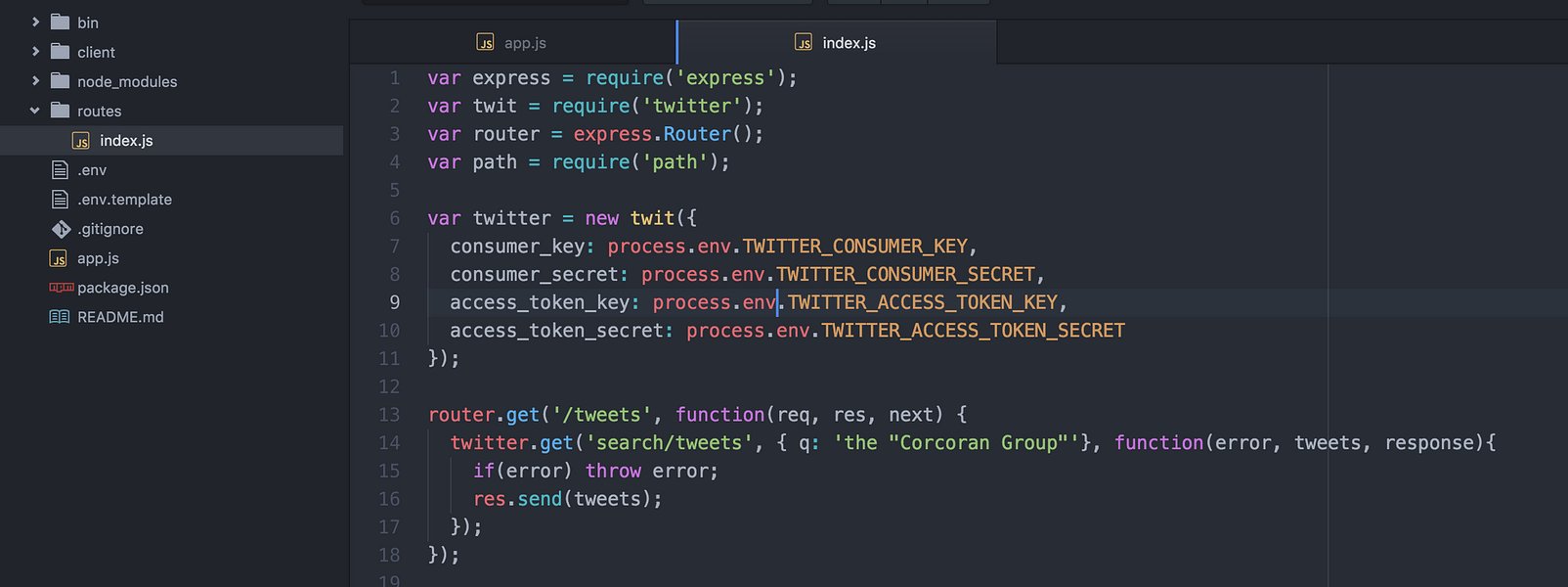
Suggested project structure for integrating DeepSeek API with Node.js.
Setting up an Express.js server can handle incoming requests, which are then routed to a controller that utilizes a service to interact with the DeepSeek API. This modular approach helps maintain code organization and separation of concerns.
Streaming Completions in Node.js
Understanding Streams in Node.js and Azure Functions
Streaming is crucial for providing real-time responses from language models, especially for interactive applications like chatbots. In Node.js, streams are objects that let you read data from a source or write data to a destination in a continuous manner. This is more efficient than loading the entire data into memory, particularly for large responses.
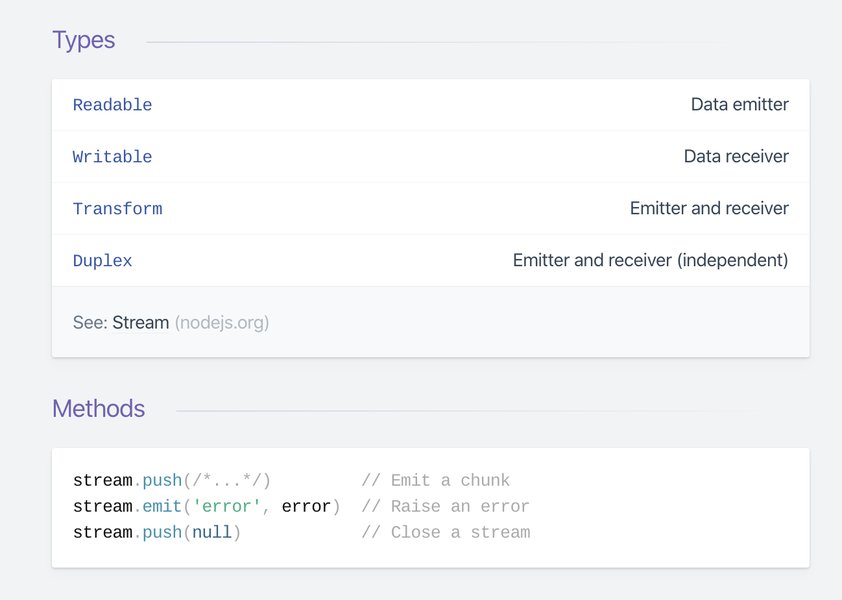
Conceptual diagram of streams in Node.js.
Azure Functions, a serverless compute service, now supports HTTP streams in its Node.js v4 programming model. This feature is significant for scenarios requiring real-time exchange of data over HTTP, such as streaming responses from AI models. Prior to this support, streaming large responses from Azure Functions in Node.js was more challenging.
To leverage HTTP streams in Azure Functions with Node.js, you need to use the Node.js v4 programming model and version 4.3.0 or higher of the @azure/functions npm package. This enables scenarios like processing large data, streaming OpenAI (and by extension, compatible DeepSeek) responses, and delivering dynamic content efficiently.
Implementing Streaming with DeepSeek API
When using the OpenAI SDK with the DeepSeek API, streaming chat completions can be enabled by setting the stream parameter to true in the chat completions request. The SDK will then return a stream that you can iterate over to receive chunks of the response as they are generated.
const stream = await openai.chat.completions.create({
  model: "deepseek-chat", // Or your deployed model name
  messages: [{ role: "user", content: query }],
  stream: true,
});

for await (const chunk of stream) {
  process.stdout.write(chunk.choices[0]?.delta?.content || "");
}
This approach allows you to send chunks of the AI-generated text to the client as they become available, providing a more responsive user experience compared to waiting for the entire completion to be generated. This is particularly useful for building interactive chat applications.
When deploying your Node.js application with streaming capabilities to Azure Functions, ensure that your function app is configured to handle potentially large request and response bodies, if necessary, by modifying the FUNCTIONS_REQUEST_BODY_SIZE_LIMIT setting.
DeepSeek R1 and Azure AI Foundry in Action
The integration of DeepSeek R1 with Azure AI Foundry provides a powerful platform for building AI applications that require sophisticated reasoning. Azure AI Foundry simplifies the process of deploying and managing these models.

Microsoft Azure Datacenter, part of the infrastructure supporting Azure AI services.
Azure AI Foundry allows users to select and deploy DeepSeek-R1 from a model catalog. Once deployed, the model can be accessed via an endpoint, which your Node.js application will interact with. The platform also supports various integration methods, including the OpenAI Node.js SDK, LangChain.js, and Azure AI Inference SDK.
Here is a brief overview of how DeepSeek R1 fits within the Azure AI landscape:
| Component | Role | Relevance to Streaming DeepSeek |
|---|---|---|
| DeepSeek R1 Model | AI model focused on complex reasoning tasks. | Generates the text completions to be streamed. |
| Azure AI Foundry | Platform for deploying and managing AI models on Azure. | Hosts the DeepSeek R1 deployment and provides the access endpoint. |
| Node.js Application | Backend application logic. | Interacts with the DeepSeek API endpoint to request and stream completions. |
| OpenAI Node.js SDK | Library for interacting with OpenAI-compatible APIs. | Facilitates making API calls and handling streamed responses from DeepSeek. |
| Azure Functions | Serverless compute service. | Can host the Node.js application and leverage HTTP streams for real-time delivery of streamed responses to clients. |
Using Azure AI Foundry for DeepSeek R1 deployments offers advantages such as integrated security, scalability, and simplified management of AI model endpoints. The availability of sample projects demonstrates various ways to integrate DeepSeek-R1 with Node.js and other JavaScript frameworks.
Frequently Asked Questions
Can I use the standard DeepSeek API key with Azure AI Foundry?
No, when you deploy DeepSeek R1 on Azure AI Foundry, you will use the API key and endpoint provided by your Azure deployment, not your standard DeepSeek API key.
What are the prerequisites for integrating DeepSeek with Node.js on Azure?
You will need a Node.js environment set up, an Azure account with access to Azure AI Foundry, a deployed DeepSeek R1 model on Azure, and potentially the Azure Developer CLI for provisioning resources. You will also need to install necessary npm packages like the OpenAI SDK.
Is DeepSeek R1 suitable for all types of AI tasks?
DeepSeek R1 is specifically designed for complex reasoning tasks. While it can handle some general queries, it is not optimized for broad conversational purposes like some other models.
How do I handle potential errors when streaming DeepSeek completions?
When working with streams, it's important to implement error handling for both the API request and the streaming process. The OpenAI SDK and Node.js stream APIs provide mechanisms for catching errors during the stream's lifecycle.
Can I use other Node.js frameworks with DeepSeek on Azure?
Yes, the OpenAI-compatible API and the availability of samples with frameworks like LangChain.js indicate that you can integrate DeepSeek with various Node.js frameworks and libraries.
References
Last updated May 6, 2025