
Understanding YouTube Live Streams: Summaries and Highlights
Exploring methods to get the gist of live content and key moments.
Key Insights
- AI-powered tools are becoming increasingly popular for summarizing YouTube videos, including live streams, by analyzing transcripts.
- Many tools offer concise summaries and key highlights, often with timestamps, to save viewers time.
- Creating manual highlights during or after a live stream is a direct way for creators to showcase important segments.
Navigating the vast landscape of online video content can be time-consuming, especially when it comes to live streams that can span hours. Fortunately, various tools and techniques have emerged to help users quickly grasp the essence of a video, whether it's a pre-recorded upload or a live broadcast. While directly accessing the content of a specific live stream URL like the one provided requires specific tools or analysis beyond a general AI's capabilities without direct integration, we can explore the general methods available for summarizing and highlighting YouTube live streams.
Methods for Summarizing YouTube Live Streams
Summarizing a YouTube live stream primarily relies on processing the audio or transcript of the broadcast. As live streams often lack pre-written descriptions that cover the entire content, AI-powered tools that can generate summaries from spoken content are particularly valuable. These tools typically work by analyzing the automatically generated or manually provided transcript of the stream.
AI-Powered Summarization Tools
Several AI tools and browser extensions are designed to provide summaries of YouTube videos. While their effectiveness on live streams can vary depending on the tool's ability to access and process the live transcript in real-time or shortly after the stream concludes, they represent a significant step in making lengthy video content more digestible.
Some popular options include:
- Browser Extensions: Extensions like "YouTube Summary with ChatGPT & Claude" and "Highlights for YouTube" are designed to integrate directly with the YouTube interface, offering quick access to summaries and highlights. They often utilize large language models (LLMs) to process the video's transcript.
- Online Tools: Websites like NoteGPT and Monica offer online platforms where users can paste a YouTube video URL (including live streams after they have ended and a transcript is available) to generate a summary.
- Dedicated Summarizer Tools: Tools like Eightify and Getrecall are specifically built for summarizing YouTube videos, aiming to provide concise and accurate recaps of the content.
These AI tools work by:
- Accessing the video's transcript.
- Using natural language processing (NLP) to identify key topics, themes, and important points discussed in the video.
- Generating a condensed summary of the content.
- Often providing timestamps to allow users to jump to specific parts of the video.
The accuracy and detail of the summary can depend on the quality of the transcript and the sophistication of the AI model used by the tool. For live streams, the availability and accuracy of the real-time transcript are crucial factors.
Manual Highlighting by Creators
YouTube provides features for creators to manually create highlights from their live streams. This is a direct way for the person broadcasting to curate and showcase the most interesting or important moments of their stream.
Creators can:
- Insert "stream markers" during the live broadcast to indicate points of interest.
- After the stream ends, use the editing tools in YouTube Studio to select segments based on these markers or other points in the timeline.
- Publish these selected segments as separate highlight videos on their channel.
This method offers the most accurate and contextually relevant highlights as they are chosen by the creator themselves, who has the best understanding of the stream's content and what would be most valuable to viewers.
The radar chart above illustrates a conceptual comparison of different methods for getting information from a YouTube live stream. Manual highlights by the creator offer high accuracy and relevance but depend on the creator's effort. AI summarization tools provide speed and convenience but their accuracy can be limited by transcript quality, especially in real-time. Watching the full stream offers complete information but requires significant time investment.
Third-Party Services for Live Stream Recaps
Beyond YouTube itself, some third-party services focus on providing recaps for live streaming platforms, including Twitch and potentially YouTube in the future. These services, like ScreenApp's Twitch Summarizer or Streams Charts' recap tools, often focus on generating key highlights, timestamps, and statistics related to the stream's performance and content.
While the specific URL provided in the user's query is a YouTube live stream, the concept of generating recaps and highlights is applicable across live streaming platforms. These services often analyze the chat, viewer engagement, and potentially the spoken content to identify significant moments.
Identifying and Accessing Highlights
Highlights from a YouTube live stream can be found in several ways:
- Creator's Channel: The most reliable place to find curated highlights is on the creator's YouTube channel, often published as separate, shorter videos.
- Description and Comments: Sometimes, creators or viewers will add timestamps to the video description or comments section, marking key moments. Browser extensions like "Highlights for YouTube" can help visualize these timestamps directly on the video player.
- AI Summarization Tools: As mentioned earlier, many AI tools provide timestamps alongside their summaries, allowing users to jump to the summarized sections.
The availability of highlights for a specific live stream depends heavily on whether the creator or a third-party tool has processed the content to extract these moments. Without such processing, viewers would need to watch the stream to find highlights themselves.
Comparing Summarization Methods
Here's a comparison of the different approaches to summarizing and highlighting YouTube live streams:
| Method | Description | Pros | Cons |
|---|---|---|---|
| AI-Powered Tools | Utilizing AI to analyze transcripts and generate summaries/timestamps. | Fast, convenient, can process long videos quickly. | Accuracy depends on AI model and transcript quality, may miss nuance or context. |
| Manual Creator Highlights | Creator selects and publishes key segments of the stream. | Highest accuracy and relevance, curated by someone with full context. | Availability depends entirely on the creator's effort, may not cover all viewer-desired highlights. |
| Third-Party Recap Services | External services analyzing stream data to provide recaps and highlights. | Can offer different perspectives (e.g., chat analysis), may provide insights beyond just content summary. | Coverage may vary by platform, availability for specific streams is not guaranteed. |
Example of a YouTube Live Stream Setup
While we cannot directly summarize the provided live stream URL without using a specific tool, understanding how live streams are created can provide context. Live streaming involves capturing audio and video and broadcasting it in real-time. Creators often use software like OBS (Open Broadcaster Software) and specialized hardware for their setup.
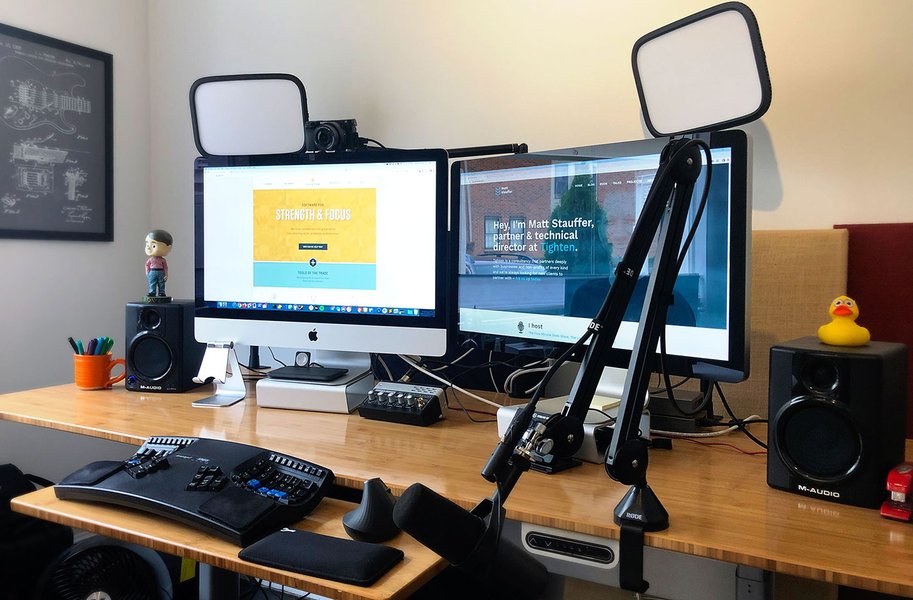
A typical setup for a live streamer.
The process typically involves:
- Hardware: Cameras, microphones, and potentially mixing boards or capture cards.
- Software: Streaming software like OBS to manage the audio and video feeds.
- Platform Integration: Connecting the streaming software to YouTube's live streaming service.
During the stream, the platform processes the incoming feed and makes it available to viewers in real-time. Transcripts are often generated automatically during or after the stream, which is what AI summarization tools rely on.
A video discussing a YouTube live streaming setup.
This embedded video provides a look into the equipment and setup involved in creating a YouTube live stream, giving insight into the technical aspects behind the content being broadcast.
Conclusion
Summarizing and finding highlights for YouTube live streams is a growing area, driven by the need to efficiently consume lengthy video content. While directly providing a summary for an arbitrary live stream URL without specialized tools or access to its processed data is challenging for a general AI, the methods discussed – utilizing AI summarization tools, relying on manual creator highlights, and exploring third-party services – offer various ways to get the gist and key moments from live broadcasts. The most suitable method depends on the user's needs, the availability of processed data for the specific stream, and the desired level of detail and accuracy.
Frequently Asked Questions
Recommended Queries
- What are the best AI tools for summarizing YouTube videos?
- How do YouTube creators make highlights from their live streams?
- How do tools access YouTube video transcripts for summarization?
- Are there tools available for summarizing Twitch streams?
References
Last updated May 20, 2025