
Unlocking Seamless Scrolling: The Infinite Carousel in SwiftUI
Explore top libraries and techniques for building endlessly looping content experiences in your iOS and macOS applications.
Key Insights into Infinite Carousels
- Illusion of Infinity: Infinite carousels in SwiftUI typically create a continuous loop by intelligently duplicating content at the ends of the data array and seamlessly resetting the scroll position.
- Versatile Implementations: Developers can choose from dedicated third-party libraries, adapt general infinite scrolling components, or build custom solutions using SwiftUI's native
TabVieworScrollViewwith advanced modifiers. - Enhanced User Experience: These carousels are crucial for displaying dynamic content like image galleries, product showcases, and news feeds, providing an engaging and intuitive browsing experience without pagination.
An infinite carousel in SwiftUI offers a captivating way to present a series of items, such as images or textual content, ensuring continuous, seamless scrolling without any perceived beginning or end. This design pattern is prevalent in modern mobile applications, serving purposes ranging from product showcases and promotional banners to dynamic image galleries, akin to the experiences found in Apple's App Store or Instagram.
While SwiftUI's native TabView or ScrollView don't inherently support endless looping, the illusion of infinity is achieved through sophisticated techniques. These often involve programmatic manipulation of content arrays and scroll positions. Developers can leverage pre-built libraries, which streamline the process, or craft custom implementations tailored to specific needs.
The Mechanics Behind Infinite Scrolling
Achieving an infinite carousel effect in SwiftUI primarily relies on clever data management and view manipulation, as direct "infinite" looping isn't a native feature. The core strategies involve:
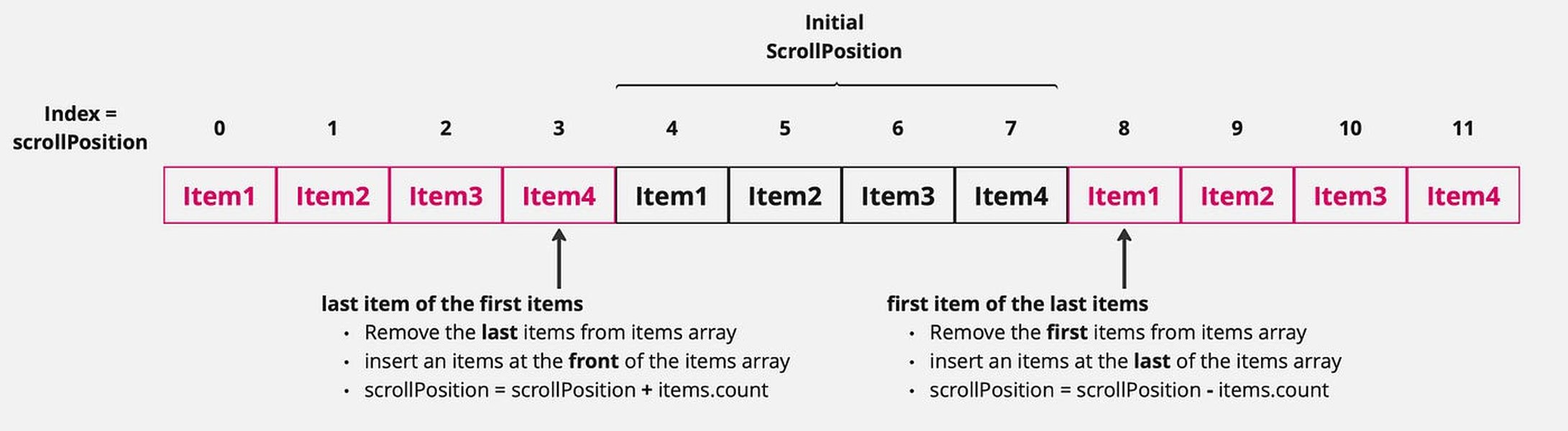
- Content Duplication: This widely used method involves adding copies of the first few items to the end of your content array and copies of the last few items to the beginning. When the user scrolls to these duplicated items, the system programmatically and instantly adjusts the
selectedIndex(or scroll offset) to the corresponding original item. This transition is imperceptible to the user, creating the illusion of a continuous loop. For instance, if you have items A, B, C, your array might become [C, A, B, C, A]. Scrolling from the last 'C' would jump to the first 'C' (original), and from the first 'C' (duplicated) would jump to the original 'C'. onAppearandonChangeModifiers: These powerful SwiftUI modifiers can detect when a user is nearing the visible bounds of the content. When an item at the "edge" appears, it triggers logic to dynamically load more data or reset theselectedIndexto a calculated position, effectively extending the scrollable area or cycling back. This is particularly useful for carousels that display dynamically loaded content, such as from an API.- Custom Gesture Handling: For highly unique or complex infinite scroll behaviors, developers might resort to implementing custom
DragGesturelogic. This provides granular control over item positions, transitions, and the looping mechanism, allowing for bespoke user interactions that might not be achievable with standard modifiers.
Leading Libraries for Infinite Carousels in SwiftUI
Several robust libraries and Swift Packages are available, simplifying the integration of infinite carousels into your SwiftUI applications. These tools abstract away the complexities of the underlying looping logic, allowing developers to focus on content and presentation.
An example of an image carousel implemented in SwiftUI, showcasing a smooth, continuous flow of visuals.
ElyesDer/InfiniteCarousel
This dedicated SwiftUI view offers a highly customizable solution for infinite carousels. It integrates seamlessly into iOS and macOS applications (via Mac Catalyst), leveraging SwiftUI's declarative syntax. Key features include infinite looping, adjustable spacing between items, and dynamic sizing, making it versatile for various content types.
dancarvajc/SwiftUI-Infinite-Carousel
Compatible with iOS 14+, this library provides an easy-to-use and customizable infinite carousel. It emphasizes simplicity and offers features like customizable height, corner radius, and various transition effects, ideal for dynamic, responsive carousels.
AnbalaganD/CarouselView
Designed for smooth user experience, this library simplifies the implementation of infinite scrolling carousel interfaces. It focuses on fluid transitions and customizable visuals, making it a great choice for image galleries and product showcases.
JWAutumn/ACarousel
ACarousel is a SwiftUI-based carousel view available as a Swift Package. It supports infinite horizontal paging with snapping behavior, offering easy integration and robust performance across iOS, macOS, and tvOS 13.0+.
Kyome22/InfinitePaging
This library provides an infinite carousel-like paging view for SwiftUI, developed with Xcode 15.0.1+ and compatible with iOS 17.0+. It's excellent for creating paginated carousels with a continuous looping effect by intelligently shifting array elements.
filletofish/InfiniteCarousel
A lightweight infinite carousel collection view, this library is tailored for horizontal scrolling of paginated items of equal size. It's available via CocoaPods, making it a convenient option for projects already using this dependency manager.
b5i/InfiniteScrollViews
This package offers generic infinite scrolling components for SwiftUI, UIKit, and AppKit, including a paged version. It's highly flexible, supporting infinite looping in both horizontal and vertical directions, and can handle dynamic content loading.
ShuffleIt
ShuffleIt is a UI library that provides a highly customizable carousel with unique scrolling and shuffling effects. Built natively with SwiftUI, it's suitable for animated banners or custom pager views that require distinctive visual behaviors.
SnapCarouselView by mrtksn
Implemented purely in SwiftUI, SnapCarouselView creates a carousel that "snaps" to items while supporting infinite looping through identifiable data. It's ideal for scenarios where a precise item alignment is desired after a swipe.
Understanding Carousel Performance and Features
When selecting or building an infinite carousel, evaluating various performance and feature aspects is crucial for a smooth user experience. This radar chart provides an opinionated comparison of key attributes for common infinite carousel approaches in SwiftUI.
This radar chart illustrates a comparative analysis across various aspects of infinite carousel implementations. Pre-built libraries generally excel in ease of integration, while custom solutions offer unparalleled customization flexibility. General infinite scroll components often shine in performance optimization, particularly when dealing with dynamic content loading, as they are often designed for efficient data management for large datasets.
Manual Implementation Approaches and Tutorials
For developers who prefer a deep dive into the underlying mechanics or require highly specific behaviors not offered by libraries, building an infinite carousel from scratch using SwiftUI's native views is a viable option. Numerous tutorials guide this process, often demonstrating how to use TabView or ScrollView in conjunction with GeometryReader and onChange modifiers to achieve dynamic behavior.
One common technique involves manipulating the selectedIndex of a TabView with .tabViewStyle(.page). By duplicating the first and last items of your data array at the opposite ends, you can create a seamless loop. When the user swipes to a duplicated item, the selectedIndex is instantly reset to the original item, maintaining the illusion of continuity.
For lists or grids with dynamically loaded content, ScrollView combined with the .onAppear modifier is frequently used. Attaching .onAppear to the last (or first) item in the scroll view allows you to detect when the user reaches the end of the loaded content. This triggers a view model (often following the MVVM pattern) to fetch the next "page" of data, extending the scrollable content indefinitely.
More advanced scenarios might involve custom DragGesture logic to implement infinite scrolling in multiple directions (e.g., four-direction infinite scroll), overcoming some of SwiftUI's inherent limitations for complex touch interactions.
Visualizing Infinite Carousel Concepts
To better understand the various facets and considerations when implementing an infinite carousel, the following mindmap outlines key components, implementation strategies, and essential features.
This mindmap provides a structured overview of the ecosystem surrounding infinite carousels in SwiftUI. It categorizes the different approaches, highlights the core features to look for, and outlines important considerations when choosing a solution.
Dive Deeper: Auto-Scrolling Infinite Carousel
One of the most engaging enhancements to an infinite carousel is auto-scrolling functionality. This allows the carousel to automatically advance through its items at a set interval, creating a dynamic visual presentation. This is particularly useful for showcasing banners, advertisements, or featured content without requiring user interaction.
An insightful video tutorial demonstrating the creation of an auto-scrolling infinite carousel in SwiftUI, leveraging new iOS 18 ScrollView APIs.
The video above provides a comprehensive walkthrough of building an auto-scrolling infinite carousel. It delves into leveraging SwiftUI and the newer ScrollView APIs (available from iOS 18 onwards) to implement this feature. Traditionally, auto-scrolling involves combining the infinite looping logic with a timer or animation API that periodically updates the scroll offset or selectedIndex. The introduction of enhanced ScrollView APIs in iOS 18 simplifies this process, offering more streamlined ways to manage scroll positions and animate transitions, making it easier to create smooth, high-performance auto-scrolling carousels.
Comparison of Infinite Carousel Library Features
To aid in selecting the most suitable library for your project, the following table summarizes key features and compatibility aspects of some prominent infinite carousel implementations in SwiftUI.
| Library Name | Core Features | iOS Compatibility | Installation Method | Key Differentiator |
|---|---|---|---|---|
| ElyesDer/InfiniteCarousel | Infinite looping, customizable appearance, dynamic sizing, Mac Catalyst support. | iOS, macOS | GitHub (manual integration) | Strong Mac Catalyst support, highly customizable. |
| dancarvajc/SwiftUI-Infinite-Carousel | Infinite looping, customizable height/radius/transitions, lightweight. | iOS 14+ | Swift Package Manager | Simplicity and ease of use for iOS 14+. |
| AnbalaganD/CarouselView | Infinite scrolling, selected item tracking, configurable spacing, smooth UX. | iOS 13+ | Swift Package Manager | Focus on fluid, smooth scrolling experiences. |
| JWAutumn/ACarousel | Infinite horizontal paging, snapping behavior, multi-platform. | iOS 13+, macOS 10.15+, tvOS 13.0+ | Swift Package Manager | Cross-platform compatibility with snapping. |
| Kyome22/InfinitePaging | Infinite paging, efficient element shifting, carousel-like behavior. | iOS 17+ | GitHub (manual integration) | Designed for modern iOS versions with optimized paging. |
| b5i/InfiniteScrollViews | Infinite ScrollView (horizontal/vertical), paged versions, dynamic content loading. | iOS, UIKit, AppKit | Swift Package Index | Generic infinite scroll components for multiple platforms. |
| SnapCarouselView | Snapping carousel, pure SwiftUI, supports identifiable data. | Varies by Xcode version | Swift Package Index | Pure SwiftUI implementation with snap-to-item behavior. |
This table provides a quick reference for assessing which library might best fit your project's specific requirements, considering factors like platform support, feature set, and integration preferences.
Frequently Asked Questions (FAQ)
What is an infinite carousel in SwiftUI?
How is infinite scrolling achieved in SwiftUI?
selectedIndex. Alternatively, developers use modifiers like onAppear and onChange to detect when the user is nearing the visible content boundaries and then dynamically load more data or adjust the view to create the continuous loop.Are there built-in SwiftUI components for infinite carousels?
TabView and ScrollView do not inherently provide infinite looping functionality out-of-the-box. However, they serve as foundational components upon which infinite carousel behavior can be built using custom logic, modifiers, and data manipulation techniques. Many third-party libraries abstract these complexities.What are the benefits of using an infinite carousel library?
What should I consider when choosing an infinite carousel library?
Conclusion
Implementing an infinite carousel in SwiftUI is a powerful way to enhance user engagement and efficiently display a continuous stream of content. Whether you opt for a dedicated third-party library for quick integration and robust features, or prefer a manual approach for ultimate control and deep understanding, SwiftUI provides the tools to create seamless, dynamic, and visually appealing carousel experiences. The choice largely depends on your project's specific requirements, desired level of customization, and development timeline.
Recommended Further Exploration
- How can I build custom carousel transitions in SwiftUI using matched geometries?
- What are the best practices for implementing dynamic content loading for infinite scrollviews in SwiftUI?
- How can I optimize the performance of infinite carousels handling large datasets in SwiftUI?
- How do I integrate Apple's Combine framework with SwiftUI for robust infinite scrolling?