

Essential Insights into TCP/IP Socket Programming in C
- Foundation of Network Communication: TCP/IP sockets in C provide the bedrock for building reliable, connection-oriented network applications, enabling seamless data exchange between clients and servers.
- Core System Calls: The Berkeley Sockets API, centered around functions like
socket(),bind(),listen(),accept(),connect(),send(), andrecv(), forms the fundamental toolkit for implementing TCP/IP communication. - Client-Server Paradigm: Successful implementation hinges on understanding distinct server-side operations (listening for connections, accepting clients) and client-side operations (initiating connections, sending requests).
TCP/IP socket implementation in C is a foundational skill for network programming, enabling applications to communicate across a network using the Transmission Control Protocol (TCP) and Internet Protocol (IP). This method provides a reliable, connection-oriented stream of data, ensuring that information is delivered in order and without errors. At its core, this involves establishing communication endpoints, known as sockets, and orchestrating their interaction through a set of system calls provided by the Berkeley Sockets API.
Understanding the TCP/IP Socket Architecture
The client-server model is central to TCP/IP socket communication. In this model, a server application awaits incoming connections, while client applications initiate these connections to request services or data. This interaction is facilitated by sockets, which act as communication endpoints, defined by a combination of an IP address and a port number.
The Role of TCP and IP
TCP (Transmission Control Protocol): TCP is responsible for providing reliable, ordered, and error-checked delivery of a stream of bytes between applications running on hosts communicating over an IP network. It handles connection establishment, data segmentation, reassembly, error detection, and retransmission. This ensures that data arrives at its destination exactly as it was sent, making it ideal for applications requiring high data integrity.
IP (Internet Protocol): IP is primarily responsible for addressing and routing data packets between different networks. It defines how data is encapsulated into packets and how these packets are addressed so that they can be sent across the internet and arrive at the correct destination. While IP handles the delivery of individual packets, TCP adds the layer of reliability and connection management.
Sockets: The Communication Endpoints
A socket is an abstract representation of a communication endpoint. In C programming, sockets are manipulated using file descriptors, allowing standard file I/O operations like read() and write() (or more specifically, recv() and send()) to be applied to network communication. For TCP/IP, the SOCK_STREAM type is used, signifying a stream-oriented, connection-based protocol.
The Server-Side Implementation Workflow
A TCP server must perform a sequence of operations to become ready to accept and process client connections. This involves creating a socket, binding it to a specific address and port, listening for incoming connection requests, and then accepting those requests.
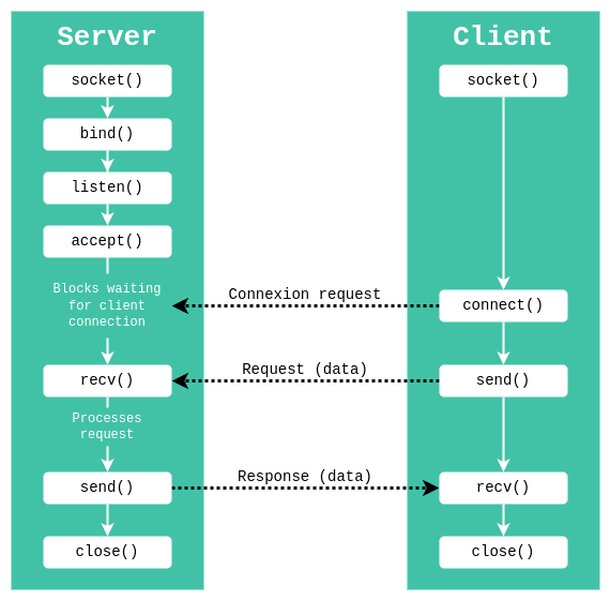
Simplified flow of socket creation and communication.
1. Creating the Socket
The first step for a server is to create a socket using the socket() system call. This function returns a socket descriptor, which is an integer identifier similar to a file descriptor. For TCP/IP sockets, the parameters typically specify the Internet address family (AF_INET for IPv4), the socket type for stream-based communication (SOCK_STREAM), and the protocol (usually 0 for TCP).
#include <sys/socket.h>
#include <arpa/inet.h>
#include <netinet/in.h>
#include <stdio.h>
#include <string.h>
#include <stdlib.h> // For exit

int server_sock_fd = socket(AF_INET, SOCK_STREAM, 0);
if (server_sock_fd == -1) {
    perror("Socket creation failed");
    exit(EXIT_FAILURE);
}
2. Configuring the Server Address Structure
A sockaddr_in structure is used to define the server's network address, including the IP address and port number. The sin_family field is set to AF_INET. The sin_port field specifies the port number, which must be converted to network byte order using htons(). For the IP address, INADDR_ANY can be used to listen on all available network interfaces, or a specific IP address can be specified using inet_addr() or inet_pton() after converting it to network byte order with htonl().
struct sockaddr_in server_addr;
server_addr.sin_family = AF_INET;
server_addr.sin_addr.s_addr = htonl(INADDR_ANY); // Listen on all interfaces
server_addr.sin_port = htons(8080); // Example port 8080
3. Binding the Socket
The bind() system call assigns the configured address and port to the socket. This makes the socket visible to the network and allows it to receive incoming connections on that specific address and port. Error checking is crucial at this stage to ensure the bind operation was successful.
if (bind(server_sock_fd, (struct sockaddr *)&server_addr, sizeof(server_addr)) < 0) {
    perror("Bind failed");
    exit(EXIT_FAILURE);
}
4. Listening for Connections
After binding, the listen() system call puts the server socket into a passive listening mode, indicating that it is ready to accept incoming client connections. The second argument to listen() specifies the maximum number of pending connections that can be queued before the server accepts them. A common value for this backlog is 5 or SOMAXCONN.
if (listen(server_sock_fd, 5) < 0) { // Allow up to 5 pending connections
    perror("Listen failed");
    exit(EXIT_FAILURE);
}
printf("Server listening on port %d\n", ntohs(server_addr.sin_port));
5. Accepting Client Connections
The accept() system call blocks until a client attempts to connect to the server. When a client connection is established, accept() returns a new socket descriptor dedicated to communication with that specific client. The original listening socket remains open to accept further client connections. This allows a server to handle multiple clients, often in a loop.
int client_sock_fd;
struct sockaddr_in client_addr;
socklen_t client_addr_len = sizeof(client_addr);

while (1) {
    client_sock_fd = accept(server_sock_fd, (struct sockaddr *)&client_addr, &client_addr_len);
    if (client_sock_fd < 0) {
        perror("Accept failed");
        continue; // Continue listening for other connections
    }
    printf("Client connected from: %s:%d\n", inet_ntoa(client_addr.sin_addr), ntohs(client_addr.sin_port));

    // Handle communication with the client_sock_fd
    // ...
    close(client_sock_fd); // Close client socket after communication
}
This video demonstrates the practical implementation of a TCP client-server architecture in C, covering essential steps for message exchange and connection handling.
The Client-Side Implementation Workflow
The client's role is to initiate a connection to an already running server, send data, and receive responses. Its workflow is generally simpler than the server's.
1. Creating the Socket
Similar to the server, the client begins by creating a socket using socket() with the same parameters for TCP/IP stream sockets.
int client_sock_fd = socket(AF_INET, SOCK_STREAM, 0);
if (client_sock_fd == -1) {
    perror("Socket creation failed");
    exit(EXIT_FAILURE);
}
2. Configuring the Server's Address
The client needs to know the IP address and port number of the server it intends to connect to. This information is stored in a sockaddr_in structure, ensuring the sin_family, sin_port (converted with htons()), and sin_addr (converted from string to network byte order using inet_pton() or inet_addr()) fields are correctly set.
struct sockaddr_in server_addr;
server_addr.sin_family = AF_INET;
server_addr.sin_port = htons(8080); // Server's port
// Convert IPv4 address from text to binary form
if (inet_pton(AF_INET, "127.0.0.1", &server_addr.sin_addr) <= 0) {
    perror("Invalid address/ Address not supported");
    exit(EXIT_FAILURE);
}
3. Connecting to the Server
The connect() system call attempts to establish a connection with the server specified in the sockaddr_in structure. If the connection is successful, the client socket is then ready for data exchange. If the server is not listening or the address is incorrect, connect() will return an error.
if (connect(client_sock_fd, (struct sockaddr *)&server_addr, sizeof(server_addr)) < 0) {
    perror("Connection failed");
    exit(EXIT_FAILURE);
}
printf("Connected to server.\n");
Data Exchange and Socket Management
Once a connection is established, both the client and server can send and receive data using a common set of functions.
Sending and Receiving Data
The send() function transmits data from a buffer over the socket, while recv() reads incoming data into a buffer. These functions provide robust mechanisms for bidirectional communication. It's important to handle return values from these functions, as they indicate the number of bytes sent or received, or an error condition.
// Example: Client sending data
char *message = "Hello from client!";
send(client_sock_fd, message, strlen(message), 0);
printf("Message sent: %s\n", message);

// Example: Server receiving data
char buffer[1024] = {0};
ssize_t bytes_received = recv(client_sock_fd, buffer, sizeof(buffer) - 1, 0); // -1 for null terminator
if (bytes_received > 0) {
    buffer[bytes_received] = '\0'; // Null-terminate the received data
    printf("Received from client: %s\n", buffer);
    // Server sends an echo back
    send(client_sock_fd, buffer, bytes_received, 0);
} else if (bytes_received == 0) {
    printf("Client disconnected.\n");
} else {
    perror("Receive failed");
}
Closing Sockets
Properly closing sockets is crucial to release system resources. The close() system call is used for this purpose. For a server, both the client-specific socket (returned by accept()) and the main listening socket should be closed when they are no longer needed.
close(client_sock_fd);
close(server_sock_fd); // Only close the listening socket when the server is shutting down
Essential Socket Programming Functions
The following table summarizes the core functions used in TCP/IP socket programming in C, along with their primary purposes:
| Function | Purpose | Server Usage | Client Usage |
|---|---|---|---|
socket() |
Creates a new socket and returns a descriptor. | Yes | Yes |
bind() |
Assigns a local address and port to a socket. | Yes | No |
listen() |
Puts the server socket in a listening state for incoming connections. | Yes | No |
accept() |
Accepts a new client connection, creating a new socket for it. | Yes | No |
connect() |
Establishes a connection to a remote server. | No | Yes |
send() |
Transmits data over an established socket connection. | Yes | Yes |
recv() |
Receives data from an established socket connection. | Yes | Yes |
close() |
Closes a socket, releasing system resources. | Yes | Yes |
Critical Considerations for Robust Implementations
Beyond the basic workflow, several critical aspects ensure the stability and portability of TCP/IP socket programs.
Byte Ordering and Endianness
Network byte order is defined as big-endian. Different computer architectures may use little-endian byte order. Functions like htons() (host to network short), htonl() (host to network long), ntohs() (network to host short), and ntohl() (network to host long) are essential for converting data, especially port numbers and IP addresses, between host byte order and network byte order to ensure interoperability.
Error Handling
Network operations are inherently prone to failures due to various reasons like network congestion, disconnections, or incorrect configurations. It is paramount to check the return values of all socket-related system calls. Functions typically return -1 on error, and the global variable errno (along with perror()) can provide more specific diagnostic information about the error.
Handling Multiple Clients
The basic server example provided earlier is sequential, meaning it can only handle one client at a time. For concurrent client handling, advanced techniques are required:
- Forking/Threading: For each new client connection, the server can fork a new process or spawn a new thread to handle the communication independently.
- Non-blocking Sockets and I/O Multiplexing: Using
select(),poll(), orepoll()(on Linux), a single-threaded server can monitor multiple sockets simultaneously, handling events as they occur without blocking.
Essential Header Files
A set of standard header files provides the necessary function declarations and data structures for socket programming:
<sys/socket.h>: Core socket functions and data types.<netinet/in.h>: Internet address family structures (sockaddr_in).<arpa/inet.h>: Functions for IP address manipulation (inet_addr,inet_pton).<unistd.h>: Forclose()and other POSIX utilities.<stdio.h>,<stdlib.h>,<string.h>: Standard I/O, general utilities, and string manipulation.
Challenges and Enhancements in Socket Programming
While the fundamentals are robust, real-world network applications demand attention to various challenges and potential enhancements.
Advanced Socket Options and Enhancements
setsockopt(): This function allows modification of socket options, such as reusing addresses (SO_REUSEADDR) to prevent "Address already in use" errors after server restarts, or setting send/receive buffer sizes.- Non-blocking I/O: By setting a socket to non-blocking mode using
fcntl(), I/O operations will return immediately if data is not available, rather than blocking the program's execution. This is crucial for event-driven architectures. - Timeouts: Implementing timeouts on
send()andrecv()operations (e.g., usingsetsockopt()withSO_SNDTIMEOandSO_RCVTIMEO) prevents applications from indefinitely waiting for data, enhancing responsiveness. - Graceful Shutdown: Instead of abruptly closing a socket, using
shutdown()can initiate a graceful termination of the connection, allowing all pending data to be sent or received before the socket is fully closed.
Architectural Overview of TCP/IP Socket Communication
To further illustrate the structure and relationships within a TCP/IP socket application, a mindmap provides a clear visual representation of the key components and their interactions.
This mindmap illustrates the fundamental components and workflows involved in TCP/IP socket implementation in C, distinguishing between client and server responsibilities and highlighting critical considerations.
FAQ: Common Questions on TCP/IP Socket Implementation in C
What is the difference between TCP and UDP sockets?
How can I test my TCP/IP client-server application locally?
127.0.0.1) and the specific port number your server is listening on. This simulates a network connection without needing separate physical machines.What is network byte order and why is it important?
htons() and htonl() convert host byte order to network byte order to ensure consistent interpretation of data across the network.How do I handle multiple clients connecting to my TCP server?
- Forking a new process: The server forks a child process for each new client connection, allowing the child to handle communication while the parent continues to listen for new clients.
- Multi-threading: The server creates a new thread for each client, achieving concurrency within a single process.
- I/O Multiplexing: Using functions like
select(),poll(), orepoll(), a single process can monitor multiple sockets for activity, handling client interactions without blocking.
Why does my server give "Address already in use" error?
TIME_WAIT state for a short period to ensure all network packets associated with the previous connection have cleared. To bypass this during development, you can use the setsockopt() function with the SO_REUSEADDR option before calling bind().Conclusion
Implementing TCP/IP sockets in C provides a robust foundation for building networked applications. By understanding the core system calls, adhering to the client-server model, and diligently handling error conditions, developers can create reliable communication channels. From basic echo servers to complex distributed systems, the principles of socket programming remain consistent. Mastering these concepts not only equips you with the ability to develop fundamental network utilities but also lays the groundwork for exploring more advanced networking paradigms and protocols.
Recommended Further Exploration
- How to implement non-blocking sockets in C for concurrent servers?
- Deep dive into security aspects of TCP/IP socket programming.
- Performance optimization techniques for high-throughput C socket applications.
- Comparison between TCP and UDP for different application types.