
Unlocking Excellence: A Deep Dive into Top Tech Documentation Sites
Analyzing Navigation, Structure, Search, and Design Across Leading Platforms
Technical documentation sites are the backbone of user enablement, providing critical information on complex products and services. Their effectiveness hinges on intuitive design, clear organization, and seamless integration with support resources. This review analyzes eight prominent documentation sites based on key usability and structural criteria, offering insights into current best practices and areas for potential improvement.
Highlights: Key Insights from the Review
- Integration is Key: The best sites seamlessly blend documentation with support and knowledge base (KB) resources, often using cross-linking or unified portals (e.g., Microsoft Learn, NetApp) to provide a holistic user support experience.
- Navigation Elegance Matters: Handling complex product taxonomies requires intuitive browse paths, often achieved through multi-level sidebars, clear filters, and consistent hierarchical structures (e.g., Palo Alto Networks, Cisco).
- Consistency Breeds Familiarity: A predictable structure (like Product Family > Product > Topic) across all documentation significantly enhances usability and reduces cognitive load for users navigating diverse product lines (e.g., Microsoft Learn, Palo Alto Networks).
1. Weaving the Support Web: Docs Site Relationship with Support/KB
Defining the Roles: Docs vs. KB
Documentation sites primarily offer structured, technical guidance—manuals, API references, tutorials, and conceptual explanations designed to teach users how a product works. Knowledge Bases (KBs), conversely, focus on problem-solving, providing articles, FAQs, and troubleshooting steps for common issues. While distinct in primary purpose, their integration is crucial for a seamless user journey.
Integration Strategies Across Platforms
The reviewed sites showcase varying approaches to integrating documentation with support and KB resources:
- Highly Integrated: Microsoft Learn stands out by merging documentation, learning modules, Q&A forums, and support links into a unified platform. NetApp also demonstrates strong integration, explicitly linking Documentation, KB, Community, and Training, even employing an AI assistant ("Doc") to bridge gaps.
- Clearly Separated but Linked: IBM, Palo Alto Networks, Intel Developer, and Cisco Developer maintain clearer distinctions. Their documentation sites focus on technical content, while separate portals handle support tickets and KB articles. Effective cross-linking allows users to transition between learning and problem-solving contexts.
- Docs-Focused with Support Links: NVIDIA Docs primarily serves as a comprehensive technical documentation hub, linking out to separate support channels like forums rather than deeply integrating KB functions. Broadcom TechDocs also keeps support decoupled but ensures cross-referencing.
The consensus leans towards clear separation of purpose but tight integration through linking and unified access points, minimizing user friction when moving between learning about a product and solving a specific problem.
2. Navigating the Maze: Browse Path UI and Taxonomy Handling
The Challenge of Complexity
Enterprise technology portfolios are often vast and complex. An effective documentation site needs a browse path User Interface (UI) that can elegantly represent diverse product taxonomies (hierarchies) without overwhelming the user. Key elements include clear visual cues, consistent navigation patterns, and flexibility.
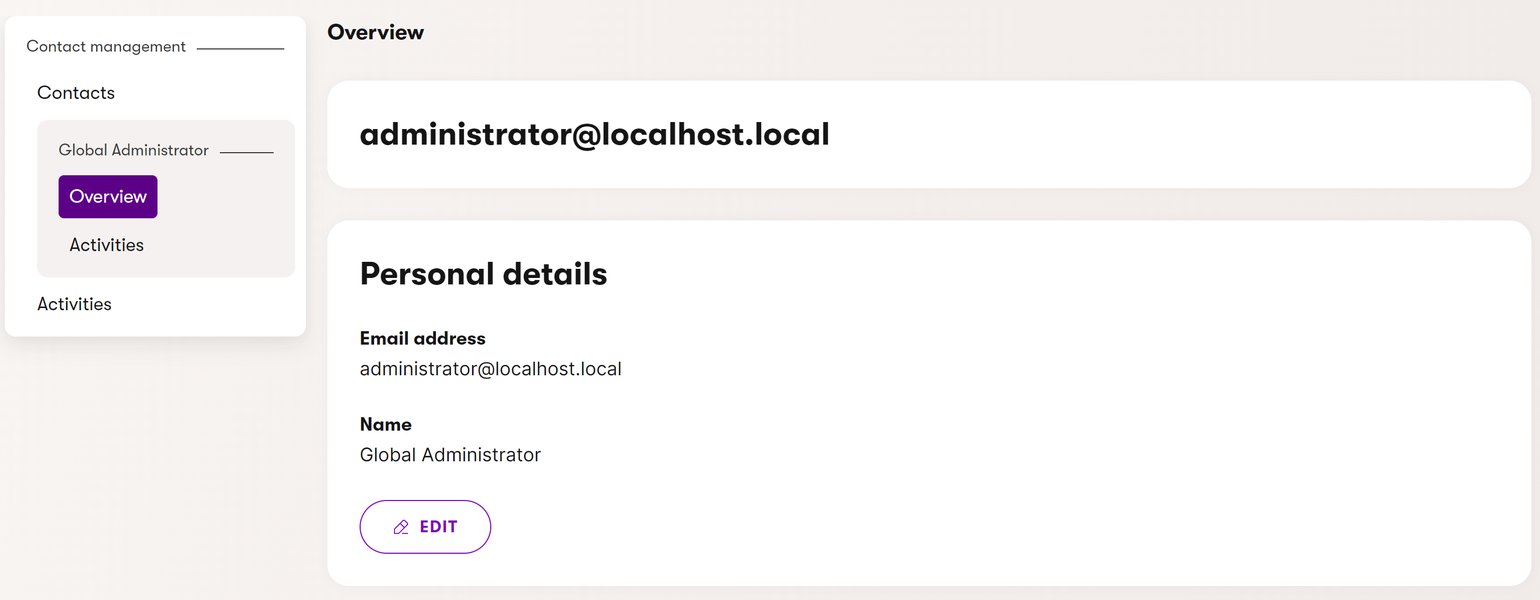
Example of a common side navigation pattern used for hierarchical browsing.
UI Approaches Observed
- Hierarchical Sidebars: Many sites, including Palo Alto Networks (collapsible tree), IBM (dynamic sidebar), Microsoft Learn (comprehensive panel), and Cisco Developer (product-centric), utilize left-hand sidebars. These effectively display multi-level taxonomies and allow users to drill down progressively.
- Top Navigation & Filters: NetApp combines top navigation dropdowns for major categories with context-sensitive sidebars. NVIDIA Docs employs robust filtering by topic, industry, and role alongside product browsing, offering multiple vectors for users to find relevant content within its broad scope. Intel uses tabs and filters effectively for its developer-focused resources.
- Elegance Factor: While most sites provide functional browse paths, some achieve greater "elegance." Palo Alto Networks and Microsoft Learn are often noted for their clean, intuitive interfaces that handle complexity smoothly. Sites like IBM and Broadcom are functional but sometimes perceived as slightly more challenging to traverse complex structures.
Best practices observed include using progressive disclosure (revealing detail as needed), modular design for scalability, and providing multiple access methods (browse, filter, search) to cater to different user needs and information-seeking behaviors.
3. The Blueprint of Understanding: Consistency and Structure of Levels
Why Consistency Matters
A consistent information architecture helps users build a mental model of the documentation, making it easier to predict where information resides. A common and effective structure follows a logical progression, often like: Product Family > Product > Topic/Task > Specific Detail. Consistency in naming conventions and hierarchical depth across different product lines is crucial.
Structural Patterns in Practice
- High Consistency: Microsoft Learn and Palo Alto Networks are frequently cited for their highly consistent structures, applying standardized levels and logical flows (e.g., tutorials, guides, references) across their vast offerings. Cisco also maintains a well-organized structure for its extensive portfolio.
- Generally Consistent: IBM, NVIDIA, and Intel generally adhere to consistent hierarchies (e.g., product line > specific API/tool > guide). While logical, minor variations or cross-listing might occasionally occur.
- Moderately Consistent: NetApp and Broadcom show good structure but sometimes exhibit variations in depth or organization between different product areas. While functional, this can slightly increase the learning curve for users navigating diverse sections.
Adhering to established frameworks like Diátaxis (categorizing content into tutorials, how-to guides, explanations, and reference material) can significantly enhance structural consistency and clarity, as seen implicitly in the more organized sites.
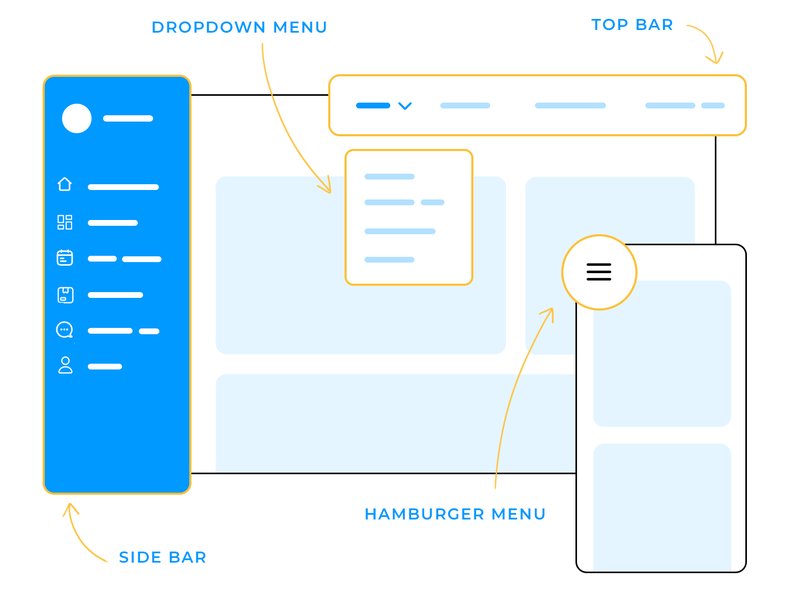
Various navigation patterns contribute to overall site structure and usability.
4. Finding Your Way: Search vs. Product Lookup
Two Paths to Information
Users find information in two main ways: searching (when they know keywords or concepts) and looking up/browsing (when exploring or navigating a known structure). An effective documentation site needs robust implementations of both.
- Search Prowess: Modern search functions go beyond simple keyword matching. Features like autocomplete, filtering (by product, version, content type), AI-powered suggestions (Microsoft Learn), and scoping (distinguishing between docs and KB results, as in NetApp) significantly enhance usability. Cisco, IBM, and Palo Alto Networks also offer strong search with effective filtering.
- Product Lookup Clarity: This relies heavily on the browse path UI (discussed earlier). Clear menus, hierarchical trees, product selector widgets (IBM, NetApp), and intuitive categorization are essential for users who prefer to navigate directly to a known product or topic.
- The Balance: The best sites offer both strong search *and* intuitive lookup/browse mechanisms. Microsoft Learn, Cisco, and Palo Alto Networks strike a good balance, ensuring users can find information efficiently regardless of their preferred method. Some sites might lean more heavily on one than the other (e.g., NVIDIA's robust search complementing its browse/filter options).
Providing both methods caters to different user behaviors and levels of familiarity with the product and terminology.
5. Zooming In: Subnavigational Systems Within Content
Navigating Within the Page
Once a user lands on a specific documentation page (which can often be quite long), effective subnavigation is crucial for orientation and quick access to relevant subsections. This prevents excessive scrolling and improves comprehension.
Common Subnavigation Techniques
- Table of Contents (TOC): The most common method. This is often presented as a sidebar (sticky or static) on the right (Palo Alto Networks, sometimes Microsoft Learn) or left (Intel, IBM, sometimes Microsoft Learn), listing clickable section headers (anchors) within the current page.
- Sticky Elements: TOCs or sub-section menus that remain visible as the user scrolls (often seen with sidebars) are particularly effective for long pages (IBM, Palo Alto Networks).
- In-Page Links & Breadcrumbs: While TOCs handle intra-page navigation, clear headings, inline links to related sections, and breadcrumbs (showing the user's location in the overall hierarchy) contribute to the broader navigational context.
- Effectiveness: Sites like Microsoft Learn, Cisco, and Palo Alto Networks generally implement clear, dynamic, and often sticky TOCs effectively. Others like IBM and Intel also provide good systems. Consistency in placement and behavior of these elements across the site is key. Some areas on sites like Broadcom might have less prominent or varied subnavigation.
A well-designed subnavigation system significantly enhances the readability and usability of detailed technical content.
6. The Canvas: Page Layout and Design
First Impressions and Readability
The overall page layout dictates how users interact with the content. A good layout prioritizes readability, accessibility, and intuitive placement of key elements like navigation, search, content area, and supplementary information (versioning, feedback). Clean design, ample whitespace, clear typography, and responsiveness across devices are hallmarks of effective layouts.
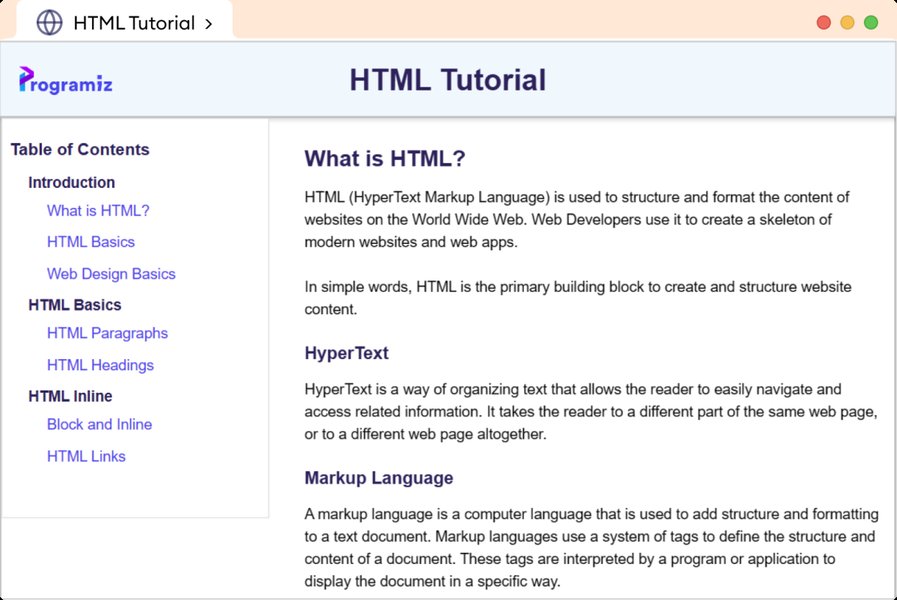
A typical documentation page layout featuring navigation, main content, and code examples.
Layout Styles Observed
- Modern & User-Friendly: Microsoft Learn presents a highly interactive, clean, and modern layout, integrating learning elements seamlessly. NVIDIA Docs offers a visually rich, responsive design with good use of icons and modern fonts. Palo Alto Networks features a minimalist, readable layout focused on content clarity.
- Clean & Functional: IBM provides a clean, responsive layout with persistent navigation and clear content panes. Cisco offers a practical layout well-suited for dense information, supported by robust navigation. Intel employs a developer-focused layout emphasizing code examples and structured sections.
- Balanced & Media-Rich: NetApp uses a balanced layout incorporating media, code samples, and expandable sections effectively.
- Traditional & Utilitarian: Broadcom TechDocs has a functional, straightforward layout using classic sidebar navigation, though it appears slightly dated compared to others and can be dense.
Key layout components contributing to success include persistent navigation (top or side), a clear central content area with well-formatted text and code blocks, easily accessible search, and often a right-hand pane for TOCs or related links. Responsive design is standard and essential.
Comparative Analysis: Documentation Site Effectiveness
Visualizing Strengths Across Criteria
The following radar chart provides a visual comparison of the reviewed documentation sites based on the six key criteria. Scores are assigned based on the synthesized analysis from the provided answers, reflecting relative strengths (higher scores indicate better performance in that area, on a scale where points are greater than the axis minimum for clarity).
This visualization highlights the strong overall performance of platforms like Microsoft Learn, Palo Alto Networks, and Cisco Developer across multiple dimensions. It also shows areas where other platforms excel or could potentially improve.
Mapping Success: Key Components of Effective Documentation
A Mindmap Overview
The mindmap below illustrates the interconnected components that contribute to a successful technical documentation site, based on the criteria reviewed. It emphasizes the balance between user experience elements (like navigation and layout) and content strategy (structure, search, and support integration).
(e.g., Family > Product > Topic)"] id2a2["Modularity"] id2a3["Predictable Organization"] id2b["Balanced Search & Lookup"] id2b1["Robust Search Engine
(Filters, Autocomplete)"] id2b2["Intuitive Product Lookup
(Browsing)"] id2b3["Caters to Different Needs"] id2c["Docs vs. Support/KB Integration"] id2c1["Clear Purpose Definition"] id2c2["Seamless Cross-linking"] id2c3["Unified Access Points"]
This visual representation underscores that creating excellent documentation requires attention to both how information is presented (UI/UX) and how it's organized and accessed (Content Strategy).
Structuring for Success: Insights from Experts
Guidance on Documentation Structure
Structuring technical documentation effectively is crucial for user comprehension and navigation. This video provides valuable tips and best practices for organizing content logically, covering essential techniques to help create clear, user-friendly documentation that enhances the overall user experience.
Key takeaways often include defining content types (like tutorials, guides, references), establishing a clear hierarchy, using consistent formatting, and ensuring easy navigation between related topics – principles reflected in the design of the more effective documentation sites reviewed.
At-a-Glance: Documentation Site Feature Summary
Comparative Table
This table summarizes the findings across the eight reviewed documentation sites, providing a quick comparison based on the key criteria evaluated.
| Site | Docs vs Support/KB Relationship | Browse Path UI & Taxonomy Handling | Structural Consistency | Search & Product Lookup Balance | Subnavigation Within Content | Page Layout Quality |
|---|---|---|---|---|---|---|
| IBM Docs | Clear separation with cross-links | Elegant hierarchical menus, dynamic sidebar | Consistent multi-level structure | Robust search filters + product lookup widget | Sticky sidebar anchors | Clean, modern, responsive |
| Palo Alto Networks Docs | Distinct docs/support, linked KB | Clean collapsible tree navigation | Clear & consistent product > topic levels | Effective search with autocomplete & filters | Right-side floating TOC | Minimalist, readable, well-organized |
| NetApp Docs | Integrated (Docs, KB, AI Assistant) | Top nav + modular context-sensitive sidebar | Mostly consistent, some variation | Strong search (distinguishes sources) + product selector | Sidebar/top nav + anchored headings | Balanced, media-rich, functional |
| Intel Developer | Separate developer docs from support/KB | Flexible tabs and filters for categories | Clear taxonomy in developer resources | Robust developer-focused search + lists | Sticky TOC (left or right) | Developer-focused, clean, organized |
| NVIDIA Docs | Docs hub with links to separate support/forums | Broad filtering (topic, industry, role) + browse | Good product hierarchy, some cross-listing | Comprehensive search across docs/APIs | Side nav + expandable in-page TOC | Visually rich, modern, responsive |
| Cisco Developer Docs | Clear separation, linked to main support | Product-centric sidebar with clear filters | Consistent product layers & versions | Excellent search with product filters + lookup | Clear anchor-based TOCs (side/top) | Practical, effective for dense info |
| Microsoft Learn | Highly integrated (Docs, Learn, Support, Q&A) | Comprehensive browse panel, consistent UI | Highly consistent taxonomy & structure | Excellent AI-enhanced search + browse lookup | Dynamic, collapsible TOCs (left/right) | Modern, user-friendly, interactive |
| Broadcom TechDocs | Decoupled docs/support, but cross-linked | Hierarchical menus, sometimes complex | Mostly consistent, occasional overlap | Functional search, basic lookup | Sidebar TOCs or inline links (varies) | Functional, straightforward, slightly dated |
Frequently Asked Questions (FAQ)
What's the ideal relationship between documentation and a knowledge base?
How can a documentation site effectively handle complex product taxonomies?
Why is consistent structure important in technical documentation?
What makes a good subnavigation system within documentation pages?
Recommended Next Steps
- Explore best practices for designing user-friendly documentation search interfaces.
- Discover how different frameworks like Diátaxis can improve documentation structure.
- Learn about implementing responsive design for technical documentation websites.
- Investigate the role of AI assistants in enhancing documentation site usability.
References
Last updated May 5, 2025