
Unlock Explosive Growth: Is Telegram Your Business's Secret Weapon?
Discover how Telegram's unique features can revolutionize your customer communication, marketing, and operational efficiency.
Key Insights: Telegram for Business at a Glance
- Unparalleled Reach & Engagement: Leverage a platform with over 900 million monthly active users, offering features like channels with unlimited subscribers for broad marketing outreach.
- Powerful Automation & Efficiency: Implement sophisticated chatbots and automated messaging to handle customer inquiries 24/7, streamline workflows, and provide instant support.
- Cost-Effective Communication Hub: Utilize Telegram's core business features, including large file sharing and cloud storage, often at no cost, unlike many competitor platforms.
What is Telegram for Business?
More Than Just a Messaging App
Telegram for Business refers to leveraging the robust features of the Telegram messaging application to enhance various aspects of business operations, including sales, marketing, customer support, and internal communications. As of 2024, Telegram boasts a massive user base exceeding 900 million monthly active users, making it a significant channel for businesses aiming to connect with a global audience, particularly in regions like Eastern Europe and Asia where its adoption is exceptionally high.
Businesses can convert standard personal Telegram accounts into dedicated business accounts. This transformation unlocks a suite of tools specifically designed for professional use, allowing companies to present a more formal and feature-rich interface to their customers and stakeholders. It's a cloud-based platform known for its emphasis on speed, security (with specific considerations), and scalability, offering a versatile solution for enterprises of all sizes.
Unlocking Business Potential: Key Features of Telegram
Telegram offers a distinctive set of features that can be tailored to meet diverse business needs, from enhancing customer interaction to streamlining internal workflows.
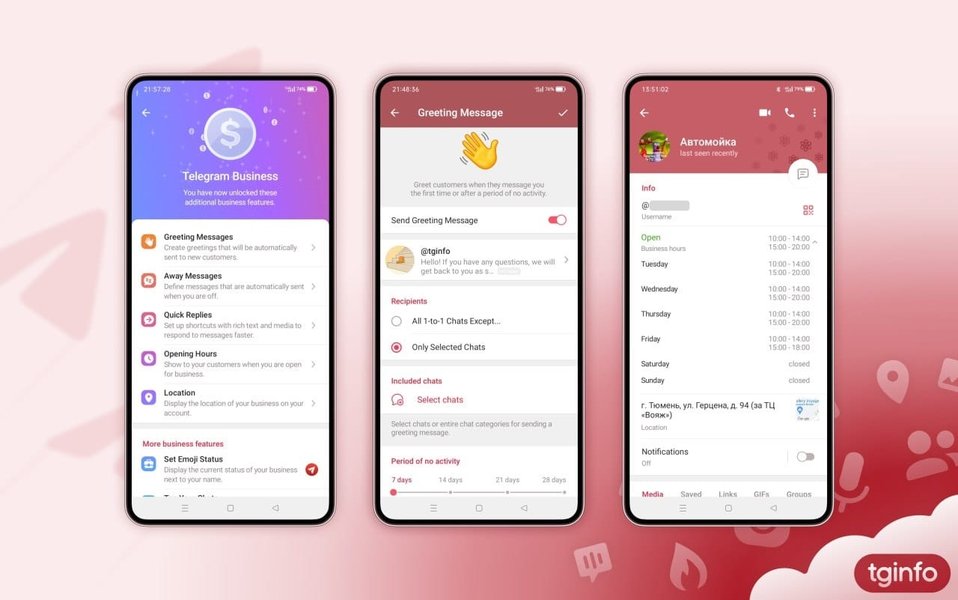
Visual representation of Telegram's business feature interface, showcasing profile customization.
Business Profile Customization
Crafting Your Professional Identity
Telegram allows businesses to create detailed profiles. You can display crucial information such as:
- Opening Hours: Let customers know when you are available.
- Location: Share your physical address with an interactive map.
- Contact Details: Provide multiple ways for customers to reach you.
- Custom Start Pages: Design a unique welcome screen for users initiating a chat. This can feature branded imagery, a welcome message, or information about ongoing promotions, setting the right tone from the first interaction.
Automation Powerhouse: Chatbots and Automated Messaging
Intelligent Assistance Around the Clock
One of Telegram's most significant advantages for businesses is its robust support for chatbots and automation:
- Chatbots (Bot API): Businesses can develop or integrate highly customizable chatbots using Telegram's Bot API. These bots can handle a wide array of tasks:
- Answering Frequently Asked Questions (FAQs)
- Processing orders and tracking shipments
- Conducting surveys and collecting feedback
- Managing event registrations and sign-ups
- Providing 24/7 customer support
- Integrating with backend systems like CRMs and databases.
- Quick Replies: Set up predefined responses to common inquiries, enabling faster and consistent communication.
- Automated Messages: Configure greeting messages for new chats, or away messages for times when your team is unavailable. Some newer features even hint at AI-powered capabilities for smarter interactions.
Broadcasting and Community: Channels and Groups
Reaching Your Audience and Fostering Connection
- Telegram Channels: Ideal for one-way communication, channels allow businesses to broadcast messages to an unlimited number of subscribers. This is perfect for newsletters, product announcements, company updates, and marketing campaigns. Public channels can be discoverable via search if relevant keywords are used in the name and description.
- Telegram Groups: Facilitate two-way communication and community building. Groups can support a very large number of members (effectively unlimited for most practical purposes) and are excellent for customer discussion forums, team collaboration, or focused interest groups related to your products or services.
Secure and Flexible Communication
Protecting Data and Enhancing Responsiveness
- Security Features: Telegram offers end-to-end encryption for "Secret Chats," ensuring that only the sender and recipient can read the messages. Standard cloud chats, while encrypted in transit and at rest on Telegram's servers, are not end-to-end encrypted by default. Businesses should be mindful of this distinction, especially when handling sensitive data and ensuring compliance with regulations. Options for auto-deleting messages further enhance privacy.
- No 24-Hour Messaging Window: Unlike some other business messaging platforms, Telegram does not impose a 24-hour restriction on replying to customer messages. This provides businesses with greater flexibility in their communication strategies, especially for follow-ups or time-sensitive campaigns.
- Multi-Device Support: A single Telegram account can be accessed simultaneously on multiple devices (smartphones, tablets, desktops), with chats syncing in real-time. This is highly beneficial for teams managing customer interactions.
- Usernames: Businesses can be contacted via unique usernames, eliminating the need to share phone numbers and offering an alternative way for customers to connect.
Efficient Workflow Tools
Streamlining Operations
- File Sharing & Cloud Storage: Telegram allows users to send large files (up to 2 GB per file) and offers free, unlimited cloud storage for media and documents. This is invaluable for sharing product catalogs, videos, marketing materials, and other assets.
- Labels and Chat Folders: Organize conversations using colored labels or custom chat folders. This helps in categorizing chats based on priority, status (e.g., new inquiry, pending, resolved), or department, leading to more efficient chat management.
- Custom Chat Links: Generate unique links that, when clicked, open a chat directly with your business account. These links can even include a pre-filled suggested message for the user, streamlining inquiries for specific services or promotions.
Why Choose Telegram? Core Benefits for Your Enterprise
Adopting Telegram for business communication and operations can offer several compelling advantages:
Cost-Effectiveness
Many of Telegram's core features, including messaging, channel creation, bot development (via the free Bot API), and unlimited cloud storage, are available at no cost. This makes it an attractive option for businesses of all sizes, especially startups and SMEs looking to minimize communication expenses. This contrasts with some other platforms that may charge for business API access or have message-based fees.
Enhanced Customer Engagement & Support
The combination of instant messaging, quick replies, and sophisticated chatbots enables businesses to provide timely and personalized customer support. Channels and groups offer platforms for continuous engagement, feedback collection, and community building around a brand.
Global Reach and Scalability
With its vast international user base, Telegram allows businesses to connect with customers globally. Features like channels with unlimited subscribers and groups with very high member limits mean that communication efforts can scale as the business grows without hitting restrictive caps.
Marketing and Sales Opportunities
Telegram channels serve as powerful tools for direct marketing, allowing businesses to broadcast promotional content, new product launches, and special offers directly to an engaged audience. The ability to include purchase links in messages can also facilitate direct sales within the platform.
Streamlined Internal Communication
Beyond customer-facing interactions, Telegram's groups and channels can be effectively used for internal team communication, project updates, document sharing, and fostering collaboration among employees, especially in remote or distributed work environments.
Setting Up Your Telegram Business Presence: A Step-by-Step Guide
Getting started with Telegram for your business is a relatively straightforward process:
- Download and Install Telegram: If you haven't already, download the Telegram app on your mobile device or desktop from the official app stores or website.
- Create a Personal Account: Sign up using your phone number and complete the initial verification. This personal account will form the basis of your business presence.
- Convert to a Business Account (or Create a Dedicated Bot):
- Business Account Features: Within Telegram settings, look for options to enable business features. This typically involves accessing a specific section (often in settings or profile) to add business hours, location, automated messages, etc. Telegram has been progressively rolling out these integrated business account tools.
- Create a Bot (for advanced automation): For custom chatbot functionality, search for "BotFather" within Telegram. This is an official Telegram bot that guides you through creating new bots.
- Send the
/newbotcommand to BotFather. - Follow the prompts to choose a name and username for your bot.
- BotFather will provide you with an API token. Keep this token secure, as it's needed to control your bot and integrate it with bot development platforms or custom code.
- Send the
- Customize Your Business Profile: Populate your profile with all relevant business information: name, logo (profile picture), description, opening hours, physical address (if applicable), and website link. Set up your custom start page if using business account features.
- Configure Automated Responses: Set up quick replies for common questions and automated greeting or away messages.
- Create Channels or Groups (as needed):
- Channels: For broadcasting information, create a new channel (public or private), give it a descriptive name and icon, and write a clear description with relevant keywords.
- Groups: For interactive discussions, create a group, add members, and set appropriate permissions.
- Promote Your Telegram Presence: Share your Telegram username, bot link, or channel/group links on your website, social media, email signatures, and other marketing materials. Use custom chat links to drive engagement.
- Integrate and Automate Further (Optional): If using a bot, connect it to a bot management platform or use the API token to develop custom functionalities and integrations with your existing business systems (CRM, e-commerce platform, etc.).

Illustration representing the elements of Telegram's business model and user interaction.
Comparing Telegram Business Capabilities
To better understand where Telegram for Business excels, the following radar chart provides a visual comparison of its key attributes against a generalized 'Standard Business Messaging App'. This is an illustrative comparison based on commonly available features and perceived strengths. The scores (out of 10, where 10 is best) reflect Telegram's advantages in areas like cost and automation, while acknowledging nuances in others like default security settings.
This chart highlights Telegram's strengths in cost efficiency, the potential reach via channels, advanced automation through its Bot API, and superior large file sharing capabilities. The 'Default End-to-End Security' score for Telegram is moderated because while Secret Chats offer it, standard cloud chats (which are more common for general business use) are server-client encrypted but not end-to-end by default.
Visualizing Telegram's Business Ecosystem
The following mindmap illustrates the interconnected components that make up Telegram's offering for businesses. It provides a bird's-eye view of how different features and benefits contribute to its overall utility as a business tool.
(Hours, Location, Start Page)"] id1b["Chatbots & Automation
(Bot API, Quick Replies)"] id1c["Channels
(Unlimited Subscribers, Broadcasts)"] id1d["Groups
(Community, Team Chat)"] id1e["Security Features
(Secret Chats, Auto-Delete)"] id1f["File Sharing & Storage
(2GB Files, Unlimited Cloud)"] id1g["Multi-Device Sync"] id1h["Usernames & Custom Links"] id2["Core Benefits"] id2a["Cost-Effective"] id2b["Enhanced Customer
Engagement & Support"] id2c["Global Reach & Scalability"] id2d["Marketing & Sales Tool"] id2e["Efficient Internal
Communication"] id2f["No 24hr Messaging Window"] id3["Setup Process"] id3a["Download & Install"] id3b["Create Account"] id3c["Enable Business Features /
Create Bot (BotFather)"] id3d["Customize Profile"] id3e["Promote Presence"] id4["Use Cases"] id4a["Customer Service
(FAQs, Support Tickets)"] id4b["Marketing & Promotions
(Newsletters, Announcements)"] id4c["Sales Automation
(Lead Gen, Order Processing)"] id4d["Internal Team Collaboration"] id4e["Event Management"] id5["Considerations"] id5a["Privacy & Compliance
(E2EE not default for all chats)"] id5b["Avoiding Spam"] id5c["Strategic Bot Use"]
This mindmap organizes the primary aspects of Telegram for business, from its versatile features and significant benefits to the steps for implementation and common applications, also noting important considerations for effective use.
Practical Applications: Telegram in Action
Telegram's features can be applied across various business functions. The table below outlines some common use cases and how specific Telegram functionalities address them:
| Use Case | Relevant Telegram Features | Example Application |
|---|---|---|
| Customer Support | Chatbots, Quick Replies, Business Profile (Hours/Location), Groups (for community support) | Automated responses to FAQs, 24/7 support for simple queries, directing users to human agents for complex issues, providing a forum for peer-to-peer help. |
| Marketing & Promotions | Channels (unlimited subscribers), Bots (for automated campaigns), Custom Chat Links, Stickers | Broadcasting newsletters, product announcements, special offers to a large audience; running targeted campaigns with bots; using branded stickers for engagement. |
| Sales Automation | Bots (for lead qualification, order taking), Integration with CRM (via API), Custom Chat Links | Automating lead capture from website/social media, guiding users through a sales funnel, processing simple orders directly in chat, following up on leads. |
| Internal Communication & Collaboration | Groups (for team discussions), Channels (for company-wide announcements), File Sharing, Multi-Device Sync | Creating dedicated project groups, sharing documents and updates, company-wide news dissemination, facilitating remote team collaboration. |
| Event Management | Bots (for registration, reminders), Channels (for event updates), Groups (for attendee interaction) | Automating event sign-ups, sending automated reminders and updates to attendees, providing a Q&A channel for event participants. |
See Telegram Business in Action
To get a better visual understanding of how Telegram's business features function and how they can be configured, the following video provides a helpful walkthrough. It demonstrates some of the key functionalities like setting up business profiles, automated replies, and categorizing chats, which can greatly enhance customer interactions and operational efficiency.
This video, "Telegram Business Features Walkthrough," showcases practical aspects of using Telegram for business. It covers mass messaging capabilities, categorization of chats (similar to labels), and chatbot integration, offering insights into how these tools can be applied in a real-world business context to streamline communication and improve customer engagement.
Important Considerations and Best Practices
While Telegram offers numerous benefits, businesses should also be aware of certain considerations and adopt best practices for optimal use:
Navigating Privacy and Compliance
Telegram's standard cloud chats are not end-to-end encrypted by default (though Secret Chats are). Messages in cloud chats are stored on Telegram's servers. This can present challenges for businesses needing to comply with stringent data privacy regulations (like GDPR or HIPAA) or those requiring complete oversight over communications. Businesses handling sensitive information must carefully evaluate Telegram's security model, actively use Secret Chats where appropriate, and understand Telegram's data processing practices. Metadata, such as contact lists synchronized from a smartphone, may also be collected.
Responsible Bot Implementation
While chatbots are powerful, they should enhance, not replace, human interaction where empathy and complex problem-solving are needed. Design bots to be helpful and provide clear escalation paths to human agents. Over-reliance on poorly designed bots can lead to user frustration.
Maintaining Communication Quality (Avoiding Spam)
With the ease of broadcasting messages, there's a temptation to over-communicate or send irrelevant content. This can be perceived as spam, leading to users unsubscribing or blocking your business. Focus on providing value and segmenting your audience for more targeted and relevant messaging.
Engage Actively and Monitor
Simply setting up a Telegram presence isn't enough. Actively engage with your audience in groups, respond promptly to inquiries, and keep channel content fresh and relevant. Utilize features like chat folders and labels to organize communications effectively. Consider using third-party tools or Telegram API integrations to analyze engagement if detailed analytics are required, as native analytics might be limited.
Stay Updated on Features
Telegram frequently updates its platform and adds new features. Keep abreast of these changes to ensure you are leveraging the latest tools and capabilities for your business.
Frequently Asked Questions (FAQ)
Is Telegram for Business free to use?
Many core Telegram features beneficial for businesses, such as creating channels with unlimited subscribers, developing bots using the Bot API, unlimited cloud storage, and sending large files (up to 2GB), are free. Telegram has also been introducing specific "Telegram Business" account features, some of which might be part of a premium subscription, but the fundamental tools remain accessible without charge. It's best to check the latest official Telegram announcements for any premium-tier features.
How secure is Telegram for business communications?
Telegram offers different levels of security. "Secret Chats" use end-to-end encryption, meaning only the sender and recipient can access the messages. However, standard "Cloud Chats" (which include group chats and channels) are encrypted between the client and Telegram's servers, and stored encrypted on their servers, but are not end-to-end encrypted by default. This means Telegram administrators could theoretically access these cloud chat messages. Businesses must be aware of this distinction and use Secret Chats for highly sensitive information. Data compliance with regulations like GDPR should also be carefully considered.
Can I use Telegram for both internal team communication and customer outreach?
Yes, absolutely. Telegram's groups are well-suited for internal team discussions, project collaboration, and file sharing. Simultaneously, Telegram channels are excellent for broadcasting updates and marketing messages to a large customer base, while direct chats and bots can handle customer service and sales inquiries. The multi-device support also makes it easy for team members to manage different types of communications.
What's the difference between a Telegram Channel and a Group for business?
Channels are designed for one-way broadcasting of messages from administrators to an unlimited number of subscribers. Subscribers cannot reply directly in the channel (though comments can be enabled if linked to a discussion group). They are ideal for newsletters, announcements, and marketing blasts.
Groups are for two-way communication among members. They support a very large number of participants and are suitable for creating communities, customer support forums, or internal team discussions. All members can typically post messages (subject to admin settings).
Recommended
- How can I create an effective Telegram chatbot to improve my customer service?
- What are the best strategies for marketing my small business using Telegram channels?
- What security measures should my business take when using Telegram for communications involving sensitive customer data?
- How do Telegram Business features compare to WhatsApp Business API for large enterprise needs?
References
Last updated May 12, 2025