
TIBCO Project Presentation
A Comprehensive Guide to Structuring and Delivering Your TIBCO Project Presentation
Highlights
- Overview of TIBCO and Product Suite: Understand TIBCO’s enterprise integration and process management tools.
- Structured Presentation Approach: Key sections include introduction, project overview, architecture, implementation, and sample projects.
- Visual Aids and Resources: Utilize diagrams, tables, charts, and references to enhance your presentation’s clarity.
Introduction to TIBCO and Its Project Scope
TIBCO is a renowned provider of enterprise software solutions that are specialized in business integration and process management. It offers a rich suite of products such as TIBCO BusinessWorks, TIBCO ActiveMatrix, and TIBCO Spotfire, which help organizations integrate disparate systems, streamline processes, and analyze data effectively. In creating a TIBCO project presentation, it is essential to establish a robust understanding of TIBCO’s capabilities, the products involved, and the overall objectives of your project.
TIBCO Overview
The TIBCO platform is engineered to provide reliable high-performance information delivery, supporting enterprise application integration, messaging, event processing, and business process management. It serves as a unified platform not only for development but also for data integration and monitoring, which is essential for modern enterprises operating in cloud-based and distributed infrastructures.
Project Objectives
When introducing your TIBCO project, clarify the main objectives: whether you aim to integrate different data sources, automate business processes, or enhance system performance. The presentation should clearly delineate what specific business or technical issues are being addressed, the rationale behind choosing TIBCO’s solutions, and how the project is expected to improve overall operations.
Structured Presentation Approach
1. Introduction and Project Overview
Begin your presentation with an introduction to TIBCO, summarizing the company's role in modern enterprise architecture. Provide a brief history, key milestones, and an explanation of the main technology pillars that underpin TIBCO’s solutions. This sets the stage for a deeper dive into the project specifics.
Defining the Project Scope
Define the scope of your project by outlining the systems involved, the integration challenges faced, and the anticipated business impact. Clearly demarcate the boundaries of the project, such as:
- Systems to be integrated (e.g., legacy systems, cloud-based platforms, databases)
- Key performance indicators (KPIs) such as time saved, increased throughput, or cost efficiency
- The role of TIBCO products in addressing these integration challenges
2. TIBCO Products and Tools Utilized
A critical component of your presentation is explaining the role of various TIBCO products that are used in the project. Mention the primary tools such as TIBCO BusinessWorks for developing integration flows, TIBCO Flogo for lightweight event processing, and other complementary products that enhance data visualization and analysis, such as TIBCO Spotfire.
Key Features and Functionalities
Elaborate on the features that make TIBCO tools stand out:
- Integration Capabilities: TIBCO’s pre-built connectors and integration modules help to seamlessly connect with various systems.
- Customization and Extensibility: The ability to develop custom plug-ins and utilize in-built activities for a range of tasks, including data transformation and file operations.
- Monitoring and Management: Tools to manage real-time data flows, performance metrics, and error-handling mechanisms available within the TIBCO ecosystem.
3. Project Implementation and Architecture
The heart of your TIBCO project presentation is the detailed explanation of the architecture and implementation strategy. Ensure that you outline each step from initial project planning to final deployment.
Architecture Overview
Explain the project’s architecture with emphasis on how TIBCO’s BusinessWorks platform is leveraged for integration. Key components can include:
- Components and Modules: Detail the BusinessWorks application modules, including file activities, messaging services, and integration flows.
- Integration Points: Describe how multiple systems communicate through TIBCO’s middleware. This might involve connectors for databases, RESTful services, or messaging queues.
- Deployment Environment: Specify whether the project was deployed in a cloud environment, using containerization with tools like Docker, or on traditional on-premise servers.
Implementation Methodology
Outline the development and deployment process step by step:
- Project Setup: Utilizing TIBCO Business Studio to create a new project, selecting appropriate modules, and configuring the environment.
- Process Development: Designing processes that include data transformation, routing, and connectivity. Incorporate specific TIBCO activities such as file reading/writing, Kafka integration, or event processing.
- Testing and Validation: Continuous testing during development using sample projects and demos provided via the TIBCO BW Samples Repository on GitHub.
- Deployment and Maintenance: Deploying the project using TIBCO’s integrated management tools and monitoring its performance post-deployment.
Implementation Steps Table
| Step | Description | Tools/Products |
|---|---|---|
| Project Initialization | Set up the project in TIBCO Business Studio and define initial configurations. | TIBCO BusinessWorks |
| Design & Development | Create integration flows using connectors, file activities, and messaging components. | TIBCO BusinessWorks, Plug-ins for Files/Kafka |
| Testing | Conduct unit and integration tests using sample projects and performance metrics. | TIBCO BW Samples Repository, Monitoring Tools |
| Deployment | Deploy in desired environments with containerization if necessary. | TIBCO AppSpace, Docker |
| Maintenance | Apply updates and monitor performance for sustaining operational efficiency. | TIBCO Monitoring Tools |
Visual Aids and Enhanced Presentation Elements
Diagrams and Screenshots
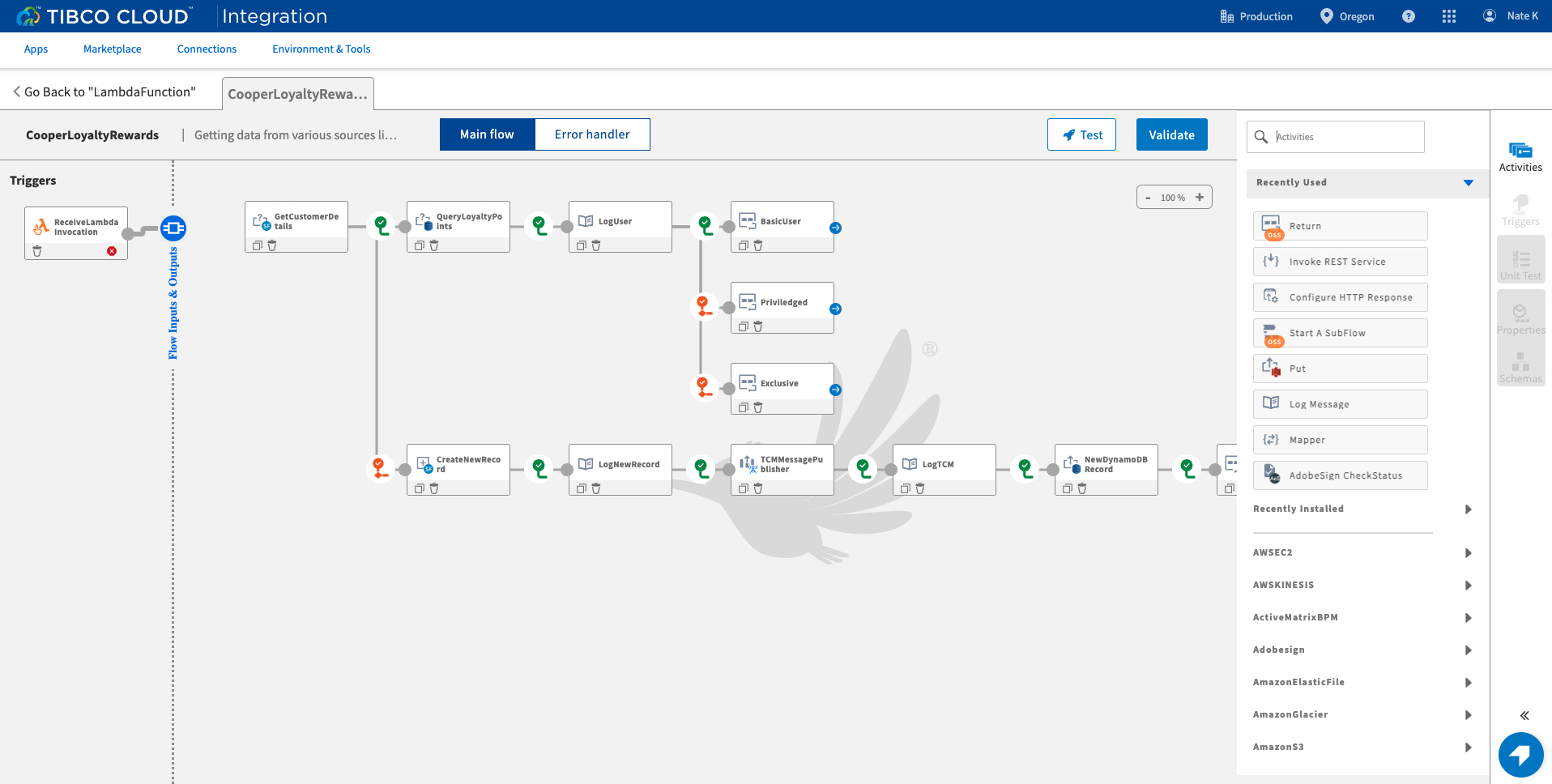
Visual components such as architecture diagrams and screenshots from TIBCO Business Studio play an essential role in clarifying complex integration workflows. An effective diagram could illustrate:
- The flow of data between various systems.
- Connections between different components built using TIBCO BusinessWorks.
- Deployment topology, including cloud elements or containerized services.
In addition to diagrams, incorporate screenshots of the TIBCO interface showing the configuration of project components and integration flows. These visuals help your audience gain practical insight into how TIBCO tools are aligned with the project’s objectives.
Charts and Performance Metrics
Present quantitative data via charts or graphs that reflect key performance indices such as system throughput, latency improvements, or error rate reductions. Visualizing these metrics reinforces the reliability and capabilities of TIBCO’s solutions and provides a tangible measure of your project’s success.
Sample Project Examples and Case Studies
Including specific case studies or sample projects within your presentation adds credibility and demonstrates practical applications of TIBCO’s products. By referencing proven projects, you can illustrate how similar challenges were successfully addressed using TIBCO.
Using Sample Projects
TIBCO offers a range of sample projects and demos available on platforms like GitHub, which serve as a reference for best practices. These include detailed examples on integrating file systems, processing events using Apache Kafka, and deploying containerized applications. Highlight one or two sample projects to show:
- The actual configuration and use of TIBCO plug-ins such as the File Plug-in or Kafka Plug-in.
- How to set up integration flows to handle specific tasks, such as data transformation or message passing.
- The overall outcomes achieved, such as improved operational efficiency and enhanced performance metrics.
Case Study Example
Consider discussing a case study where a company integrated disparate systems using TIBCO BusinessWorks. Emphasize how TIBCO’s pre-built connectors streamlined the process, reducing development time significantly and delivering robust data management solutions. This detailed example not only elucidates the technical aspects but also bolsters the business case for adopting TIBCO solutions.
Strategies for Effective Presentation Delivery
Engaging Your Audience
An effective presentation is more than just data and diagrams—it is also about engaging and communicating with your audience. Here are some strategies to ensure your presentation keeps your audience both informed and engaged:
- Storytelling: Narrate the journey of the project, from inception to final deployment, to create an emotional connection with the audience.
- Interactive Elements: Incorporate Q&A sessions, live demos of TIBCO Business Studio, or interactive polls to encourage active participation.
- Concise and Clear Visuals: Use clear headlines, bullet points, and annotated diagrams to ensure the audience does not get lost in technical details.
Tailoring Technical Content for Varied Audiences
Depending on your audience’s level of technical expertise, adjust the depth of your technical content. For mixed audiences:
- Explain foundational technical concepts in simple language.
- Use analogies and comparative visuals to illustrate complex topics, such as data flow or middleware operations.
- Provide detailed technical specifications in appendices or supplementary slides for those interested in deeper insights.
Deployment, Maintenance, and Future Enhancements
Deployment Considerations
Delve into the deployment aspects of your TIBCO project by explaining how the solution is rolled out across different environments. Discuss:
- The practicality of using containerized deployments and cloud infrastructures.
- Deployment methodologies that leverage TIBCO AppSpace or similar cloud management platforms.
- The use of continuous monitoring tools to assess performance metrics post-deployment.
Maintenance and Future Enhancements
After deployment, maintaining the solution is critical to ensure long-term operational efficiency. Outline your strategy for:
- Regular updates to incorporate new features or adapt to evolving business needs.
- Monitoring system performance and troubleshooting issues using TIBCO’s management tools.
- Exploring future enhancements such as integrating additional TIBCO tools, expanding integration points, or optimizing existing processes for greater efficiency.
Supplementary Tools and Resources
Additional Visual Content
Consider integrating additional visual materials throughout your presentation for clarity and engagement. These include:
- Flowcharts that map out integration processes.
- Graphical representations of data before and after implementing TIBCO solutions.
- Comparison tables that highlight key differences between various TIBCO products and other market alternatives.
Comparison Table: TIBCO Products
| TIBCO Product | Primary Use | Key Features |
|---|---|---|
| TIBCO BusinessWorks | Enterprise Integration | Pre-built connectors, file activities, messaging integration, process management |
| TIBCO ActiveMatrix | Distributed Application Management | High scalability, container deployment, modular design |
| TIBCO Spotfire | Data Visualization & Analytics | Interactive dashboards, real-time analytics, predictive insights |
| TIBCO Flogo | Lightweight Event Processing | Low footprint, fast integration, IoT focus |
Using Sample Projects and Demos
Leveraging sample projects available on platforms like GitHub can provide a practical look into how TIBCO projects are typically structured. These repositories not only offer examples of coding practices but also detail the configuration and setup of integration flows. Discuss how these samples can be adapted to meet your specific project needs or act as benchmarks for performance.
References
- Top 10 TIBCO PowerPoint Presentation Templates - SlideTeam
- TIBCO Product Documentation - TIBCO
- Samples and Open API's for TIBCO BusinessWorks Platform - GitHub
- Transform Your Business with the TIBCO Platform: Unified Data Solutions - TIBCO
- TIBCO Software - Wikipedia
Recommended
Last updated March 11, 2025