
Understanding Pagination: Enhancing Content Navigation and Performance
A comprehensive guide to pagination, its types, benefits, and best practices
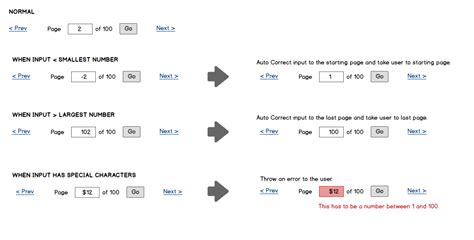
Key Takeaways
- Improved User Experience: Pagination organizes content into manageable sections, making it easier for users to navigate and consume information.
- Performance Optimization: By loading content in smaller chunks, pagination enhances website performance and reduces server load.
- SEO Benefits: Properly implemented pagination aids search engines in crawling and indexing content effectively, potentially boosting search rankings.
What is Pagination?
Pagination is the process of dividing content into discrete pages, applicable to both printed and digital media. It enhances navigability, improves user experience, and optimizes content presentation across various platforms. The term originates from "page," reflecting its primary function in organizing information into sequential segments.
Definition and Purpose
At its core, pagination involves separating content into individual pages to make information more accessible and easier to consume. This applies to physical documents like books and magazines, as well as digital formats such as websites, applications, and e-books (TechTarget). The primary purposes of pagination include:
-
Organization: Structuring content into orderly pages ensures information is presented systematically.
-
Navigability: Facilitates easier movement through large volumes of data without overwhelming the user.
-
Performance: Enhances load times by displaying only a subset of content at a time, reducing the strain on servers and improving overall responsiveness.
Types of Pagination
Pagination can be implemented in various forms, each catering to different user needs and technical requirements. The most common types include:
Standard Pagination
This traditional form involves sequentially numbered pages, allowing users to navigate forward and backward through content (e.g., Page 1, Page 2). It provides clear indicators of the user's position within the content and offers straightforward navigation controls.
Offset-Based Pagination
Utilizes an offset to determine the starting point of the next set of results (e.g., friends(first:2 offset:2)). While straightforward, this method can face performance and security issues, especially with larger datasets (Laravel Documentation).
Cursor-Based Pagination
Employs a cursor to mark the position in the dataset, enabling the retrieval of the next set of results (e.g., friends(first:2 after:$friendCursor)). This approach is more efficient and secure, particularly for dynamic or large datasets (Google Developers).
Infinite Scroll
Continuously loads content as the user scrolls down the page, commonly seen in social media feeds. While it provides a seamless browsing experience, it can complicate navigation and impact SEO (Interaction Design Foundation).
"Load More" Buttons
Allows users to manually load additional content by clicking a button. This method balances between traditional pagination and infinite scroll, offering better control over content loading (Pagination.com).
Benefits of Pagination
Implementing pagination offers numerous advantages for both users and website performance:
Implementing Pagination in Web Development
Effective pagination implementation in web development involves both front-end and back-end considerations to ensure seamless user interaction and optimal performance.
Front-End Implementation
HTML and Accessibility
Utilizing HTML elements, pagination is often structured within a <nav> wrapper to enhance accessibility. Frameworks like Bootstrap provide built-in pagination components that ensure compatibility with screen readers and keyboard navigation (Bootstrap Pagination).
React Components
Libraries such as Material UI offer React components designed for pagination, enabling developers to create intuitive and responsive pagination controls effortlessly (Material UI Pagination).
Back-End Integration
Server-side frameworks like Laravel provide built-in pagination methods that handle data retrieval and count management efficiently. These methods ensure that only the necessary data is fetched and sent to the client, optimizing database interactions and response times (Laravel Documentation).
Best Practices for Pagination
To maximize the benefits of pagination, developers should adhere to the following best practices:
Clear Navigation Controls
Implement intuitive navigation elements such as "Previous" and "Next" buttons, numbered page indicators, and "First" or "Last" page links. These controls help users understand their current position and easily navigate through the content (Google Developers).
Consistent Page Size
Maintaining a consistent number of items per page ensures a stable layout and predictable user experience. This consistency aids in the smooth operation of pagination controls and contributes to better performance metrics.
Accessibility Compliance
Ensure that pagination controls are fully accessible to all users, including those using screen readers or keyboard navigation. Descriptive labels and highlight indicators for the current page enhance usability (Interaction Design Foundation).
SEO Optimization
Proper pagination implementation involves using SEO-friendly URL structures, avoiding duplicate content, and ensuring that search engines can effectively crawl and index paginated pages. Techniques such as rel="canonical", rel="next", and rel="prev" (though recently deprecated by Google) can still aid in conveying page relationships (Google Developers).
Common Confusion: "Pagenation" vs. "Pagination"
The term "pagenation" is often encountered, but it appears to be a typographical error or misconception. The correct term is pagination, consistently used across technical, editorial, and web development contexts. Ensuring the correct usage of "pagination" is essential for clear communication and accurate implementation in projects (Merriam-Webster).
Modern Alternatives to Traditional Pagination
While traditional pagination remains widely used, modern alternatives offer different user experiences and technical advantages:
Infinite Scrolling
Enables content to load automatically as the user scrolls down the page, creating a seamless and continuous browsing experience. Commonly used in social media platforms and content-heavy websites (Interaction Design Foundation).
"Load More" Buttons
Provides users with control over when additional content is loaded by clicking a button. This method mitigates some drawbacks of infinite scrolling by allowing users to choose when to load more content (Pagination.com).
Tools and Services for Implementing Pagination
Several tools and services can assist in the effective implementation of pagination, streamlining the process across different platforms and data sources:
Pagination Libraries and Frameworks
Utilizing pre-built pagination components from libraries like Bootstrap and Material UI can expedite development and ensure responsive, accessible designs (Bootstrap Pagination, Material UI Pagination).
Data Transformation Services
Services like Pagination.com facilitate the transformation of data from various sources, such as Excel, CSV, or XML, into well-structured documents, simplifying the pagination process across different data formats (Pagination.com).
Conclusion
Pagination is an essential design pattern in both print and digital media, playing a pivotal role in organizing content, optimizing performance, and enhancing user experience. Whether through traditional page numbering in books or dynamic pagination systems in web applications, understanding and implementing effective pagination strategies is crucial for managing large volumes of information efficiently. By adhering to best practices and leveraging modern tools, developers can create user-friendly, high-performing interfaces that cater to the needs of diverse audiences.
Last updated January 10, 2025