
Unlock Intuitive Interfaces: What Exactly Are UI Laws?
Discover the psychological principles guiding effective and user-friendly digital design.
User Interface (UI) laws are fundamental principles and guidelines, rooted in human psychology, cognition, and behavior, that inform the design of digital interfaces. They aren't strict legal regulations but rather evidence-based recommendations derived from decades of research into how people perceive, interact with, and understand visual information. By applying these laws, designers aim to create products – like websites and apps – that are intuitive, efficient, engaging, and ultimately more user-friendly.
Key Takeaways: Understanding UI Laws
- Psychological Foundation: UI laws stem from cognitive psychology, explaining how users perceive, learn, remember, and make decisions when interacting with interfaces.
- Enhanced Usability: Applying these laws helps create interfaces that align with user expectations, reduce cognitive load, minimize errors, and improve overall task efficiency.
- Design Guidance: They provide a framework for making informed decisions about layout, navigation, interaction design, information presentation, and visual aesthetics.
The Science Behind the Screen: Why UI Laws Matter
More Than Just Rules: The Psychological Roots
UI laws translate complex psychological concepts into actionable design guidelines. They leverage insights into human limitations and capabilities, such as working memory capacity (Miller's Law), decision-making processes (Hick's Law), motor control (Fitts's Law), and perceptual organization (Gestalt principles). Understanding these underlying psychological factors allows designers to anticipate user behavior and craft experiences that feel natural and effortless.
For instance, knowing that users prefer familiar experiences (Jakob's Law) guides designers to use established conventions, reducing the learning curve. Similarly, understanding that people perceive items close together as related (Law of Proximity) helps in structuring information logically on the screen.
The Impact of Applying UI Laws
Adhering to UI laws offers significant benefits:
- Improved Usability: Interfaces become easier to learn, navigate, and understand, leading to fewer user errors and less frustration.
- Reduced Cognitive Load: By simplifying choices, chunking information, and maintaining clarity, designers can prevent users from feeling overwhelmed.
- Increased Efficiency: Users can accomplish tasks faster and more effectively when interfaces are optimized according to principles like Fitts's Law.
- Enhanced User Satisfaction: Intuitive and aesthetically pleasing designs (Aesthetic-Usability Effect) lead to a more positive overall user experience.
- Consistency and Predictability: Following established patterns and maintaining internal consistency makes interfaces feel reliable and trustworthy.
Essentially, UI laws provide a systematic way to design with the user's inherent cognitive and perceptual tendencies in mind, moving beyond guesswork towards evidence-based design decisions.
Core UI Laws and Principles Explained
Numerous UI laws and principles guide effective design. Here are some of the most influential:
1. Jakob's Law
Principle:
Users spend most of their time on other websites and applications. This means they prefer your site to work the same way as all the others they already know.
Application in UI Design:
Leverage familiar design patterns, navigation structures, and interaction models. Don't reinvent the wheel for common elements like login forms, shopping carts, or search bars. Meeting user expectations reduces the cognitive effort required to learn your interface.
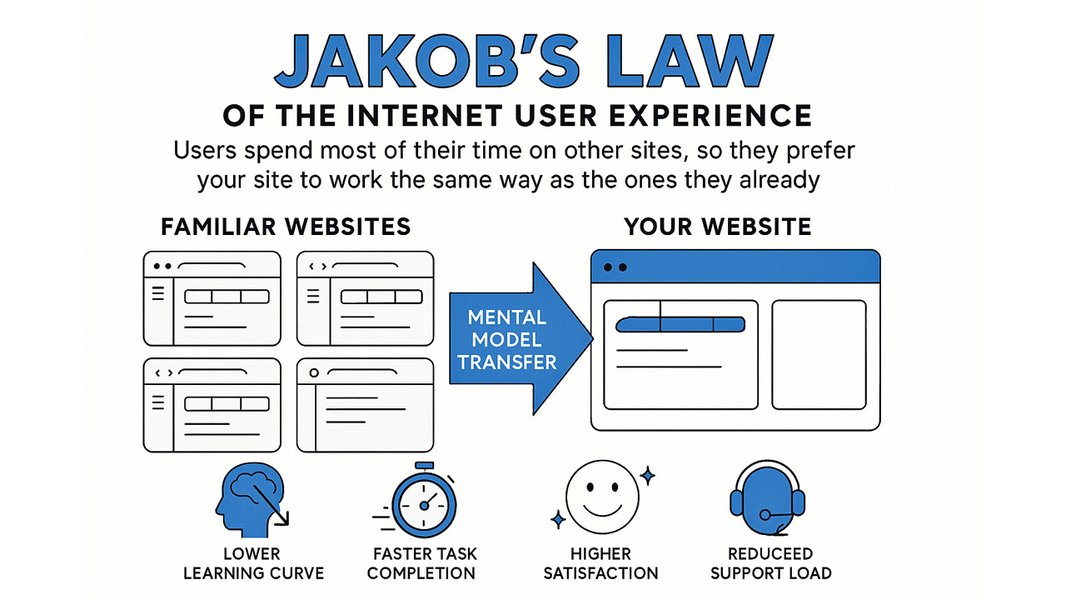
Jakob's Law emphasizes leveraging existing user habits.
2. Hick's Law
Principle:
The time it takes to make a decision increases with the number and complexity of choices available.
Application in UI Design:
Simplify choices for the user. Break down complex tasks into smaller steps. Minimize the number of options in navigation menus, forms, and selection processes. Highlight recommended options to speed up decision-making.
3. Miller's Law
Principle:
The average person can only keep about 7 (plus or minus 2) items in their working memory at any one time.
Application in UI Design:
Organize content into smaller, manageable chunks (chunking). Group related information visually. Avoid presenting too many pieces of information or options simultaneously. For example, break long forms into sections or use pagination for long lists.
4. Fitts's Law
Principle:
The time required to move to a target area (e.g., clicking a button) is a function of the distance to the target and the size of the target.
Application in UI Design:
Make interactive elements (buttons, links, icons) large enough to be easily clicked or tapped. Position frequently used targets closer to the user's likely starting point (e.g., previous action) or common resting areas (like thumbs on mobile). Ensure adequate spacing between targets to prevent accidental clicks.
5. Law of Prägnanz (Simplicity)
Principle:
People will perceive and interpret ambiguous or complex images as the simplest form possible because interpretation requires the least cognitive effort.
Application in UI Design:
Strive for clarity and simplicity in visual design and layout. Use clear iconography and avoid overly complex visual structures. Ensure that the meaning and function of interface elements are immediately apparent.
6. Gestalt Principles of Visual Perception
These principles describe how humans naturally organize visual elements into unified wholes or groups.
Law of Proximity:
Objects near each other are perceived as belonging together. Use spacing to group related elements (e.g., labels with their corresponding input fields).Law of Similarity:
Objects that share visual characteristics (like shape, color, or size) are perceived as related. Use consistent styling for similar types of elements (e.g., all primary action buttons).Law of Common Region:
Elements placed within a boundary (like a border or background color) are perceived as a group. Use cards, boxes, or background shading to group related content.Law of Continuity:
The eye tends to follow lines, curves, or sequences of shapes. Arrange elements to guide the eye smoothly through the interface.Law of Closure:
People tend to perceive incomplete shapes as complete. Ensure icons and graphics are clear and don't rely heavily on closure, which can cause ambiguity.Figure-Ground:
People instinctively perceive objects as either being in the foreground (figure) or background (ground). Ensure clear contrast between foreground elements (like text and buttons) and the background.7. Von Restorff Effect (Isolation Effect)
Principle:
When multiple similar objects are present, the one that differs from the rest is most likely to be remembered.
Application in UI Design:
Use visual distinction (e.g., different color, size, or style) to make important information or key actions stand out from surrounding elements. This is often used for call-to-action buttons or alerts.
8. Tesler's Law (Law of Conservation of Complexity)
Principle:
Every application has an inherent amount of complexity that cannot be removed. This complexity must be dealt with, either during product development or by the user.
Application in UI Design:
Aim to simplify the interface for the user by handling inherent complexity within the system design whenever possible. Don't burden the user with complexity that could be abstracted away by the developers or designers.
Other Important Principles
- Aesthetic-Usability Effect: Users often perceive aesthetically pleasing designs as more usable. Good visual design builds trust and tolerance for minor usability issues.
- Peak-End Rule: Users judge an experience largely based on how they felt at its most intense point (peak) and at its end, rather than the average of every moment. Focus on optimizing key moments and ensuring a positive final interaction.
- Doherty Threshold: Productivity soars when a computer and its users interact at a pace (< 400ms) that ensures neither has to wait on the other. Strive for fast system response times to keep users engaged.
- Serial Position Effect: Users tend to best remember the first and last items in a series. Place the most important items or actions at the beginning or end of lists and navigation menus.
- Law of Clarity: The interface should be clear and unambiguous. Users should be able to understand what elements are, what they do, and the current system status.
- Law of Consistency: Maintain uniformity in design elements (colors, fonts, interactions) throughout the interface and across related products. Consistency reduces learning time and prevents confusion.
Connecting the Dots: UI Laws, Heuristics, and Guidelines
Beyond Laws: Heuristics and Platform Guidelines
UI laws provide the foundational psychological understanding, but they are often complemented by more practical sets of guidelines and heuristics:
- Nielsen's 10 Usability Heuristics: Developed by Jakob Nielsen and Rolf Molich, these are widely accepted "rules of thumb" for interaction design. They include principles like "Visibility of system status," "User control and freedom," "Consistency and standards," and "Error prevention," which often encapsulate the practical application of underlying UI laws.
- Platform Guidelines (e.g., Apple HIG, Google Material Design): Major platform providers publish detailed Human Interface Guidelines (HIG) or design systems. These provide specific recommendations for designing applications on their respective platforms, incorporating many UI laws and heuristics to ensure consistency and usability within their ecosystems.
Designers typically use a combination of UI laws, established heuristics, and platform-specific guidelines to create effective and well-rounded user interfaces.
Many UI/UX laws focus on optimizing cognitive load and interaction efficiency.
Visualizing Impact: How UI Laws Shape Design Focus
Different UI laws have varying degrees of impact on specific aspects of user interface design, such as usability, efficiency, learnability, reducing cognitive load, and overall aesthetics. This radar chart illustrates the perceived relative influence of some key laws across these dimensions. A higher score indicates a stronger influence on that particular design aspect.
This visualization helps understand that laws like Fitts's Law primarily boost efficiency, while Miller's and Hick's Laws are crucial for managing cognitive load. Jakob's Law significantly impacts learnability, and the Aesthetic-Usability effect directly influences user satisfaction and perceived usability.
Mapping the Concepts: A Mindmap of UI Laws
This mindmap provides a visual overview of key UI laws, grouping them by the primary aspect of user experience they influence, such as perception, interaction, memory, and decision-making.
(Target Size & Distance)"] id2b["Tesler's Law
(Complexity Conservation)"] id2c["Doherty Threshold
(Response Time)"] id3["Memory & Learning"] id3a["Miller's Law
(Working Memory ~7±2)"] id3b["Serial Position Effect
(First/Last Items)"] id3c["Von Restorff Effect
(Isolation/Distinctiveness)"] id3d["Zeigarnik Effect
(Incomplete Tasks)"] id4["Decision Making & Cognition"] id4a["Hick's Law
(Choice Overload)"] id4b["Jakob's Law
(Familiarity/Convention)"] id4c["Law of Clarity"] id4d["Law of Consistency"] id5["User Satisfaction"] id5a["Aesthetic-Usability Effect"] id5b["Peak-End Rule"]
This structure helps visualize how different psychological principles translate into design guidelines aimed at optimizing distinct facets of the user's interaction with an interface.
Watch and Learn: Exploring UI/UX Laws Visually
For a dynamic overview of essential UI/UX laws and their practical importance for designers, this video offers valuable insights. It covers several key principles discussed here, explaining their relevance in creating effective digital products in today's design landscape.
Video explaining 12 crucial UI/UX laws for designers.
The video delves into laws such as Fitts's Law, Hick's Law, Jakob's Law, and others, illustrating how understanding these concepts is crucial for anyone aiming to become proficient in UI/UX design. It emphasizes that while visual appeal is important, grounding design decisions in these established psychological principles is key to creating truly user-centered experiences.
UI Laws at a Glance: Summary Table
This table provides a quick reference to some of the most commonly cited UI laws, summarizing their core principles and typical applications in interface design.
| UI Law / Principle | Core Principle | Key Application in UI Design |
|---|---|---|
| Jakob's Law | Users prefer familiar experiences based on other sites. | Use common design patterns and conventions. |
| Hick's Law | More choices lead to longer decision times. | Simplify and minimize options; break down complex tasks. |
| Miller's Law | Working memory holds ~7±2 items. | Chunk content into manageable groups; avoid information overload. |
| Fitts's Law | Target acquisition time depends on distance and size. | Make interactive elements large and easily reachable. |
| Law of Prägnanz | People perceive complex shapes in simplest forms. | Strive for visual clarity and simplicity in layouts and icons. |
| Law of Proximity | Objects near each other are seen as grouped. | Use spacing to visually group related elements. |
| Law of Similarity | Similar objects are seen as grouped. | Use consistent styling for elements with similar functions. |
| Von Restorff Effect | Distinctive items are remembered better. | Highlight key actions or information visually. |
| Tesler's Law | Complexity is conserved; shift it from user to system. | Simplify the user's tasks by handling complexity behind the scenes. |
| Aesthetic-Usability Effect | Aesthetic designs are perceived as more usable. | Invest in visual design quality to enhance perception and trust. |
Frequently Asked Questions (FAQ) about UI Laws
Are UI laws actual laws like legal statutes?
No, UI laws are not legal requirements. They are principles and guidelines based on psychological research and observation of user behavior. They describe tendencies in human perception and cognition that designers can leverage to create more effective interfaces. Think of them as scientifically-backed best practices rather than enforceable regulations.
What's the difference between UI laws and UX laws?
The terms "UI laws" and "UX laws" are often used interchangeably, and there's significant overlap. Both draw from psychology to guide design. Generally, UI (User Interface) focuses more on the visual and interactive elements on the screen (layout, buttons, visual hierarchy), while UX (User Experience) encompasses the user's entire journey and interaction with a product or service, including usability, accessibility, and overall satisfaction. Many principles (like Hick's Law or Fitts's Law) apply directly to both UI elements and broader UX flows.
Do I need to apply all these laws in every design?
Not necessarily. UI laws are guidelines, not rigid rules. The context of your design, your target audience, and the specific goals of the interface will determine which laws are most relevant. Sometimes, laws might even seem contradictory (e.g., simplifying choices via Hick's Law vs. providing necessary options). Good design involves understanding these principles and applying them thoughtfully and appropriately based on the specific design problem you're solving. Often, usability testing is needed to validate design decisions based on these laws.
Where can I learn more about UI laws?
Several excellent resources delve deeper into UI/UX laws. Websites like Laws of UX (lawsofux.com), the Nielsen Norman Group (nngroup.com), and the Interaction Design Foundation (interaction-design.org) offer detailed articles and explanations. Books like Jon Yablonski's "Laws of UX" also provide comprehensive overviews.
Recommended Further Exploration
- How do Gestalt principles specifically improve visual hierarchy in UI design?
- Can you show practical examples of applying Fitts's Law in mobile app interfaces?
- How do Nielsen's 10 Usability Heuristics relate to and differ from the core UI laws?
- What are the negative consequences for user experience when common UI laws are ignored?
References

Last updated May 4, 2025