
Unlocking Your Unity 3rd Person Action Game: A Guide to Essential Modules & Frameworks
Strategically select the building blocks for your immersive action game, from character control to engaging dialogue.
Developing a compelling third-person action game in Unity requires a well-thought-out architecture. Identifying the right modules and frameworks from the outset can significantly streamline your development process, enhance gameplay quality, and ensure your project remains manageable. This guide will help you determine the essential components, such as input systems, dialogue managers, character controllers, and more, tailored to the needs of a dynamic action game.
Key Insights: Planning Your Game's Foundation
- Define Core Gameplay First: Before diving into specific tools, clearly outline your game's essential features (e.g., combat style, narrative depth, exploration mechanics). This will naturally guide your module selection.
- Leverage Unity's Ecosystem & Specialized Assets: Utilize Unity's powerful built-in features like the Input System and Cinemachine. For more complex functionalities like advanced combat, AI, or dialogue, explore dedicated frameworks and assets from the Unity Asset Store or open-source communities.
- Embrace Modularity: Design your game with a modular approach. This means creating independent, interchangeable systems (e.g., a separate module for input, another for combat). This enhances scalability, simplifies debugging, and facilitates teamwork.
Step 1: Defining Your Game's Core Requirements
Laying the Groundwork for Module Selection
The journey to building your third-person action game begins with a clear vision of its core gameplay features. Ask yourself:
- What kind of movement and interaction will the player character have? (e.g., basic locomotion, climbing, swimming, stealth)
- What combat mechanics are central to the experience? (e.g., melee, ranged, special abilities, combos)
- How will enemies behave and challenge the player? (Enemy AI sophistication)
- Will there be a narrative component? If so, how complex will the dialogue and quest systems be?
- Does the game require an inventory system for items, weapons, or gear?
- Will there be character progression, such as leveling or skill trees?
- What information needs to be displayed to the player via the UI/HUD? (e.g., health, ammo, objectives)
- Is a save/load system necessary to retain player progress?
- How will audio enhance the atmosphere and gameplay feedback?
Answering these questions will create a blueprint, making it easier to identify which specific modules and frameworks are indispensable, which are desirable, and which might be out of scope for your initial version.
Step 2: Identifying Key Modules and Frameworks
Once you have a grasp of your game's features, you can start mapping them to specific modules. Below are common systems essential for most third-person action games, along with suggestions for how to implement them in Unity.
Player Controller & Input System
This is the heart of player interaction, governing how the character moves, jumps, and interacts with the game world. Unity's modern Input System package is highly recommended over the older Input Manager due to its flexibility, support for various devices, and action-based mapping. You can define player actions (like "Move," "Jump," "Attack") and bind them to different inputs (keyboard, mouse, gamepad).
Many developers start with Unity's Starter Assets: ThirdPerson Controller, which provides a solid foundation for character movement and camera control that integrates with the new Input System.
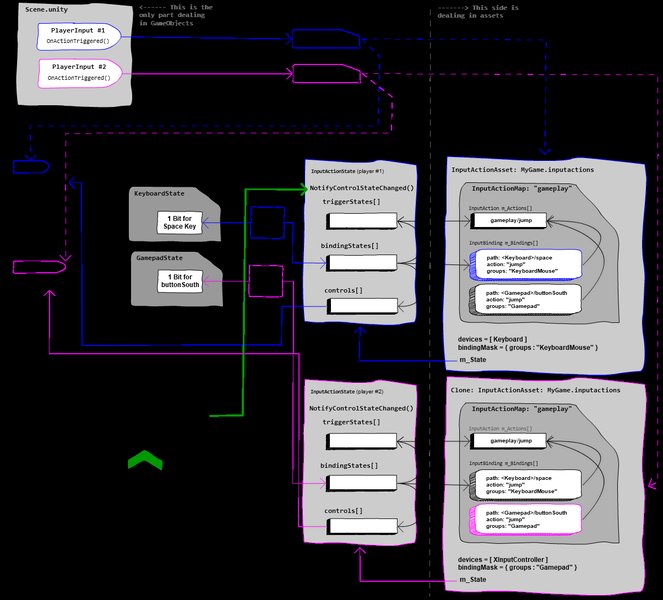
High-level architecture of Unity's Input System.
Camera System
A dynamic and responsive third-person camera is crucial for player immersion. Cinemachine, Unity's powerful camera management tool, is the go-to solution. It allows you to create complex camera behaviors (like follow cams, orbiting cams, look-at targets, and smooth transitions) without writing extensive code. Cinemachine integrates seamlessly with character controllers and the Input System.
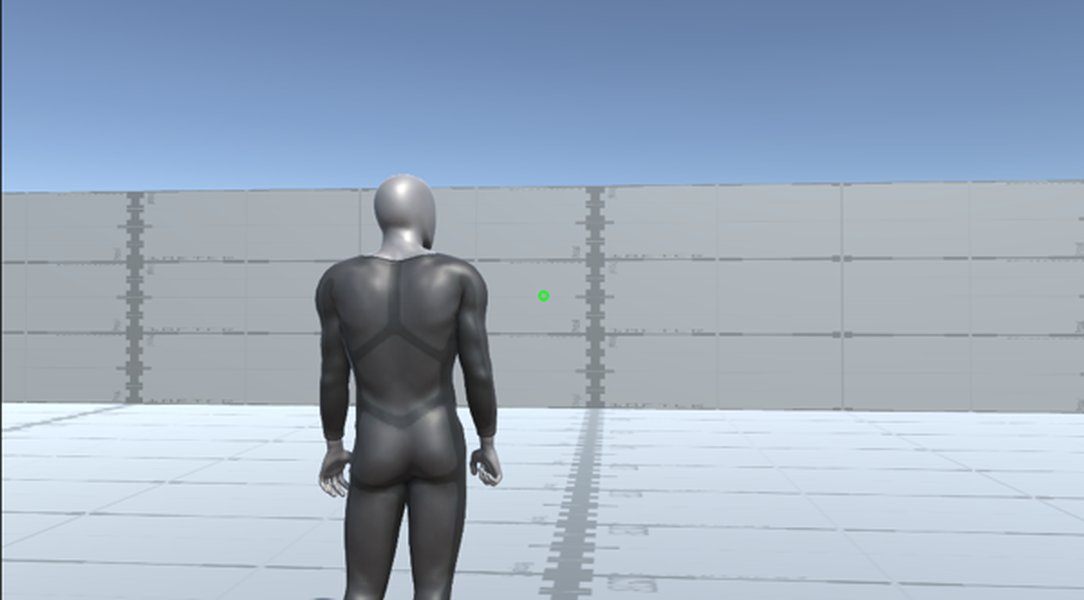
Example of a Cinemachine 3rd Person Follow setup in game view.
Character and Combat Framework
This module handles everything related to combat: attack animations, hit detection, damage calculation, health systems, special abilities, and potentially enemy AI interaction during fights. You can build this system from scratch using Unity's animation tools (Animator, Animation Events) and physics (colliders, raycasts for hit detection). Alternatively, several frameworks on the Unity Asset Store can accelerate development, such as the Action RPG Framework (often discussed in Unity forums for its comprehensive features including combat, inventory, and leveling) or more specialized combat assets. Some third-person controller assets like the Invector Third Person Controller also come with robust shooter or melee combat templates.
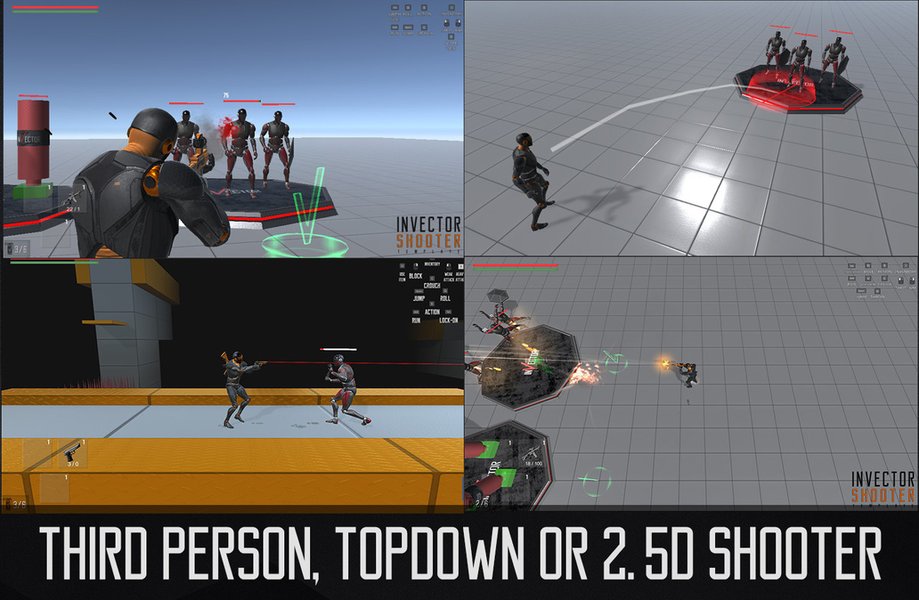
Example of a comprehensive third-person controller asset with combat features.
Enemy AI
Compelling enemies require intelligent behavior. Enemy AI modules typically cover pathfinding (navigating the environment), perception (detecting the player), decision-making (patrolling, chasing, attacking, retreating), and combat tactics. Unity offers NavMesh for pathfinding. For more complex AI, you might use behavior trees (available as assets or custom-coded) or look into frameworks like Game Action System – Gameplay Interaction Framework which can assist with modular AI components.
Dialogue and Story System
If your game features a narrative, NPCs, or quests, a dedicated dialogue system is essential. This module manages conversations, branching dialogue choices, quest tracking, and potentially cutscene integration. While Unity doesn't have a built-in comprehensive dialogue system, numerous third-party assets are available on the Unity Asset Store. Frameworks like ORK Framework (a broad RPG toolkit) include robust dialogue and quest systems. Simpler, dedicated dialogue assets are also plentiful.
Inventory & Item Management
For games where players collect items, weapons, or equipment, an inventory system is necessary. This involves UI for displaying items, logic for picking up, dropping, using, and equipping items, and potentially systems for item stats and effects. The Action RPG Framework is an example that includes inventory functionality.
UI (User Interface) System
The UI displays crucial game information like health bars, ammo counts, mini-maps, quest objectives, menus, and interaction prompts. Unity's UI Toolkit is its modern solution for creating UIs, though many developers also use the older Unity UI (Canvas-based system). Modular UI kits can also help in rapidly developing consistent and functional interfaces.
Save/Load System
To allow players to resume their progress, a save/load system is critical. This involves serializing game state (player position, inventory, quest progress, world state) and deserializing it. This often requires custom scripting or dedicated save system assets.
Audio System
Sound significantly enhances immersion. This module manages background music, sound effects (for actions, combat, environment), and voiceovers. Unity's built-in audio system is capable, but for more advanced needs, integration with tools like FMOD or Wwise might be considered.
Physics and Collision Handling
Unity's built-in physics engine (PhysX) handles realistic physical interactions, collisions, and environmental responses. This is fundamental for character movement, combat (e.g., ragdolls, projectile impacts), and interactive objects.
Visualizing Core Game Systems: A Mindmap
To better understand how these modules interconnect, consider the following mindmap. It illustrates the central role of the Player Controller and how other systems branch out or interact with it in a typical third-person action game architecture.
This mindmap highlights the interconnected nature of various game systems. For instance, Player Input directly influences the Character Controller, which in turn interacts with the Animation System and potentially the Combat System. The Camera System must dynamically follow the character, while Enemy AI needs to react to the player's actions and position.
Exploring Existing Frameworks: A Comparative Overview
Leveraging existing frameworks can significantly accelerate your development. These frameworks often bundle multiple systems together, providing a more integrated starting point. Here's a look at some commonly mentioned options and the kinds of modules they might offer:
| Module / Feature | Purpose | Example Framework/Asset or Unity Tool | Notes |
|---|---|---|---|
| Input & Player Control | Handles player movement, camera control, and interactions. | Unity Input System, Unity Starter Assets: ThirdPerson Controller | Essential first step. Modern Input System is preferred. |
| Camera System | Provides dynamic and smooth 3rd person camera views. | Cinemachine | Unity's official advanced camera tool. Highly flexible. |
| Combat System | Manages attacks, damage, health, combos, and abilities. | Action RPG Framework, ZADE: Action FrameWork, Game Action System, Custom Scripts | Core gameplay loop. Complexity varies greatly. |
| Enemy AI | Governs NPC behaviors, pathfinding, and combat logic. | Custom Logic, Behavior Tree Assets, NavMesh, Game Action System | Often requires significant customization for unique gameplay. |
| Dialogue System | Manages NPC conversations, branching narratives, and quest text. | ORK Framework, Dedicated Dialogue Assets (Asset Store), Custom Scripts | Crucial for story-driven games. |
| Inventory System | Handles item collection, storage, usage, and equipping. | Action RPG Framework, ORK Framework, Dedicated Inventory Assets | Important for games with loot, crafting, or consumables. |
| UI System | Displays health bars, menus, interaction prompts, etc. | Unity UI Toolkit, Unity UI (Canvas) | Provides essential player feedback and game state information. |
| Save/Load System | Allows players to persist and resume their game state. | Custom Scripts, Save/Load Assets (Asset Store) | Critical for player retention in longer games. |
| Audio Management | Controls sound effects, background music, and voiceovers. | Unity Audio system, FMOD/Wwise (for advanced needs) | Enhances immersion and provides gameplay cues. |
When choosing a framework, consider its scope, ease of integration with other systems you might use, documentation quality, community support, and alignment with your game's specific genre and feature set (e.g., a hack-and-slash vs. a narrative-heavy adventure).
Evaluating Framework Focus: A Radar Chart Perspective
Different frameworks and development approaches prioritize different aspects of game creation. The radar chart below offers a conceptual comparison of how various types of solutions might stack up across key development areas for a third-person action game. The values are illustrative, representing general tendencies rather than precise metrics for specific assets.
This chart illustrates that a "Comprehensive RPG Kit" might excel in narrative and inventory systems but could have a steeper learning curve ("Ease of Initial Setup" might be lower). An "Action-Focused Core" would likely prioritize combat and character control. Relying on "Unity Starter Assets + Custom Dev" offers maximum customizability and an easy start for basic movement, but requires building complex systems like combat or dialogue from scratch. A "Modular Toolkit" aims to provide building blocks that are easier to integrate and customize to a moderate degree.
Adopting a Modular Design Approach
Building for Scalability and Maintainability
Regardless of whether you use comprehensive frameworks or build systems yourself, a modular design philosophy is paramount. This means structuring your game as a collection of independent, well-defined components that communicate through clear interfaces (e.g., events, public methods, or ScriptableObjects acting as data containers or event channels).
Benefits of modularity include:
- Scalability: Easier to add new features or expand existing ones without breaking other parts of the game.
- Maintainability: Simpler to debug and update individual modules.
- Reusability: Modules can potentially be reused in future projects.
- Collaboration: Different team members can work on separate modules concurrently with fewer conflicts.
- Testability: Individual modules can be tested in isolation.
Unity's component-based architecture naturally lends itself to modular design. Aim to keep scripts focused on specific responsibilities. For instance, a character's health logic should be separate from its movement logic, and both should be distinct from its attack logic, even if they reside on the same GameObject as different components.
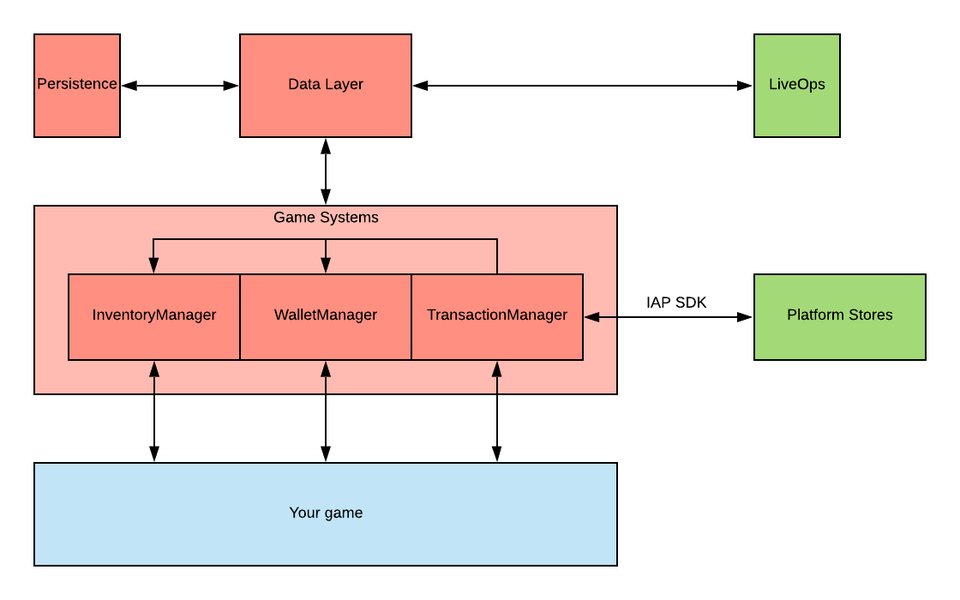
Example of a high-level modular architecture, as conceptualized by Unity's Game Foundation.
Visualizing Third-Person Controller Setup
Many tutorials can help you get started with specific modules. For instance, setting up a basic third-person character controller is a fundamental first step. The video below demonstrates how to create a third-person controller in Unity, often utilizing starter assets to expedite the process.
This tutorial covers creating a Third Person Controller in Unity, often leveraging Starter Assets. It's a great visual guide for understanding the initial setup of character movement and camera control.
Watching such tutorials can provide practical insights into how these systems are built and integrated within the Unity editor, complementing the theoretical understanding of modules and frameworks.
Practical Steps for Integration and Evaluation
Bringing It All Together
- Define Core Features Clearly: Reiterate and finalize the list of essential features your game *must* have for its first playable version.
- Start with Unity's Built-in Tools: For fundamental systems like input (Input System) and camera (Cinemachine), leverage Unity's robust offerings. Begin with basic character movement using Starter Assets or by scripting your own.
- Research and Prototype: For more complex systems (combat, AI, dialogue, inventory), research available assets on the Unity Asset Store and GitHub. Read reviews, check documentation, and if possible, try out demos or lite versions. Prototype small pieces of functionality to see how well an asset fits your needs and integrates with your existing setup.
- Prioritize and Implement Incrementally: Don't try to integrate everything at once. Start with the most critical systems (usually character control and core gameplay mechanics like combat). Get a basic version working, then iteratively add other modules.
- Test for Compatibility and Performance: As you integrate different modules or frameworks, continuously test for conflicts and performance impacts. Ensure systems communicate effectively without creating tight dependencies that make future changes difficult.
- Consider Your Team and Scope: If you're a solo developer or part of a small team, comprehensive frameworks can save a lot of time. Larger teams might opt for more custom solutions or a mix of custom and third-party tools for greater flexibility. Always be realistic about your project's scope and your team's expertise.
- Maintain Organization: Use clear folder structures and naming conventions in your Unity project. This becomes increasingly important as your game grows in complexity and incorporates more modules.
Frequently Asked Questions (FAQ)
What's the first module I should focus on for a third-person action game?
Generally, you should start with the Player Character Controller and the Input System. These form the foundation of how the player interacts with your game world. Getting smooth and responsive character movement and basic camera control working early is crucial.
Do I need to use a comprehensive framework, or can I build modules myself?
This depends on your project's scope, your team's size and expertise, and your timeline. Comprehensive frameworks (like ORK Framework or Action RPG Framework) can significantly speed up development by providing many pre-built systems. However, they might be less flexible or have a steeper learning curve than building specific modules yourself. Building custom modules offers maximum control and tailor-fit solutions but requires more development time and expertise.
How important is modularity in game development?
Modularity is extremely important. It makes your project more scalable (easier to add/change features), maintainable (easier to debug and update), and allows for better team collaboration. Independent modules with clear interfaces reduce complexity and prevent a "spaghetti code" scenario where changes in one part of the game unintentionally break others.
Where can I find good frameworks and assets for Unity?
The primary source is the Unity Asset Store, which hosts thousands of tools, frameworks, art assets, and utilities. GitHub is another excellent resource for open-source projects and frameworks. Unity's official forums and communities (like Discord servers or subreddits) are also great places to find recommendations and support for various assets.
What is Cinemachine and why is it recommended for camera systems?
Cinemachine is Unity's advanced camera system. It's highly recommended because it allows you to create dynamic, responsive, and professional-quality camera behaviors with minimal or no coding. It offers various virtual cameras (e.g., for third-person follow, freelook, fixed shots, dolly tracks) and features like smart targeting, blending between cameras, and procedural noise, making it extremely powerful for third-person games.
Recommended Further Exploration
To deepen your understanding, consider exploring these related topics:
- How to implement a modular combat system in Unity for a third-person action game?
- What are the best practices for designing enemy AI behaviors in Unity action games?
- Can you explain how to integrate an advanced dialogue system with NPC interactions and quests in Unity?
- What are the pros and cons of using large game development frameworks versus building game systems from scratch in Unity?
References
Last updated May 10, 2025