
Navigating the Digital Job Market: Where and How to Upload Your Resume
Unlock Your Job Search Potential by Strategically Posting Your Resume Online
Key Highlights for Your Resume Upload Journey
- Strategic Placement is Key: Maximize your resume's visibility by uploading it to leading job boards and professional networking sites like Indeed, LinkedIn, Monster, and ZipRecruiter.
- Format Matters for ATS: Always save your resume in a compatible format, preferably .docx or PDF, to ensure it is accurately parsed by Applicant Tracking Systems (ATS), which are widely used by employers.
- Leverage AI Tools: Utilize AI-powered resume builders and optimizers to tailor your resume for specific job descriptions, increasing your chances of passing ATS filters and catching recruiter attention.
In today's competitive job market, uploading your resume online is not just a convenience; it's a critical strategy for increasing your visibility to potential employers. While you cannot directly upload your resume to this platform, there are numerous powerful and effective websites where you can post your resume to enhance your job search. Understanding where and how to upload your resume can significantly impact your success in landing interviews.
Why Upload Your Resume Online?
Posting your resume online offers several significant advantages. It allows recruiters and hiring managers to find you proactively, even before job openings are formally advertised. This can give you a significant edge in the job search. An online resume also streamlines the application process, enabling quick applications with a simple click on many platforms. Moreover, maintaining an online professional profile, which often includes your resume, is crucial for building a strong professional network and directly reaching out to companies of interest.
Increased Visibility and Accessibility
One of the primary benefits of uploading your resume to job boards and professional networks is the immense increase in visibility. Sites like Indeed and LinkedIn are global hubs for recruitment, visited by millions of employers monthly. By having your resume accessible on these platforms, you become part of a vast database that recruiters actively search when looking for candidates.
Streamlined Application Process
Many online platforms offer "Easy Apply" or "One-Click Apply" features, which pull your uploaded resume details directly into job applications. This saves considerable time and effort compared to filling out repetitive forms for each application, making your job search more efficient.
Professional Networking and Branding
Platforms like LinkedIn allow your resume to serve as a cornerstone of your professional online presence. Beyond just applying for jobs, you can connect with industry peers, follow companies, and share insights, all while showcasing your qualifications and experience through your uploaded resume and profile.
Top Platforms for Uploading Your Resume
To maximize your chances of getting noticed, it's essential to strategically choose where to upload your resume. The following are some of the best and most widely used sites for posting your resume online, catering to both general and industry-specific audiences.
| Platform Name | Primary Focus | Key Features for Job Seekers |
|---|---|---|
| Indeed | General Job Board | Largest job board globally, free resume upload, resume builder, job alerts, company reviews. |
| Professional Networking & Job Board | Professional profile, networking opportunities, "Easy Apply" feature, direct messaging with recruiters, career advice. | |
| Monster | General Job Board | Extensive resume database for recruiters, job alerts, career advice, easy resume upload. |
| ZipRecruiter | General Job Board | Top pick for employers and job seekers, free resume posting, broad distribution to over 100 job sites. |
| CareerBuilder | General Job Board | Pioneer in online recruiting, wide reach through partnerships, resume database, mobile app. |
| Glassdoor | Job Board & Company Reviews | Job listings, company insights, salary tools, anonymous company reviews, resume upload. |
| Dice | Tech-Specialized Job Board | Specific for tech professionals, empowers employers to find tech talent, resume posting for IT roles. |
| Jobspresso | Remote Job Board | Specializes in remote talent, free resume posting to be discovered by remote employers. |
| Resume-Now | AI Resume Builder & Job Search | Free AI resume builder, templates, helps optimize for ATS, can upload existing resume. |
| Canva | Resume Builder with Design Focus | Free resume maker with editable templates, good for graphic designers, share online or download. |
This table outlines some of the most prominent platforms where you can upload your resume, highlighting their main focus and features beneficial for job seekers. Each platform offers unique advantages, and leveraging a combination of them can broaden your reach.
The Resume Upload Process: A Step-by-Step Guide
While specific steps may vary slightly between platforms, the general process for uploading your resume online is consistent. Following these guidelines will ensure a smooth and effective upload.
Preparing Your Resume for Upload
Before you even click the "upload" button, ensuring your resume is in the correct format and optimized is crucial. Most websites prefer PDF or .docx formats. PDF ensures your formatting remains intact, while .docx is often recommended for better parsing by Applicant Tracking Systems (ATS). Avoid complex graphics or two-column layouts that can confuse ATS software.
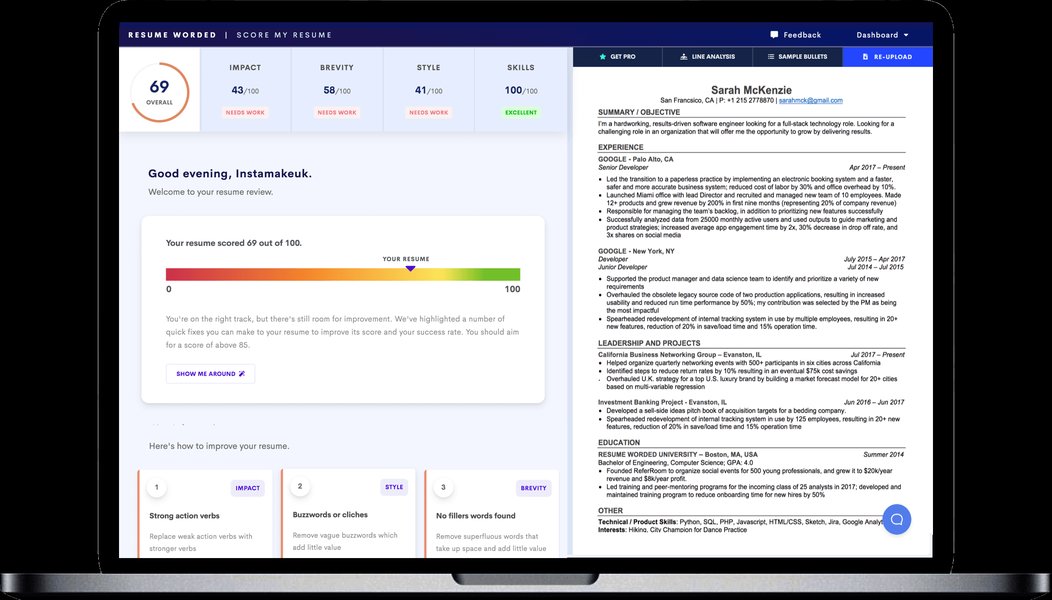
An example of a CV checker, which can help ensure your resume is optimized for ATS.
Choosing the Right File Format
The choice between PDF and .docx largely depends on the specific job application's requirements. If the job posting specifies a format, adhere to it strictly. Otherwise, for general uploads to job boards, having both versions ready is a good practice.
Optimizing for Applicant Tracking Systems (ATS)
Many large companies use ATS to filter resumes. To pass these systems, incorporate keywords from the job description into your resume. Use standard headings (e.g., "Experience," "Education") and a clean, readable font. Tools like Jobscan can help you analyze how well your resume is tailored for a specific job listing and suggest optimizations.
The Upload Steps
Once your resume is ready, the upload process is typically straightforward:
- Create an Account: Most job boards and professional networks require you to create a free account to upload your resume.
- Locate the "Upload Resume" Button: Look for clear prompts like "Upload Your Resume," "Post a Resume," or "Build Your Profile." These are usually found on the homepage or within your profile settings.
- Select Your File: Choose the correctly formatted resume file from your computer or cloud storage (e.g., Google Drive, Dropbox).
- Review and Edit: After uploading, many sites allow you to review how your resume appears and make edits directly within their platform. This is a critical step to ensure all information is accurately parsed and presented.
- Save and Make Visible: Confirm your upload and ensure your resume's privacy settings are set to visible to employers or recruiters, as desired.
For platforms like LinkedIn, the process involves navigating to "Job Application Settings" or "Resumes and application data" to upload your resume. Some sites might also offer the option to copy and paste your resume content directly into text fields, which can be useful if you encounter formatting issues with file uploads.
This video explains how to create an ATS-friendly resume for today's job market, highlighting the importance of templates and AI prompts.
The video above provides valuable insights into creating an ATS-friendly resume, which is crucial for modern job applications. Understanding how keywords and formatting impact how your resume is processed by automated systems can significantly boost your chances of getting noticed.
Leveraging AI and Resume Builders
The landscape of resume creation and optimization is constantly evolving, with AI tools and dedicated resume builders playing an increasingly significant role. These tools can help you craft a professional and effective resume even if you're starting from scratch or need to refine an existing one.
Benefits of AI-Powered Resume Builders
AI resume builders, such as those offered by Resume-Now and Teal, can provide invaluable assistance. They can analyze job descriptions, suggest relevant keywords, and even help restructure your resume to better align with specific roles. This can save you time and help you create a resume that stands out to both human recruiters and ATS.
Personalized Suggestions and Optimization
Many AI tools offer context-sensitive tips from professional recruiters as you build your document. They can suggest how to phrase achievements, optimize bullet points, and ensure your resume contains the necessary information to impress hiring managers. Some even allow you to upload a job description and receive tailored suggestions for adapting your resume to fit its requirements.
Template Variety and Visual Appeal
Resume builders often come with a wide array of templates, allowing you to choose a design that best represents your professional brand. While functionality is key, a visually appealing resume can also make a positive first impression.
This radar chart illustrates the perceived strengths of various resume posting and building strategies based on current market trends and common job seeker needs. The data points reflect a qualitative assessment of how effective each strategy is across different dimensions, rather than quantifiable metrics. Higher values indicate greater perceived effectiveness.
This chart illustrates the varying strengths of different resume strategies. For instance, while traditional job boards excel in recruiter visibility, AI resume builders offer superior ATS compatibility and AI optimization. Professional networks, naturally, lead in networking potential.
Common Pitfalls to Avoid
While uploading your resume online is beneficial, certain mistakes can hinder your job search. Being aware of these can help you avoid common pitfalls.
Incorrect File Formats and Formatting Issues
As mentioned, using unaccepted file formats or complex formatting can lead to your resume being unreadable by ATS or appearing distorted to recruiters. Always double-check the required format and ensure your resume is clean and easy to read.
Lack of Customization
Uploading a generic resume to every job application is a common mistake. Tailoring your resume to each specific job description, even if it's just a few keywords, can dramatically increase your chances of getting noticed. Many sites allow you to store multiple versions of your resume, or you can use AI tools to quickly adjust your resume for specific roles.
Inconsistent Online Presence
If you have an online resume on various platforms, ensure consistency in your professional brand across all of them. Discrepancies in dates, job titles, or responsibilities can raise red flags for recruiters.
Frequently Asked Questions (FAQ)
Can I upload my resume to any job site for free?
What is the best format for uploading a resume?
Should I customize my resume for every application?
Can I get feedback on my resume after uploading it?
Conclusion
While you cannot upload your resume directly here, the digital landscape offers a multitude of powerful platforms and tools designed to help you post and optimize your resume for maximum impact. By strategically choosing where to upload, ensuring your resume is ATS-friendly, and leveraging the capabilities of AI-powered builders, you can significantly enhance your job search efforts. Remember to maintain consistency across your online presence and customize your applications to stand out in a competitive market. Taking these steps will not only increase your visibility but also streamline your journey to securing your next career opportunity.
Recommended Searches
- Discover the top AI resume builders to optimize your job application.
- Learn essential tips for creating an Applicant Tracking System friendly resume.
- Find free services to host your resume and share it via a direct link.
- Explore the best platforms dedicated to finding remote job opportunities.