
Getting Vanguard Anti-Cheat Running on Linux
An in-depth discussion on the challenges and alternatives surrounding Vanguard on Linux
Key Highlights
- Kernel-Level Integration: Vanguard is deeply integrated with the Windows kernel, making its transfer to Linux extremely challenging.
- No Official Support: Riot Games has neither provided nor planned official Linux support for Vanguard, leaving users with unsupported workarounds.
- Practical Alternatives: Options like dual-booting Windows, using remote desktop setups, or cloud gaming are more feasible routes to play games requiring Vanguard.
Understanding Vanguard’s Architecture and Its Linux Incompatibility
Kernel-Level Anti-Cheat Design
Vanguard anti-cheat is designed to operate at the kernel level in a Windows environment. This means it needs deep integration with the operating system’s core components to actively monitor system integrity and identify potential cheating behaviors. In Windows, the architecture of the kernel allows Vanguard to gain the necessary privileges (commonly referred to as ring 0 access) that are essential for its operation. On Linux, however, the kernel architecture differs significantly. Linux systems are designed with alternative security controls and permissions, with a focus on open-source security practices that make the injection of kernel-level drivers and modifications problematic.
Kernel-Level Access and Security Concerns
One of the core obstacles is that Vanguard requires elevated privileges in the operating system that are not typically permitted or easily replicated on Linux. Such privileges are used to monitor low-level system processes and guarantee that no unauthorized modifications occur. Allowing such access on Linux poses serious security and privacy concerns for many users, as the open-source nature and the security design of Linux do not align with the operation of intrusive kernel-level software.
Windows Dependency and Operating System Differences
Vanguard is built around Windows-specific kernel code and system libraries. It utilizes features and protocols that are native to the Windows operating system, explicitly depending on its underlying architecture. In contrast, Linux utilizes different system calls, a different driver model, and a fundamentally different approach to security and system management. This explains why even the most advanced emulation or virtualization techniques – such as Wine or custom wrappers – have been unable to replicate the necessary environment for Vanguard. The reliance on Windows-only code makes a native Linux version of Vanguard nearly impossible under the current design.
Why It’s Currently Not Feasible to Run Vanguard on Linux
Lack of Official Support
Riot Games has clearly stated that it does not support Linux for running Vanguard. Their strategic decisions have prioritized Windows as the primary platform considering the size of the player base and the complexities involved in developing and maintaining a cross-platform kernel-level component. Without official support, any attempt to re-engineer or adapt Vanguard for Linux leads to significant risks including system instability, potential security vulnerabilities, and even account bans.
Security and Stability Concerns
Encouraging users to attempt running Vanguard on Linux involves serious concerns. Kernel-level software alters the integrity of the operating system, and modifying Linux to accommodate Vanguard would require changes that could compromise the overall security, stability, and open nature of the system. These modifications could introduce unforeseen vulnerabilities, thereby exposing the system to malicious exploits. Consequently, the risks far outweigh any benefits for those who might attempt to port Vanguard.
Challenges with Workarounds
Over the years, users have explored several unofficial methods in attempts to run Vanguard on Linux. The most common strategies include:
- Emulation using Wine or Crossover: This involves running a layer that translates Windows API calls into Linux-compatible ones. However, because Vanguard requires kernel-level privileges, such emulation layers cannot adequately replicate the necessary environment.
- Virtual Machines (VMs): Virtual machines can host Windows environments on Linux, but they often encounter performance issues and still might not meet the stringent requirements imposed by Vanguard. Emulating direct hardware access while maintaining performance and security is a notoriously difficult challenge.
- Dual-Boot Systems: Dual-booting allows users to install Windows alongside Linux and switch environments depending on the task. While effective for meeting Vanguard’s requirements, dual-booting does not offer a seamless way to run games directly from Linux.
- Remote Desktop or Cloud Gaming: These options involve playing games on a remote Windows machine via streaming or cloud gaming services. Although they provide alternative ways to access games that require Vanguard, they introduce latency and potential connectivity issues.
The above workarounds provide limited success due to performance bottlenecks, latency, or the inability to fully simulate the required kernel-level conditions. Each of these methods is hampered by the fact that the anti-cheat measures of Vanguard are designed to detect and prevent circumvention tactics.
Detailed Comparison Table: Challenges and Alternatives
| Method | Description | Advantages | Disadvantages |
|---|---|---|---|
| Native Execution | Running Vanguard directly on Linux. | No performance compromise. | Not possible due to kernel-level differences & security restrictions. |
| Wine/Crossover Emulation | Using compatibility layers to run Windows applications. | Works for many Windows apps. | Fails to provide required kernel-level integration and privileges. |
| Virtual Machines | Virtualized Windows environment on Linux. | Provides Windows environment without dual-booting. | Performance overhead, potential kernel-level access issues, and incompatibility risks. |
| Dual-Booting | Installing Windows alongside Linux and switching OS. | Meets requirements for Vanguard without emulation; full Windows support. | Slight inconvenience in switching systems and not a native Linux solution. |
| Remote Desktop/Cloud Gaming | Accessing a Windows machine remotely or through cloud services. | Allows continued use of Linux as a primary OS. | Latency issues, require a strong internet connection, and may not be viable for competitive gaming. |
Rationale Behind Riot Games' Decisions
Focus on Windows Environment
Riot Games has designed Vanguard specifically for Windows due to its wide user base and the standardized environment that Windows provides. Developing, maintaining, and supporting an anti-cheat system that operates at a kernel level is complex and resource-intensive. Expanding this support to include Linux would not only double the development workload but also introduce new security challenges that are difficult to mitigate. The controlled environment that Windows offers ensures that the anti-cheat measures are predictable and robust against various cheating exploits.
Security Implications
Any modifications to allow Vanguard functionality outside a controlled environment like Windows inherently invite security risks. Linux's open architecture means that any kernel-level changes made to adapt Vanguard could expose the OS to vulnerabilities or be exploited by malicious software. Riot Games has opted to avoid these risks by not venturing into an unsupported domain where the integrity of the anti-cheat system could be compromised.
Community Feedback and Ongoing Discussions
Discussions on community forums and platforms like Reddit and GamingOnLinux consistently highlight the frustration of Linux users who wish to play games using Vanguard. However, the consensus among experienced developers and gaming experts is that any successful workaround would either break the core functionality of Vanguard or severely impair system performance.
Many community threads have documented attempts to bypass these restrictions, but these attempts often result in game instability, reduced performance, or even the risk of account suspension due to violations of the anti-cheat policies. Consequently, the community generally recommends sticking to supported configurations, such as dual-boot setups or playing on Windows for games requiring Vanguard.
Exploring Alternative Solutions for Linux Users
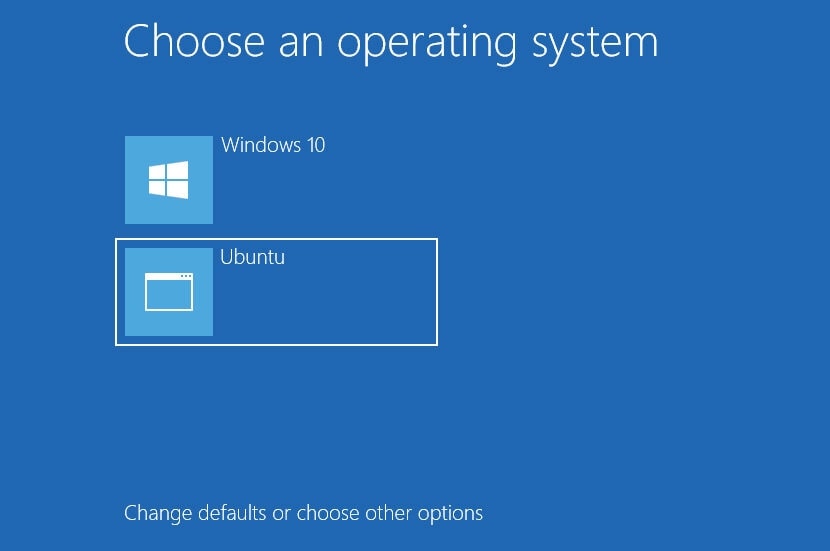
Using a Dual-Boot System
One of the most reliable methods to play games that require Vanguard is to install Windows alongside Linux using a dual-boot configuration. This approach allows users to maintain their preferred Linux ecosystem for daily tasks and switch to Windows for gaming. Dual-booting provides a native Windows environment where Vanguard functions as intended, ensuring that you do not compromise on the security or performance of your gaming experience.
Steps for Configuring Dual-Boot
Users interested in dual-boot systems should create separate partitions for Windows and Linux, install Windows first to ensure proper bootloader configuration, and then install Linux. Boot managers such as GRUB can facilitate switching between operating systems. Many online guides detail the process, including partition planning, installation of necessary drivers, and post-installation configuration.
Remote Desktop and Cloud Gaming
For those who wish to avoid rebooting their system or do not want to sacrifice their Linux environment, remote desktop applications or cloud gaming services provide an alternative. With remote desktop setups, users can run games on a dedicated Windows machine and stream them to Linux systems. Cloud gaming services, though not commonly supporting Vanguard games like Valorant, are gradually expanding, but always check compatibility before subscribing.
Considerations for Remote Gaming
Remote gaming can be viable provided you have a robust, low-latency internet connection. Hardware like dedicated streaming boxes or home servers running Windows can serve as the gaming platform. However, these systems may come with extra costs and could potentially add latency, which is crucial for competitive play.
Other Anti-Cheat Systems on Linux
It is worth noting that some games use alternative anti-cheat systems such as Easy Anti-Cheat (EAC), which have varying levels of support on Linux. Although EAC operates differently from Vanguard, its compatibility is also dependent on the game developers’ implementation and support for the Linux platform. If you are a Linux user looking to avoid these issues, researching the specific anti-cheat system used for your game may open up possibilities to use titles that are already optimized for Linux.
Summarizing the Feasibility Issue
Current Conclusion
In summary, running Vanguard anti-cheat on Linux is practically unfeasible due to its kernel-level design, deep integration with the Windows operating system, and the absence of official support from Riot Games. The very architecture that makes Vanguard effective in combating cheats on Windows renders it incompatible with the Linux environment, both from a technological and security standpoint.
While numerous creative workarounds have been attempted over time, none provide a practical or secure solution for Linux users who wish to enjoy games that incorporate Vanguard. Instead, it is recommended to consider alternative options such as dual-booting into Windows, using remote desktop solutions, or exploring game titles that have been designed with compatible anti-cheat systems for Linux.
References
- Reddit - Vanguard on Linux Discussion - Reddit
- GamingOnLinux - Riot Games talk Vanguard anti-cheat for League of Legends and why it's a no for Linux - GamingOnLinux
- League of Linux - Vanguard FAQ - League of Linux
- SkyCoach - How to Play Valorant on Linux - SkyCoach
- 1v9 - How to Play Valorant on Linux - 1v9
Recommended Queries for Further Research
Last updated March 15, 2025